In our previous lesson, you learned to control the flow of your programs by making decisions with if, elif, and else statements. This allowed your code to follow different paths based on specific conditions, much like following a simple clinical protocol. Today, we'll expand on this by introducing a way to make your programs perform repetitive tasks automatically.
This lesson is about loops, a fundamental concept in programming that allows you to execute a block of code multiple times. This is the cornerstone of data analysis, enabling tasks like processing every patient record in a dataset, analyzing a series of lab results over time, or running a simulation. By the end of this lesson, you will be able to write for and while loops to iterate over sequences and automate repetitive actions in your code.
1. The for Loop: Repeating for a Known Number of Times
The first type of loop we'll explore is the for loop. It is used when you want to repeat a task for a specific, known number of times—for instance, for every item in a list. The basic idea is: "for each item in this collection, do this action."
Let's begin with a conceptual overview. The video "Python Loops (Visually Explained)" provides an excellent, animated introduction to how loops work.
Python Loops (Visually Explained) | For, While, Break, Continue, Else
This video by Data with Baraa will help you build a strong mental model of what a for loop is and how Python executes it.
Please watch the section explaining the for loop, from this segment. Pay close attention to the flowchart and the role of the "iterator."
As the video explained, a for loop takes a sequence (like a list of numbers or strings) and executes a block of code once for each element in that sequence. The flowchart below illustrates this process.
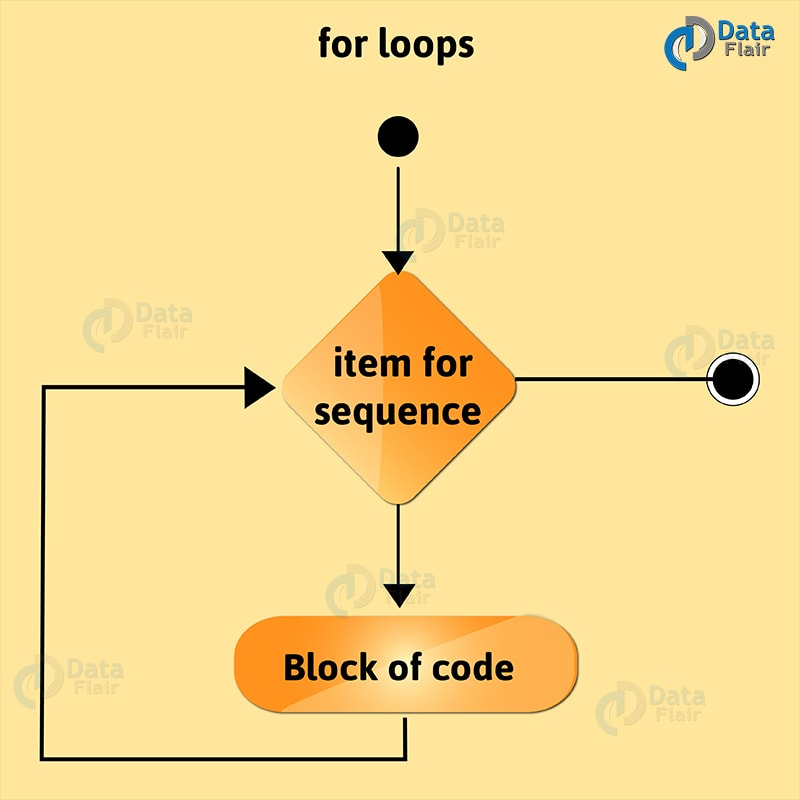
Let's apply this to a healthcare scenario. Imagine you have a list of patient body temperatures from hourly checks, and you want to screen them for fever.
# Create a file named 'lesson3.py' in PyCharm and add this code.
patient_temperatures = [36.8, 37.5, 38.9, 37.1, 39.2, 36.9]

print("--- Temperature Screening ---")
for temp in patient_temperatures:


    # This block of code will run for each temperature in the list
    if temp > 37.5:
        print(f"High temperature detected: {temp}°C. Flag for review.")
    else:
        print(f"Temperature normal: {temp}°C.")

print("--- Screening Complete ---")
In this code:
for temp in patient_temperatures:sets up the loop. On each iteration, the variabletempwill hold the next value from thepatient_temperatureslist.- The indented code block, which contains our
if/elselogic from the previous lesson, is executed for each temperature.
Generating Sequences with range()
Sometimes you don't have a list to iterate over, but you want to repeat an action a specific number of times. The built-in range() function is perfect for this. It generates a sequence of numbers that you can use in a for loop.
The video "Python For & While Loops" by Luke Barousse offers a clear, practical demonstration of using range().
Python For & While Loops for Data Science / Data Analysis - P.3
This video will show you how to use the range() function to control your for loops.
Watch the segment from this part. Notice how you can specify the start, stop, and step size.
As the video shows, range(5) generates numbers from 0 to 4. range(1, 5) generates numbers from 1 to 4. And range(1, 10, 2) generates numbers from 1 to 9, skipping every other number. This is incredibly useful for controlled repetition.
2. The while Loop: Repeating Until a Condition is Met
What if you don't know how many times you need to loop? For example, how many doses of medication will it take to bring a patient's blood pressure into the normal range? This is where the while loop comes in. It repeats a block of code while a certain condition remains true.
The logic is: "while this condition is true, keep doing this action." The loop stops as soon as the condition becomes false.
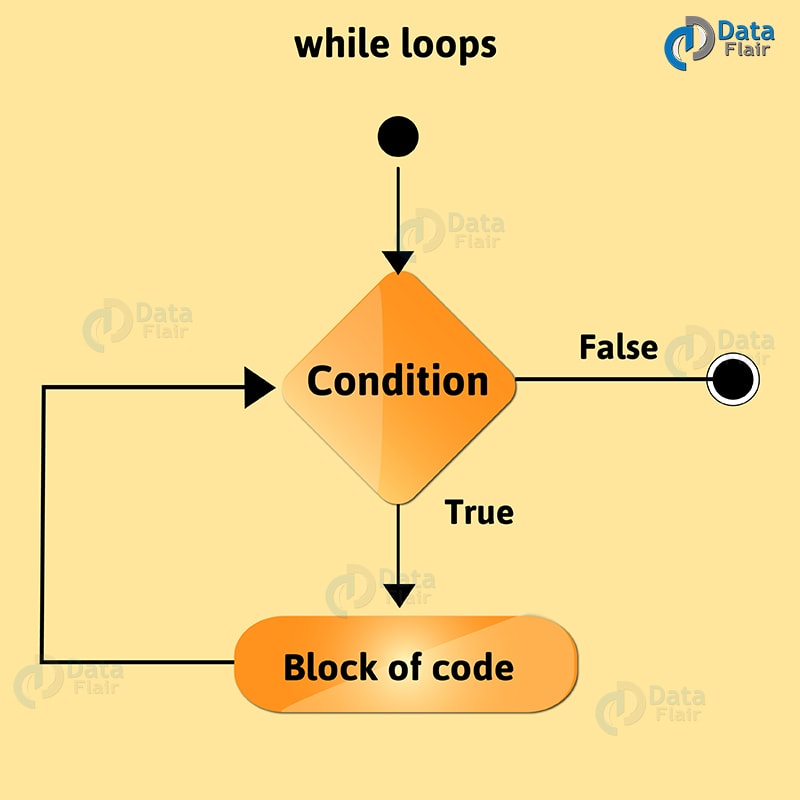
A while loop requires three key components:
- Initialization: A variable is set up before the loop starts.
- Condition: The
whilestatement checks this variable in a condition that evaluates toTrueorFalse. - Update: Inside the loop, something must happen to eventually change the variable and make the condition
False. If not, you'll create an infinite loop, where the code runs forever!
Let's simulate a clinical scenario: administering medication to control a patient's high systolic blood pressure (SBP).
# Add this code to your 'lesson3.py' file.
systolic_bp = 160
doses_given = 0
target_bp = 140

print(f"Initial SBP: {systolic_bp} mmHg. Target is <= {target_bp} mmHg.")

while systolic_bp > target_bp:
    print(f"Current SBP: {systolic_bp}. Administering medication.")


    # Simulate the effect of one dose of medication
    systolic_bp -= 7  # This is the update step!
    doses_given += 1

    print(f"New SBP after dose {doses_given}: {systolic_bp} mmHg.")

print(f"\nTarget BP reached after {doses_given} doses.")
Here, we didn't know it would take exactly three doses. The while loop continued executing as long as the patient's blood pressure was above the target, making it the perfect tool for this dynamic situation.
The "Python For & While Loops" video also provides a concise explanation of while loops and the risk of infinite loops.
Python For & While Loops for Data Science / Data Analysis - P.3
This segment explains the structure of a while loop and contrasts it with a for loop.
Watch the section on while loops from this clip.
3. Controlling Your Loops: break and continue
Sometimes you need more fine-grained control over your loop's execution. Python provides two statements for this: break and continue.
break: Immediately terminates the loop. No more iterations will run.continue: Skips the rest of the current iteration and jumps to the beginning of the next one.
The video "Python Loops (Visually Explained)" beautifully illustrates these concepts.
Python Loops (Visually Explained) | For, While, Break, Continue, Else
This segment provides a clear visual breakdown of how break and continue alter the flow of a loop.
Watch the part explaining these statements. Notice how break provides an "emergency exit," while continue is more like a "skip."
Let's see them in action.
break Example: Emergency Stop
Imagine you are screening patient lab results. If you find a critically dangerous value, you should stop immediately and raise an alarm, not continue processing the rest of the batch.
# Add this to your 'lesson3.py' file.
potassium_levels = [4.1, 4.5, 3.8, 6.2, 4.4] # Normal is ~3.5-5.2 mEq/L

for level in potassium_levels:
    if level > 6.0:
        print(f"CRITICAL ALERT: Hyperkalemia detected! Level: {level} mEq/L.")
        print("Stopping further processing. Immediate intervention required.")
        break # Exit the loop immediately
    print(f"Level {level} is within normal range.")
The loop stopped as soon as it hit 6.2 and did not process the final value (4.4).
continue Example: Skipping Bad Data
Now imagine you are calculating the average age from a list of patient records, but the data contains some errors (e.g., negative ages). You want to ignore these bad entries but still process the valid ones.
# Add this to your 'lesson3.py' file.
patient_ages = [45, 52, -5, 67, 33, 0, 71]
valid_ages = []

for age in patient_ages:
    if age <= 0:
        print(f"Invalid age detected: {age}. Skipping record.")
        continue # Skip to the next age in the list


    # This code only runs if 'continue' was not triggered
    print(f"Processing valid age: {age}")
    valid_ages.append(age) # We will learn about .append() in the next lesson


# Calculate the average of only the valid ages
average_age = sum(valid_ages) / len(valid_ages)
print(f"\nAverage age of valid records: {average_age:.1f}")
The loop skipped -5 and 0 but completed its run for all the valid ages.
4. Practical Exercise: Searching Clinical Notes
Let's put these concepts together in an exercise that mirrors a real-world task in public health and clinical research: searching through text for specific keywords.
Imagine you have a series of unstructured clinical notes for a patient and you need to find any mention of an "adverse reaction" to a drug. For context, you want to see not only the note containing the phrase but also the note that came immediately before it.
The "Conditionals and Loops" guide from Python for health data science provides a good foundation for this kind of problem. We'll adapt one of its exercises.
Conditionals and Loops - Python for health data science.
This resource contains a simple exercise for finding the maximum value in a list, which is a great warm-up.
Read through the problem description for Loops Exercise 1. Think about the logic required: you need a loop to go through each item and an if statement to check if it's the biggest one you've seen so far. You don't need to code it, just understand the logic.
Now, apply similar thinking to our clinical notes problem. Your task is to write a script that iterates through a list of notes. If a note contains the search term, it should print both that note and the one that came before it.
Copy the following code into your lesson3.py file and complete the logic inside the loop.
# Simplified clinical notes
notes = [
    "Patient presents with a persistent cough.",
    "Prescribed Amoxicillin 500mg.",
    "Follow-up: Patient reports feeling nauseous.",
    "Observed a mild skin rash on the patient's back.",
    "Suspect an adverse reaction to the antibiotic.",
    "Advised to discontinue Amoxicillin and switch to Azithromycin."
]

search_term = "adverse reaction"
previous_note = "" # A variable to store the previous note

print("--- Searching for Adverse Events ---")


# --- Your code goes here ---
# Create a 'for' loop to iterate through each 'note' in the 'notes' list.
for note in notes:


    # Inside the loop, use an 'if' statement to check if the 'search_term' is in the current 'note'.
    # Hint: The 'in' keyword works for checking if a substring exists in a string.
    # To make the search case-insensitive, you can use 'note.lower()'.
    if search_term in note.lower():


        # If the term is found, print the 'previous_note' and the current 'note'.
        print("\n--- POTENTIAL ADVERSE EVENT DETECTED ---")
        print(f"Context: {previous_note}")
        print(f"Finding: {note}")
        print("----------------------------------------")


    # At the end of each iteration, update 'previous_note' to be the current 'note'.
    # This prepares it for the next loop iteration.
    previous_note = note


# --- End of your code ---
This task combines a for loop, an if statement, and variable updates to solve a practical text-searching problem relevant to your field.
Conclusion
In this lesson, you've learned how to make your programs perform repetitive work, a crucial skill for any form of data processing.
Here are the key takeaways:
forloops are used for definite iteration, when you know how many times you want to repeat something (e.g., for each patient in a list).- The
range()function is a powerful tool for creating number sequences to controlforloops. whileloops are used for indefinite iteration, when you need to repeat an action until a specific condition is met (e.g., administer treatment until a lab value normalizes).breakandcontinuegive you precise control to exit a loop or skip an iteration based on conditions you define.
So far, we've used lists and other sequences to control our loops. In the next lesson, you will dive deeper into lists and dictionaries, learning how to create, modify, and manage these essential data structures. Mastering them will unlock your ability to organize and handle the complex datasets you'll encounter in healthcare.