In our last lesson, you took your first steps into programming by learning how to store information in variables and how to work with Python's basic data types. This gave you the ability to represent pieces of data, like a patient's age or vital signs. Today, we will build on that foundation by teaching your programs how to make decisions.
This lesson focuses on conditional statements, the tools that allow a program to evaluate conditions and execute different blocks of code based on whether those conditions are true or false. This is the core of what makes software "smart." In a healthcare context, this is the fundamental logic behind simple clinical decision support systems, such as a program that checks if a lab value is outside the normal range and flags it for review. By the end of this lesson, you will be able to use if, elif, and else statements to control the flow of your Python programs.
1. Making Decisions with if
The simplest form of decision-making is the if statement. It poses a question, and if the answer is "yes" (or True), it executes a specific block of code. If the answer is "no" (False), it does nothing and moves on.
Imagine a simple triage rule: if a patient's body temperature is above 37.5°C, they might have a fever. In Python, this logic would look like this:
body_temperature = 38.5


# The condition is 'body_temperature > 37.5'
# This evaluates to True, so the indented code below will run.
if body_temperature > 37.5:
    print("Patient may have a fever.")


# This line is not indented, so it runs regardless of the 'if' statement.
print("Assessment complete.")
Notice two critical syntax rules:
- The line with the
ifstatement must end with a colon (:). - The code to be executed conditionally must be indented (by convention, four spaces). This indentation tells Python that the code "belongs" to the
ifstatement.
The video "How to Use If Else Statements in Python" from CS Dojo provides a clear introduction to this concept.
How to Use If Else Statements in Python (Python Tutorial #2)
This first segment will walk you through the basic syntax of an if statement and the crucial role of indentation.
Please watch from the beginning of the main topic at this section. Follow along as the instructor demonstrates how to write a simple if clause and how indentation defines the code block.
2. Comparison and Logical Operators: The Language of Conditions
The "questions" we ask in our if statements are called conditions or conditional expressions. They are built using comparison operators to compare values. These expressions always evaluate to a Boolean value: True or False.
The article "Control Statements" provides a great summary of these operators.
6. Control Statements — Programming for Financial ...
This section lists the essential operators you'll use to build conditional logic.
Please read the section titled Comparison Operators. Pay close attention to the table, especially the distinction between the assignment operator (=) and the equality operator (==).
As the article highlights, x = 5 assigns the value 5 to the variable x, while x == 5 compares x to 5 and returns True or False. This is a very common point of confusion for new programmers.
The "If statements in Python are easy" video from Bro Code has a great, quick explanation of this distinction.
If statements in Python are easy (if, elif, else) 🤔
This short clip clearly explains the difference between the assignment (=) and comparison (==) operators.
Watch the segment from this section for a practical demonstration of why using == for comparisons is so important.
3. Handling Alternatives: else and elif
An if statement alone is useful, but often you need to specify an alternative action for when the condition is False. This is done using an else statement.
body_temperature = 37.0

if body_temperature > 37.5:
    print("Patient may have a fever.")
else:
    print("Patient's temperature is within the normal range.")
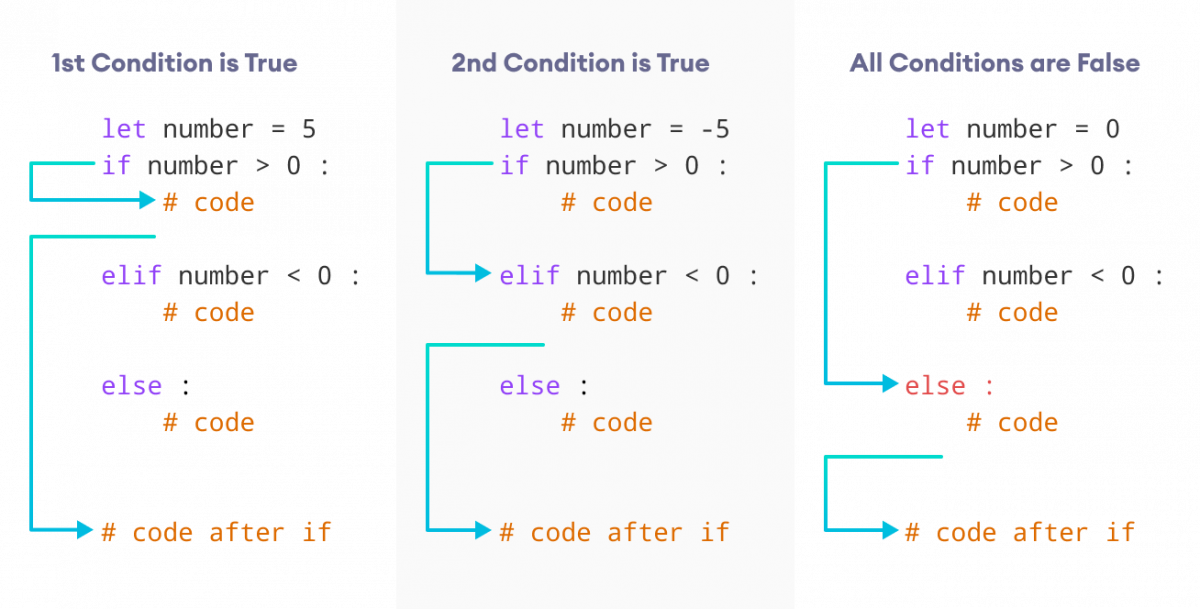
What if you have more than two possibilities? For instance, classifying a number as positive, negative, or zero. For this, you can chain conditions together using elif, which is short for "else if".
Python will check each condition in order from top to bottom. As soon as it finds one that is True, it runs the corresponding code block and then skips the rest of the chain. The final else acts as a catch-all if none of the preceding if or elif conditions are met.
Let's return to the CS Dojo video, which explains this flow very well.
How to Use If Else Statements in Python (Python Tutorial #2)
These segments introduce the else and elif keywords, showing you how to build logic for two or more possible outcomes.
First, watch the part on the else statement from this segment. Then, continue with the explanation of elif for handling multiple cases from this part.
The image below illustrates the flow of an if-elif-else block. Depending on the value of the number variable, only one path is taken through the code.
4. Practical Application: A BMI Calculator
Now let's put this together with a relevant healthcare example: calculating and categorizing Body Mass Index (BMI). BMI is a simple measure used to screen for weight categories that may lead to health problems.
The formula is:
We can use if-elif-else to classify the result into standard categories (e.g., underweight, normal weight, overweight). The CS Dojo video includes a great walkthrough of building a simple version of this.
How to Use If Else Statements in Python (Python Tutorial #2)
This final segment from the video applies conditional logic to a practical, health-related problem.
Watch from this section to see how to build a basic BMI calculator. Pay attention to how the calculated BMI value is used in the if-else statement to determine the output.
Now, try to build a slightly more advanced version yourself. In PyCharm, create a new file named lesson2.py. Write a script that:
- Defines variables for a patient's
weight_kgandheight_m. - Calculates the BMI and stores it in a variable.
- Uses an
if-elif-elsechain to print one of the following classifications based on the BMI value:- BMI < 18.5: "Underweight"
- 18.5 <= BMI < 25: "Normal weight"
- 25 <= BMI < 30: "Overweight"
- BMI >= 30: "Obese"
You can use this code as a starting point:
# Patient data
weight_kg = 75
height_m = 1.80


# Calculate BMI
# The ** operator is used for exponentiation (raising to the power of)
bmi = weight_kg / (height_m ** 2)

print(f"The patient's BMI is: {bmi:.2f}") # The :.2f formats the number to 2 decimal places


# --- Your if-elif-else block goes here ---
if bmi < 18.5:
    print("Classification: Underweight")


# Add the elif and else conditions below
# ...
Experiment with different values for weight and height to ensure your logic works correctly for all categories.
5. Combining and Nesting Conditions
Sometimes, a decision depends on more than one factor. You can combine conditions using the logical operators and, or, and not.
and:Trueonly if both conditions are true.if systolic_bp < 90 and heart_rate > 110:(indicates shock)
or:Trueif at least one condition is true.if has_fever or has_cough:(possible infection)
not: Reverses the result of a condition.if not is_conscious:(emergency)
You can also nest if statements inside one another for more complex logic. This is common in real-world applications, such as a drug dosage calculator that first checks the patient's age group, and then within that group, checks their weight.
6. Control Statements — Programming for Financial ...
These sections detail how to create more complex decision-making structures.
First, read about Nested Ifs to see how you can place if statements within other if statements. Next, read the section on Boolean Operators to understand how and, or, and not allow you to build more powerful conditions.
6. Final Exercise: Cinema Booking Logic
To consolidate everything you've learned, let's tackle a more complex problem from the "Python for health data science" guide. While the example is about cinema tickets, the logic of applying different rules and discounts is directly analogous to calculating patient co-pays based on insurance plans, demographics, and services rendered.
Conditionals and Loops - Python for health data science.
This exercise requires you to write a function that calculates cinema ticket costs based on multiple conditions.
Read the problem description under Exercise 1. Your task is to complete the tickets function from the provided code skeleton. Here is the code to copy into your lesson2.py file. Your goal is to fill in the logic inside the tickets function.
def tickets(number, day, premium_seating):
  """
  Calculates the cost of cinema tickets.
  - Normal ticket cost is 10.99.
  - On Wednesdays (day == 3), the price is reduced by 2.00 per ticket.
  - If premium seating is requested (premium_seating == True), the cost increases by 1.50 per ticket, regardless of the day.

  Parameters:
  ----------
  number: int
    Number of seats to book.
  day: int
    Day of the week (1=Mon, 2=Tue, 3=Wed, ...).
  premium_seating: bool
    True if premium seats are required.

  Returns:
  -------
  float: The total cost of the tickets.
  """


  # --- Start your code here ---
  base_price_per_ticket = 10.99


  # Apply Wednesday discount
  if day == 3:
      base_price_per_ticket = base_price_per_ticket - 2.00


  # Apply premium seating charge
  if premium_seating == True: # This can also be written as 'if premium_seating:'
      base_price_per_ticket = base_price_per_ticket + 1.50

  total_cost = base_price_per_ticket * number

  return total_cost


  # --- End your code here ---


# --- Test Cases (do not change) ---
# Test 1
persons = 2
booking_day = 1 # Monday
is_premium = True
cost = tickets(persons, booking_day, is_premium)
print(f"Test 1: Cost for {persons} people on day {booking_day} with premium seats: £{cost:.2f}")


# Expected output: £24.98


# Test 2
persons = 3
booking_day = 3 # Wednesday
is_premium = False
cost = tickets(persons, booking_day, is_premium)
print(f"Test 2: Cost for {persons} people on day {booking_day} with standard seats: £{cost:.2f}")


# Expected output: £26.97
This problem requires you to combine multiple if statements to correctly calculate the final price. The logic is not elif because the conditions (day discount and premium charge) are not mutually exclusive—a premium ticket could be bought on a Wednesday.
Conclusion
In this lesson, you've moved from simply storing data to making your programs act on it. You've learned to direct the flow of your code using conditional logic, a fundamental skill in any programming language.
Here are the key takeaways:
if,elif,elsestatements are used to execute different code blocks based on conditions.- Conditions are expressions that evaluate to
TrueorFalse, often built with comparison operators (==,!=,<,>). - Code blocks associated with conditional statements must be indented.
- Logical operators (
and,or,not) allow you to combine multiple conditions for more complex decision-making. - The order of an
if-elif-elsechain matters, as Python executes the first branch that evaluates toTrueand skips the rest.
In our next lesson, we will explore loops. While conditional statements allow you to make a decision once, loops will enable your program to repeat actions multiple times, such as processing every patient record in a dataset, which is a cornerstone of data analysis.