Hello! Welcome to our third lesson. In our previous session, we demystified the C compilation pipeline, breaking down how your source code is transformed into a native executable. You learned about the four stages—preprocessing, compilation, assembly, and linking—and how to inspect the output of each.
Today, we'll shift our focus from the process to the language itself. We'll explore the building blocks of any C program: fundamental data types, operators, and control flow structures. This lesson directly addresses the learning outcome by diving into how C handles variables and logic, and we'll consistently compare these concepts to their counterparts in JavaScript and PHP to leverage your extensive full-stack experience.
A key takeaway from our last lesson was that C is compiled ahead-of-time. A direct consequence of this is that the compiler must know the exact size and type of every variable when it builds the program. This allows it to generate highly efficient machine code that manages memory directly. This is a fundamental departure from dynamically-typed languages like JavaScript, where the engine determines types at runtime.
The Landscape of C Data Types
In JavaScript, you're used to a few flexible data types like Number, String, and Boolean. C, by contrast, provides a more granular and rigid set of types, which gives you precise control over memory usage.
Let's start with a high-level overview.
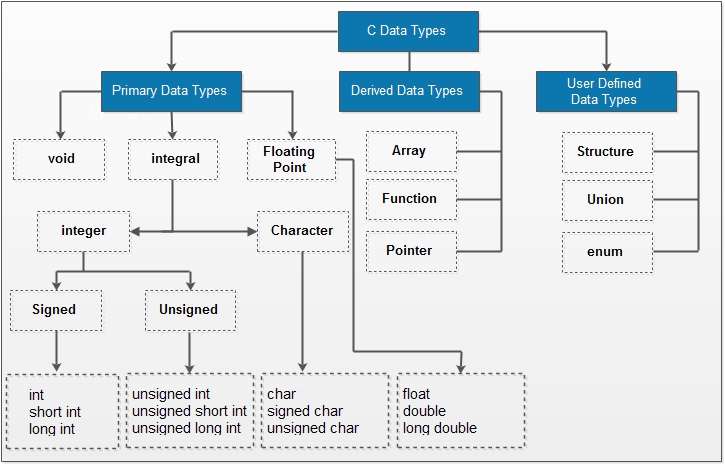
The primary, or basic, data types can be summarized as follows:
| Type Keyword | Description | Typical Size (bytes) | Typical Range |
|---|---|---|---|
char |
A single character (or a very small integer) | 1 | -128 to 127 or 0 to 255 (compiler dependent) |
int |
The system's "natural" integer size | 4 | -2,147,483,648 to 2,147,483,647 |
float |
Single-precision floating-point number | 4 | ~7 decimal digits of precision |
double |
Double-precision floating-point number | 8 | ~15 decimal digits of precision |
These basic types can be modified with qualifiers like short, long, signed, and unsigned to fine-tune their size and range. For example, unsigned int can only store non-negative numbers, but its maximum value is twice that of a signed int.
How Data is Really Stored: A Low-Level Look
Your goal is to understand how C translates to machine instructions. A crucial part of that is grasping how these data types are represented in memory as bits and bytes.
The following video provides an excellent deep dive into this topic. It starts with some thought-provoking questions and then breaks down the "magic" behind the answers. This directly addresses your interest in memory representation, signed vs. unsigned numbers, and potential pitfalls like overflow.
C Data Types - Bits & Bytes (+7 Test Cases with Solution) | Sanfoundry
The video 'C Data Types - Bits & Bytes' from Sanfoundry explores the low-level representation of numbers in C. It's a fantastic way to connect the abstract idea of a data type to its concrete form in memory.
This video is dense with valuable, low-level information. I recommend watching it in its entirety, but here's a structured approach: Watch the intro quiz (00:00 - 06:15): Don't worry about getting the answers right. The purpose is to see how seemingly simple code can have surprising results. Understand the theory (06:27 - 17:38): Pay close attention to the explanations of Most Significant Bit (MSB), signed vs. unsigned, and two's complement for representing negative numbers. See the theory in action (25:00 - End): The instructor revisits the quiz questions, explaining each result based on the bit-level representations. This part is crucial as it connects theory to practice, especially the explanation of default argument promotion (35:52) which is a common C subtlety.
Key Takeaways from the Video:
- Signed vs. Unsigned: For a signed type (like
intorsigned char), the most significant bit (MSB) is the sign bit. If it's 1, the number is negative. For anunsignedtype, the MSB is just part of the number, allowing for a larger positive range. - Two's Complement: This is the standard method for representing negative integers in binary. To find the two's complement of a negative number (e.g., -7), you:
- Take the binary representation of its positive counterpart (7 is
00000111). - Invert all the bits (one's complement):
11111000. - Add 1:
11111001. This is how -7 is stored.
- Take the binary representation of its positive counterpart (7 is
- Overflow: When you assign a value that's too large for a variable's type (e.g.,
char c = 256;), the value "wraps around." This is undefined behavior for signed types but well-defined for unsigned types. The compiler often warns you about this.
Comparison with JavaScript and PHP
Your experience with JS and PHP provides a useful contrast. Let's frame C's typing system against what you know.
| Feature | C | JavaScript | PHP |
|---|---|---|---|
| Typing | Static & Strong: Types are checked at compile-time. | Dynamic & Weak: Types are checked at runtime. | Dynamic & Weak: Types are checked at runtime. |
| Integers | Multiple types (char, short, int, long) with fixed sizes. |
One Number type (a 64-bit float). No true integer type. |
int type, size is platform-dependent (usually 64-bit). |
| Characters/Strings | char for single characters. Strings are arrays of char ending in \0. |
String primitive. No separate char type (strings can have length 1). |
string type. No separate char type. |
| Booleans | _Bool type (from C99). 0 is false, any non-zero value is true. |
Boolean type (true, false). |
bool type (true, false). |
To explore these differences further, this article written specifically for JavaScript developers moving to C is a great read.
C for JavaScript Developers. Memory Allocation. Pointers ...
The article 'C for JavaScript Developers' explains key differences in memory handling and data representation between the two languages.
Please read the following sections: 'Automatic Variables and the Stack': This explains where your local variables (like int x;) are stored. It's a core concept that underpins everything else. 'Strings': This section is critical. It explains that strings in C are not a built-in type but a convention—a null-terminated array of characters. This is one of the most significant differences from JS/PHP. 'Answers to Questions': Read the answers to questions 1, 2, and 7. They provide practical explanations for common C 'gotchas' related to data types and string literals.
Operators in C
Most operators in C will look very familiar to you. The syntax for arithmetic, comparison, and logical operators in C was the direct inspiration for their implementation in JavaScript and PHP.
Here is a cheat sheet for JavaScript operators, which you can use as a reference point.

Here's a quick comparison:
| Operator Type | C | JavaScript/PHP Equivalent | Notes |
|---|---|---|---|
| Arithmetic | +, -, *, /, %, ++, -- |
Same | Identical functionality. |
| Relational | ==, !=, >, <, >=, <= |
Same | C has no strict equality operator (===). == in C compares values, but type promotion rules can apply, which are different from JS's type coercion. |
| Logical | &&, ` |
, !` |
|
| Assignment | =, +=, -=, *=, /=, %=, &=, ` |
=, ^=, <<=, >>=` |
Same |
| Bitwise | &, ` |
, ^, ~, <<, >>` |
Same |
| Ternary | condition ? x : y |
Same | Identical functionality. |
A Deeper Look at Bitwise Operators
Since you're interested in systems programming, mastering bitwise operators is non-negotiable. They allow you to manipulate individual bits within an integer.
&(AND):1010 & 1100->1000(sets a bit if it's set in both operands)|(OR):1010 | 1100->1110(sets a bit if it's set in either operand)^(XOR):1010 ^ 1100->0110(sets a bit if it's set in one, but not both, operands)~(NOT):~1010->...0101(flips all bits)<<(Left Shift):0001 << 2->0100(shifts bits to the left, equivalent to multiplying by 2^n)>>(Right Shift):1000 >> 2->0010(shifts bits to the right, equivalent to dividing by 2^n)
Test your understanding!
Imagine you have a set of 8 configuration flags stored in a single unsigned char variable named flags. The 4th bit (from the right, starting at bit 0) represents whether "logging" is enabled.
How would you write C expressions to:
- Turn logging ON (set the 4th bit to 1) without changing other bits?
- Turn logging OFF (set the 4th bit to 0) without changing other bits?
- Check if logging is currently ON?
Show answer
Let's use a "mask" for the 4th bit. The 4th bit has a value of 2^4 = 16. In binary (8 bits), this is 00010000. We can create this mask with a left shift: 1 << 4.
-
Turn ON: Use the OR operator.
flags = flags | (1 << 4);orflags |= (1 << 4); -
Turn OFF: Use the AND operator with an inverted mask.
flags = flags & ~(1 << 4);orflags &= ~(1 << 4);
The inverted mask~(00010000)is11101111. ANDing with this preserves all bits except the 4th, which is forced to 0. -
Check: Use the AND operator. The result will be non-zero (true) only if the 4th bit was set.
if (flags & (1 << 4)) { ... }
Control Flow
The good news is that C's control flow syntax is the direct ancestor of what's used in JavaScript and PHP. The concepts of if, else, while, and for will be immediately familiar.
This short video provides a great visual refresher on the logic of conditional statements.
Coding Basics: If Statements, If Else, Else - Coding Tutorial For Java, C, and C++!
The video 'Coding Basics: If Statements, If Else, Else' from Transcode offers a simple and clear explanation of conditional logic. Although it mentions Java, the syntax shown is identical for C.
Watch from the beginning up to 08:13. This covers: The concept of conditional logic (using a flowchart). The syntax for if, comparison operators (==, >), and logical operators (&&, ||). The use of else and else if to chain conditions.
Here's a quick syntactic comparison based on the Wikipedia resource.
| Control Flow | C Syntax | JS/PHP Equivalent |
|---|---|---|
| If-Else | if (condition) { ... } else { ... } |
Identical |
| Switch | switch (var) { case 1: ...; break; ... } |
Identical, but with a critical difference (see below). |
| While | while (condition) { ... } |
Identical |
| Do-While | do { ... } while (condition); |
Identical |
| For Loop | for (int i = 0; i < 10; i++) { ... } |
Identical |
| Foreach | Not available | for...of (JS), foreach (PHP) |
The switch Statement's "Fall-Through" Behavior
The most important difference to be aware of is that in C, switch cases fall through by default. If you omit the break statement, execution will continue into the next case.
int num = 2;
switch (num) {
    case 1:
        printf("One\n"); // Skipped
    case 2:
        printf("Two\n"); // Executed
    case 3:
        printf("Three\n"); // Also executed because there's no break!
    default:
        printf("Default\n"); // Also executed!
}
// Output:
// Two
// Three
// Default
This is a classic source of bugs for newcomers. You must explicitly break out of a case if you don't want this behavior.
Conclusion
In this lesson, we laid the groundwork for writing C programs by covering the essential building blocks. You now have a low-level appreciation for how data is stored and manipulated.
Key Takeaways:
- C is statically typed; you must declare the type of every variable. This allows the compiler to perform compile-time memory allocation.
- The
signedandunsignedmodifiers are crucial, as they change how the most significant bit is interpreted and affect the range of values a variable can hold. - Negative numbers are stored using two's complement.
- Most C operators are syntactically identical to their JS/PHP counterparts, but bitwise operators are especially important for low-level programming.
- Control flow structures like
if,while, andforare very familiar, but you must be mindful of the fall-through behavior in C'sswitchstatement.
In our next lesson, we will move on to another fundamental concept: functions. We will learn how to define and call them, and we will explore C's pass-by-value mechanism for function arguments, which has important implications for how data is handled.
Practice Exercises
Time to put theory into practice! Create a new directory and work through these problems. They are designed to be solved with the concepts from this lesson.
-
Type Inspector: Write a program that declares one variable of each of these types:
char,unsigned char,int,unsigned int,float, anddouble. Use thesizeof()operator to print the size (in bytes) of each type. For example:printf("Size of int: %zu bytes\n", sizeof(int));. The%zuformat specifier is used forsizeof's return type. -
Fahrenheit to Celsius Converter: Write a program that converts a temperature from Fahrenheit to Celsius. Define a
floatvariable for the Fahrenheit temperature and assign it a value (e.g., 68.0). Calculate the Celsius temperature using the formulaC = (F - 32) * 5.0 / 9.0and print the result with one decimal place (e.g.,%.1f). -
Simple Bitwise Flag Checker: Write a program that uses bitwise operators.
- Declare an
unsigned charcalledstatusand initialize it to0. - Set the 1st, 3rd, and 7th bits to 1 using the
|(OR) operator and bit shifts (1 << n). - Print the
statusas a number. - Use an
ifstatement and the&(AND) operator to check if the 3rd bit is set and print a message if it is. - Turn off the 7th bit using the
&and~(NOT) operators. Print the newstatus.
- Declare an
-
Grade Calculator with
switch: Write a program that converts a numerical grade into a letter grade. Declare anintvariablescore(e.g., 85). Divide the score by 10. Use aswitchstatement on the result of the division.case 10:andcase 9:should print "Grade: A".case 8:should print "Grade: B".- ...and so on for C, D, and F.
- Remember to use
breakand adefaultcase for invalid scores.
-
FizzBuzz: Implement the classic FizzBuzz problem. Write a
forloop that iterates from 1 to 100.- For multiples of three, print "Fizz".
- For multiples of five, print "Buzz".
- For numbers which are multiples of both three and five, print "FizzBuzz".
- Otherwise, print the number.
- (Hint: The modulo operator
%is your best friend here).