In our last lesson, we used the protoc compiler to generate the Python scaffolding for our user service. This process created two crucial files: user_service_pb2.py, which contains our message classes, and user_service_pb2_grpc.py, which gave us an abstract UserServiceServicer class for the server and a UserServiceStub for the client. We have the "skeleton" of our service.
Today, we will bring that skeleton to life by implementing our first end-to-end gRPC interaction: a unary RPC. We will build a server that provides a concrete implementation for the UserServiceServicer and an async client that uses the UserServiceStub to communicate with it.
A unary RPC is the most fundamental and common communication pattern, directly analogous to a standard function call or a typical REST API request. The client sends a single request message, and the server replies with a single response message.
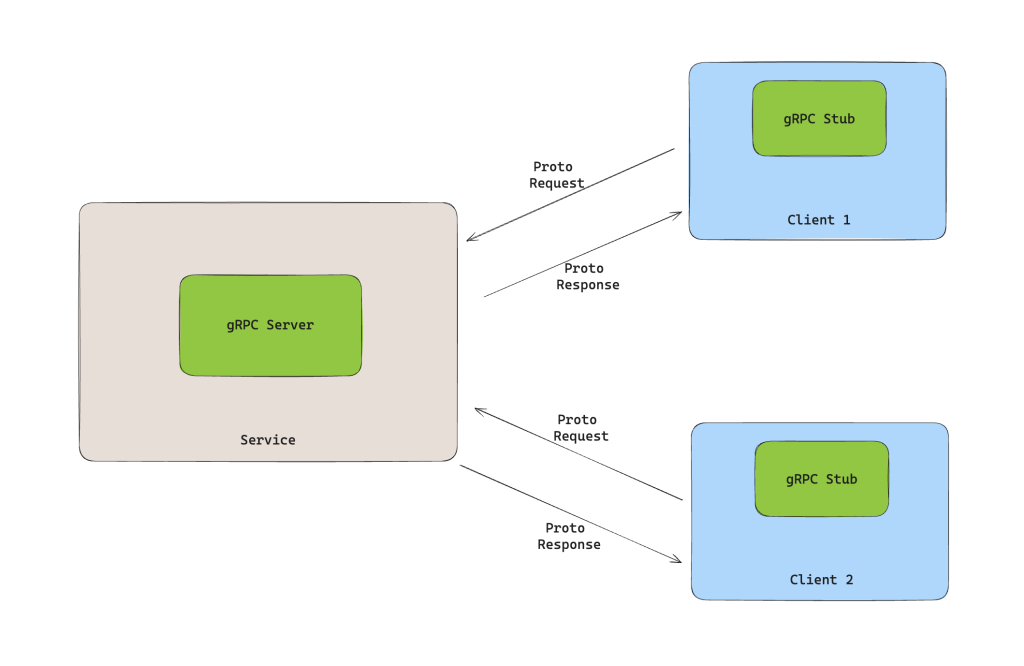
By the end of this lesson, you will have a running async gRPC server and a client that can communicate with it, successfully executing a full request-response cycle.
1. Implementing the Async gRPC Server
Our first task is to create the server. It needs to listen for incoming requests, route them to the correct service method, and execute our application logic. We will implement the CreateUser RPC defined in our user_service.proto file.
Create a new file named server.py in the root of your myservice/ directory.
The overall structure of an async gRPC server in Python involves two main parts:
- A Servicer class that inherits from the generated base class (
UserServiceServicer) and implements the service's RPC methods asasyncfunctions. - A startup script that creates an instance of a
grpc.aio.server, registers your servicer implementation with it, binds it to a network address, and starts it.
The following guide demonstrates this exact pattern. While the specific service is different, the architectural approach of subclassing the servicer and using grpc.aio.server is universal.
Getting Started: Creating A Python gRPC Server
This guide from Tyk.io shows how to build an async gRPC server.
Focus on two key parts of the guide: Implementing the service: Observe how the PythonDispatcher class inherits from the generated DispatcherServicer and provides async implementations for its methods (like Dispatch). This is precisely the pattern we will follow to implement our UserService. Creating the server: Examine the serve function. It demonstrates the standard boilerplate for instantiating grpc.aio.server(), registering the servicer, adding a port, and starting the server.
Now, let's write our own server.py based on this pattern.
# myservice/server.py

import asyncio
import logging
import uuid

import grpc
from generated import user_service_pb2
from generated import user_service_pb2_grpc


# 1. Create a Servicer class
class UserService(user_service_pb2_grpc.UserServiceServicer):
    """
    Provides the implementation for the UserService's RPCs.
    """
    async def CreateUser(
        self,
        request: user_service_pb2.CreateUserRequest,
        context: grpc.aio.ServicerContext,
    ) -> user_service_pb2.CreateUserResponse:
        """
        Implements the Unary RPC for creating a new user.
        """
        logging.info(f"Received CreateUser request for email: {request.email}")


```grasp
{
  "type": "exercise",
  "id": "2f1b104f-6579-457a-8ae0-ac22c2d69849"
}
    # In a real application, you would validate the input and
    # persist the user to a database.
    # Here, we'll just simulate the user creation.

    user = user_service_pb2.User(
        id=str(uuid.uuid4()),
        name=request.name,
        email=request.email,
        age=request.age,
        roles=request.roles,
        status=user_service_pb2.UserStatus.ACTIVE  # Set a default status
    )


    # The response message is `CreateUserResponse`, which contains a `User` field.
    return user_service_pb2.CreateUserResponse(user=user)
2. Create a function to start the server
async def serve() -> None:
"""
Creates and starts the async gRPC server.
"""
server = grpc.aio.server()
# Register our servicer implementation with the server
user_service_pb2_grpc.add_UserServiceServicer_to_server(UserService(), server)


# Listen on port 50051. [::] means we'll listen on all available network interfaces.
listen_addr = "[::]:50051"
server.add_insecure_port(listen_addr)

logging.info(f"Starting server on {listen_addr}")
await server.start()


# Keep the server running until it's manually stopped
await server.wait_for_termination()
3. Entry point for running the server
if name == "main":
logging.basicConfig(level=logging.INFO)
try:
asyncio.run(serve())
except KeyboardInterrupt:
logging.info("Server shut down by user.")
Let's break down the key components of this file:

*   **`UserService` class:** This class inherits from `user_service_pb2_grpc.UserServiceServicer` and provides the actual logic for our service.
*   **`async def CreateUser(...)`:** This is the core of our unary RPC implementation.
    *   It's an `async` function, making it non-blocking and suitable for an `asyncio` environment.
    *   It accepts `request`, which is an instance of the `user_service_pb2.CreateUserRequest` message class we defined in our `.proto` file. You can access its fields directly (e.g., `request.email`).
    *   The `context` object provides information about the RPC call itself, such as deadlines or metadata, which we'll explore later.
    *   It returns an instance of `user_service_pb2.CreateUserResponse`. Note how we construct the nested `User` object first and then assign it to the `user` field of the response.
*   **`serve()` function:** This async function contains the standard boilerplate to get the server up and running. The `grpc.aio.server()` creates a server designed to work with Python's `asyncio`.
*   **`if __name__ == "__main__"`:** This ensures that when we run `python server.py`, it starts the `asyncio` event loop and runs our `serve()` coroutine.

Our server is now ready. Next, we need a client to talk to it.


```grasp
{
  "type": "exercise",
  "id": "e39780ba-f97f-414b-aa7a-318d69f48a16"
}
2. Implementing the Async gRPC Client
The client's job is to connect to the server, serialize a request message, send it, and deserialize the response. The generated UserServiceStub handles all this complexity for us.
For a robust application, it's good practice to wrap the raw stub in your own client class. This allows you to manage the connection lifecycle (the "channel") and provide more user-friendly methods. The following resource shows an excellent, production-ready pattern for an async client.
How to Build gRPC Clients in Python
This resource from OneUptime presents a well-structured pattern for an asynchronous gRPC client.
Study the AsyncUserServiceClient class in the "AsyncIO-Based Client" section. Pay close attention to: The __init__ method, which sets up the asynchronous channel (grpc.aio.insecure_channel) and creates the stub. The get_user method, which is an async function that takes request data, calls the stub (await self.stub.GetUser(...)), and returns the response. We will implement a similar create_user method. The main function at the end, which shows how to instantiate and use the client class, including handling potential grpc.aio.AioRpcError exceptions.
Inspired by that pattern, let's create our client.py file in the myservice/ directory. For simplicity in this first example, we will write a straightforward async script instead of a full class wrapper, but we will adopt the class-based approach in later, more complex examples.
# myservice/client.py

import asyncio
import logging

import grpc
from generated import user_service_pb2
from generated import user_service_pb2_grpc

async def run() -> None:
    """
    Creates a client and makes a unary RPC call to the server.
    """


    # Create an insecure channel to connect to the server
    # The 'async with' statement ensures the channel is properly closed
    async with grpc.aio.insecure_channel("localhost:50051") as channel:


        # Create a stub (client) from the channel
        stub = user_service_pb2_grpc.UserServiceStub(channel)

        logging.info("--- Client will call CreateUser ---")


        # Create a request message
        request = user_service_pb2.CreateUserRequest(
            name="Alice",
            email="alice@example.com",
            age=30,
            roles=["user", "reader"]
        )

        try:


            # Make the RPC call with a 10-second timeout
            response = await stub.CreateUser(request, timeout=10)
            logging.info(f"Client received response: \n{response.user}")
        except grpc.aio.AioRpcError as e:
            logging.error(f"RPC failed: {e.code()} - {e.details()}")

if __name__ == "__main__":
    logging.basicConfig(level=logging.INFO)
    asyncio.run(run())
Here's the client-side breakdown:
grpc.aio.insecure_channel(...): This creates the communication channel to the server.insecuremeans we are not using TLS encryption for this example. Theasync withblock is crucial as it automatically handles closing the channel when we're done.UserServiceStub(channel): We instantiate the client stub, passing the channel to it. The stub is our entry point for making all RPC calls.user_service_pb2.CreateUserRequest(...): We create and populate the request object, just like we would with any Python object.await stub.CreateUser(...): This is the actual RPC call.- It's an
await-able coroutine. - The method name on the stub,
CreateUser, directly corresponds to therpc CreateUserin our.protofile. - We pass the
requestobject. The stub handles serializing it to the Protobuf binary format. - The call returns the
CreateUserResponsemessage, which the stub has already deserialized for us.
- It's an
- Error Handling: Wrapping the call in a
try...except grpc.aio.AioRpcErrorblock is essential for handling network issues, server errors, or timeouts gracefully.
3. Running the Application
You now have a complete, working client-server application. Let's run it. You will need two separate terminal windows, both navigated to your myservice/ directory.
Terminal 1: Start the Server
python server.py
You should see the following output, indicating the server is running and waiting for requests:
INFO:root:Starting server on [::]:50051
Terminal 2: Run the Client
python client.py
The client will start, make the request, and print the response from the server. The output should look like this:
INFO:root:--- Client will call CreateUser ---
INFO:root:Client received response:
id: "..."  # A new UUID will be here
name: "Alice"
email: "alice@example.com"
age: 30
roles: "user"
roles: "reader"
status: ACTIVE
If you look back at Terminal 1, you will see the log message from the server, confirming it received the request:
INFO:root:Received CreateUser request for email: alice@example.com
Congratulations, you have successfully implemented and executed your first asynchronous unary gRPC call!
Conclusion
In this lesson, you bridged the gap between a service definition and a running application. You saw how the generated code provides a clear contract that both the server and client must adhere to, enabling seamless communication.
Key Takeaways:
- Server Implementation: You implement a gRPC service by creating a class that inherits from the generated
Servicerand providesasyncimplementations for its RPC methods. - Server Startup: An async server is created with
grpc.aio.server(), your servicer is registered, and the server is started within anasyncioevent loop. - Client Implementation: A client connects to the server via a
grpc.aio.channeland uses the generatedStubto make remote calls. - The Unary Call: Making a unary RPC call,
await stub.Method(request), feels like a regular asynchronous function call, abstracting away all the underlying network communication and data serialization.
Preview of the Next Lesson
We have mastered the fundamental request-response pattern. In the next lesson, "Implement a server-streaming RPC," we will explore a more dynamic communication style. You will learn how a server can respond to a single client request by sending back a continuous stream of multiple messages, a pattern essential for building features like real-time notifications or live data feeds.