In our previous lesson, you successfully built and ran your first unary RPC, establishing a foundational request-response communication channel. This pattern is the workhorse of many distributed systems, but gRPC offers more dynamic communication styles for different use cases.
Today, we will explore one of these: server-streaming RPC. Instead of the server sending just one response, it will respond to a single client request with a stream of multiple messages. This is incredibly useful for scenarios like sending notifications, feeding live data, or transmitting large datasets that are better processed in chunks rather than all at once.
Our goal is to implement a new GetUsers endpoint. A client will make a single request, and our server will stream back a list of User objects, one by one.
The Server-Streaming RPC Model
Conceptually, the flow is straightforward. The client sends one request, and the server keeps the connection open to send back a sequence of response messages.
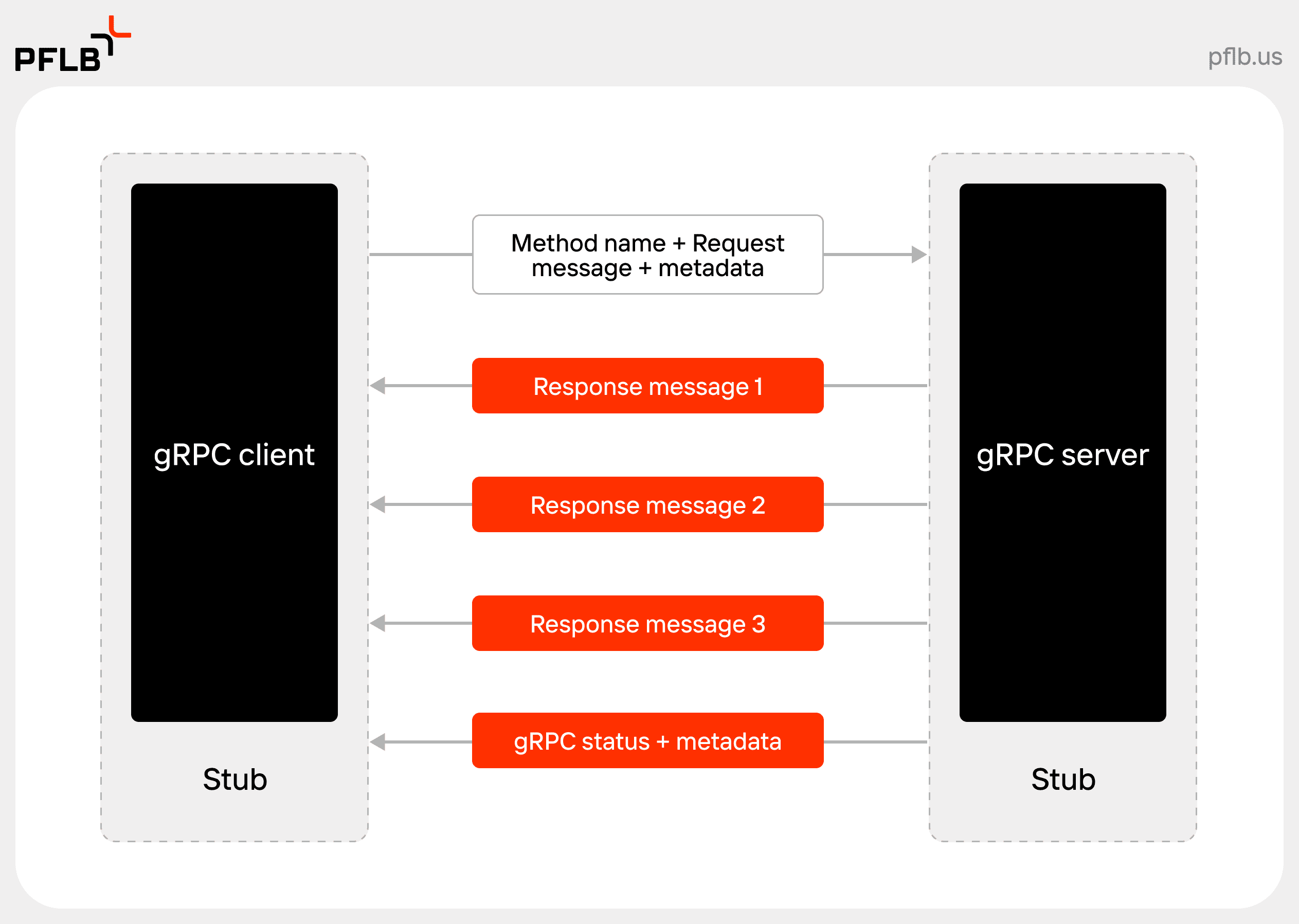
This is fundamentally different from a typical REST GET request that returns a large JSON array. With server-streaming, the client can start processing the first user record without waiting for the server to gather and send all of them, leading to better responsiveness and lower memory usage on both ends.
Step 1: Updating the Service Definition
First, we need to update our contract in user_service.proto to define the new streaming RPC. We'll add a GetUsers method that takes a request and returns a stream of User messages.
The key is the stream keyword placed before the response type.
Basics tutorial | Python - gRPC
The official gRPC documentation explains how to define all four RPC types.
Focus on the section that describes a response-streaming RPC. Notice the syntax rpc ListFeatures(Rectangle) returns (stream Feature) {}. This use of the stream keyword is exactly what we need to do.
Now, let's apply this to our myservice/generated/user_service.proto file. We'll add a new GetUsersRequest (which for now will be empty, but could later hold filters) and the GetUsers RPC itself.
Update user_service.proto:
// ... (keep the existing content: syntax, package, User, UserStatus, CreateUserRequest, CreateUserResponse)

// Add these new message and rpc definitions

// The request message for GetUsers, currently empty.
message GetUsersRequest {}

service UserService {
  // A unary RPC to create a user.
  rpc CreateUser(CreateUserRequest) returns (CreateUserResponse);

  // A server-streaming RPC to get all users.
  rpc GetUsers(GetUsersRequest) returns (stream User);
}
After saving the .proto file, you must regenerate the Python stubs. Run the same protoc command you used in the previous lesson from your project's root directory:
python -m grpc_tools.protoc -I=myservice/generated --python_out=myservice/generated --pyi_out=myservice/generated --grpc_python_out=myservice/generated myservice/generated/user_service.proto
This updates user_service_pb2.py and user_service_pb2_grpc.py with the new request message and the necessary code for our streaming RPC.
Step 2: Implementing the Server-Side Stream
Now we'll implement the logic for GetUsers in our server.py. Unlike a unary method that uses return, a streaming RPC uses yield to send each message in the stream. This should be familiar from Python's generator functions. In an async context, this allows the event loop to work on other tasks between yield calls.
The following resource provides a clear example of this yield pattern in a gRPC servicer.
Building Scalable Services with gRPC and Python
This article contains a simple, complete gRPC service.
In the server.py code block, find the GetAllEmployees method. See how it iterates through a list of employees and uses yield emp to stream each one back to the client. We will use this exact pattern.
Let's modify myservice/server.py. We'll add a small, in-memory list of users to act as our "database" and then implement the GetUsers method.
Update server.py:
# myservice/server.py

import asyncio
import logging
import uuid

import grpc
from generated import user_service_pb2
from generated import user_service_pb2_grpc


# In-memory "database" of users
_USERS = [
    user_service_pb2.User(id="1", name="Bikal", email="bikal@example.com", age=23, status=user_service_pb2.UserStatus.ACTIVE),
    user_service_pb2.User(id="2", name="Suman", email="suman@example.com", age=28, status=user_service_pb2.UserStatus.INACTIVE),
    user_service_pb2.User(id="3", name="Rijan", email="rijan@example.com", age=35, status=user_service_pb2.UserStatus.ACTIVE),
]

class UserService(user_service_pb2_grpc.UserServiceServicer):
    """
    Provides the implementation for the UserService's RPCs.
    """
    async def CreateUser(


        # ... (no changes to this method)
        self,
        request: user_service_pb2.CreateUserRequest,
        context: grpc.aio.ServicerContext,
    ) -> user_service_pb2.CreateUserResponse:
        logging.info(f"Received CreateUser request for email: {request.email}")
        user = user_service_pb2.User(
            id=str(uuid.uuid4()),
            name=request.name,
            email=request.email,
            age=request.age,
            roles=request.roles,
            status=user_service_pb2.UserStatus.ACTIVE
        )
        _USERS.append(user) # Add to our in-memory list
        return user_service_pb2.CreateUserResponse(user=user)


    # Add the new server-streaming method
    async def GetUsers(
        self,
        request: user_service_pb2.GetUsersRequest,
        context: grpc.aio.ServicerContext,
    ) -> user_service_pb2.User:
        """
        Implements the Server-Streaming RPC for getting all users.
        """
        logging.info("Received GetUsers request. Streaming users...")
        for user in _USERS:
            logging.info(f"Streaming user: {user.name}")


            # Instead of returning, we yield each user.
            yield user


            # Simulate a delay, e.g., fetching from a slow database or network call.
            await asyncio.sleep(1.0)
        logging.info("Finished streaming users.")

async def serve() -> None:


    # ... (no changes to this function)
    server = grpc.aio.server()
    user_service_pb2_grpc.add_UserServiceServicer_to_server(UserService(), server)
    listen_addr = "[::]:50051"
    server.add_insecure_port(listen_addr)
    logging.info(f"Starting server on {listen_addr}")
    await server.start()
    await server.wait_for_termination()

if __name__ == "__main__":


    # ... (no changes here)
    logging.basicConfig(level=logging.INFO)
    try:
        asyncio.run(serve())
    except KeyboardInterrupt:
        logging.info("Server shut down by user.")
Key changes:
- We created a
_USERSlist to simulate a data source. - The new
async def GetUsersmethod iterates over this list. - Inside the loop, it
yields aUserobject. The gRPC library intercepts this and sends the message to the client. - We've added an
asyncio.sleep(1.0)to make the streaming behavior obvious. Without it, the messages might arrive so quickly they appear to come all at once.
Step 3: Implementing the Client-Side Stream Consumer
On the client side, calling a server-streaming RPC is also different. Instead of awaiting a single response, the method call immediately returns an asynchronous iterator. You then use an async for loop to iterate over the messages as they arrive from the server.
The gRPC documentation and the article from the previous step both show this client-side pattern.
Basics tutorial | Python - gRPC
The official documentation again provides a clear example.
Find the "Response-streaming RPC" subsection under "Calling service methods." Notice the for feature in stub.ListFeatures(rectangle): loop. This is the standard way to consume a stream on the client.
Let's modify myservice/client.py to call our new GetUsers endpoint. We will add a new function to demonstrate this call.
Update client.py:
# myservice/client.py

import asyncio
import logging

import grpc
from generated import user_service_pb2
from generated import user_service_pb2_grpc

async def call_create_user(stub: user_service_pb2_grpc.UserServiceStub):
    """Calls the Unary CreateUser RPC."""
    logging.info("--- Client will call CreateUser ---")
    request = user_service_pb2.CreateUserRequest(
        name="Alice", email="alice@example.com", age=30, roles=["user", "reader"]
    )
    try:
        response = await stub.CreateUser(request, timeout=10)
        logging.info(f"Client received response from CreateUser: \n{response.user}")
    except grpc.aio.AioRpcError as e:
        logging.error(f"CreateUser RPC failed: {e.code()} - {e.details()}")

async def call_get_users(stub: user_service_pb2_grpc.UserServiceStub):
    """Calls the Server-Streaming GetUsers RPC."""
    logging.info("--- Client will call GetUsers ---")
    request = user_service_pb2.GetUsersRequest()
    try:


        # The stub call returns an async iterator.
        response_stream = stub.GetUsers(request, timeout=20)


        # Use 'async for' to iterate over the messages in the stream.
        async for user in response_stream:
            logging.info(f"Client received streamed user: {user.name} ({user.email})")

    except grpc.aio.AioRpcError as e:
        logging.error(f"GetUsers RPC failed: {e.code()} - {e.details()}")

async def run() -> None:
    """Creates a client and makes RPC calls to the server."""
    async with grpc.aio.insecure_channel("localhost:50051") as channel:
        stub = user_service_pb2_grpc.UserServiceStub(channel)


        # We can call both RPCs
        await call_create_user(stub)
        print("-" * 20)
        await call_get_users(stub)

if __name__ == "__main__":
    logging.basicConfig(level=logging.INFO)
    asyncio.run(run())
Key changes:
- We've created a new async function
call_get_users. - The call
stub.GetUsers(request)does not need anawaithere; it immediately returns an object that can be used in anasync forloop. - The
async for user in response_stream:loop will receive oneUsermessage per iteration. The loop will suspend execution until the next message arrives from the server and will terminate automatically when the server closes the stream.
Step 4: Running the Streaming Application
The process is the same as before. You'll need two terminals.
Terminal 1: Start the Server
Make sure you're in your myservice/ directory and run:
python server.py
The server will start and log:
INFO:root:Starting server on [::]:50051
Terminal 2: Run the Client
In another terminal, also in the myservice/ directory, run:
python client.py
Now, watch the client's output carefully. You will see the CreateUser response first, followed by the GetUsers responses, which will appear one by one, with a one-second delay between each.
The client output will look like this:
INFO:root:--- Client will call CreateUser ---
INFO:root:Client received response from CreateUser:
user: id: "..."
name: "Alice"
...
--------------------
INFO:root:--- Client will call GetUsers ---
INFO:root:Client received streamed user: Bikal (bikal@example.com)


# (waits 1 second)
INFO:root:Client received streamed user: Suman (suman@example.com)


# (waits 1 second)
INFO:root:Client received streamed user: Rijan (rijan@example.com)


# (waits 1 second)
INFO:root:Client received streamed user: Alice (alice@example.com)
Simultaneously, the server's terminal will show its logs as it sends each message. This interaction clearly demonstrates the server-streaming pattern in action.

Conclusion
You have now successfully implemented a server-streaming RPC. This pattern is a powerful tool for building more efficient and responsive services when dealing with sequences of data.
Key Takeaways:
- Service Definition: A server-streaming RPC is defined in the
.protofile by adding thestreamkeyword to the response type. - Server Implementation: On the server, you use
yieldwithin anasyncmethod to send multiple messages back to the client. Eachyieldsends one message over the stream. - Client Implementation: On the client, you use an
async forloop to iterate over the stream of messages as they are received from the server.
Preview of the Next Lesson
We have seen how a server can stream data to a client. In the next lesson, we will reverse the roles and explore client-streaming RPC. You will learn how a client can send a stream of messages to the server, which then processes them and returns a single response. This is ideal for use cases like uploading large files or sending a batch of data for processing.