Welcome to Module 8, Lesson 4. In our last lesson, we compared the powerful messaging tools at our disposal—RabbitMQ, Kafka, and Redis—and learned to select the right one based on architectural needs. We now have the "what." This lesson focuses on the "how": how to use these tools to design a complete, asynchronous business process from start to finish.
Today, you will learn how to design an event-driven workflow for a classic microservices scenario: an e-commerce order confirmation. This is a fundamental skill that moves beyond simple request-response interactions and is central to building resilient, scalable distributed systems. By the end of this lesson, you will be able to map out a complex business process as a series of asynchronous events, a crucial step before writing any code.
1. From Synchronous Chains to Asynchronous Collaboration
In your experience with monolithic Django applications, processing an order is often a single, synchronous function call within a database transaction. This function might directly call other modules for inventory, payment, and notifications.
# A simplified monolithic approach
@transaction.atomic
def place_order(user, cart_items):


    # 1. Check inventory
    if not inventory.check_stock(cart_items):
        raise InsufficientStockError("Not enough items in stock.")


    # 2. Process payment
    payment_successful = payment_gateway.charge(user.credit_card, cart.total)
    if not payment_successful:
        raise PaymentFailedError("Payment was declined.")


    # 3. Create order record
    order = Order.objects.create(user=user, total=cart.total, status='CONFIRMED')


    # 4. Update inventory
    inventory.decrement_stock(cart_items)


    # 5. Send confirmation email
    notifications.send_order_confirmation(user, order)

    return order
This works well in a monolith because it's a single, atomic operation. A naive transition to microservices might replace these function calls with synchronous HTTP or gRPC calls:
- Order Service calls Inventory Service (and waits).
- Order Service calls Payment Service (and waits).
- ...and so on.
This creates a distributed monolith, a fragile chain of dependencies where a failure or slowdown in one service (like Payments) brings the entire process to a halt.
Event-driven architecture breaks this chain. Instead of the Order Service commanding other services, it simply announces a fact: an OrderPlaced event has occurred. Other services listen for this event and react independently. This is a shift from a tightly controlled sequence to a collaborative, asynchronous workflow.
2. Events, Messages, and the Language of Asynchrony
Before designing the workflow, it's critical to be precise with our terms. An event is different from a message or a command.
Patterns of Event Driven Architecture - Mark Richards
In this clip, software architect Mark Richards provides a clear, concise distinction between events and messages. Understanding this is fundamental to event-driven design.
Watch the segment from Events versus Messages. Pay close attention to the four key differences he outlines: Intent: Advertising a fact vs. commanding an action. Ownership: Sender owns the event topic vs. receiver owns the message queue. Contract: Sender owns the event schema vs. receiver owns the message schema. Communication Style: Broadcast (publish-subscribe) vs. point-to-point.
To summarize:
- Event: A record of something that happened in the past (e.g.,
OrderPlaced). It's a broadcast notification. - Command: A request for an action to be performed in the future (e.g.,
ProcessPayment). It's directed to a specific handler.
An event-driven workflow is primarily composed of services reacting to events.
3. Choreography vs. Orchestration: Two Workflow Patterns
How do we coordinate the steps of a business process across multiple services? There are two primary patterns.
Pattern 1: Choreography
In this pattern, there is no central controller. Each service knows what events to listen for and what events to publish in response. They collectively achieve the business outcome without a single point of direction.
- Analogy: A dance troupe. Each dancer knows their cues from the music and the movements of others, performing their part to contribute to the overall performance.
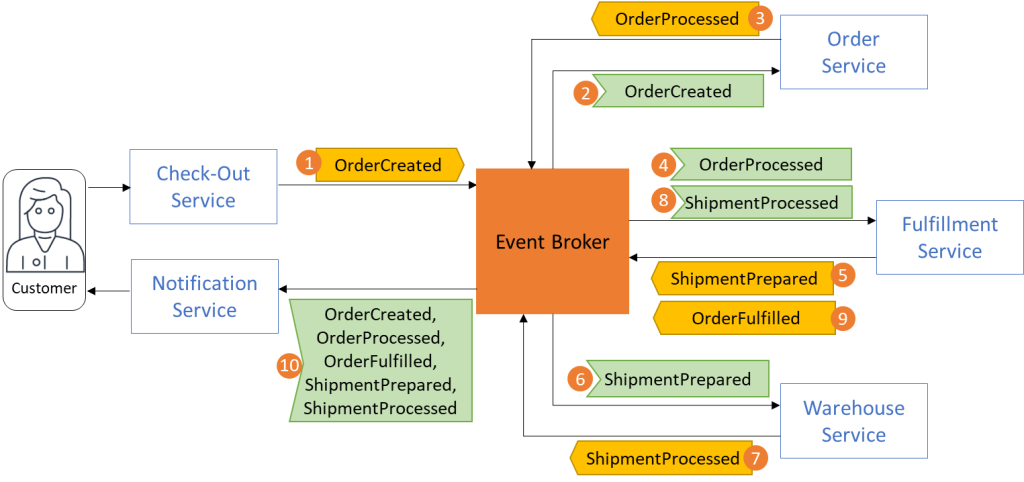
- Pros: Highly decoupled, resilient, and flexible. You can add new services (e.g., a fraud detection service that also listens to
OrderPlaced) without changing existing ones. - Cons: The overall business logic is distributed, making it harder to monitor and understand the state of a specific workflow instance (e.g., "Where is order #123 right now?").
Pattern 2: Orchestration (The Saga Pattern)
In this pattern, a central orchestrator service manages the workflow. It sends commands to other services and reacts to their reply events. This pattern is commonly used to implement the Saga pattern for managing distributed transactions.
- Analogy: An orchestra conductor. The conductor explicitly tells each instrument section when to play and what to play.

- Pros: Centralized workflow logic makes it easier to understand, monitor, and modify. The state of the transaction is explicit.
- Cons: The orchestrator can become a complex bottleneck. It introduces coupling between the orchestrator and the participating services.
For our design, we'll focus on the choreography pattern, as it represents a more purely event-driven mindset.
4. Designing the Order Confirmation Workflow
Let's design a choreographed workflow for an e-commerce order confirmation.
Business Process Steps:
- Customer submits an order.
- The system reserves inventory.
- The system processes payment.
- The customer is notified of the outcome.
- If successful, shipping is initiated.
Services Involved:
- Order Service: Manages order data.
- Inventory Service: Manages product stock.
- Payment Service: Interacts with payment gateways.
- Notification Service: Sends emails or other notifications.
- Shipping Service: Manages the shipping process.
The Event Flow (Happy Path)
- Client sends a
POST /ordersrequest to the API Gateway, which routes it to the Order Service. - The Order Service creates an order in its database with a
PENDINGstatus and publishes anOrderPlacedevent. - The Inventory Service consumes the
OrderPlacedevent. It attempts to reserve the required stock. If successful, it publishes anInventoryReservedevent. - The Payment Service consumes the
InventoryReservedevent. It processes the payment. If successful, it publishes aPaymentSucceededevent. - The Order Service consumes the
PaymentSucceededevent and updates the order's status toCONFIRMED. - The Shipping Service consumes the
PaymentSucceededevent and begins the fulfillment process, eventually publishing anOrderShippedevent. - The Notification Service consumes
PaymentSucceededandOrderShippedto send confirmation and shipping emails to the customer.
Designing the Events
A well-designed event is crucial. It must be self-contained and immutable.
This section from the "How to Design Event-Driven Architecture" article provides an excellent template for a well-structured event.
Focus on the example OrderPlacedEvent schema. Notice how it includes not just the payload but also essential metadata like eventId, timestamp, aggregateId, and correlationId for tracing.
An OrderPlaced event, for example, should contain all the data a consumer needs, so the consumer doesn't have to call back to the Order Service.
{
  "eventId": "uuid-v4-for-this-event",
  "eventType": "OrderPlaced",
  "timestamp": "2024-10-27T10:00:00Z",
  "version": "1.0",
  "payload": {
    "orderId": "ord-12345",
    "customerId": "cust-67890",
    "items": [
      { "productId": "prod-abc", "quantity": 1, "price": 99.99 },
      { "productId": "prod-def", "quantity": 2, "price": 19.99 }
    ],
    "totalAmount": 139.97
  },
  "metadata": {
    "correlationId": "uuid-v4-for-the-initial-request"
  }
}
Handling Failures: Compensating Actions
What if a step fails? For example, the PaymentService publishes a PaymentFailed event. This triggers compensating actions to undo previous steps.
- The Inventory Service consumes the
PaymentFailedevent and executes a compensating action: it un-reserves the stock for that order, making it available again. It might publish anInventoryReleasedevent. - The Order Service consumes the
PaymentFailedevent and updates the order's status toCANCELLED. - The Notification Service consumes
PaymentFailedto inform the customer that their order could not be processed.
This sequence of actions and compensating actions forms a Saga.
5. A Practical Walkthrough with Code
Let's watch a practical implementation of these concepts. The following video builds a simplified e-commerce system using FastAPI and Redis Streams. It starts with a synchronous anti-pattern and refactors it into a resilient, event-driven workflow.
Microservices with FastAPI – Full Course
This "Microservices with FastAPI" course provides a concrete example of building an event-driven workflow.
First, watch the initial implementation using direct HTTP calls. This demonstrates the tightly-coupled, synchronous anti-pattern we discussed. Next, observe the refactoring to an event-driven model with Redis Streams. The Payment service publishes an order_completed event, and the Inventory service consumes it asynchronously. This is the core of the choreographed workflow. Finally, watch how a rare failure case is handled using a compensating event. When the inventory update fails, a refund_order event is published, triggering a compensating action in the Payment service. This is a practical demonstration of a Saga.
Conclusion
You have now learned the principles of designing an event-driven workflow. This is a significant step up from simple request-response communication and is essential for building robust microservice architectures.
Key Takeaways:
- Shift from Commanding to Notifying: Instead of services telling each other what to do via direct calls, they publish events about what has happened.
- Choreography vs. Orchestration: Choreography offers maximum decoupling but distributes logic, while orchestration centralizes workflow control but adds coupling.
- Design for Failure: A robust workflow must include compensating actions (Sagas) to handle failures in a distributed environment and maintain data consistency.
- Events are Immutable Facts: Design events to be self-contained data records, enabling consumers to act independently.
Preview of the Next Lesson
We've now covered the high-level design of an asynchronous workflow and even seen a simplified implementation with Redis Streams. In the real world, complex background jobs often require more advanced features like scheduled tasks, automatic retries, and dedicated worker pools.
In our next lesson, you will "Configure Celery with Redis as a message broker for background task processing." You'll learn how to set up this industry-standard combination to build a powerful and scalable task-processing system, which is a common component in event-driven architectures.