Hello! In our last lesson, we mastered the producer-consumer pattern using asyncio queues, a powerful technique for managing concurrent work within a single service. We saw how to build resilient, scalable systems where tasks can communicate and operate independently.
Now, we shift our focus from internal coordination to external communication. In a microservices architecture, services must talk to each other over the network. How do they ensure they understand the data being exchanged? This is where Protocol Buffers (Protobuf) come in.
This lesson introduces the first fundamental component of gRPC: Protocol Buffers. You will learn how to define the "contract" or schema for your data using the Protobuf language in a .proto file. Think of this as creating a universal language for your services. Just as you define data models in Django or Pydantic for your application logic, you will now define language-neutral models for your network APIs.
Today, you will learn to define these data contracts using the three core building blocks of Protobuf: scalar types for simple data, nested messages for complex objects, and repeated fields for lists.
From Unstructured to Structured Data
Your experience with REST APIs has likely centered around JSON, a flexible and human-readable format. However, its flexibility can also be a weakness in a large system. Without a strict schema, it's easy for a service to send data in an unexpected format, causing bugs that are hard to trace.
Protocol Buffers solves this by enforcing a rigid schema. It's a method for serializing structured data that is compact, efficient, and language-neutral.
The following video provides an excellent "crash course" that contrasts the worlds of unstructured JSON and structured Protobuf. It's a great starting point for understanding why Protobuf is so foundational in microservices.
Watch this introduction from the "Protocol Buffers Crash Course" by Hussein Nasser. It builds a simple application first with JSON, then with Protobuf, highlighting the core differences.
Focus on the first part of the video, the comparison with JSON. Pay attention to his discussion of JSON's flexibility versus Protobuf's requirement for a pre-defined, rigid schema. This sets the stage for everything that follows.
As you saw, the key difference is the .proto file—the source of truth for your data structure.
Anatomy of a .proto File
A .proto file is a simple text file where you define your data structures, called messages. The syntax is straightforward and consists of a few key components.
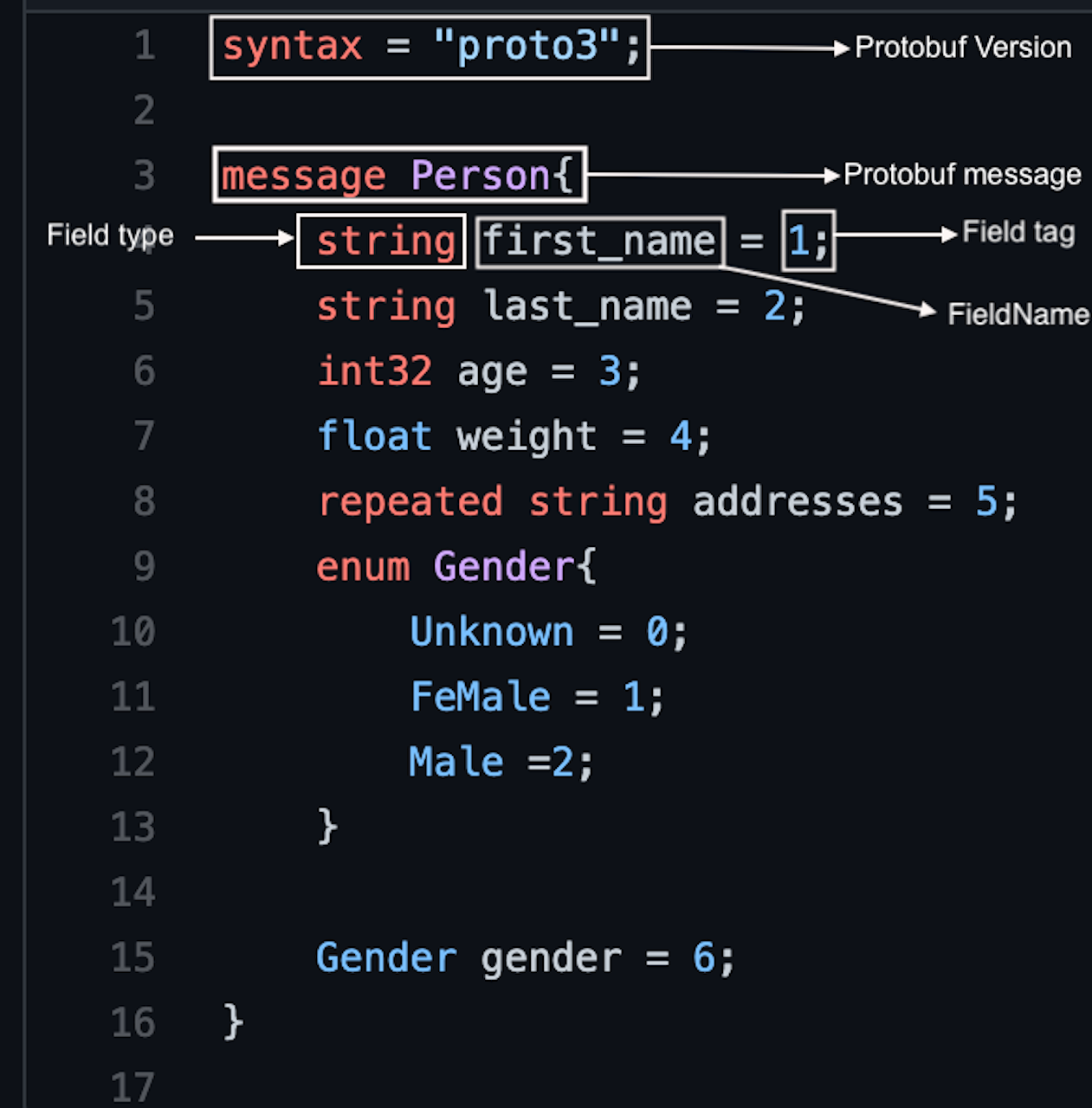
Let's break down the core elements:
- Syntax:
syntax = "proto3";is the first non-comment line and declares that you are using the proto3 syntax, which is the modern standard. - Message: The
messagekeyword defines a data structure, similar to aclassin Python or astructin other languages. - Fields: Inside a message, you define fields, each with three parts:
- Type: The data type, such as
string,int32, or even another message type. - Name: The field name, typically using a
snake_caseconvention. - Field Number (Tag): A unique positive integer (
= 1,= 2, etc.). This number is used to identify the field in the compact binary format after serialization. These numbers are critical for schema evolution and cannot be changed once the message is in use.
- Type: The data type, such as
Defining Messages: The Three Building Blocks
The official Google Developers documentation provides a fantastic Python-centric tutorial for defining messages. We will use its addressbook.proto example to explore the three fundamental ways to structure your data.
This section from the official "Protocol Buffer Basics: Python" tutorial provides a complete example of a .proto file and explains its components.
Read the section "Defining Your Protocol Format" and carefully study the addressbook.proto code block. We will be dissecting this example.
After reading, let's analyze the addressbook.proto example to see our three building blocks in action.
1. Scalar Types
These are the basic data types for single values. The Person message uses several:
message Person {
  string name = 1;
  int32 id = 2;
  string email = 3;
  // ...
}
Here, name, id, and email are all scalar fields. Protobuf supports a wide range of scalar types like float, double, bool, and various integer sizes. For a comprehensive list, you can reference the Scalar Value Types table in the official Proto3 Language Guide (LINK).
2. Nested Messages
You can define messages inside other messages to represent complex, structured objects. The Person message contains a definition for PhoneNumber:
message Person {
  // ...
  message PhoneNumber {
    string number = 1;
    PhoneType type = 2;
  }
  // ...
}
Here, PhoneNumber is a nested message type. This is conceptually similar to defining an inner class in Python. It helps group related data and prevents naming collisions.
3. Repeated Fields
To represent a list or an array of items, you use the repeated keyword. The Person message can have multiple phone numbers, which is defined like this:
message Person {
  // ...
  repeated PhoneNumber phones = 4;
}
The repeated keyword in front of PhoneNumber indicates that a Person can have zero or more PhoneNumber messages. The AddressBook message at the end of the example also uses this to create a list of Person objects: repeated Person people = 1;.
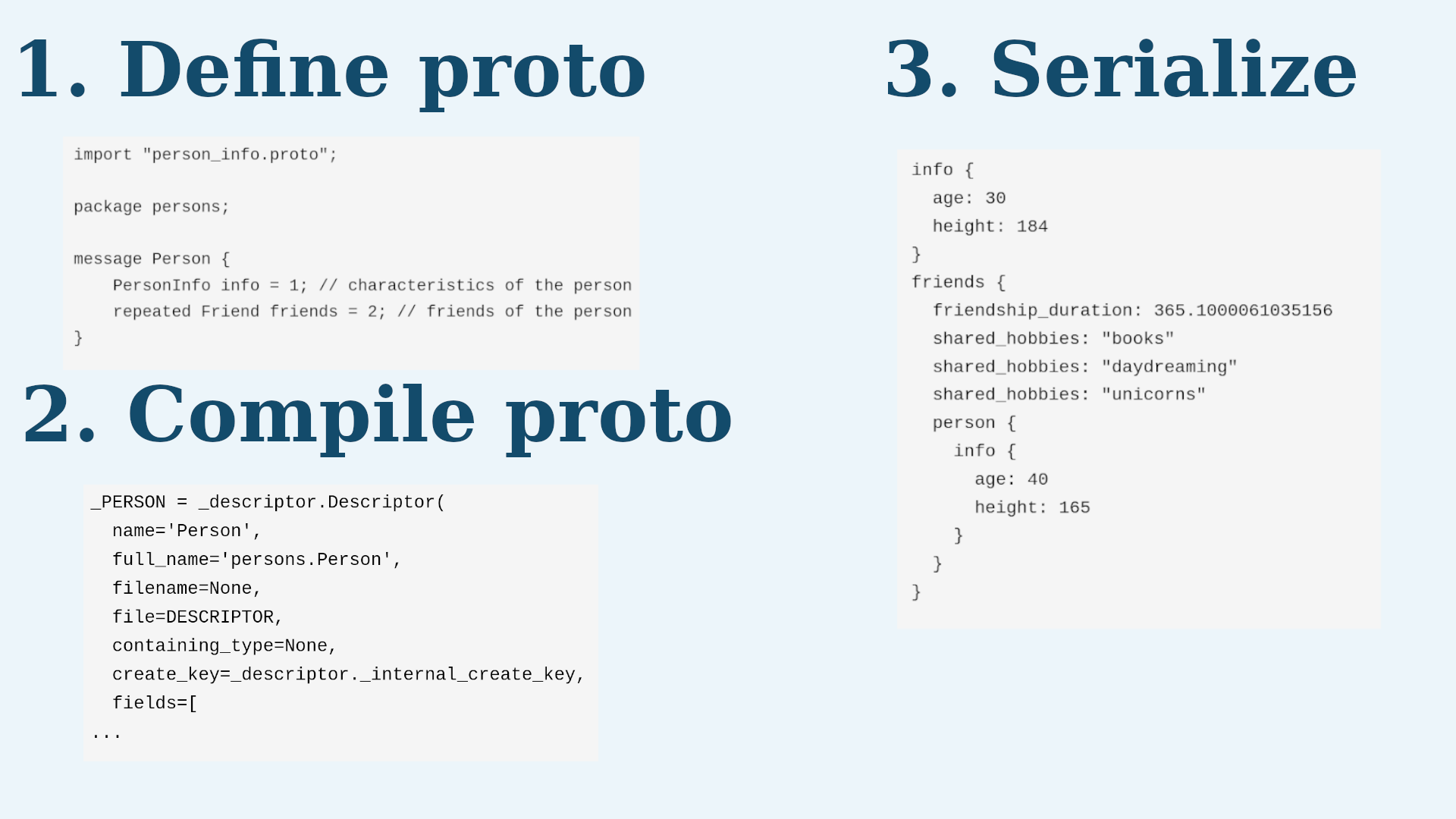
This visual diagram provides a high-level summary of the entire process, from defining the schema to using it.
Practice Exercise
Now, let's apply what you've learned. Imagine you are designing the data contracts for a simplified e-commerce system.
Your task: Create a new file named order.proto and define the necessary messages.
- Start with the
syntax = "proto3";line. - Define a
Productmessage with the following fields:- A
stringfor the product ID (product_id) with field number 1. - A
stringfor the product name (name) with field number 2. - A
floatfor the price with field number 3.
- A
- Define an
OrderItemmessage that represents a product in an order. It should contain:- A
Productfield (product) with field number 1. - An
int32for the quantity (quantity) with field number 2.
- A
- Finally, define the main
Ordermessage with:- A
stringfor the order ID (order_id) with field number 1. - A
stringfor the customer ID (customer_id) with field number 2. - A repeated field of
OrderItemmessages (items) with field number 3.
- A
Click to see the solution
syntax = "proto3";

// Message representing a product in the catalog.
message Product {
  string product_id = 1;
  string name = 2;
  float price = 3;
}

// Message representing a line item in an order.
// This is a nested structure, containing a Product and its quantity.
message OrderItem {
  Product product = 1;
  int32 quantity = 2;
}

// The main message representing a customer's order.
// It contains a list (repeated field) of order items.
message Order {
  string order_id = 1;
  string customer_id = 2;
  repeated OrderItem items = 3;
}
Conclusion
In this lesson, you've taken the first crucial step toward building gRPC-based microservices. You've learned how to create a .proto file to serve as a strict, language-neutral data contract between services. By understanding and using the three fundamental building blocks, you can now model complex data structures.
Key Takeaways:
- Protocol Buffers (Protobuf) provide a way to serialize structured data using a predefined schema in a
.protofile. - Messages are defined with the
messagekeyword and contain fields. - Each field has a type, a name, and a unique, immutable field number (tag) that is vital for binary encoding.
- The three main ways to structure data are:
- Scalar types: For simple values like
string,int32,bool. - Nested messages: For creating complex objects by embedding one message type within another.
repeatedfields: For creating lists or arrays of a specific type.
- Scalar types: For simple values like
Preview of the Next Lesson
You've designed your first schema, but in the real world, requirements change. What happens when you need to add a new field to your Order message, like a discount_code? If you're not careful, this could break older services that don't know about the new field.
In the next lesson, we will tackle this exact problem by exploring schema evolution. You'll learn the rules for modifying .proto files while ensuring backward compatibility, a critical skill for maintaining a healthy, evolving microservices architecture.