Welcome back! In our last lesson, we laid the groundwork for inter-service communication by learning how to define data contracts using Protocol Buffers. You mastered the three core building blocks—scalar types, nested messages, and repeated fields—to create a well-structured .proto file.
But in the real world, systems are never static. Business requirements change, new features are added, and old ones are retired. This means your data contracts must also evolve. This lesson tackles a critical challenge in distributed systems: how to change your Protobuf schemas without breaking the services that depend on them. You will learn the principles of backward compatibility and the specific rules you must follow when modifying .proto files to ensure your microservices architecture remains robust and reliable during updates.
The Challenge: Evolving Data in a Distributed World
In a monolithic application, changing a data structure is relatively straightforward—you update the code, redeploy the entire application, and you're done. In a microservices architecture, it's far more complex. Services are deployed independently, which means at any given time, you could have different versions of services running in production.
- A new version of a "producer" service might start sending data with a new field.
- An old version of a "consumer" service must not crash when it receives this unknown field.
- A new consumer must be able to handle data created by an old producer that lacks the new field.
This reality requires us to design for both backward and forward compatibility.
The Reality of Change and The Two Golden Rules
This article, "Microservices Data Evolution," clearly explains why simultaneous updates are unrealistic in a microservices world and defines the two compatibility rules that are essential for safe evolution.
Start by reading the section "The Reality of Change: Why Deployments Break Things." Then, focus on "The Two Golden Rules: Backward and Forward Compatibility" and study the table that illustrates the relationship between old and new producers and consumers. This table is a mental model you should always have in mind when planning a change.
As the article explains, backward compatibility (new code reads old data) and forward compatibility (old code reads new data) are not optional; they are essential for preventing system failures during deployments and rollbacks. Protobuf is designed to help us achieve this, but only if we follow the rules.
The Rules of Safe Protobuf Schema Evolution
So, how do we make changes that are both backward and forward compatible? The official Protobuf language guide and best practices from companies like Google and Uber have established a clear set of rules.
Core Principles of Evolvable Protobuf
This article, "Designing Evolvable Protobuf Schemas for Microservices," provides an excellent summary of the core principles. It's a great reference for the do's and don'ts of schema evolution.
Read the section "Core Principles of Evolvable Protobuf." Pay close attention to each of the eight rules, especially the ones concerning field numbers, changing types, and using reserved. We will go through the most important ones now.
Let's distill these rules into a practical guide.
Rule #1: Field Numbers are Permanent
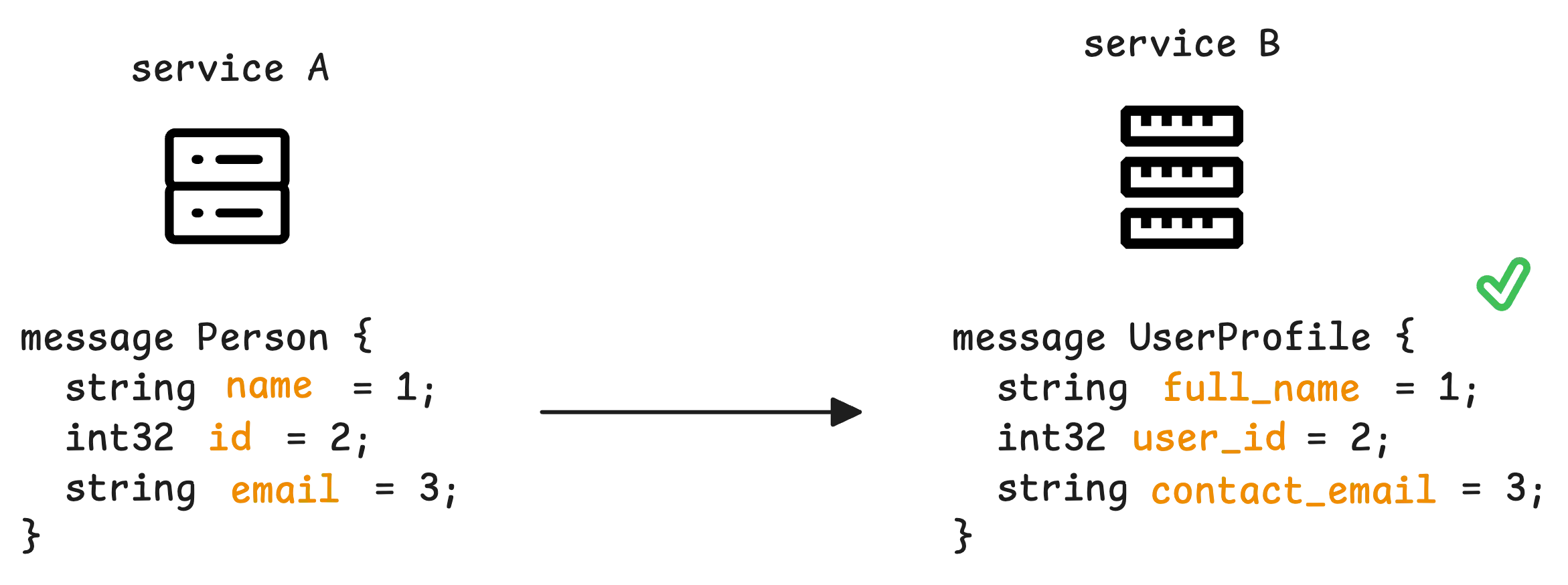
This is the most important rule. Protobuf uses the numeric tag, not the field name, to identify fields in the binary message. Once a message is in use, you must never change or reuse a field number.
You can rename a field, but you cannot change its number. An old service that was compiled with the old field name will still be able to parse a message from a new service that uses the new name, as long as the field number is the same.
Rule #2: Adding a New Field is Safe (As Long as It's Optional)
In proto3, all fields are implicitly optional. When you add a new field with a new, unique field number:
- Forward Compatibility: Old consumers that don't know about the new field will simply ignore it when parsing the message. The system won't crash.
- Backward Compatibility: New consumers reading old data (which lacks the new field) will see the field as unset or with its default value (e.g., 0 for numbers, empty for strings). Your application logic in the new consumer must be able to handle this missing data gracefully.
This is a key benefit of Protobuf for additive changes.
Schema Evolution with Zero Down Time | Designing Event-Driven Microservices
This video from Confluent explains this exact scenario in the context of an event-driven system.
Watch the segment on additive changes. It perfectly illustrates how a producer can be updated first with a new field, and existing consumers will continue to work without issue.
Rule #3: "Removing" a Field Requires Deprecation and Reservation
You should never just delete a field from a .proto file. Doing so makes it possible for someone to accidentally reuse that field number later with a new meaning, which would corrupt data and break clients in unpredictable ways.
The safe, multi-step process for removing a field is:
-
Deprecate: First, mark the field with
[deprecated = true]. This doesn't change the behavior but will cause most compilers to issue a warning if new code tries to use it. It signals to other developers that the field is obsolete.// v1 message User { string username = 1; int32 age = 2; // We want to remove this } // v2 - Deprecate the field message User { string username = 1; int32 age = 2 [deprecated = true]; string birth_date = 3; // Replaced 'age' with this } -
Reserve: After a period of time, once you are confident no services are still using the deprecated field, you can remove it from the message definition but you must reserve its field number and name. This prevents future reuse.
// v3 - Remove the field and reserve its number and name
message User {
  string username = 1;
  reserved 2;
  reserved "age";
  string birth_date = 3;
}
What NOT to Do: Breaking Changes
Following the rules above keeps you safe. Violating them will almost certainly lead to production issues. The most common breaking changes are:
- Changing a field's number.
- Changing a field's type (e.g., from
int32tostring). The binary encoding is different and will fail to parse. - Changing a field's cardinality (e.g., from a single field to a
repeatedfield).
A Cautionary Tale: Why required was a "Million-Dollar Mistake"
You may see references to a required keyword in older proto2 documentation. The designers of Protobuf eventually considered its inclusion a major mistake, and it was removed entirely in proto3. Understanding why provides a deep insight into designing evolvable systems.
This is Google's Worst Mistake with Protobuf (it cost them millions!)
This short video explains the exact problem with required fields and why they create deployment deadlocks.
Watch the entire video. Pay attention to how a seemingly simple change to a required field creates a catch-22 where neither the new nor the old code can read all the data. The key takeaway is in the segment on separating parsing from validation.
The core lesson is this: parsing should not be responsible for validation. A Protobuf parser's only job is to turn bytes into a data structure. It should succeed as long as the data is well-formed. Whether that data is valid for your application (e.g., "does this User message have an email?") is a question for your application logic to answer, after parsing is complete.
By making all fields optional by default, proto3 enforces this separation and makes schema evolution much safer.
Practice Exercise: Evolving the E-commerce Schema
Let's apply these rules to the order.proto file you created in the last lesson.
Original order.proto:
syntax = "proto3";

message Product {
  string product_id = 1;
  string name = 2;
  float price = 3;
}

message OrderItem {
  Product product = 1;
  int32 quantity = 2;
}

message Order {
  string order_id = 1;
  string customer_id = 2;
  repeated OrderItem items = 3;
}
Your task:
Your team has new requirements. Evolve the schema to accommodate them while maintaining backward compatibility.
- A new feature requires you to store a coupon code with each order. Add a new
stringfield namedcoupon_codeto theOrdermessage. Choose an appropriate field number. - The business has decided to phase out the float
priceon theProductmessage in favor of storing the price in cents as an integer to avoid floating-point precision issues.- Add a new
int64field namedprice_in_cents. - Mark the old
pricefield as deprecated.
- Add a new
Update your order.proto file to reflect these changes.
Click to see the solution
syntax = "proto3";

message Product {
  string product_id = 1;
  string name = 2;
  float price = 3 [deprecated = true]; // Deprecate the old field
  int64 price_in_cents = 4;           // Add the new field with a new number
}

message OrderItem {
  Product product = 1;
  int32 quantity = 2;
}

message Order {
  string order_id = 1;
  string customer_id = 2;
  repeated OrderItem items = 3;
  string coupon_code = 4; // Add the new field with a new number
}
Explanation:
- We added
coupon_codetoOrderwith a new field number4. Old clients will ignore this field. New clients must handle cases where it's missing from oldOrdermessages. - In
Product, we addedprice_in_centswith a new field number4. We kept the oldpricefield but marked it[deprecated = true]to warn developers away from it while maintaining compatibility for older clients that might still be reading or writing it.
Conclusion
Today you've learned one of the most important practical skills for managing microservices: how to evolve your data contracts safely. By treating schema evolution as a deliberate, careful process, you can update and improve your services without causing system-wide failures.
Key Takeaways:
- Microservice deployments are gradual, so you must design for backward and forward compatibility.
- Field numbers are permanent. Never change or reuse them.
- Adding new fields is safe in
proto3because they are implicitly optional, and old clients will ignore them. - To remove a field, you must first
deprecateit, and then laterreserveits number and name to prevent accidental reuse. - Avoid breaking changes like altering a field's type or cardinality.
- The removal of
requiredinproto3was a deliberate design choice to separate parsing from application-level validation, making systems more evolvable.
Preview of the Next Lesson
We've now covered how to define a Protobuf schema and how to evolve it safely. But why go through all this trouble when JSON is so simple and human-readable? In our next lesson, we will do a deep-dive comparison of Protobuf vs. JSON, analyzing the trade-offs in terms of performance, data size, and schema enforcement. This will solidify your understanding of when and why Protobuf is the superior choice for high-performance internal service communication.