Welcome back! In our last session, we built a solid theoretical foundation by exploring Apache Airflow's core components: DAGs, tasks, operators, and the scheduler. You now understand the blueprint of an Airflow workflow.
Today, we transition from theory to practice. The goal of this lesson is to author a self-contained Python script for an ingestion task. This script will represent the actual "work" that an Airflow task will execute. We will focus on building a robust script that fetches data from an API and loads it into your PostgreSQL database, incorporating best practices for reliability and modularity. This foundational skill is the next crucial step before we integrate this script into an Airflow DAG in our following lesson.
What is a Self-Contained Ingestion Task?
Before we write any code, let's clarify what we mean by a "self-contained" script. In the context of a data pipeline, it's a script that has a single, well-defined responsibility and can be executed independently.
- Single Responsibility: It should do one thing well, such as extracting data from a specific API or loading a particular type of file.
- Modularity: The logic should be organized into functions. This makes the code reusable, easier to test, and simpler to understand.
- Idempotency: As we've discussed, the script should be designed so that running it multiple times has the same effect as running it once. We'll implement this more formally in a later lesson.
The diagram below shows a typical pipeline structure. Our focus today is on the "Python for Data Extraction" component, which takes data from a source and lands it in our "Raw Data" store within PostgreSQL.
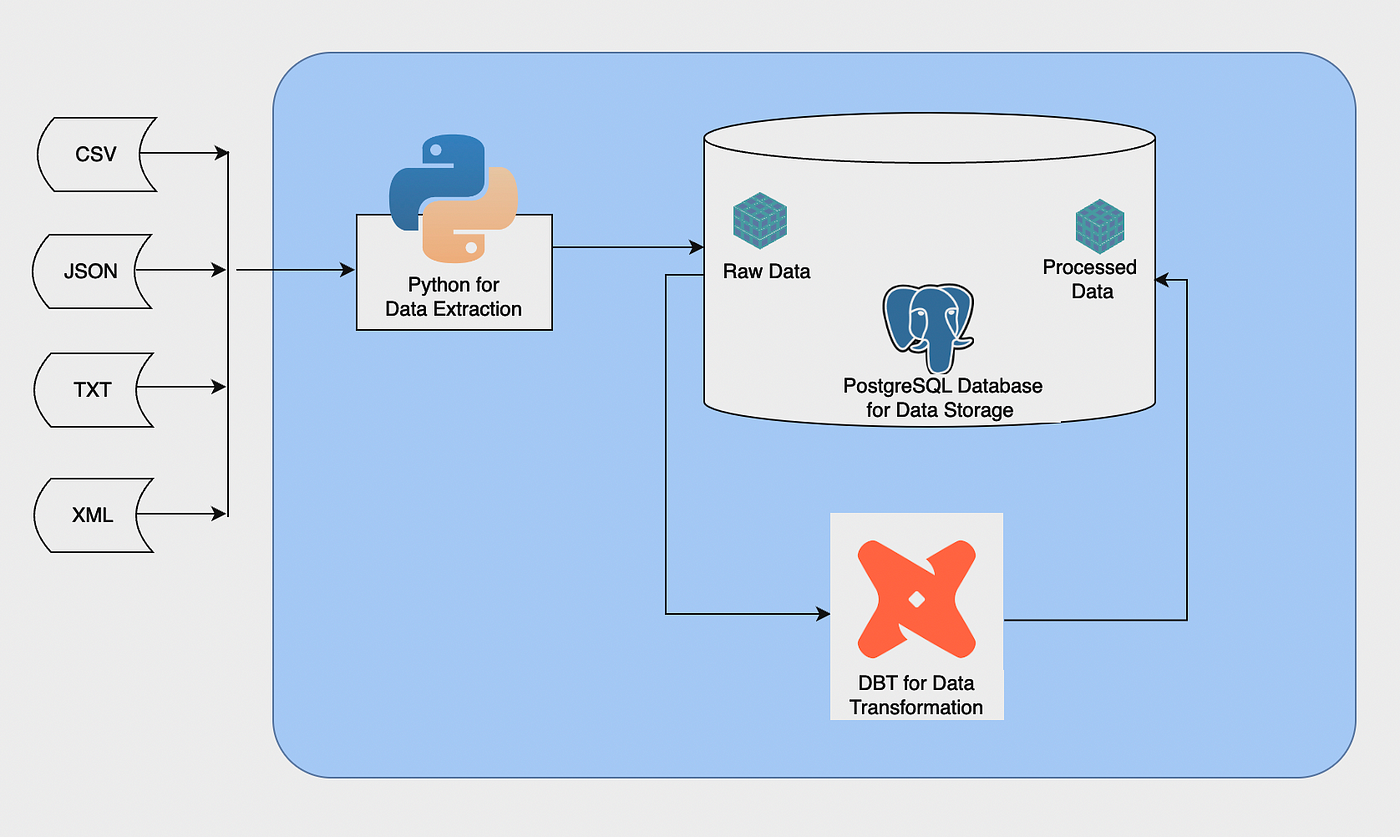
We will build a script that performs a simple ETL (Extract, Transform, Load) process, structured into distinct functions for each step.
Step 1: Extracting Data from an API
Your project requires fetching data from APIs, so we'll start there. We'll use the requests library, a standard choice for making HTTP requests in Python. Our goal is to call an API, handle potential errors, and parse the response.
The following video provides a great walkthrough of creating a basic Python function to fetch data from an API. Pay close attention to how the code is structured into a function and how it handles the API response.
How to build an automated data pipeline using Airflow, dbt, Postgres, and Superset (Windows 11 WSL)
Watch this segment from a tutorial by Calvin Yoon. It demonstrates how to create a Python file, write a function to call an API with the requests library, and then enhance it with basic error handling.
Focus on the process of creating the fetch_data function from the initial call to the API. Then, observe how the function is improved by adding error handling using a try-except block and response.raise_for_status().
The video introduces two critical concepts for reliability:
try...exceptBlock: This is a fundamental Python construct for catching and handling exceptions (errors) that might occur, such as a network failure.response.raise_for_status(): This is a convenient method from therequestslibrary that will automatically raise anHTTPErrorif the API responds with a "bad" status code (like 404 Not Found or 500 Server Error).
To build truly robust pipelines, we need to handle a range of potential issues. The article "Python requests best practices for data engineers" details these strategies.
Python requests best practices for data engineers
This article provides excellent strategies for making your data extraction scripts more reliable. We'll focus on the section about error handling.
Please read the section titled Handle exceptions gracefully. Note the different types of exceptions you can catch, from specific HTTP errors to general connection problems.
By combining raise_for_status() with a try...except block, you can create a resilient function that anticipates and gracefully manages API issues.
Step 2: Transforming and Loading the Data
Once we've successfully extracted the data (usually in JSON format), the next step is to load it into our PostgreSQL 'bronze' table. Given your proficiency with Python and SQL, the combination of pandas and SQLAlchemy is a powerful and efficient way to achieve this.
- Transform (JSON to DataFrame): The
pandaslibrary can easily parse a list of JSON objects into a DataFrame, which is a tabular data structure that aligns perfectly with a database table. - Load (DataFrame to PostgreSQL):
SQLAlchemyprovides a database-agnostic way to connect to your database. We'll use it to create an "engine" thatpandascan use to write the DataFrame directly to a SQL table.
The video below demonstrates this exact Extract-Transform-Load pattern. It uses requests to extract, pandas to transform, and SQLAlchemy to load the data.
Python Fundamentals For Data Engineering: Create your first ETL Pipeline
This video by Anuj Syal walks through a complete, albeit simple, ETL pipeline in Python. It's a great example of how to structure your ingestion script.
Watch the following segments to see the full process: Extract: Fetching JSON data from an API. Transform: Converting the JSON to a pandas DataFrame and applying simple transformations. Load: Using SQLAlchemy and the DataFrame's .to_sql() method to write to a database. Putting it together: Organizing the E, T, and L steps into distinct functions.
The key takeaway is the df.to_sql() method. It's a powerful feature of pandas that abstracts away the complexity of writing INSERT statements, especially for bulk loads. You provide the table name, the connection engine, and instructions on what to do if the table already exists (e.g., 'replace' or 'append').
A Complete Self-Contained Script
Now, let's assemble these pieces into a complete, self-contained script. We will write a script that fetches a list of universities from a public API, loads them into a pandas DataFrame, and then writes them to a universities table in your PostgreSQL database.
This script is structured with separate functions for each logical step, making it clean and reusable—perfect for calling from an Airflow PythonOperator.
import requests
import pandas as pd
from sqlalchemy import create_engine
import os


# --- Configuration ---
# In a real pipeline, these would be managed by Airflow connections & variables
DB_USER = os.getenv("POSTGRES_USER", "airflow")
DB_PASSWORD = os.getenv("POSTGRES_PASSWORD", "airflow")
DB_HOST = "postgres" # This is the service name in our Docker Compose file
DB_PORT = "5432"
DB_NAME = os.getenv("POSTGRES_DB", "airflow")

API_URL = "http://universities.hipolabs.com/search?country=United+States"
TABLE_NAME = "universities_bronze"
SCHEMA_NAME = "raw" # We'll load into a 'raw' schema


def extract_data(url: str) -> list:
    """Extracts data from an API and returns a list of records."""
    print(f"Fetching data from {url}...")
    try:
        response = requests.get(url)


        # This will raise an HTTPError if the HTTP request returned an unsuccessful status code
        response.raise_for_status()
        print("Data fetched successfully.")
        return response.json()
    except requests.exceptions.RequestException as e:
        print(f"An error occurred during API request: {e}")


        # In a real pipeline, you might want to raise the exception
        # to cause the Airflow task to fail.
        raise


def transform_and_load(data: list, table_name: str, schema: str, db_conn_str: str):
    """Transforms the data into a pandas DataFrame and loads it into a Postgres table."""
    if not data:
        print("No data to load. Exiting.")
        return

    print("Transforming data and loading to Postgres...")
    df = pd.DataFrame(data)


    # Simple transformations
    df.rename(columns={'name': 'university_name', 'state-province': 'state'}, inplace=True)
    df['web_pages'] = df['web_pages'].apply(lambda x: x[0] if x else None)
    df['domains'] = df['domains'].apply(lambda x: x[0] if x else None)


    # Create a SQLAlchemy engine
    engine = create_engine(db_conn_str)


    # Ensure schema exists
    with engine.connect() as connection:
        connection.execute(f"CREATE SCHEMA IF NOT EXISTS {schema}")


    # Load data into Postgres
    df.to_sql(
        table_name,
        engine,
        schema=schema,
        if_exists='replace', # For simplicity, we replace the table. Later, we'll learn incremental loads.
        index=False
    )
    print(f"Successfully loaded {len(df)} records into {schema}.{table_name}.")


if __name__ == "__main__":


    # Construct the database connection string
    # postgresql://user:password@host:port/dbname
    connection_string = f"postgresql://{DB_USER}:{DB_PASSWORD}@{DB_HOST}:{DB_PORT}/{DB_NAME}"


    # Run the ETL process
    api_data = extract_data(API_URL)
    transform_and_load(api_data, TABLE_NAME, SCHEMA_NAME, connection_string)
This script is now ready. You could save it as api_ingestion.py in your project. It's "self-contained" because you can run it directly (python api_ingestion.py), and it performs the entire task of fetching data and loading it into your database.
Adapting the Pattern for CSV Files
Your project also involves ingesting CSV files. The same pattern applies beautifully. The only part that changes is the extract_data function. Instead of using requests, you would use pandas.read_csv(). The transform_and_load function could remain nearly identical.
For very large CSVs, more advanced techniques can significantly boost performance. While df.to_sql() is convenient, PostgreSQL's native COPY command is the fastest way to bulk-load data. You can leverage this from Python, often by writing the DataFrame to an in-memory buffer and passing it to the database. We won't implement this now, but it's a powerful tool for your arsenal.
Csv import postgresql: Master Data Loads Faster (csv import postgresql) | Adamant Code
This article from Adamant Code discusses advanced strategies for loading data into PostgreSQL.
For now, you don't need to implement this, but I recommend reading the section on performance tuning. It introduces concepts like UNLOGGED tables and disabling indexes, which are crucial for optimizing large-scale batch ingestion.
Conclusion
In this lesson, we have successfully authored a complete, self-contained Python script for a data ingestion task. You have built a modular and robust program that extracts data from an API, performs light transformations with pandas, and loads the result into PostgreSQL using SQLAlchemy.
Here are the key takeaways:
- Structure is Key: Organizing ingestion logic into distinct
extract,transform, andloadfunctions makes your code clean, reusable, and easier to debug. - Build for Reliability: Always include error handling in your API calls using
try...exceptblocks andresponse.raise_for_status()to create resilient tasks. - Leverage the Right Tools: The combination of
requests,pandas, andSQLAlchemyprovides a powerful and flexible toolkit for most ingestion scenarios. - The Pattern is Reusable: The core ETL script structure can be easily adapted for different sources, like CSV files, by swapping out the extraction logic.
You now have the functional code that will be the heart of our first Airflow task. In the next lesson, we will create an Airflow DAG and use the PythonOperator to orchestrate this very script, turning it into a scheduled, monitored, and repeatable part of your data pipeline.