Hello! Welcome to the fourth module of our course. Having set up your local development environment with Docker, you're now ready to tackle the heart of our data pipeline's automation: Apache Airflow. Airflow will act as the conductor for your data orchestra, ensuring every piece of your pipeline—from API ingestion to database loading—runs at the right time and in the right order.
In this first lesson on Airflow, we will focus on its foundational concepts. By the end of our session, you'll be able to explain what DAGs, tasks, operators, and scheduling are. Mastering this vocabulary is the first and most crucial step before we start writing the Python code to orchestrate your pipeline. Let's begin by looking at the big picture.
The Four Pillars of Airflow
At its core, Airflow is a platform to programmatically author, schedule, and monitor workflows. Everything you do in Airflow revolves around four key concepts.

As you can see, these four components—DAGs, Tasks, Operators, and Scheduling—are interconnected. A DAG is composed of Tasks. Each Task is an instance of an Operator. And the entire DAG is executed by the Scheduler. Let's explore each of these in more detail.
1. DAGs: The Blueprint of Your Workflow
The central concept in Airflow is the DAG, which stands for Directed Acyclic Graph. This may sound like a term from a computer science textbook, but the idea is straightforward. It's simply a blueprint that describes your entire workflow. Let's break down the name.
Introduction to Apache Airflow and DAGs | CodeSignal Learn
The resource from CodeSignal Learn offers a very clear and concise explanation of what "Directed Acyclic Graph" means in the context of Airflow. Please read the section "Understanding Apache Airflow and DAGs".
Focus on the three bullet points that break down the terms Graph, Directed, and Acyclic. This will solidify your understanding of why workflows in Airflow are structured this way.
To summarize:
- Graph: Your workflow is represented as a collection of tasks (nodes) and the dependencies between them (edges).
- Directed: The dependencies have a direction. For example, a
load_datatask must happen after anextract_datatask, not the other way around. - Acyclic: Your workflow cannot have loops. A task can't depend on itself, either directly or indirectly, which ensures your workflow has a clear beginning and end.
This structure is what allows Airflow to manage complex dependencies and ensure your pipeline runs reliably. One of the most powerful features of Airflow, which will be particularly relevant given your Python expertise, is that these DAGs are defined entirely in Python code.
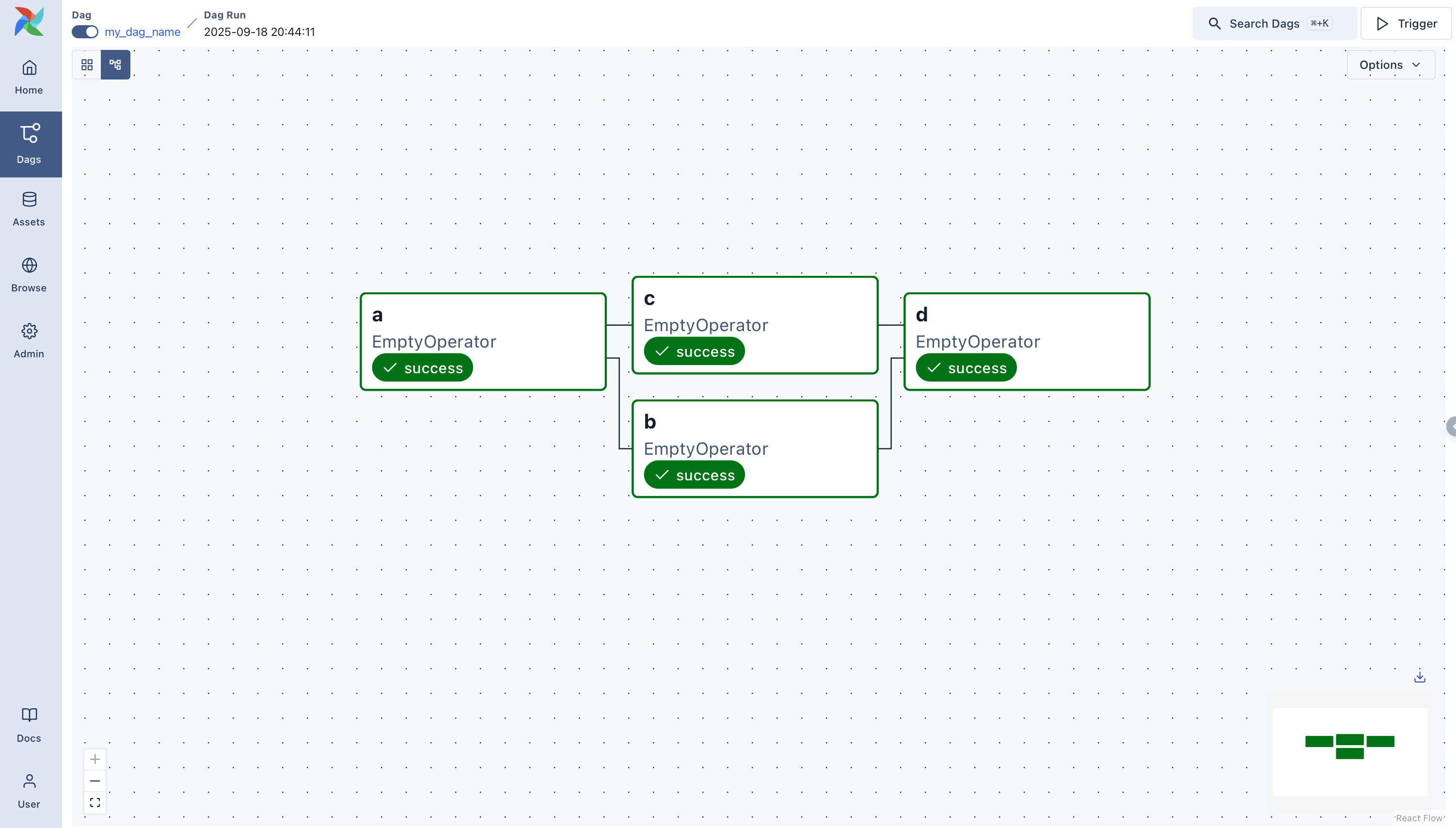
2. Tasks: The Units of Work
If a DAG is the blueprint, then Tasks are the individual steps or instructions in that blueprint. A task is a single unit of work in your pipeline. For your project, you might have tasks like:
fetch_data_from_apiread_records_from_csvvalidate_json_schemaload_raw_data_to_postgres
Airflow Core Concepts - Part 1 - by Seckin Dinc
The blog post by Seckin Dinc provides clear definitions for both DAGs and Tasks. We've already covered DAGs, but it's worth reviewing the first section before moving on to the definition of a Task.
Read the section on DAGs to reinforce the concept, and then read the section titled "Task" to understand its role as a single unit of work.
As the article notes, it's important that tasks are idempotent. You'll recall this term from our first module; it means that running a task multiple times with the same input will produce the same result, which is critical for making pipelines resilient to failures and retries.
3. Operators: The "How-To" for Tasks
So, a DAG is a collection of tasks. But how does Airflow know what a task is supposed to do? This is where Operators come in. An Operator is a pre-built template that defines a specific action. A Task is simply an instance of an Operator.
This is analogous to object-oriented programming: an Operator is like a class, and a Task is like an object (an instance of that class).
Task = Operator(parameters)
Airflow comes with a huge library of built-in operators, and you can also write your own. The video below explains this relationship clearly and introduces the main categories of operators.
Airflow tutorial - DAGs, Operators, Tasks, Providers & airflow.cfg
The SleekData YouTube channel has a great tutorial that explains the distinction between an Operator and a Task. It also categorizes operators, which is useful for understanding the breadth of what's possible with Airflow.
Please watch the segment from this section. Pay close attention to the class/object analogy and the three categories of operators described: Action, Transfer, and Sensor.
The three main types of operators are:
- Action Operators: Perform an action. The most common ones you'll use are the
PythonOperator(to run a Python function) and theBashOperator(to run a shell command). - Transfer Operators: Move data from one system to another, like
S3ToPostgresOperator. - Sensor Operators: Wait for something to happen. For example, a
FileSensorcan wait for a new file to appear in a directory before triggering downstream tasks. We will use this in a future lesson.
For your project, we will rely heavily on the PythonOperator, allowing you to leverage your existing Python skills to perform the custom logic needed for API calls, data validation, and loading.
4. Scheduling: The "When" of Your Workflow
We now know what a workflow is (a DAG), what it's made of (Tasks), and how tasks are defined (Operators). The final piece of the puzzle is scheduling: telling Airflow when to run your DAG.
Scheduling in Airflow is a notoriously tricky topic, primarily because of how it thinks about time. A DAG run is always executed for a specific "data interval," and crucially, the run is only triggered after the data interval has passed.
This concept is best explained visually.
Airflow DAG Scheduling in 5 mins
The "Data with Marc" channel offers a very clear, 5-minute explanation of Airflow scheduling that is essential viewing for any new Airflow user.
Watch the entire video. Focus on understanding the three key concepts: start_date: The date your DAG becomes eligible for scheduling. schedule_interval: How often the DAG should run (e.g., daily, hourly). Data Interval: The core concept that a DAG run for a period (e.g., for all of January 1st) is only triggered at the end of that period (i.e., at midnight on January 2nd). The segment from this explanation is particularly important.
To recap the key points from the video:
- You define a
start_dateand aschedule_interval(e.g.,@daily,@hourly, or a cron expression) in your DAG file. - Airflow will not run your DAG for a given interval until that interval is complete. For a
@dailyDAG, the run for "Monday" will kick off at midnight as Tuesday begins. - This data interval is passed to your tasks, which is extremely useful for processing data incrementally (e.g., "process all records created on Monday").
Understanding this "run after the interval ends" logic is the key to mastering Airflow scheduling and avoiding common pitfalls.
Conclusion
In this lesson, we've unpacked the four fundamental concepts of Apache Airflow. Let's summarize the key takeaways:
- DAGs (Directed Acyclic Graphs) are the Python-defined blueprints for your workflows, outlining tasks and their dependencies.
- Tasks are the individual, idempotent units of work within a DAG.
- Operators are the templates (classes) that define what a task does. A task is an instance of an operator.
- Scheduling determines when a DAG runs, based on a
start_dateand aschedule_interval, following the "data interval" logic.
With this theoretical foundation in place, you are now ready to start applying these concepts. In our next lesson, we will get practical and write our first Python script for an ingestion task. This script will later be orchestrated by an Airflow DAG that we will build together.