Welcome back! In our previous lesson, we built a robust API client capable of handling network errors and retries. We can now reliably fetch raw data from our sources. However, fetching the data is only the first step. The data that arrives from an API can be messy, incomplete, or in an unexpected format. Blindly loading this data into our database is a recipe for disaster, a classic case of "garbage in, garbage out."
This lesson tackles that very problem. We will learn how to validate incoming JSON data against a predefined schema using Pydantic. By defining the "shape" of our expected data—including data types, required fields, and even complex business rules—we can create a powerful gatekeeper for our pipeline. This step ensures that only clean, structured, and valid data proceeds to the next stage, which is a cornerstone of building reliable data systems.
The Problem with Manual Validation
Before diving into Pydantic, let's consider how we might validate data manually. You would likely write a series of if/isinstance checks and try/except blocks to verify each field's type, presence, and value. This approach is not only tedious and error-prone but also difficult to maintain. Furthermore, it often fails at the first error, forcing a frustrating cycle of fixing one issue at a time.
Pydantic solves this by using Python's type hints in a declarative way. You define what your data should look like, and Pydantic handles the enforcement.
The following video from Corey Schafer provides an excellent introduction to Pydantic and contrasts its clean, powerful approach with the complexity of manual validation.
Python Pydantic Tutorial: Complete Data Validation Course (Used by FastAPI)
Why Pydantic is so useful
Watch the beginning of the video, from the introduction, to see a comparison between manual validation code and the equivalent Pydantic implementation. Notice how Pydantic provides clearer, more comprehensive error reports with far less code.
As you saw, Pydantic not only simplifies the code but also aggregates all validation errors at once, providing a complete picture of what's wrong with the data. This is a crucial feature for debugging data quality issues in a pipeline.
The diagram below illustrates where this validation step fits into a typical data engineering workflow. It acts as a critical checkpoint right after data ingestion.

Defining Your Data Schema with BaseModel
The core of Pydantic is the BaseModel. You create a class that inherits from BaseModel and define your data fields as class attributes with Python type annotations. Pydantic uses these annotations to perform validation at runtime.
Let's look at a concrete example. Imagine we're ingesting user data from an API that returns JSON objects.
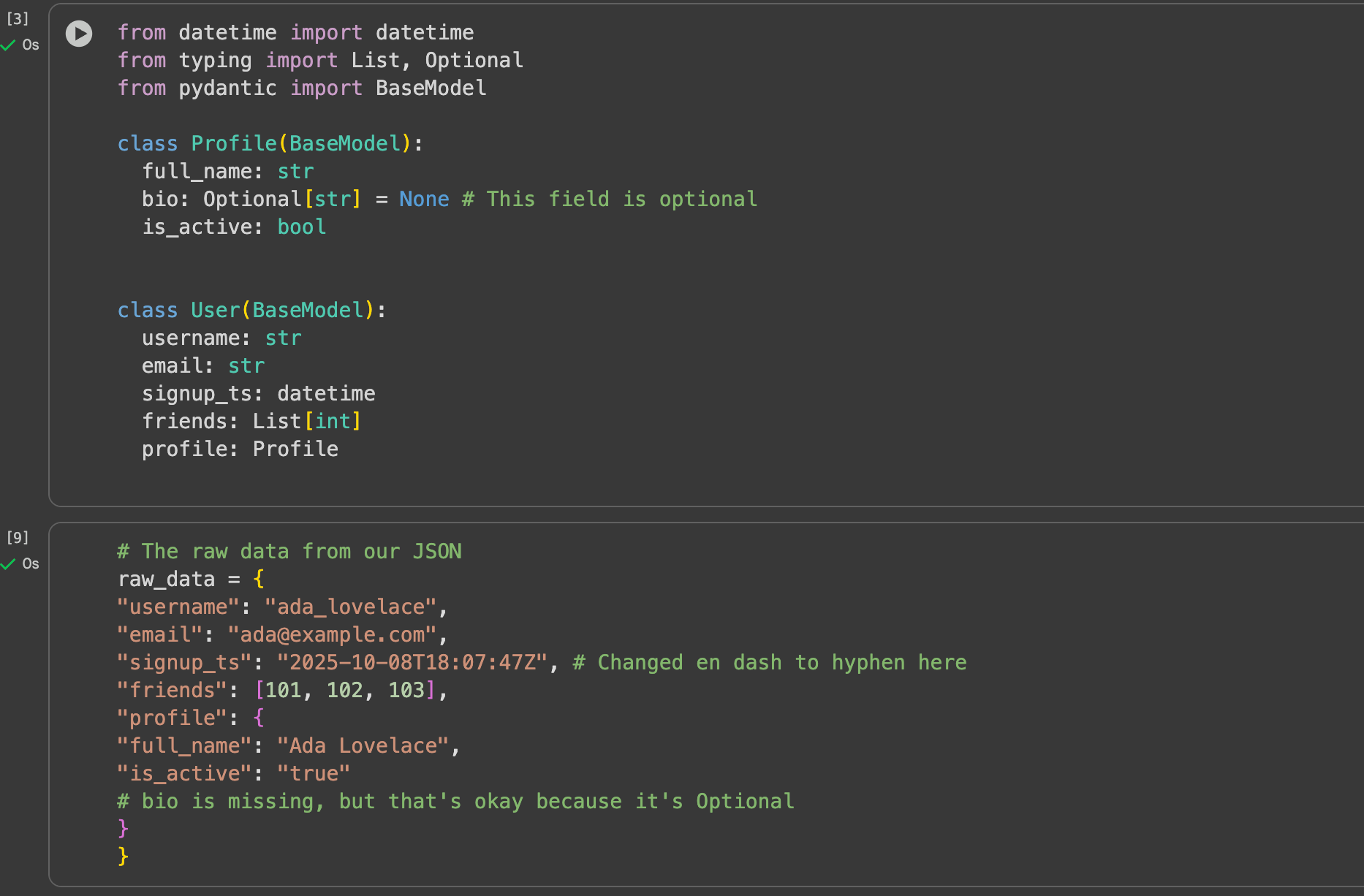
Here's what makes this so powerful:
- Declarative Schema: The
UserandProfileclasses serve as clear, readable documentation for your data structure. - Type Hinting: Standard Python types like
str,int,bool,datetime, andListare used to define the expected types. - Required vs. Optional: Fields without a default value (like
username) are required. Fields with a default value (likebio = None) are optional. You can usetyping.Optionalor the| Noneunion syntax for this.
The article "Pydantic : A Data Engineer's guide to Data Validation" provides a great walkthrough of these fundamentals.
Pydantic : A Data Engineer's guide to Data Validation
This article provides an excellent introduction to Pydantic from a data engineering perspective. It demonstrates how to handle common scenarios like nested JSON and automatic type conversion.
Please read the first section, Pydantic Basics. Pay close attention to how Pydantic performs automatic type coercion (e.g., converting a date string to a datetime object) and how it handles nested validation with the Profile model.
Type Coercion: A Key Feature
One of Pydantic's most useful features for data engineers is type coercion. As you saw in the reading, when Pydantic encounters data, it doesn't just check if the type is correct; it actively tries to convert the data to the declared type.
"2025-10-08T18:07:47Z"(a string) is coerced into a Pythondatetimeobject."true"(a string) is coerced into the booleanTrue."123"(a string) would be coerced into the integer123.
This behavior is incredibly helpful because data from JSON sources is often represented as strings, even for numeric or date values. Pydantic handles this conversion for you, saving you from writing boilerplate parsing code.
Of course, if a value cannot be coerced (e.g., trying to convert "hello" to an int), Pydantic will raise a ValidationError. The following video from DataCamp clearly demonstrates this automatic conversion and its limits.
💻Pydantic Tutorial for Beginners: Enhance Your Data Validation Skills
Automatic Type Conversion
Watch the segment on Validation and Conversion. It shows a simple example of Pydantic successfully converting a numeric string to an integer and then failing when the string is not a valid number.
Handling Complex and Nested Data
Real-world API responses are rarely flat. They often contain nested objects and lists of objects. Pydantic excels at this. As we saw in the first code example, you can define a Pydantic model as the type of a field, and Pydantic will recursively validate the nested structure.
You can also use specialized types that come with built-in validation logic, which is extremely convenient. Some of the most useful for data engineering include:
EmailStr: Validates that a string is a valid email address.HttpUrl: Validates that a string is a valid HTTP or HTTPS URL.UUID: Represents and validates a universally unique identifier.SecretStr: A special string type for sensitive data like passwords or API keys, which redacts the value when printed or logged.
This next video segment demonstrates how to use nested models and some of these powerful built-in types.
Python Pydantic Tutorial: Complete Data Validation Course (Used by FastAPI)
Nested Models and Specialized Types
First, watch the section on nested models. This shows how a BlogPost model can contain a User object as its author and a list of Comment objects. Next, watch the segment on specialized types to see how types like EmailStr, HttpUrl, and UUID can simplify your validation code.
Advanced Logic with Custom Validators
While type validation and built-in types cover many use cases, you'll often need to enforce your own business rules. For instance:
- A
start_datemust be before anend_date. - If
countryis "USA", thenzip_codemust be a 5-digit string. - A username must not contain spaces.
Pydantic provides powerful decorators, @field_validator and @model_validator, to implement this custom logic directly within your data model.
@field_validator('field_name'): Use this to validate a single field. The decorated function receives the field's value. You can check it, transform it, and must return it. If it's invalid, you raise aValueError.@model_validator(): Use this for rules that depend on multiple fields. The decorated function receives the entire model instance, allowing you to compare values across different fields.
The article from "Towards AI" has an excellent section explaining this with practical examples.
Pydantic : A Data Engineer's guide to Data Validation
This section explains how to add custom business logic to your models.
Read the section titled Custom Validation. The zip code example is a perfect illustration of a cross-field validation rule that is impossible to enforce with type hints alone.
Putting It All Together: A Practical Example
Now, let's integrate Pydantic into the ingestion script we've been developing. We will define a model for the data we expect from our API and then wrap our data processing logic in a try...except block to catch validation errors.
Let's assume our API for fetching user conversations returns a list of dictionaries, each looking something like this:
{
    "conversation_id": "c-a8b2c-123",
    "user_id": 101,
    "created_at": "2023-10-27T10:00:00Z",
    "message_count": 5,
    "messages": [
        {"author": "user", "text": "Hello, I need help."},
        {"author": "agent", "text": "How can I assist you?"}
    ]
}
We can create Pydantic models to represent this structure:
from datetime import datetime
from typing import List, Literal
from pydantic import BaseModel, ValidationError, Field


# Model for a single message
class Message(BaseModel):
    author: Literal['user', 'agent']
    text: str


# Model for the main conversation object
class Conversation(BaseModel):
    conversation_id: str
    user_id: int
    created_at: datetime
    message_count: int = Field(gt=0) # Must be greater than 0
    messages: List[Message]
Now, we can modify our main ingestion loop to use these models for validation.
import logging


# Assume fetch_all_data from the previous lesson is available

def process_and_validate_data(endpoint: str):
    """
    Fetches data from an API, validates each record using Pydantic,
    and separates valid and invalid records.
    """
    raw_records = fetch_all_data(endpoint) # From previous lesson

    valid_records = []
    invalid_records = []

    logging.info(f"Fetched {len(raw_records)} raw records. Starting validation...")

    for record in raw_records:
        try:


            # Attempt to parse and validate the raw dictionary
            validated_conversation = Conversation.model_validate(record)


            # If successful, add the validated data object to our list
            # We can convert it back to a dictionary for database loading
            valid_records.append(validated_conversation.model_dump())

        except ValidationError as e:


            # If validation fails, log the error and store the bad record
            logging.warning(f"Validation failed for record: {record}. Error: {e}")
            invalid_records.append({"raw_data": record, "error": str(e)})

    logging.info(f"Validation complete. Valid: {len(valid_records)}, Invalid: {len(invalid_records)}")


    # In a real pipeline, you would now load valid_records into your database
    # and perhaps write invalid_records to an error log or a dead-letter table.
    return valid_records, invalid_records


# Example usage:
# valid_convos, invalid_convos = process_and_validate_data("/conversations")
This pattern is extremely robust. It creates a clear separation between valid and invalid data, ensuring that only high-quality data enters your system while also giving you visibility into the data that was rejected and why.
Conclusion
In this lesson, you've learned how to establish a critical data quality gate in your ingestion pipeline using Pydantic. By defining explicit data contracts, you can protect your downstream systems from malformed, incomplete, or unexpected data.
Here are the key takeaways:
- Declarative Validation: Pydantic uses Python type hints to create readable, self-documenting data schemas via
BaseModel. - Type Coercion and Error Handling: It automatically attempts to convert data to the correct type and provides detailed, aggregated error messages when validation fails.
- Handling Complexity: Pydantic effortlessly handles nested JSON structures and provides specialized types (
EmailStr,HttpUrl, etc.) for common validation tasks. - Custom Business Logic: For rules that go beyond simple types, you can use the
@field_validatorand@model_validatordecorators to embed complex logic directly in your models. - Pipeline Integration: You can integrate Pydantic into your ingestion scripts by wrapping data parsing in a
try...except ValidationErrorblock to separate good data from bad.
So far, we have focused on ingesting data from APIs. In our next lesson, we will shift our focus to another common data source: files. You will learn how to efficiently read large CSV files, handle common issues like encoding and delimiters, and prepare that data for loading into our pipeline.