In our previous lesson, we built a Python function to handle authentication and pagination, laying the groundwork for fetching complete datasets from APIs. However, that function made a crucial assumption: that every network request would succeed. In the real world, networks are unreliable, and services can experience temporary glitches. This lesson is about moving from a "happy path" script to a robust, production-ready client.
Our goal is to implement sophisticated error handling for our API calls. We'll explore how to automatically retry failed requests in a smart way, using strategies like exponential backoff, and how to gracefully handle API rate limits. By the end, you'll be able to make your data ingestion code significantly more resilient to the transient failures that are a fact of life in distributed systems.
Not All Errors Are Created Equal
When an API call fails, the first step is to understand why it failed. HTTP status codes are our primary tool for this diagnosis. A 404 Not Found error, for example, means the resource you asked for doesn't exist. Retrying this request is pointless; the resource won't magically appear. This is a permanent error that requires a code or configuration change to fix.
On the other hand, a 503 Service Unavailable error indicates a temporary problem on the server's end. The service might be restarting or overloaded. This is a transient error, and retrying the request after a short delay is a sensible strategy.
The video "How to Work with API's as a Data Engineer!" provides a good overview of the common status code ranges.
How to Work with API's as a Data Engineer! Part 1
Watch the segment on error codes to refresh your understanding of what different status codes like 2xx, 4xx, and 5xx signify.
This part is located from the explanation of error codes. Pay attention to the distinction between client errors (4xx) and server errors (5xx).
To build a robust retry mechanism, we need a clear policy on which errors warrant a retry. The following resource provides an excellent and concise guide.
Python Requests - How To Retry Failed Requests (2026 Guide) | ScrapeOps
This article starts with a clear table that categorizes HTTP status codes and connection errors, explaining whether they should be retried and why. This forms the foundation of our error handling logic.
Please read the section Which status codes should I retry?. The summary rule of thumb at the end is particularly useful.
The key takeaway is that we should retry on transient issues: server-side problems (5xx status codes), specific client-side codes that ask us to wait (429 Too Many Requests), and network-level problems (like ConnectionError or Timeout).
Implementing Automatic Retries with Exponential Backoff
Now that we know what to retry, let's discuss how. A naive approach would be to immediately retry a failed request in a loop. This is often a bad idea. If a service is overloaded, hammering it with immediate retries will only make the problem worse for everyone.
A much better strategy is exponential backoff. This means we increase the waiting period between each successive retry. For example, wait 1 second after the first failure, 2 seconds after the second, 4 after the third, and so on. This gives the struggling service time to recover.
To prevent a "thundering herd" problem—where many clients all retry at the exact same moments after an outage—we can add jitter. Jitter introduces a small, random amount of time to each backoff delay, spreading out the retry attempts.

The video "Retry Pattern" by ArjanCodes provides an excellent from-the-ground-up explanation of building a retry mechanism, including exponential backoff.
Retry Pattern: The Secret to Resilient Python Code
This video is great for building intuition. You'll see how a retry function is constructed from scratch, why exponential backoff is introduced, and why using a dedicated library is the best practice for production code.
Watch these three key segments: First, see how a basic retry function is built. Next, understand the motivation for and implementation of exponential backoff. Finally, listen to the recommendation for using the tenacity library in production, which is what we'll do: don't reinvent the wheel.
Implementing Retries in Python
While it's useful to understand how to build a retry function manually, for our project, we will use a robust, battle-tested library. In Python, there are two excellent ways to approach this with the requests library.
1. The Built-in HTTPAdapter Approach
The requests library can be configured to handle retries automatically at the session level. This is done by creating a Retry object (from the underlying urllib3 library), configuring its behavior, and "mounting" it to a requests.Session via an HTTPAdapter.
This approach is great for applying a consistent, simple retry policy to all requests made with a session.
Python Requests - How To Retry Failed Requests (2026 Guide) | ScrapeOps
This section of the ScrapeOps guide provides a complete example of the HTTPAdapter method. It walks through configuring total retries, the backoff factor, and the list of status codes that should trigger a retry.
Read the section titled Retry Failed Requests Using Sessions & HTTPAdapter. Pay close attention to the parameters of the Retry class, like total, backoff_factor, and status_forcelist. The explanation of the backoff formula is particularly useful.
2. The tenacity Library Approach
For more complex or granular control, the tenacity library is the gold standard in the Python ecosystem. It uses decorators to wrap functions with retry logic, offering immense flexibility. You can specify complex wait strategies (like exponential backoff with jitter), define retry conditions based on exceptions or return values, and add logging hooks to observe retry behavior.
Given its flexibility and explicit nature, we will use tenacity to make our API client more robust.
How to Implement Retry Logic with Exponential Backoff in ...
This guide is a deep dive into the tenacity library. It covers all the core components you'll need to build a production-ready retry mechanism.
Focus on the following sections to get a firm grasp of tenacity: Start with the introduction to understand Why Exponential Backoff? is important. Review the Basic Retry example to see the decorator in action. Skim the Wait Strategies to see options like wait_exponential_jitter. Briefly look at Stop Conditions to understand how to limit retries. Finally, read the Retry Conditions section carefully. The retry_if_exception example is very similar to what we will implement.
Handling API Rate Limits
A common reason for an API to temporarily reject a request is rate limiting. When you make too many requests in a given time period, a server will often respond with a 429 Too Many Requests status code.
A well-behaved API will also include a Retry-After header in the response, which tells you exactly how many seconds (or until what specific date-time) you should wait before trying again. Respecting this header is crucial; ignoring it can lead to your IP address being blocked.
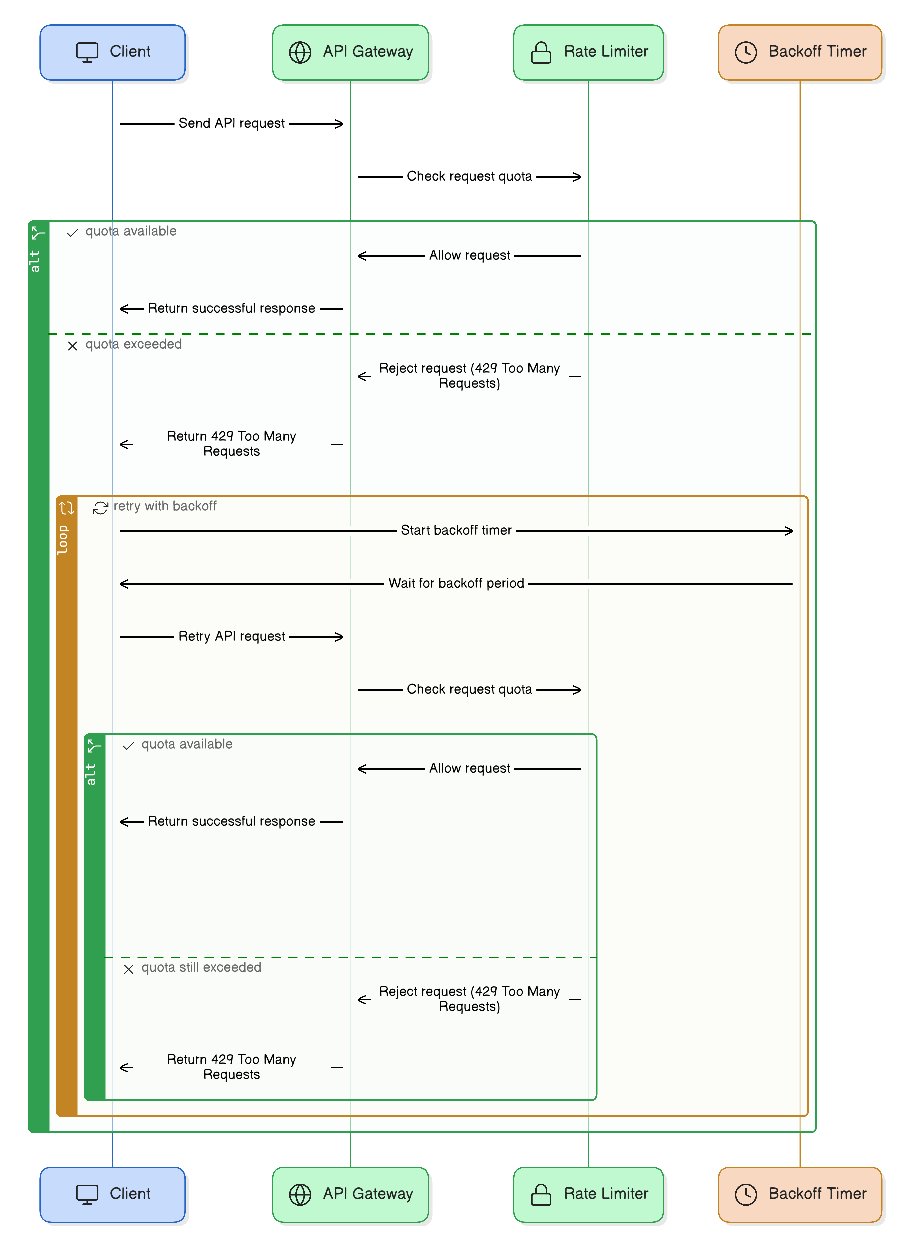
The urllib3.util.Retry object we saw earlier has a respect_retry_after_header=True parameter that handles this automatically. When using tenacity, we would need to inspect the response and handle it more explicitly, though this gives us more control.
A Critical Consideration: Idempotency
Before we wrap up, we must address a crucial concept: idempotency. An operation is idempotent if making it multiple times has the same effect as making it once.
GET,HEAD,PUT, andDELETErequests are generally idempotent. RequestingGET /users/123ten times is the same as requesting it once. Deleting a user twice has the same result as deleting them once (they're gone).POSTrequests are generally not idempotent. If youPOSTto/usersto create a new user, retrying that request after a timeout could result in creating two identical users.
This has major implications for retries. It is only safe to automatically retry idempotent requests. For non-idempotent requests like POST, you should only retry on connection errors where you are certain the request never reached the server. If you get a 5xx error, the server may have processed the request before crashing, so a blind retry is unsafe.
Modern APIs solve this problem using an Idempotency-Key header. You generate a unique ID for each logical operation and send it with your POST request. If the server sees the same key again (e.g., on a retry), it knows not to re-process the request and can simply return the original result.
Python Requests - How To Retry Failed Requests (2026 Guide) | ScrapeOps
This final reading selection explains the concept of idempotency in the context of HTTP methods and its direct impact on retry logic.
Read the section Idempotency: When You Shouldn't Retry. The table classifying HTTP methods and the discussion on the Idempotency-Key header are critical for a data engineer to understand.
Upgrading Our API Client
Let's refactor the pagination function from our previous lesson to incorporate what we've learned. We'll use tenacity to add robust retries to each individual API call within our pagination loop.
import os
import requests
import logging
from tenacity import retry, stop_after_attempt, wait_exponential_jitter, retry_if_exception


# Configure basic logging
logging.basicConfig(level=logging.INFO, format='%(asctime)s - %(levelname)s - %(message)s')

API_TOKEN = os.getenv("MY_API_TOKEN", "your-secret-token")
API_BASE_URL = "https://api.example.com/v1"

def is_retryable_error(exception: BaseException) -> bool:
    """Return True if the exception is a retryable network error or a 5xx/429 status code."""
    if isinstance(exception, (requests.exceptions.ConnectionError, requests.exceptions.Timeout)):
        logging.warning(f"Retryable network error occurred: {exception}")
        return True
    if isinstance(exception, requests.exceptions.HTTPError):
        is_server_error = 500 <= exception.response.status_code < 600
        is_rate_limit = exception.response.status_code == 429
        if is_server_error or is_rate_limit:
            logging.warning(f"Retryable HTTP error occurred: {exception.response.status_code}")
            return True
    return False


# The @retry decorator wraps our function with retry logic.
@retry(
    wait=wait_exponential_jitter(initial=2, max=60, jitter=1), # wait 2s, then 4s, etc. up to 60s, with jitter
    stop=stop_after_attempt(5), # Give up after 5 attempts
    retry=retry_if_exception(is_retryable_error), # Use our custom function to decide if we should retry
    reraise=True # If all retries fail, re-raise the last exception
)
def fetch_page(session: requests.Session, url: str) -> dict:
    """
    Fetches a single page of data with automatic retries for transient errors.
    """
    logging.info(f"Fetching data from {url}")
    response = session.get(url, timeout=15) # A reasonable timeout
    response.raise_for_status() # Raises HTTPError for 4xx/5xx responses
    return response.json()

def fetch_all_data(endpoint: str) -> list[dict]:
    """
    Fetches all pages of data from a paginated API endpoint,
    with robust error handling for each page request.

    Args:
        endpoint: The API endpoint path (e.g., '/conversations').

    Returns:
        A list containing all records from all pages.
    """
    all_records = []

    with requests.Session() as session:
        session.headers.update({"Authorization": f"Bearer {API_TOKEN}"})

        next_page_url = f"{API_BASE_URL}{endpoint}"

        page_num = 1
        while next_page_url:
            try:


                # The retry logic is applied here by the decorator on fetch_page
                logging.info(f"--- Attempting to fetch page {page_num} ---")
                data = fetch_page(session, next_page_url)

                records = data.get("results", [])
                all_records.extend(records)

                next_page_url = data.get("next")

                logging.info(f"Successfully fetched page {page_num} with {len(records)} records. Total: {len(all_records)}.")
                page_num += 1

            except requests.RequestException as e:


                # This block catches non-retryable errors (like 404 Not Found)
                # or the final exception after all retries have failed.
                logging.error(f"Failed to fetch data for page {page_num} at {e.request.url}. Error: {e}")


                # Depending on requirements, you might want to stop entirely or just skip the failing page.
                # For this pipeline, we'll stop to ensure data completeness.
                break

    return all_records


# Example usage:
# conversations = fetch_all_data("/conversations?status=active")
# print(f"Successfully fetched a total of {len(conversations)} conversations.")
Notice how we've separated the logic. The fetch_page function is responsible for a single atomic request and is decorated with our retry logic. The fetch_all_data function orchestrates the pagination, calling our new, robust function for each page. This is a clean and powerful pattern.
Conclusion
In this lesson, we've significantly hardened our API client. You learned how to differentiate between transient and permanent errors and to build a resilient data ingestion function that can automatically recover from temporary network or server issues.
Here are the key takeaways:
- Retry on transient failures: Only retry on server errors (5xx), specific client errors (
429), and network connection issues. - Use exponential backoff with jitter: This strategy prevents overwhelming a struggling service and avoids synchronized retry storms.
- Leverage libraries: Use
requests.HTTPAdapterfor simple, session-wide policies, andtenacityfor fine-grained control with decorators. - Respect
Retry-After: When an API tells you how long to wait, listen to it. - Understand idempotency: Be very careful when retrying non-idempotent operations like
POSTto avoid creating duplicate data. Use anIdempotency-Keywhere possible.
Now that we can reliably fetch raw data from our sources, our next challenge is to ensure its quality before loading it. In the next lesson, we will learn how to validate this incoming JSON data against a predefined schema using Pydantic, preventing malformed data from corrupting our pipeline.