Hello! Welcome back to our module on Actionable Insights with Google Analytics 4.
In our last lesson, we mastered the Funnel Exploration report, which is perfect for analyzing a known, linear process like your hotel's booking funnel. We learned how to pinpoint exactly where potential guests are dropping off in that predefined journey.
But what about the paths you didn't define? How do guests explore your site before deciding to book? Do they check out the restaurant menu, browse the photo gallery, or look at local attractions? Answering these questions can uncover valuable insights for your marketing.
This lesson addresses the learning outcome: Use path exploration reports to understand common user journeys on the hotel website. We'll move from the rigid structure of the funnel to the free-form discovery of path exploration, helping you understand the organic, and often surprising, ways guests navigate your digital property.
1. Funnel vs. Path Exploration: The Right Tool for the Job
Before we dive in, it's crucial to understand the difference between the two exploration tools we've covered.
- Funnel Exploration (Previous Lesson): You define a specific, step-by-step path you expect users to take (e.g., View Rooms -> Begin Checkout -> Purchase). It's ideal for measuring the efficiency of a known process.
- Path Exploration (This Lesson): You start with a single event or page and GA4 shows you all the different paths users take from there. It's a discovery tool for understanding organic user behavior.
Think of it in a hotel context:
- A funnel report is like mapping the prescribed check-in process: Lobby -> Front Desk -> Elevator -> Room.
- A path report is like observing what guests actually do: Lobby -> Bar -> Photo Gallery -> Front Desk. It reveals their interests and uncovers popular, but unplanned, journeys.
The article from MySoftinn, which we briefly saw before, highlights that both tools are key parts of analyzing user behavior.
How to Measure My Hotel Website Performance Using GA4
This article discusses several analysis techniques in GA4. It's a good reminder of how Path Exploration fits into the broader toolkit for understanding your website's performance.
Briefly review the section 'Analyzing User Behavior with Custom Reports and Exploration Tools'. Notice how it positions Path and Funnel analyses as complementary tools for visualizing user journeys.
2. Building a Path Exploration Report
Let's get oriented with the Path Exploration interface in GA4. Like other explorations, it has three main parts: Variables, Tab Settings, and the report output itself, which is a tree-like graph.
Path exploration in Google Analytics 4 (2026) || Path reports in GA4
This video from Analytics Mania provides an excellent tour of the Path Exploration interface. It will show you how to start a report and explain the key settings we'll be using.
Watch from the beginning to 02:36. Focus on understanding: How to create a new Path Exploration report. The three main sections of the interface. The difference between Event name and Page path as the 'Node type'. For analyzing website navigation, we will often use Page path.
The most important initial choice you'll make is the Node type.
- Event name: Shows the sequence of actions (events) users perform, like
page_view,scroll,click. - Page path and screen name: Shows the sequence of pages users visit. This is generally more insightful for understanding navigation flow on your hotel website.
3. Forward Pathing: What Do Guests Do First?
The most straightforward use of path exploration is "forward pathing." You define a starting point and see where users go from there. A great starting point is the homepage.
Let's imagine you want to answer: "After a guest lands on our homepage, what are they most interested in?"
- In your Path Exploration report, click Start over.
- For the Starting point, choose the
session_startevent or your homepage's path (e.g.,/). - The report will automatically populate
Step +1, showing you the most common next pages or events. - You can then click on any of the blue bars (called "nodes") in
Step +1to see where users went next inStep +2, and so on.
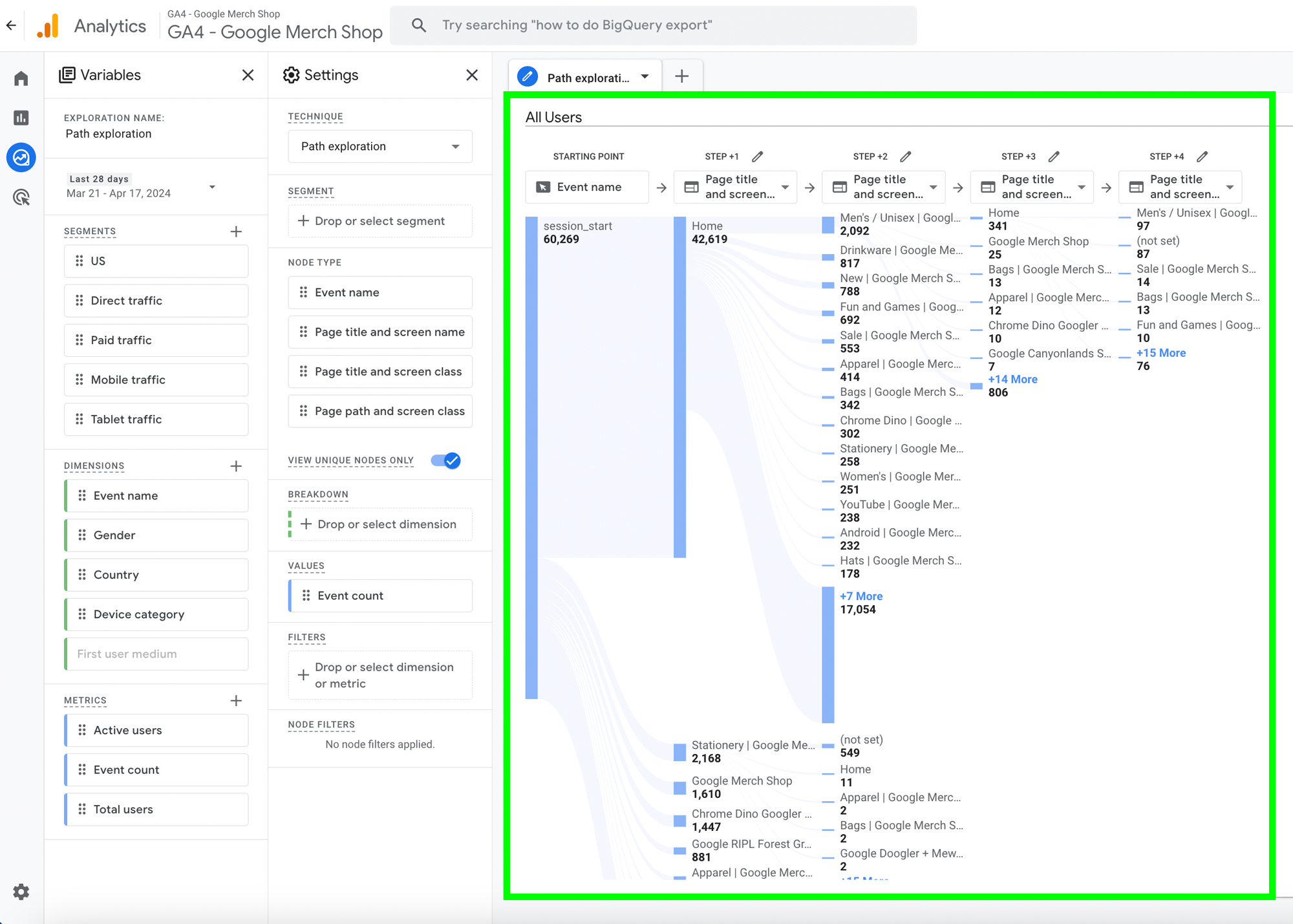
Interpreting the Results:
If you see that a large number of users navigate from your homepage directly to the "Photo Gallery" page, it's a strong signal that your visuals are a key decision-making factor for guests. This might suggest featuring your best photos more prominently on the homepage or in your ad campaigns.
4. Reverse Pathing: How Did Guests Get to the Booking Page?
Reverse pathing is an incredibly powerful technique. Instead of starting at the beginning, you choose an ending point and work backward. This is perfect for understanding what leads to a successful booking.
Let's answer the question: "What are the most common pages guests visit right before making a purchase?"
Path exploration in Google Analytics 4 (2026) || Path reports in GA4
The concept of reverse pathing is a game-changer. This clip demonstrates how to switch from a starting point to an ending point, using a 'purchase' event as the goal.
Watch from 03:46 to 04:56. The video shows how to select 'purchase' as the ending point and then expand the path backward to see the preceding steps.
By setting the purchase event as your ending point, you might discover that a significant percentage of your bookings come from users who just visited the "Special Offers" page or your "Weddings & Events" page. This insight is pure gold for your marketing strategy—it tells you which pages are most effective at converting lookers into bookers, and which landing pages you should prioritize for your paid ad campaigns.
Test your understanding!
You run a reverse path analysis ending with the purchase event on your hotel website. You find two main paths leading to a booking:
- Path A (45% of bookings): Homepage -> Special Offers ->
purchase - Path B (20% of bookings): Homepage -> Restaurant Page -> Rooms ->
purchase
Based on this, what is one immediate action you could take with your digital marketing?
Show answer
The "Special Offers" page is clearly a major driver of conversions. An immediate action would be to create a dedicated ad campaign on Meta or Google that directs traffic straight to the "Special Offers" page, as you have data proving it's an effective path to a booking.
Using Reverse Pathing to Troubleshoot
Reverse pathing isn't just for positive outcomes. It's also a fantastic diagnostic tool. For example, if you've set up an error event, you can set that as your ending point to find broken user journeys.
Path Exploration in Google Analytics 4 (practical examples and 4 ideas) || Path Analysis
Here's a brilliant practical example of using reverse pathing to find a broken link on a live website, starting from an 'error' event. This shows how path exploration can directly help you find and fix issues that are costing you revenue.
Watch from 12:01 to 16:34. Pay attention to the logic: start with the 'error' page, find the page users were on before the error, and then investigate that page to find the broken link. Imagine finding a broken 'Book Now' button for one of your most popular room packages this way.
5. Refining Your Path Analysis
Once you have a basic path, you can slice the data for deeper insights using the Tab Settings panel.
- Breakdown: Add a dimension like
Device categoryto see if mobile users navigate your site differently than desktop users. Are mobile users getting lost on a path that works perfectly on desktop? - Segments: Drag a segment into the report to focus on a specific group. For example, you can apply the 'Paid traffic' segment to see how users arriving from your Meta ads navigate the site. This helps you evaluate if your landing pages are effectively guiding users toward a booking.

- Values: By default, the report shows
Event count. This can sometimes be misleading, as one user can trigger many events. It's often more useful to change this toTotal usersto understand how many unique individuals are taking a certain path.
Conclusion
Today, we've unlocked the power of the Path Exploration report. While the Funnel report is essential for optimizing a known process, the Path report is your tool for discovery, helping you understand the real, unscripted journeys your guests take through your website.
Key Takeaways:
- Path Exploration is for Discovery: Use it to find common, unexpected, or problematic user journeys that you haven't predefined.
- Forward vs. Reverse Pathing: Use forward pathing to see where users go from a starting point (like the homepage). Use reverse pathing to see how they arrived at an endpoint (like a booking or an error).
- Page Path is Key for Navigation: When analyzing how users move between pages, set your node type to
Page path and screen name. - Analyze and Refine: Use breakdowns and segments to analyze the behavior of specific groups, like mobile users or visitors from your ad campaigns.
What's Next?
We've seen how applying a simple, default segment like 'Paid traffic' can make our path analysis much more powerful. But what if you want to analyze an even more specific group, like "guests from the US who are using a mobile device and landed on the Special Offers page"?
In our next lesson, "Create custom segments for analysis," we will dive deep into building these highly specific user groups from scratch. This will allow you to perform incredibly granular analysis and uncover insights about your most valuable guest segments.