Hello! Welcome to the first lesson in our module on Advanced Automation & Personalization for Hotels.
In the previous module, we laid the groundwork for effective email marketing, culminating in a crucial lesson on compliance. We learned that following rules like providing a one-click unsubscribe isn't just a legal formality—it's essential for ensuring your emails reach your guests' inboxes.
Today, we'll put that foundation to use by building one of the most powerful and profitable automations for any hotel. Our goal is to design and implement an abandoned booking recovery email sequence. This is the automated process that re-engages potential guests who start the booking process on your website but leave before completing it. For a hotelier, mastering this is like having a digital concierge who proactively brings guests back to the front desk to finalize their stay, directly recovering otherwise lost revenue.
Let's get started.
1. The High Value of Recovering "Lost" Bookings
Why is this one of the first advanced automations we're tackling? Because the opportunity is enormous. The act of a potential guest selecting dates and a room type is a very strong signal of intent, far more so than just browsing your site. Yet, for various reasons—distractions, price comparisons, or an unanswered question—many of these high-intent visitors leave without booking.
Why your hotel needs an abandoned cart campaign
To understand the scale of this opportunity, let's look at an article from Revinate, a hospitality marketing platform. It provides key statistics on just how common booking abandonment is and how effective recovery campaigns can be.
Read the sections 'What is an abandoned cart campaign?' and 'Are abandoned cart emails worth it?'. Pay close attention to the statistics mentioned, such as the abandonment rate and the average conversion rate of recovery emails.
As the article highlights, with booking abandonment rates as high as 85%, and recovery emails converting at an average of 30%, it's clear this isn't a minor optimization—it's a core revenue-driving strategy. Your experience with Meta ads involves targeting users based on interest and behavior; think of this as the ultimate retargeting campaign for users who are just one step away from becoming guests.
2. Designing a High-Impact Hotel Booking Sequence
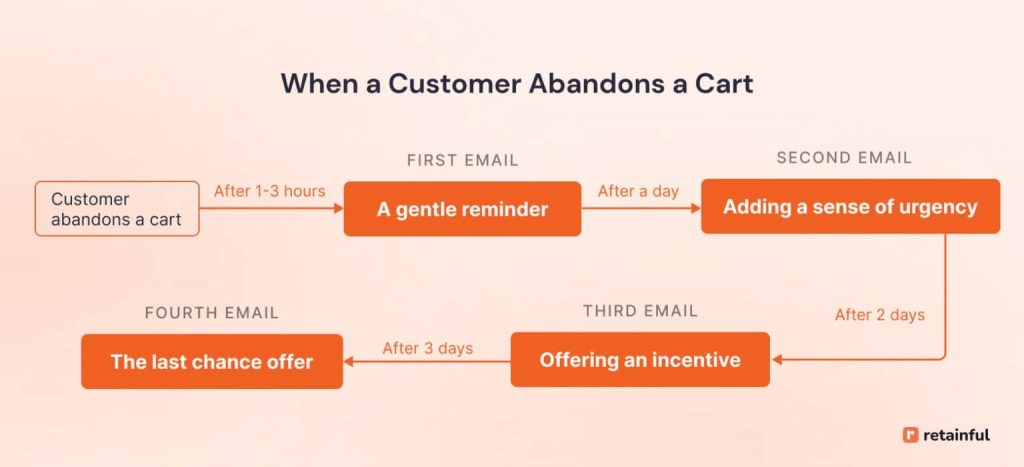
An effective recovery sequence isn't a single, generic email. It's a thoughtfully timed series of messages that evolves with each step, guiding the guest back to their booking.
We'll focus on a proven three-email structure. This approach is designed to address different potential reasons for abandonment at different times.

Let's dive into the strategy for each email in the sequence.
Cart Abandonment Sequence for Hotels Email Guide
This guide from EasyEmailWriter is tailored specifically for hotels and provides excellent templates and psychological explanations for a 3-email abandoned cart sequence. It will be our blueprint for the design phase.
Read the section 'The Complete 3-Email Cart Abandonment Sequence for Hotels' to understand the purpose and content of each email: 'The Oops', 'The Reason', and 'The Rescue'. Then, review the 'Cart Abandonment Sequence Timing Guide' to understand when each email should be sent.
Let's break down this sequence with the timing and strategy in mind.
Email 1: The Gentle Nudge ("The Oops")
- When to send: Within 1 hour of abandonment.
- Goal: To catch the guest while the thought of their stay is still fresh. The abandonment may have been due to a simple distraction (a phone call, a slow page load).
- Content Strategy:
- Keep it simple and helpful. A friendly, low-pressure reminder.
- Use dynamic content to reference the specific room and dates they were considering (e.g., "Your King Suite for July 15-18 is waiting"). This personalization is critical.
- Provide a single, clear call-to-action (CTA) that links directly back to their pre-filled booking page to minimize friction.
- Do not offer a discount. It's too soon and devalues your offering.
Email 2: The Helpful Follow-Up ("The Reason")
- When to send: 24 hours after abandonment.
- Goal: To address deeper hesitations. By now, the guest may be comparing options or have unanswered questions.
- Content Strategy:
- Shift from reminding to assisting. Frame the email as an offer of help.
- Proactively address common concerns. Ask if they have questions about amenities, your cancellation policy, or local attractions.
- Reinforce your value proposition. Briefly mention what makes your hotel special (e.g., "our award-winning spa," "stunning city views").
- Provide an easy way to get in touch (reply to the email or a phone number). This positions you as a helpful resource, not just a seller.
Email 3: The Incentive ("The Rescue")
- When to send: 48-72 hours after abandonment.
- Goal: To provide a final, compelling reason to book now and create a sense of urgency.
- Content Strategy:
- Create urgency. Mention that rooms are booking up or that their chosen dates are popular.
- Offer a value-add incentive. This doesn't have to be a discount. For hotels, a non-monetary incentive can be more effective and protect your brand positioning. Consider offering:
- Complimentary breakfast for two.
- A free room upgrade (subject to availability).
- A welcome drink at the bar.
- Set a deadline for the offer (e.g., "Book within the next 24 hours to claim..."). This encourages immediate action.
3. Implementing the Sequence: The Technical Steps
Now that we've designed the what and when, let's look at the how. While the specific interface varies between platforms like Klaviyo, Mailchimp, or Revinate, the core concepts of implementation are universal.
How to Create High Converting Abandoned Cart and Checkout Flows
This video provides a practical walkthrough of setting up an abandoned cart flow in Klaviyo. While the context is e-commerce, the principles are directly applicable to a hotel's booking engine. Focus on the concepts, not the specific product details.
Watch these three segments to understand the key technical components: Setting the Trigger (00:46 - 01:29): Pay attention to the distinction between an 'added to cart' event and a 'checkout started' event. Using Flow Filters (01:45 - 02:45): This is crucial. Understand how to add a filter to ensure you don't email someone who has already completed their booking. Using Dynamic Content (05:25 - 06:20): Observe how dynamic blocks are used to pull product information into the email. In your case, this would be the room type, dates, and a link back to the booking.
Let's translate those e-commerce concepts into our hotel context. Building this automation involves these key steps in your email marketing platform:
-
Define the Trigger: This is the event that starts the automation. For a hotel, you'll have two main triggers:
Viewed Room / Selected Dates(like "Added to Cart"): The guest has shown interest but hasn't started entering their personal details. This is a large audience.Began Booking(like "Started Checkout"): The guest has proceeded to the page where they enter their name and payment info. This is a smaller but much higher-intent audience. You can create separate, slightly different flows for each.
-
Add Flow Filters: This is a critical safety net. You must add a filter to the flow that checks: "Has the person
Completed Bookingzero times since starting this flow?" This ensures that if a guest goes back and books on their own, they are immediately removed from the sequence and don't receive unnecessary emails. -
Build the Automation Path: Drag and drop the components of your sequence:
Time Delay(e.g., Wait 1 hour)Send Email(Your "Gentle Nudge" email)Time Delay(e.g., Wait 23 hours)Send Email(Your "Helpful Follow-Up" email)- And so on.
-
Personalize with Dynamic Content: Inside each email template, use the platform's personalization tags to insert the guest's specific booking details. Instead of "Your room," you'll use a dynamic tag to pull in the actual room name, like
{{ event.RoomType }}. Instead of a generic link, you'll use a dynamic URL that reconstructs their booking session. This makes the email feel personal and highly relevant.
Test your understanding!
A potential guest looks at a "King Suite with Ocean View" for a weekend in August but leaves your website. Twenty-four hours later, they receive an automated email.
Email Content: "Did you forget something? We noticed you were looking at a room at our hotel. Book now and get 10% off any stay this year!"
Based on what you've learned, identify two major flaws in this recovery email and explain how you would fix them.
Show answer
-
Flaw 1: Lack of Personalization. The email is generic ("a room at our hotel") instead of specific.
- Fix: Use dynamic content to reference the exact room and dates: "Your King Suite with Ocean View for August 16-18 is still available."
-
Flaw 2: Poor Timing for a Discount. This is the second email in the sequence (sent after 24 hours). The primary goal here should be to offer help, not to immediately offer a discount. This devalues the hotel and misses an opportunity to address the guest's potential questions.
- Fix: Replace the discount with helpful content. The email should ask if they have questions about the suite, our amenities, or things to do in August. It should provide an easy way to contact the hotel. A value-add incentive (like a free upgrade) is better reserved for the third email if they still haven't booked.
Conclusion
Congratulations! You've just designed and learned how to implement a complete abandoned booking recovery sequence. This is a cornerstone of modern hotel marketing automation that works 24/7 to turn browsing interest into confirmed bookings.
Key Takeaways:
- Abandoned booking recovery is a high-ROI strategy. It targets guests with the highest possible intent.
- Design a multi-email sequence. A single email is not enough. Your strategy should evolve from a gentle nudge, to offering help, to providing an incentive.
- Personalization is non-negotiable. Use dynamic content to reference the guest's specific room type and dates.
- Implementation relies on three pillars: A specific trigger (e.g.,
Began Booking), a crucial filter (to exclude those who completed the booking), and timed delays between emails.
What's Next?
Now that we have a strategy to recover guests during the booking process, what happens after their stay? In our next lesson, we'll continue along the guest journey by learning how to set up a post-stay automation sequence to solicit reviews and encourage repeat bookings. This moves us from customer acquisition to the equally important goals of fostering loyalty and generating positive social proof.