Hello! Welcome back to our module on Meta Ads Optimization & Analysis.
In our last lesson, we focused on ad fatigue—what happens when a good ad runs for too long. We saw how to spot it by tracking rising frequency and declining performance, and how to fix it with fresh creative.
But what if your ads aren't delivering properly from the start? Or what if performance suddenly drops for reasons that aren't creative-related? Today, we'll expand our diagnostic toolkit to cover these scenarios. This lesson is designed to help you master the learning outcome: Troubleshoot common ad delivery issues related to bids, budgets, and audience saturation.
By the end of this lesson, you'll have a systematic framework to identify why an ad campaign might be under-spending, under-delivering, or performing poorly, and know the precise steps to take to get it back on track.
1. The Starting Point: Understanding the "Learning Phase"
Almost all delivery problems trace back to one core concept: the Learning Phase. Whenever you launch a new ad set or make a significant edit, Meta's algorithm needs to "learn" who is most likely to take the action you want (e.g., book a room). During this period, performance can be unstable.
To get a clear overview of what this phase is and why it's so important, please watch the following video.
Facebook Ads Learning Phase Explained: How to Optimize Your Ads for Better Results
This HubSpot Marketing video offers an excellent, concise explanation of the Meta Ads learning phase, what it's for, and the common mistakes that prevent ad sets from exiting it.
Watch the video from the beginning until 03:35. Pay close attention to: What the algorithm is doing during this 'trial period'. The four primary reasons an ad set gets stuck in learning: insufficient conversions, small audience, low budget, and too many changes.
As the video explains, the goal is for an ad set to get approximately 50 optimization events (e.g., 50 bookings, if you're optimizing for purchases) within a 7-day period to exit the learning phase. If it can't, it enters a state called "Learning Limited."
When you see "Learning Limited" in the Delivery column of Ads Manager, it doesn't mean the ad is failing, but it does mean Meta doesn't have enough data to stabilize delivery. This leads to unpredictable spending and often, inefficient results. This is frequently the first symptom of a deeper issue with your budget, bids, or audience.
2. Diagnosing Common Delivery Issues
Let's break down the three most common culprits behind delivery problems.
A. Budget-Related Issues
Your budget directly controls the volume of data the algorithm receives.
-
Problem: Budget is too low. This is the most common cause of "Learning Limited." If your hotel's daily budget for a "Bookings" campaign is only £20 and your average cost per booking is £50, you mathematically cannot get enough conversions to exit the learning phase.
- Solution: Increase the budget to a level that can realistically achieve ~50 conversions per week. If that's not feasible, change your optimization event to a more frequent, lower-funnel action (e.g., optimize for 'Initiate Checkout' or even 'View Content' instead of 'Purchase'). This gives the algorithm more data points to work with.
-
Problem: Scaling budget too quickly. You have a winning ad set, so you double the budget. Suddenly, your Cost Per Booking (CPA) shoots up. Why?
- Explanation: A large budget increase forces Meta into "exploration" mode, seeking new pockets of users. These users are often less qualified, leading to higher costs.
- Solution: Scale budgets gradually, by no more than 20-25% every few days, to avoid shocking the algorithm and resetting the learning phase.
Meta Ads Performance Diagnosis: Spend, Learning, Creative
This article from GoMarble provides a very sharp analysis of budget-related performance issues. It explains why spend isn't always even and what happens when you scale.
Please read the sections 'Diagnosing spend & budget issues' and 'Meta Ads learning phase explained'. Focus on: The explanation for 'Why increasing budget can reduce performance.' The common causes of 'Learning Limited' and when you should wait versus intervene.
B. Bid-Related Issues
Your bid strategy tells Meta how you want to compete in the ad auction. A misaligned strategy can halt delivery. The table below gives a great overview of the main options.
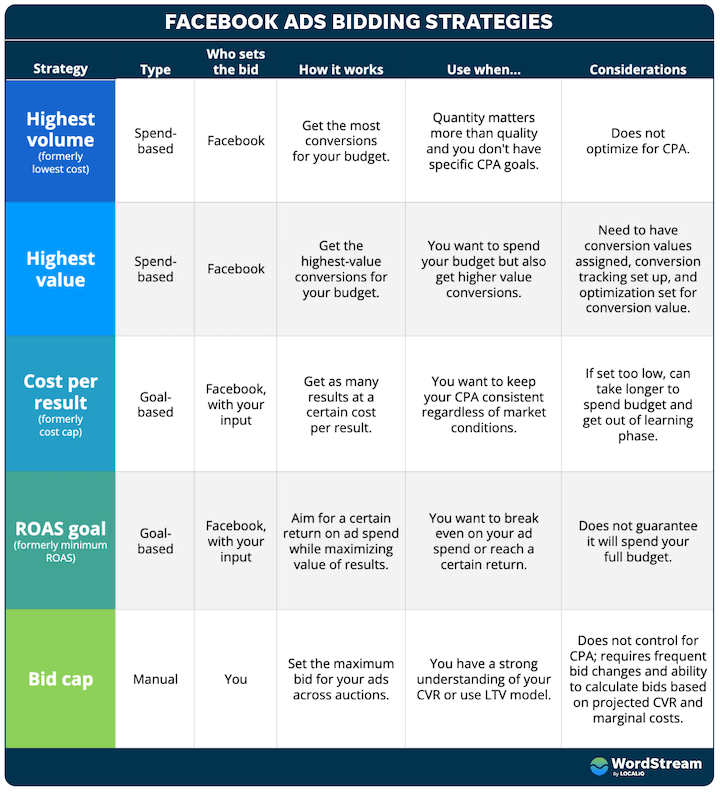
- Problem: Bid/Cost Cap is too low. You tell Meta you want bookings, but you're not willing to pay more than £15 per result (using a "Cost Per Result Goal"). If the market rate to acquire a booking in your competitive area is actually £40, Meta simply won't be able to win any auctions for you. Your ad will have almost no delivery.
- Solution: Start with the Highest Volume (automatic bidding) strategy to let Meta find the most results for your budget. This will establish a benchmark CPA. If you then want to use a Cost Cap to control costs, set it at or slightly above that benchmark, not significantly below it.
Troubleshooting Meta Campaign Delivery Issues
The team at HunchAds provides a clear, checklist-style article on troubleshooting delivery. We'll focus on the 'Low Bids' section.
Read just section 8, 'Low Bids'. It quickly summarizes the problem and the most effective solutions.
C. Audience-Related Issues
This builds directly on our last lesson about ad fatigue but covers a broader range of audience problems.

-
Problem: Audience Saturation. Your frequency is high, and your performance is degrading. You've hit the limit of people in your target audience who are interested in your offer right now.
- Solution: As discussed previously, introduce new creative. If that doesn't work, you need to expand your audience by broadening your targeting (e.g., a 3-5% lookalike instead of 1%) or adding new interest groups.
-
Problem: Audience is too small. This is especially common for hotel retargeting campaigns. If you target "Website visitors who viewed the spa page in the last 7 days," that audience might only be a few hundred people. Meta's algorithm will struggle to deliver ads consistently to such a small group.
- Solution: Consolidate your audiences. Instead of five different small ad sets for each room type, group them into one "Room Viewer" ad set. Expand the time window (e.g., "all website visitors in the last 30 days"). Meta generally needs an audience of at least 1,000 people to deliver ads effectively.
-
Problem: Excessive Audience Exclusions. To ensure you're reaching new people, you might exclude past bookers, all website visitors, and all social media engagers from your prospecting campaign. This can shrink your potential audience so much that delivery is constrained.
- Solution: Review your exclusions. A common best practice is to only exclude recent purchasers (e.g., last 30-60 days) from prospecting campaigns, not your entire customer list or all website visitors.
3. A Step-by-Step Diagnostic Framework
So, your campaign is acting strangely. Where do you start? Don't just start changing things randomly. Follow a process to locate the break in the chain.
The article from GoMarble that you read earlier contains an excellent, practical framework for this. Let's study its core logic.
Meta Ads Performance Diagnosis: Spend, Learning, Creative
We'll now look at a powerful, systematic framework for diagnosing any performance issue in your Meta ads account.
Read the section 'Step-by-step Meta Ads performance diagnostic framework' and review the 'Simple decision table' at the end of it. This is the most important takeaway of the lesson. Focus on: The logic of Step 3: 'Locate the break in the chain' (CPM, CTR, CVR). The actionable advice in the decision table. It connects symptoms directly to likely causes and next actions.
Let's simplify that framework into a decision table you can use for your hotel's campaigns. When you see a problem, ask these questions in order:
| Symptom | Likely Cause | First Check | Next Action |
|---|---|---|---|
| Ad set is not spending its full daily budget | Low bids, very small audience, or insufficient conversions to exit learning. | Check the "Delivery" column. Is it "Learning Limited"? What is the audience size? | 1. If bids are manual, switch to automatic. 2. If the audience is tiny, broaden it. 3. If budget is too low, increase it or optimize for a higher-frequency event. |
| CPA (Cost Per Booking) suddenly increased | Creative fatigue, audience saturation, or a bad creative. | Check Frequency, CTR (Click-Through Rate), and CVR (Conversion Rate). | 1. If Frequency is high and CTR is dropping -> Ad fatigue. Refresh creative. 2. If CTR is very low from the start -> Bad ad. Test new creative. 3. If CTR is good but CVR is low -> Landing page issue. Check your booking engine/website. |
| Spend is volatile and results are inconsistent | Ad set is stuck in "Learning Limited," or you're making too many edits. | Check the "Delivery" column and your account's change history. | 1. Address the "Learning Limited" cause (budget, audience, etc.). 2. Freeze all changes for 3-5 days to let the algorithm stabilize. |
To effectively use this table, you need to be comfortable analyzing the secondary metrics that tell you why your main KPI (like CPA) is changing. The video below is a great refresher on what these metrics mean.
How To Analyse Facebook Ads The RIGHT Way
In this video, Ben Heath breaks down the key performance and diagnostic metrics in Ads Manager, explaining what each one tells you about your campaign's health.
Watch the section from 12:44 to 15:10, where he explains how to interpret secondary metrics to understand the 'why' behind performance changes. This reinforces the logic used in the diagnostic table above.
Test your understanding!
You launch a new retargeting campaign for your hotel, targeting people who visited your booking page in the last 7 days but didn't complete a booking. You set a daily budget of £50. After three days, the campaign has only spent £15 total, and the delivery status shows "Learning Limited." Your audience size is estimated at 1,200 people.
Based on the diagnostic framework, what are the two most likely causes of this delivery issue, and what would be your first corrective action?
Show answer
-
Likely Cause #1: Insufficient Conversions. The primary goal is likely "Purchase" (a booking). Even with a £50/day budget, it's difficult to get enough conversions from a small retargeting audience to exit the learning phase quickly. The algorithm doesn't have enough data to optimize.
-
Likely Cause #2: Small Audience. While 1,200 people is above the bare minimum, it's still a relatively small pool for a £50/day budget, especially if only a fraction of them are ready to book right now. This can contribute to the lack of conversion signals.
-
First Corrective Action: The most logical first step is to change the optimization event. Instead of optimizing for "Purchase," optimize for a higher-frequency event like "Initiate Checkout" or "Add to Cart." This will give the algorithm many more data points to work with, helping it exit the learning phase and stabilize delivery, even with the same budget and audience. If that doesn't work, the next step would be to expand the audience window (e.g., to 30 days) to increase the pool of potential users.
Conclusion
Troubleshooting ad delivery isn't about guesswork; it's about systematic diagnosis. By understanding the interplay between the learning phase, your budget, your bids, and your audience, you can confidently identify and fix the root cause of most performance issues.
Key Takeaways:
- Most delivery issues start with the Learning Phase. Ensure your ad sets have enough budget and a large enough audience to get ~50 optimization events per week.
- Budget: Too little budget starves the algorithm; scaling too quickly causes it to explore inefficiently.
- Bids: A cost or bid cap set too low will prevent you from winning auctions and stop delivery in its tracks. Start with automatic bidding to find a benchmark.
- Audience: Small audiences and excessive exclusions can throttle delivery, while saturated audiences lead to declining performance (ad fatigue).
- Adopt a framework: When performance drops, diagnose first by looking at the chain of metrics (CPM -> CTR -> CVR) to locate the break before you start making changes.
What's Next?
We've spent a lot of time learning the manual levers for optimization. But Meta is increasingly moving toward automation. In our next lesson, we will dive into one of its most powerful automated tools: Meta Advantage+ campaigns. Understanding the principles from today's lesson will give you crucial context for how to set up and evaluate these campaigns for success.