Hello! Welcome back to the third module, "Advanced Meta Ads: Audience & Campaign Strategy."
In our previous lesson, we designed the architectural blueprint for your Meta campaigns, establishing the crucial Campaign > Ad Set > Ad hierarchy. You learned how to structure campaigns for different hotel offerings, like room bookings or wedding inquiries, by targeting "warm" (retargeting) and "cold" (prospecting) audiences in separate ad sets.
Today, we get practical and build the very foundation of any effective retargeting strategy. This lesson directly addresses the learning outcome: Build custom audiences from customer lists and website traffic for targeted promotions. We will dive into Meta's Ads Manager to create these powerful "warm" audiences, turning your existing data—website visitors and past guest information—into your most profitable advertising segments.
1. What are Custom Audiences?
Before we jump into the "how," let's solidify the "what" and "why." Custom Audiences allow you to target ads to people who have already interacted with your business. In your case, this means potential guests who have browsed your website or past guests whose information you have in your booking system.
These audiences are built from your first-party data—data you own and have collected directly. As we discussed in Module 1, this data is becoming increasingly valuable in a privacy-focused digital world. Advertising to a warm audience who already knows your brand is almost always more efficient and effective than advertising to a cold audience of strangers.
To get a sense of the possibilities, take a look at the different data sources Meta allows you to use to build Custom Audiences.
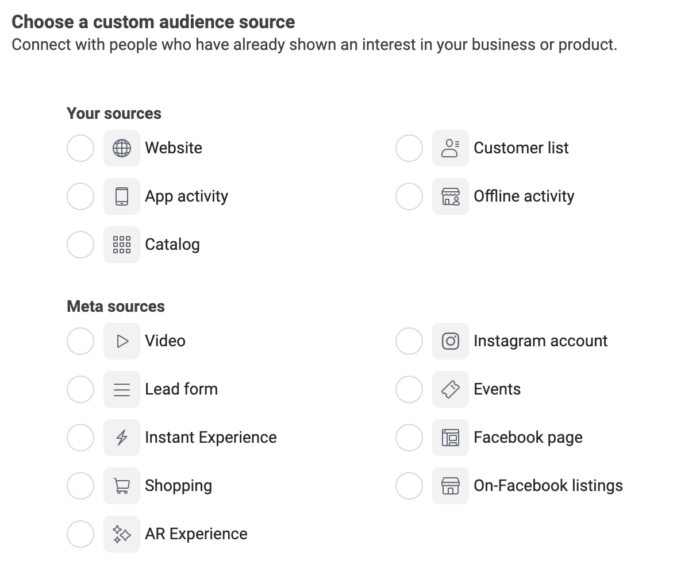
Today, we will focus on the two most powerful sources for any hotel: Website and Customer List.
2. Building an Audience from Website Traffic
Think of this as your digital front desk. The Meta Pixel, which you learned to set up in Module 2, acts as your concierge, taking note of everyone who visits your website. With a Website Custom Audience, you can re-engage these visitors. This is especially powerful for targeting users who browsed rooms or even started to book but didn't finish.
To see exactly how to create these audiences in Ads Manager, we'll turn to an expert walkthrough.
The ONLY Meta Ads Targeting Tutorial You Need in 2026
Ben Heath's video, 'The ONLY Meta Ads Targeting Tutorial You Need in 2026', provides an excellent, up-to-date demonstration. This first clip will show you how to create Custom Audiences from your website traffic.
Watch the section from 16:29 to 21:42. Pay close attention to his reasoning for choosing 'All website visitors' with a 180-day retention period. This is a key best practice.
As Ben explained, the best practice is often to start with a broad audience and let Meta's algorithm find the best people within it. Here are the key types of Website Custom Audiences for your hotel:
- All Website Visitors (180 days): This is your main retargeting audience. It includes everyone who has visited your site in the last six months. It’s large, continuously updated, and gives Meta the most data to work with.
- Visitors of Specific Pages: You can create more granular audiences for specific promotions. For example:
- An audience of people who visited your
/weddingsor/eventspages. You can then show them ads for your event packages. - An audience of people who visited your
/spapage, perfect for promoting a new spa treatment.
- An audience of people who visited your
- Booking Abandoners: This is a high-intent audience. You can create an audience of people who triggered a
begin_checkoutevent but not apurchaseevent. These are people who were one step away from booking, and a timely ad with a gentle reminder or a small incentive can be highly effective.
3. Building an Audience from Your Customer List
Your list of past guests is arguably your most valuable marketing asset. These are people who have already stayed with you and experienced your hospitality. A Customer List Audience allows you to upload their information (like email addresses and phone numbers) to Meta, which then matches it to user profiles.
This is perfect for driving repeat bookings, promoting loyalty offers, or informing past guests about new renovations or services.

Now, let's watch the process of uploading a list.
The ONLY Meta Ads Targeting Tutorial You Need in 2026
In this next clip from the same video, Ben Heath demonstrates how to upload a customer list and map the data fields correctly.
Watch the segment from 21:42 to 27:32. Notice the 'customer value' option he discusses. For a hotel, this could be the total amount a guest has spent across all their stays. This is a powerful feature for identifying your best customers.
Here's how to apply this to your hotel:
- Export Your Data: From your CRM or Property Management System (PMS), export a list of past guests as a
.csvfile. Include columns for email, phone number, first name, last name, and city. The more data you provide, the higher the "match rate" will be. - Add Customer Value (Pro Tip): If you can, add a column for
LTV(Lifetime Value). This could be the total revenue from a guest. Uploading this value data allows Meta to understand who your most valuable guests are, which is incredibly useful for optimization and for creating Lookalike Audiences (more on that in our next lesson!). - Upload to Meta: Follow the steps in the video to upload your list and map the columns. Give it a clear name like
Past Guests - All Time - [Date]. - Keep it Fresh: Unlike pixel-based audiences that update automatically, uploaded lists are static. It's good practice to re-upload an updated list every few months to capture new guests and remove those who may have unsubscribed.
Test your understanding!
Your hotel hosted several large corporate events last year. You now want to launch a campaign to promote your newly refurbished conference rooms to the companies that attended. How would you approach this using Custom Audiences? What data would you need?
Show answer
You would create a Customer List Custom Audience.
You would need to export a list of the event organizers or attendees from your records. The ideal data would be a .csv file containing their email addresses, phone numbers, and company names. You would then upload this list to Meta to create a specific audience to target with ads showcasing your new conference facilities.
4. Using Your New Audiences in a Campaign
Once created, putting these audiences to work is simple. In your campaign structure from the last lesson, you'd create an ad set dedicated to retargeting.
Meta Ads Custom Audiences Explained
This article from CAB Hospitality, a hotel marketing agency, reinforces the strategic value of what we've just built. It explains how using these audiences for retargeting boosts conversion rates and reduces wasted ad spend.
Please read the sections 'Benefits of Using Custom Audiences' and 'Best Practices for Custom Audiences'. Pay attention to the best practice of using exclusions.
When setting up your ad set, you simply select the Custom Audiences you created from the "Custom audiences" field. A common strategy is to layer several warm audiences together in one retargeting ad set (e.g., All Website Visitors 180d + Instagram Engagers 365d + Past Guests List).
This is an example of selecting multiple Custom Audiences within the ad set's audience targeting section.
A key best practice mentioned in the article is using exclusions. For a room booking campaign, you would want to exclude people who have recently booked. This prevents you from wasting money and annoying guests with ads for something they just purchased. You can do this by creating a Custom Audience of recent purchasers (e.g., purchase event in the last 14 days) and adding them to the "Exclude" section.
Conclusion
You now have the practical skills to create the most valuable audience segments in Meta Ads. By leveraging your own first-party data, you can move beyond broad, hopeful targeting and start engaging directly with people who have already shown interest in your hotel.
Key Takeaways:
- Custom Audiences are for retargeting: They allow you to advertise to "warm" users who have visited your website or are on your customer list.
- Website Audiences are dynamic: Created via the Meta Pixel, they automatically update. The "All Website Visitors - 180 days" audience is a cornerstone of most retargeting strategies.
- Customer List Audiences are powerful: Your list of past guests is a goldmine for driving repeat business and promoting new offers. Including customer value data supercharges this.
- Structure is key: Use these audiences in a dedicated "retargeting" ad set within your campaign structure, and use exclusions to refine your targeting and avoid ad waste.
What's Next?
We've mastered how to retarget people who already know you. But what if you could find thousands of new people who are just like your best guests?
That's exactly what our next lesson, "Create effective lookalike audiences based on high-value guest segments," is about. You will learn how to take a high-quality Custom Audience—like your list of top-spending past guests—and use it as a source to have Meta find a massive new audience of highly relevant potential customers.