Welcome to your next lesson in the "Scalable Data Processing and Platforms" module.
In our last lesson, we deconstructed MapReduce, the paradigm that defined large-scale batch processing. You learned how it processes massive, finite datasets by writing intermediate results to disk, and we concluded by noting its key limitation: high latency, making it unsuitable for real-time analysis.
Today, we make a critical shift from processing data that has an end to processing data that is endless. Your learning outcome is to explain core stream processing concepts: event time vs. processing time, windowing, and watermarks. Mastering these concepts is non-negotiable for building modern data platforms, real-time AI/ML features (like fraud detection or recommendations), and scalable monitoring systems—all cornerstones of the elite engineering roles you're targeting.
We will break this down into five interrelated concepts, moving from the fundamental shift in thinking to the sophisticated mechanisms that make real-time processing reliable at scale.
- From Batches to Streams: A New Paradigm
- The Two Clocks: Event Time vs. Processing Time
- Making Sense of Infinity: Windowing
- The Progress Gauge: Watermarks and the Correctness/Latency Trade-off
- Beyond Watermarks: Triggers and Incremental Results
1. From Batches to Streams: A New Paradigm (Easy)
-
Technical Explanation:
While batch processing deals with bounded data (e.g., all of yesterday's sales data), stream processing is designed for unbounded data—a continuous, never-ending sequence of events. Think of events as small, immutable facts about something that happened, like a user click, a sensor reading, or a financial transaction.These events arrive continuously and must be processed as they come in, often with low latency requirements. You can't wait for the "end" of the data, because there is no end. This invalidates the core assumption of batch systems like MapReduce and requires a new model for computation. Instead of a job that starts, reads a dataset, and then finishes, a stream processing application is a long-running service that consumes events, processes them, and produces output events.
The Dataflow Model: A Practical Approach to Balancing ...
The seminal Google Dataflow paper elegantly distinguishes between bounded/unbounded data and batch/streaming execution. Reading this short section will clarify the foundational terminology.
Read Section 1.1, titled 'Unbounded/Bounded vs Streaming/Batch'. Focus on why the paper prefers to describe the data as bounded/unbounded and the execution engine as batch/streaming. This distinction is subtle but important.
-
Metaphor for a 5-Year-Old:
Imagine you're getting your allowance.- Batch Processing is like your parents giving you all your allowance for the entire year in one big bag on January 1st. You can count it all at once.
- Stream Processing is like your parents giving you one dollar every single day. You don't have all the money at once; you get a continuous "stream" of dollars, and you have to decide what to do with each one as it arrives.
-
Python Code Snippet:
We can simulate an infinite stream of events using a Python generator. This function will produce a new event every second, forever.import time import random import json def generate_click_stream(): """A generator that simulates a continuous stream of user click events.""" user_ids = ['user_a', 'user_b', 'user_c', 'user_d'] products = ['product_1', 'product_2', 'product_3'] while True: event = { "event_type": "user_click", "user_id": random.choice(user_ids), "product_id": random.choice(products), "timestamp": time.time() # The time the event was generated } yield json.dumps(event) time.sleep(random.uniform(0.5, 2.0)) # Simulate variable arrival time if __name__ == "__main__": click_stream = generate_click_stream() print("Starting to consume the event stream... (Press Ctrl+C to stop)") try: for i in range(10): # In a real app, this would be `for event in click_stream:` event_data = next(click_stream) print(f"Received Event: {event_data}") except KeyboardInterrupt: print("\nStream consumption stopped.")
2. The Two Clocks: Event Time vs. Processing Time (Medium)
-
Technical Explanation:
In stream processing, time is not a single, simple concept. We must distinguish between two fundamental "clocks":- Event Time: This is the timestamp embedded within the event itself, representing when the event actually occurred in the real world. For example, the time a user clicked "add to cart" on their mobile device. This time is determined by the client generating the event.
- Processing Time: This is the timestamp from the clock of the machine that is processing the event. It's the moment our streaming application "sees" the data.
These two times are almost never the same. The difference between them is called skew. Skew can be caused by network latency, a user's device being offline for hours before sending a batch of cached events, or intentional backfilling of historical data. For calculations that depend on the true sequence of events (e.g., financial transactions, user behavior analysis), relying on Processing Time can lead to incorrect results. Event Time gives you reproducible, correct results, but is much harder to work with due to out-of-order data.
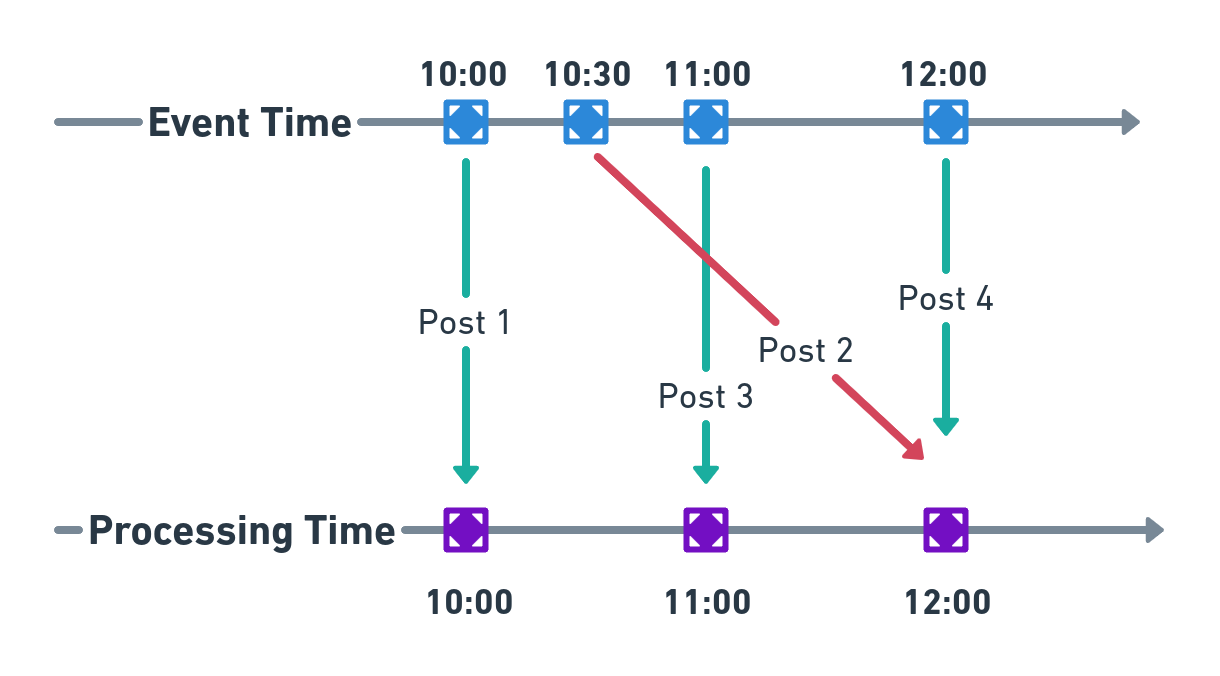
How to deal with late data | Event vs Processing Time | Stream Processing
This video provides a very clear explanation of the difference between Event Time and Processing Time and, crucially, why this difference occurs in real-world systems.
Watch from the beginning to 05:31. Pay close attention to the reasons given for the divergence of the two times (delayed data, out-of-order data, backfilling) and the use cases where Event Time is critical versus those where Processing Time might suffice.
-
Metaphor for a 5-Year-Old:
Imagine you and your friend are in a drawing contest. You both have to draw a picture of the sun.- Event Time is the time on the clock when you finished your drawing. You finished at 3:00 PM.
- Processing Time is when the judge actually looks at your drawing.
You run to the judge immediately, so the judge sees yours at 3:01 PM. Your friend stops to get a snack, so the judge doesn't see their drawing until 3:15 PM, even though they also finished at 3:00 PM. If the judge gave a prize for "first drawing received" (Processing Time), you would win. If the prize was for "first drawing finished" (Event Time), it would be a tie.
-
Python Code Snippet:
Let's extend our event object to explicitly model this difference.import time import random class StreamEvent: def __init__(self, user_id, data): # This is set when the event happens on the client self.event_time = time.time() self.user_id = user_id self.data = data # This will be set when the server processes the event self.processing_time = None def __repr__(self): skew = self.processing_time - self.event_time if self.processing_time else 'N/A' return (f"StreamEvent(user='{self.user_id}', " f"event_time={self.event_time:.2f}, " f"processing_time={self.processing_time:.2f if self.processing_time else 'N/A'}, " f"skew={skew:.2f}s)") def simulate_processing_pipeline(): # Client generates an event event = StreamEvent(user_id='user_x', data={'action': 'logout'}) print(f"1. Event created on client at {event.event_time:.2f}") # Simulate network delay network_delay = random.uniform(1, 3) print(f" (Simulating {network_delay:.2f}s network latency...)") time.sleep(network_delay) # Server receives and processes the event event.processing_time = time.time() print(f"2. Event processed by server at {event.processing_time:.2f}") print(f"-> Final State: {event}") if __name__ == "__main__": simulate_processing_pipeline()
3. Making Sense of Infinity: Windowing (Medium)
-
Technical Explanation:
How do you perform aggregations likecount,sum, oraverageon an infinite stream? You can't. You need to break the stream into finite chunks. This process is called windowing. A window is a slice of a stream over a specific period of event time or processing time.The most common types of windows are:
- Tumbling (Fixed) Windows: These are fixed-size, non-overlapping windows. For example, calculating the total number of clicks for every 1-minute interval.
[12:00-12:01),[12:01-12:02), etc. No event can belong to more than one tumbling window. - Sliding Windows: These are fixed-size, overlapping windows. They are defined by a size and a slide period. For example, calculating the average number of clicks over the last 10 minutes, updated every minute. The windows would be
[12:00-12:10),[12:01-12:11), etc. Events can belong to multiple sliding windows. - Session Windows: These are data-driven windows with no fixed size. A session window groups events for a key (e.g., a user) and is closed after a specific period of inactivity (a "gap"). This is perfect for analyzing user sessions on a website.
- Tumbling (Fixed) Windows: These are fixed-size, non-overlapping windows. For example, calculating the total number of clicks for every 1-minute interval.
Windowing and Watermarks in Flink | Flink with Java
The video 'Windowing and Watermarks in Flink' provides excellent, concise animations for each window type. Watching this will build a strong visual intuition.
Watch from the beginning to 03:35. Focus on the distinct characteristics of tumbling, sliding, and session windows as explained through the fitness tracker example.
-
Metaphor for a 5-Year-Old:
Let's watch cars passing by on a road.- Tumbling Window: You count how many cars pass between 3:00 and 3:05. Then you count again for 3:05 to 3:10. Each 5-minute block is separate.
- Sliding Window: At 3:05, you ask, "How many cars passed in the last 10 minutes (2:55-3:05)?" At 3:06, you ask again, "How many cars passed in the last 10 minutes (2:56-3:06)?" You keep asking, and your 10-minute "window" of observation slides forward.
- Session Window: You watch one specific red car. You start a timer when you see it. As long as it stays in sight, the "session" continues. The moment it's out of sight for more than 1 minute, you say the session is over.
-
Python Code Snippet (Conceptual):
This code conceptually shows how events would be assigned to different windows. A real implementation would use a stream processing framework like Flink or Spark Streaming.from datetime import datetime, timedelta # --- TUMBLING WINDOWS (10 seconds) --- # E.g., for event at 12:00:07, window is [12:00:00, 12:00:10) def get_tumbling_window(event_time, window_size_secs=10): timestamp = int(event_time.timestamp()) window_start = timestamp - (timestamp % window_size_secs) return (datetime.fromtimestamp(window_start), datetime.fromtimestamp(window_start + window_size_secs)) # --- SLIDING WINDOWS (size=10s, slide=5s) --- # E.g., for event at 12:00:07, it's in two windows: # [12:00:00, 12:00:10) and [12:00:05, 12:00:15) def get_sliding_windows(event_time, size_secs=10, slide_secs=5): timestamp = int(event_time.timestamp()) windows = [] # Find the first window start before or at the event time last_window_start = timestamp - (timestamp % slide_secs) current_start = last_window_start while current_start > timestamp - size_secs: windows.append((datetime.fromtimestamp(current_start), datetime.fromtimestamp(current_start + size_secs))) current_start -= slide_secs return windows if __name__ == "__main__": now = datetime.now() event_time_at_7_secs = now.replace(second=7, microsecond=0) print(f"Event time: {event_time_at_7_secs}") tumbling_win = get_tumbling_window(event_time_at_7_secs) print(f"Belongs to Tumbling Window: {tumbling_win}") sliding_wins = get_sliding_windows(event_time_at_7_secs) print(f"Belongs to Sliding Windows: {sliding_wins}")
4. The Progress Gauge: Watermarks and the Correctness/Latency Trade-off (Hard)
-
Technical Explanation:
This is the most critical concept. When windowing by Event Time, how do we know when a window (e.g.,[12:00-12:01)) is complete? Since events can arrive late, we can't simply close the window at 12:01 processing time; an event with a 12:00:59 event time might arrive at 12:02!The solution is a watermark. A watermark is a special record in the data stream with a timestamp
T. It acts as a declaration from the stream processor that it expects to see no more events with a timestampt < T. When the watermark passes the end of a window, the system considers that window complete and ready for processing/aggregation.Watermarks are generated based on a heuristic, most commonly bounded out-of-orderness. We declare that we are willing to tolerate events being out of order by at most
Xseconds. The watermark is then calculated as(max_event_time_seen_so_far - X).This creates a fundamental trade-off:
- Low
X(Aggressive Watermark): Low latency. You get results faster. High risk of incorrectness because late events arriving afterXseconds will be dropped. - High
X(Conservative Watermark): High correctness. You wait longer, catching more late events. High latency.
- Low
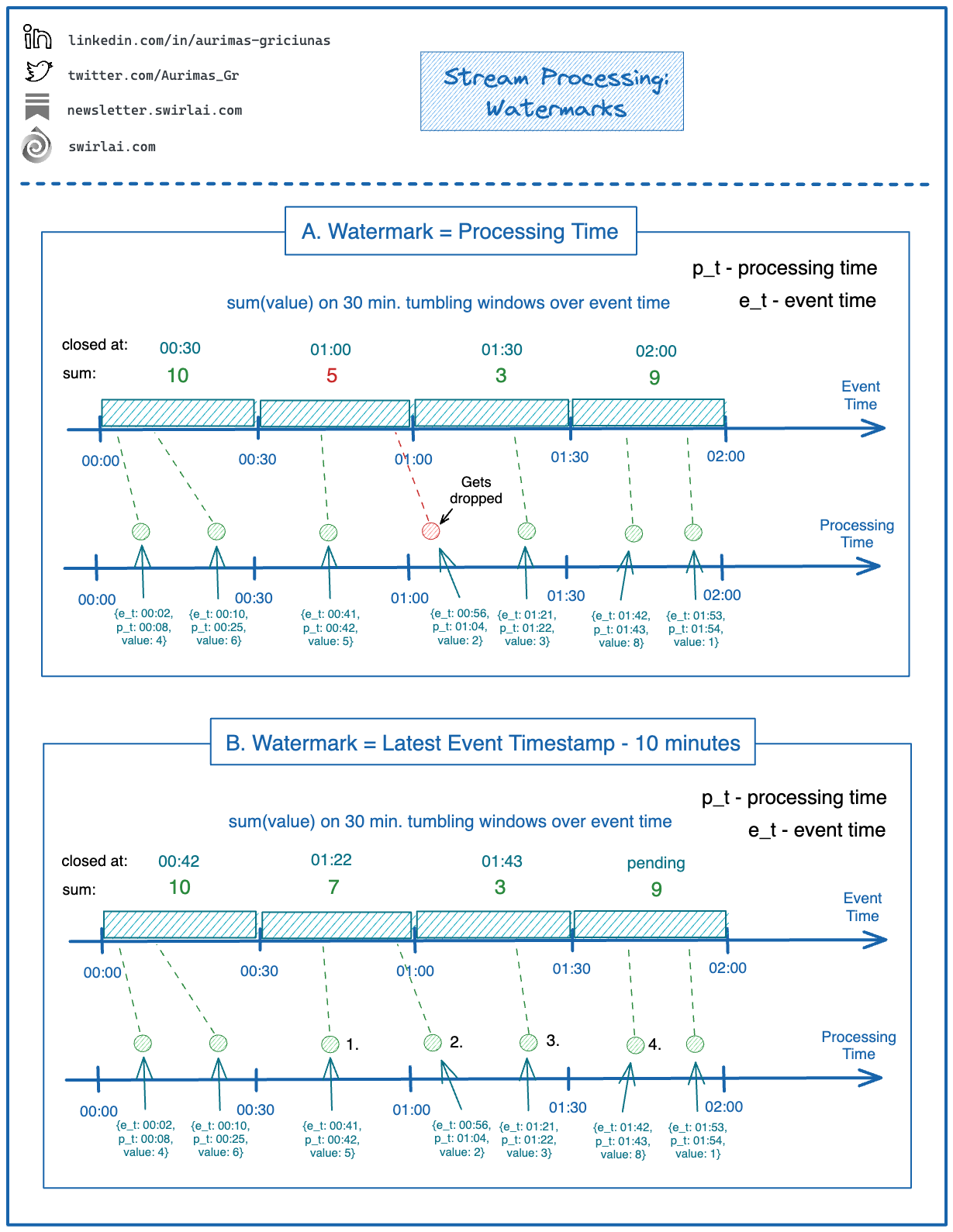
Streaming Analytics | Apache Flink
The Apache Flink documentation provides an excellent walkthrough of why watermarks are needed and the latency vs. completeness trade-off they represent.
Read the sections 'Watermarks' and 'Latency vs. Completeness'. The stream sorter example is a perfect mental model for understanding why some delay is necessary and how watermarks provide a policy for it.
-
Metaphor for a 5-Year-Old:
You're a gatekeeper at a party that ends at 8:00 PM. The invitations say, "Party from 7 PM to 8 PM." (This is the window). But you know some guests might be running late.- The Problem: When do you lock the gate? If you lock it at exactly 8:00 PM, you might lock out a friend who arrives at 8:01 PM.
- The Watermark: You decide on a rule: "I will lock the gate 15 minutes after the last guest who was on time arrives." This 15-minute grace period is your
bounded-out-of-orderness. The watermark is your watch, which is always 15 minutes behind the time the last on-time guest arrived. When your watch finally says 8:00 PM, you know it's safe to lock the gate.
-
Python Code Snippet (Simulation):
This simulation shows a watermark in action.def process_with_watermark(event_stream, allowed_lateness_secs=5): """Simulates processing an event stream with a watermark.""" max_event_time = 0 watermark = 0 # A dictionary to hold events for open windows. Key is window start timestamp. windows = {} print(f"Watermark Policy: Max Event Time - {allowed_lateness_secs} seconds\n") for event in event_stream: event_time = event['event_time'] print(f"Processing Event: {event}") # 1. Update max event time seen max_event_time = max(max_event_time, event_time) # 2. Update watermark new_watermark = max_event_time - allowed_lateness_secs if new_watermark > watermark: watermark = new_watermark print(f" --> Watermark advanced to: {datetime.fromtimestamp(watermark)}") # 3. Assign event to window if not late if event_time < watermark: print(f" !! DROPPED LATE EVENT !! (Event time {datetime.fromtimestamp(event_time)} < Watermark)") continue window_start = int(event_time / 10) * 10 # 10-second tumbling windows if window_start not in windows: windows[window_start] = [] windows[window_start].append(event['value']) # 4. Trigger (close) windows that are behind the watermark triggered_windows = [] for start_ts in windows: if start_ts + 10 < watermark: # If window end is before watermark print(f" >>> TRIGGERING WINDOW [{datetime.fromtimestamp(start_ts)}, {datetime.fromtimestamp(start_ts+10)}): Sum = {sum(windows[start_ts])}") triggered_windows.append(start_ts) for start_ts in triggered_windows: del windows[start_ts] # Remove closed window print("-" * 20) if __name__ == "__main__": t = int(time.time()) # Stream with an out-of-order, late event stream = [ {'event_time': t, 'value': 5}, {'event_time': t + 2, 'value': 3}, # In window [t, t+10) {'event_time': t + 12, 'value': 10},# In window [t+10, t+20) {'event_time': t + 14, 'value': 2}, {'event_time': t + 16, 'value': 8}, {'event_time': t + 3, 'value': 1}, # Out-of-order, but not late {'event_time': t + 1, 'value': 9}, # Very late event, will be dropped ] process_with_watermark(stream, allowed_lateness_secs=5)
5. Beyond Watermarks: Triggers and Incremental Results (Harder)
-
Technical Explanation:
Relying solely on watermarks can lead to high latency if the watermark is held back by a single slow event source. Sometimes, we need results before the window is officially closed. This is accomplished with triggers.A trigger is a mechanism that determines when in processing time a window's results are emitted. The watermark is the default trigger, but we can define others:
- Processing Time Triggers: Emit a result every
Nseconds of processing time. - Count Triggers: Emit a result after
Melements have arrived in the window. - Composite Triggers: Combine multiple triggers (e.g., "fire every minute, OR when the watermark passes the end").
When a trigger fires multiple times for the same window, we must define how the results relate:
- Discarding: Each output is independent. The window's state is cleared after each firing. (Useful for deltas).
- Accumulating: Later outputs are refinements of earlier ones. The state is preserved. (Useful for dashboards that can overwrite old values).
- Accumulating & Retracting: Like accumulating, but when a new result is emitted, a "retraction" message for the previous result is also sent. This is crucial for multi-stage pipelines where downstream aggregations need to reverse the effect of a now-outdated partial result.
This model, pioneered by the Google Dataflow paper, provides the ultimate flexibility, allowing engineers to precisely balance correctness, latency, and cost.
- Processing Time Triggers: Emit a result every
The Dataflow Model: A Practical Approach to Balancing ...
The Google Dataflow paper is the definitive source on this advanced concept. It decomposes pipeline design into four clear questions and explains how triggers provide the answer to 'When in processing time are results materialized?'.
This is a dense but rewarding read. Skim Section 2.3 'Triggers & Incremental Processing' to understand the motivation and the three refinement modes. Then, look at the diagrams in Section 2.4 'Examples', especially Figures 12 and 13. Compare them to see how adding a processing-time trigger provides early, partial results before the watermark-triggered final result.
-
Metaphor for a 5-Year-Old:
You are reporting the score of a basketball game (the window). The game ends at 9:00 PM.- Watermark Trigger: You only report the final score at 9:10 PM, after you're sure all points have been counted correctly.
- Processing-Time Trigger (Accumulating): Your boss wants updates. So, you tweet the current score at the end of every quarter. The score you tweet in the 2nd quarter
(50-45)replaces the score you tweeted in the 1st quarter(25-20). This gives your audience low-latency, partial results. The final result is still the one you report at 9:10 PM.
-
Python Code Snippet (Conceptual):
This conceptual code shows a window with both a default watermark trigger and an early, periodic processing-time trigger.# PSEUDOCODE for a streaming framework like Flink/Beam # Get the stream of events events = read_from_kafka(...) # Define the windowing and triggering logic windowed_counts = events \ .assign_timestamps_and_watermarks(for_bounded_out_of_orderness(seconds(30))) \ .key_by(event -> event.product_id) \ .window(tumbling_event_time_windows(minutes(5))) \ .trigger( # The trigger logic: after_watermark() # Primary trigger: Fire when the window is complete. .with_early_firings( # Also, add early firings: every(seconds(60)) # Fire every 60s of processing time. ) ) \ .with_accumulation_mode(ACCUMULATING) \ # Refinement mode: update previous results. .aggregate(count()) # The operation to perform: count elements. # Write results to a database windowed_counts.write_to_database(...)This setup would give you a per-product count for a 5-minute window. You would get partial, updated counts every 60 seconds, and a final, correct count once the watermark passes the end of the 5-minute window.
Test your understanding! (Interview-Style Question)
You are asked to design a real-time dashboard for a popular online game that shows the "Top 10 Players by Score" for the last hour. The data comes from an event stream where each event is (player_id, score_delta, event_timestamp). Millions of events arrive per second, and some can be delayed by up to 5 minutes due to mobile network issues.
How would you use the concepts of windows, watermarks, and triggers to build this? Describe your choices and the trade-offs involved.
Show answer
This is a classic stream processing problem that requires balancing latency and accuracy.
-
Windowing Strategy:
- I would use a sliding window with a
sizeof 1 hour and aslideof 10 seconds. This meets the requirement of showing data for the "last hour" and provides fresh updates to the dashboard every 10 seconds. A tumbling window would not work, as it would only show disjoint 1-hour blocks.
- I would use a sliding window with a
-
Time Domain:
- I must use Event Time. The score must be attributed to when the player achieved it, not when our server received the event. Using Processing Time would lead to an incorrect leaderboard if events arrive out of order.
-
Watermark Strategy:
- The problem states events can be delayed by up to 5 minutes. To ensure high correctness, I would set a bounded-out-of-orderness watermark with a delay of 5 minutes. The watermark would be
(max_event_time_seen - 5 minutes). - Trade-off: This means the "final, 100% correct" leaderboard for any given 1-hour window will only be available 5 minutes after that hour ends. For example, the final result for the
[2:00-3:00 PM]window will be computed at3:05 PM. This is a 5-minute latency for the perfectly correct result.
- The problem states events can be delayed by up to 5 minutes. To ensure high correctness, I would set a bounded-out-of-orderness watermark with a delay of 5 minutes. The watermark would be
-
Triggering Strategy:
- Waiting 5 minutes for any update is too slow for a real-time dashboard. Therefore, I need to supplement the default watermark trigger with early firings.
- I would add a processing-time trigger that fires every 10 seconds (matching the slide period of my window).
- The trigger logic would be:
Fire when watermark passes window end, with early firings every 10 seconds of processing time. - I would use the Accumulating refinement mode. Each 10-second trigger will calculate the Top 10 based on the data received so far for that 1-hour window. The output will overwrite the previous result for that window in the database that powers the dashboard.
Summary of the Flow:
- Every 10 seconds, a new 1-hour window is created (e.g.,
[2:01:10 - 3:01:10]). - The processing-time trigger fires every 10 seconds, causing an early, speculative "Top 10" calculation for all active windows. This result is sent to the dashboard, providing low-latency updates.
- The watermark slowly advances, trailing the real-time event flow by 5 minutes.
- When the watermark finally passes the end of a window (e.g., at
3:05 PMfor the[2:00-3:00 PM]window), a final, complete "Top 10" is calculated and emitted. This final result is guaranteed to include all non-late events.
This hybrid approach gives the users a fast, mostly-correct view of the leaderboard, which eventually converges to the perfectly correct view, satisfying both the low-latency and correctness requirements.
Conclusion
Today, we've transitioned from the world of bounded, batch data to unbounded, real-time streams. You've learned the fundamental concepts that underpin all modern stream processing systems.
Key Takeaways:
- Stream processing handles continuous, unbounded event streams, unlike batch processing's finite datasets.
- The distinction between Event Time (when it happened) and Processing Time (when we see it) is critical for correctness.
- Windowing (Tumbling, Sliding, Session) is the technique for creating finite analytics on infinite streams.
- Watermarks are the mechanism for tracking progress in event time, allowing us to decide when a window is "complete" and forcing a trade-off between latency and correctness.
- Triggers provide more granular control over when results are emitted, allowing for low-latency partial results before a window is complete.
Next Lesson Preview
We've discussed how data is processed in-flight. But where does the data live? For many high-throughput systems, traditional databases are not the answer. In the next lesson, we will dive into a data structure that powers many of the world's most scalable NoSQL databases (like Cassandra and RocksDB). Your task will be to describe the architecture of a log-structured merge-tree (LSM Tree) and its read/write path trade-offs.