Hello! Welcome to the next lesson in our module on "Designing Scalable & Resilient Systems."
In our last session, we designed caching strategies to reduce database load and improve latency. We briefly touched upon the idea of a Content Delivery Network (CDN) as a specialized, globally distributed cache for static assets.
Today, we will expand on that idea significantly. This lesson is dedicated to explaining the purpose and architecture of a Content Delivery Network (CDN). For any application with a global audience—from e-commerce sites and blogs to massive streaming services—a CDN is not a luxury; it's a foundational component for providing a fast, reliable, and secure user experience. Understanding how they work is a key part of developing an architectural mindset.
1. The "Why": What Problem Does a CDN Solve?
Imagine your web application is hosted on servers in a datacenter in Virginia, USA. When a user from Virginia accesses it, the response is quick. But what happens when a user from Sydney, Australia, makes a request?
The data must travel across continents and oceans via undersea fiber-optic cables. Even at the speed of light, this journey introduces significant latency, leading to slow page loads and a poor user experience. This is a physical constraint that no amount of server optimization can fix.
A CDN solves this problem by bringing your content closer to your users. Let's start with a quick video that introduces the fundamental concepts.
What Is A CDN? How Does It Work?
The video 'What Is A CDN? How Does It Work?' by ByteByteGo provides a clear and concise overview of a CDN's purpose and its main benefits.
Please watch the following segments: 00:01 - 01:25: This introduces the core problem of latency and the main architectural components of a CDN: Points of Presence (PoPs) and edge servers. 03:17 - 04:07: This covers the crucial secondary benefits of a CDN, including security and availability. Focus on understanding the three primary benefits a CDN provides.
As the video explained, a CDN is a globally distributed network of proxy servers. These servers are located in datacenters called Points of Presence (PoPs). The core idea is to cache copies of your website's content on these servers around the world.
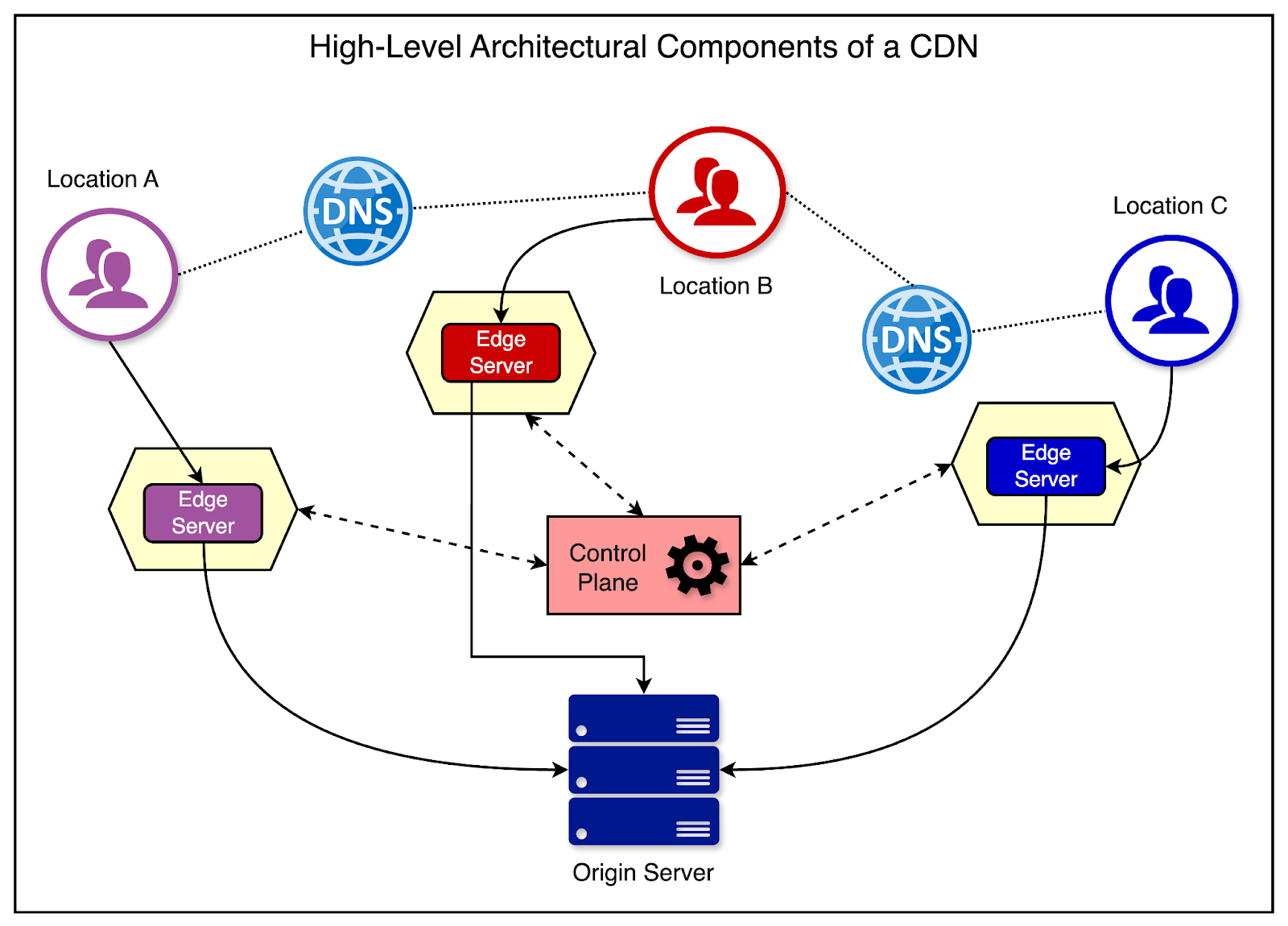
To summarize, a CDN serves three main purposes:
- Improved Performance: By caching content close to users, a CDN drastically reduces latency, resulting in faster load times.
- Higher Availability and Scalability: A CDN distributes traffic across many servers, reducing the load on your origin server. If your origin server goes down, the CDN can often continue to serve cached content, improving the overall availability of your site.
- Enhanced Security: CDNs can absorb massive amounts of traffic, providing a powerful front-line defense against Distributed Denial of Service (DDoS) attacks. They also often include other security features like Web Application Firewalls (WAFs).
2. The "How": A Walkthrough of CDN Architecture
Now that we understand why CDNs are essential, let's dive into how they are designed. We'll explore the key architectural decisions involved in building and using a CDN, moving from a simple model to a more sophisticated, real-world design.
The following video provides an excellent system design walkthrough that we will use as the foundation for this section. We will break it down into manageable parts.
Design a CDN | System Design Walkthrough
We'll begin our architectural exploration with the video 'Design a CDN' from AlgoJS. It covers the core design choices you'd make when building a CDN from the ground up, which is perfect for thinking like an architect.
We will watch this video in several segments throughout the lesson. For now, just have it ready.
2.1. Caching Models: How Content Gets to the Edge
The first architectural question is: how does content from your origin server get into the CDN's edge servers? There are two primary models, Pull and Push, which are often combined into a Hybrid approach.
Design a CDN | System Design Walkthrough
Let's watch the segment from the 'Design a CDN' video that explains these caching models.
Please watch from 01:54 to 07:43. This covers the Pull CDN, Push CDN, and the Hybrid approach, including the pros and cons of each.
Let's summarize the trade-offs in a table:
| Model | How it Works | Best For | Pros | Cons |
|---|---|---|---|---|
| Pull CDN | The edge server pulls content from the origin server on the first user request (a cache miss). | Dynamic content, long-tail content (less popular files). | Efficient resource use (only caches what's requested), lower storage costs. | First request is always slow. Can cause high traffic to the origin if many new files are requested at once. |
| Push CDN | The origin server owner pushes content to the edge servers in advance of any user request. | Static, popular content (e.g., streaming video files, JS libraries, new movie releases). | Very low latency for all users (content is pre-warmed). Reduces origin server load. | Can be inefficient, using storage and bandwidth for content that is never requested. |
| Hybrid CDN | Combines both models. | Most modern, large-scale applications. | Balances performance and efficiency. Push popular content for speed; allow pull for less-used assets. | More complex to manage. |
Test your understanding!
You are designing the CDN strategy for a global news website. How might you use a Push vs. Pull strategy for the following assets?
- The website's logo and CSS stylesheet.
- A breaking news article published moments ago.
- An article from the archive, published 5 years ago.
Show answer
- Logo and CSS (Push): These are small, static, and requested by every single visitor. Pushing them to all edge servers ensures the core site structure loads instantly for everyone.
- Breaking News Article (Push): This article is expected to become "hot content" immediately. Pushing it to the CDN proactively ensures it can handle the imminent spike in traffic with low latency.
- Archived Article (Pull): This article represents "long-tail" content. It's unlikely to be requested frequently. Using a pull model is most efficient; the first user to request it will experience a slight delay, but the CDN won't waste resources storing it everywhere beforehand.
2.2. Request Routing: Finding the Closest Edge Server
Once your content is on the CDN, how does a user's browser get directed to the nearest PoP? This is a critical routing problem solved primarily by two technologies: DNS and Anycast.
Design a CDN | System Design Walkthrough
Let's see how the 'Design a CDN' video explains these routing mechanisms.
Please watch from 10:33 to 12:49. This segment covers standard DNS resolution and the more advanced Anycast approach.
Here's a breakdown of the two approaches:
-
DNS-based Routing: When a user's browser requests your domain (e.g.,
www.myapp.com), it queries a DNS server. A special CDN-aware DNS server detects the approximate geographic location of the user's request (based on the resolver's IP address) and returns the IP address of the closest PoP.- Pro: Gives the CDN provider fine-grained control over traffic management.
- Con: Can be inaccurate if the user's DNS resolver is far from their actual location.
-
Anycast Routing: With Anycast, multiple PoPs around the world announce the exact same IP address. When a user makes a request, the underlying internet routing protocols (specifically BGP) automatically direct the traffic to the "closest" server in terms of network topology.
- Pro: Highly resilient. If a PoP fails, traffic is automatically rerouted. It also naturally distributes and absorbs DDoS attacks across the entire network.
- Con: Routing is based on network hops, not necessarily the lowest latency path.
Most modern, large-scale CDNs use a combination of these techniques, often leveraging Anycast for its resilience and security benefits.
2.3. Overall CDN Architecture
Let's put all the pieces together. A production-grade CDN is more than just a flat network of edge servers. It often involves a multi-layered architecture to further optimize performance and efficiency.
Design a CDN | System Design Walkthrough
The next segment of the video discusses a multi-tier architecture and the strategic placement of PoPs.
Please watch from 07:43 to 10:33. This part explains the concept of a multi-tier CDN with 'child' and 'parent' tiers, which is an important pattern for optimizing cache hits.
The multi-tier (or multi-layered) architecture introduces intermediate layers of caching.
- Child Tier (Edge Servers): Closest to the users, holding the most popular, "hot" content.
- Parent Tier (Regional Caches): Fewer, more powerful servers that aggregate requests from multiple edge servers. They have larger caches and store less popular content.
If an edge server has a cache miss, instead of going all the way to your origin server, it first asks its parent cache. This significantly increases the cache hit ratio and further protects the origin server.
The final diagram below shows a comprehensive view, integrating all the components we've discussed.

2.4. Ensuring Content Freshness
Finally, we need to address a problem we first saw in our last lesson: what happens when content is updated? A CDN must have a strategy for handling stale content.
Design a CDN | System Design Walkthrough
The final segment of our video walkthrough covers cache invalidation strategies used in CDNs.
Please watch from 14:17 to 17:30. This explains how Time-To-Live (TTL) and Entity Tags (E-tags) are used to manage content freshness.
As a quick recap and extension of our previous lesson:
- Time-To-Live (TTL): Each object in the cache is assigned an expiration time. After the TTL expires, the edge server must re-fetch the content from the origin (or a parent cache). This is simple and effective for content that can tolerate some staleness.
- Manual Invalidation/Purge: The content owner can actively send an API call to the CDN to purge a specific file (e.g.,
styles.css) from the cache on all edge servers. This is used when an update needs to be reflected immediately. - E-Tags (Entity Tags): When an edge server's cached object with a TTL expires, it can ask the origin server, "Has this file changed since this E-tag?" If the E-tag matches, the origin responds with a
304 Not Modifiedstatus and no data, saving bandwidth. The edge server can then reset the TTL on its cached version.
Conclusion
In this lesson, we demystified the Content Delivery Network, moving from its core purpose to its detailed architecture. This is a critical piece of the puzzle for designing any system that needs to perform well at a global scale.
Key Takeaways:
- A CDN's primary purpose is to reduce latency by caching content geographically closer to users, but it also provides significant availability and security benefits.
- The core architectural components are the Origin Server and a distributed network of Edge Servers located in Points of Presence (PoPs).
- Key design decisions include the caching model (Push vs. Pull), the request routing method (DNS vs. Anycast), and the internal structure (flat vs. multi-tier).
- Content freshness is managed using familiar caching concepts like TTL and explicit invalidation, often optimized with mechanisms like E-Tags.
Preview of the Next Lesson:
So far, we have focused on scaling read performance and content delivery with load balancers, caches, and CDNs. However, modern systems also involve complex background tasks, data processing, and communication between different microservices. How can we manage these workflows reliably without services being tightly coupled?
In our next lesson, we will answer that by exploring how message queues can be used to decouple services and improve resilience, a fundamental pattern for building robust, asynchronous systems.