Hello! Welcome to the first lesson of Module 4, "Developing Containerized Solutions."
In the last module, we explored how to build powerful serverless workflows with Azure Functions and Durable Functions. We are now shifting from functions to another essential compute model for modern application development: containers.
This lesson will introduce you to the foundational concepts you need to start working with containers. We will address the learning outcome: Describe the core concepts of Docker containers, images, and registries. This is a conceptual lesson that will build the foundation for the hands-on labs in the rest of this module. By the end, you'll understand what containers are, how they differ from virtual machines, and how the core components of the Docker ecosystem fit together.
1. The "It Works on My Machine" Problem
As a developer, you've likely encountered a situation where your code runs perfectly on your local machine but fails in a testing or production environment. This classic problem often stems from subtle differences in configuration, system libraries, or dependency versions between environments.
Containers are a technology designed to solve this problem by packaging an application with all its dependencies into a single, isolated, and portable unit.
To understand the motivation behind using Docker, please read the introductory section of the following article. It's written for .NET developers and clearly frames the problem that Docker solves.
Docker Guide for .NET Developers
This article, 'Docker Guide for .NET Developers', starts by outlining the common causes for the 'it works on my machine' problem and introduces Docker as the solution.
Read the text from the beginning down to the section titled 'How does Docker Work?'. Focus on the list of root causes and how Docker's packaging approach addresses them.
2. Containers vs. Virtual Machines
To understand what a container is, it's helpful to compare it to a technology you might be more familiar with: Virtual Machines (VMs). Both are virtualization technologies, but they operate at different levels.
-
Virtual Machines virtualize the hardware. Each VM includes a full copy of a guest operating system, the application, and its necessary binaries and libraries. This provides strong isolation but is heavyweight, slow to boot, and consumes significant resources (CPU, memory, and disk space).
-
Containers virtualize the operating system. They share the host machine's OS kernel but run as isolated processes in user space. A container packages only the application and its dependencies. This makes them extremely lightweight, fast, and efficient.

For a quick, clear explanation of this difference, please watch the first minute of the following video.
AZ-204 Exam EP 18: Azure Container Instances (ACI)
This video from 'A Guide To Cloud' begins with a concise comparison of virtualization and containerization, setting the stage for understanding Docker.
Watch from 0:14 to 1:11. The video clearly illustrates the architectural differences between VMs and containers, reinforcing the diagram above.
3. Core Concepts: Images and Containers
Now let's define the two most fundamental concepts in the Docker world: images and containers.
-
An Image is a read-only, inert template containing everything needed to run an application: the code, a runtime (like the .NET runtime), system tools, libraries, and settings. You can think of a Docker image as a "blueprint" or, in terms familiar from your C# experience, a class.
-
A Container is a runnable, live instance of an image. When you run an image, you create a container. You can create many containers from the same image, just as you can create many objects (instances) from the same class.
The following video provides an excellent explanation of this relationship.
Intro to Docker - A Tool Every Developer Should Know
In this segment from 'Intro to Docker' by Tim Corey, the distinction between a read-only image and a running container is clearly explained.
Watch from 20:04 to 21:34. Pay attention to the description of an image as a 'point in time' snapshot and a container as the running instance of that image.
4. The Anatomy of an Image: Layers
One of the keys to Docker's efficiency is its use of a layered file system. A Docker image is not a single monolithic file; it's composed of a series of stacked, read-only layers.
Each instruction in a Dockerfile (the script used to build an image, which we'll cover in the next lesson) creates a new layer.
This has two major benefits:
- Efficiency: When you change your application and rebuild the image, only the layer containing your change (and subsequent layers) needs to be rebuilt. The underlying layers are cached and reused.
- Sharing: If you have multiple images that share a common base (e.g., they are all based on the same .NET runtime image), those base layers are stored only once on your host machine and shared among all containers.
This layering technique is what makes Docker images much smaller and faster to work with than monolithic VM images.
Intro to Docker - A Tool Every Developer Should Know
Tim Corey's video provides a great visual breakdown of how layers work, making an abstract concept very concrete.
Watch two segments to understand layers: 6:52 - 17:10: This section provides a high-level visual explanation of layers, comparing them to building blocks and contrasting them with the heavyweight nature of VMs. 33:09 - 36:35: Here, the presenter uses the docker image history command to show you the actual layers of a built image, including their individual sizes. This demonstrates how a small code change only adds a tiny new layer on top.
5. Storing and Sharing Images: Registries
You've built your image—now where do you put it? This is where registries come in.
A container registry is a storage and distribution system for container images. It's conceptually similar to how NuGet.org hosts NuGet packages or how GitHub hosts Git repositories.
There are two main types of registries:
- Public Registries: The most common is Docker Hub, which hosts a vast collection of official and community-contributed images.
- Private Registries: For proprietary code, you'll use a private registry. In Azure, the primary service for this is Azure Container Registry (ACR). ACR allows you to build, store, and manage your container images securely within your Azure subscription.
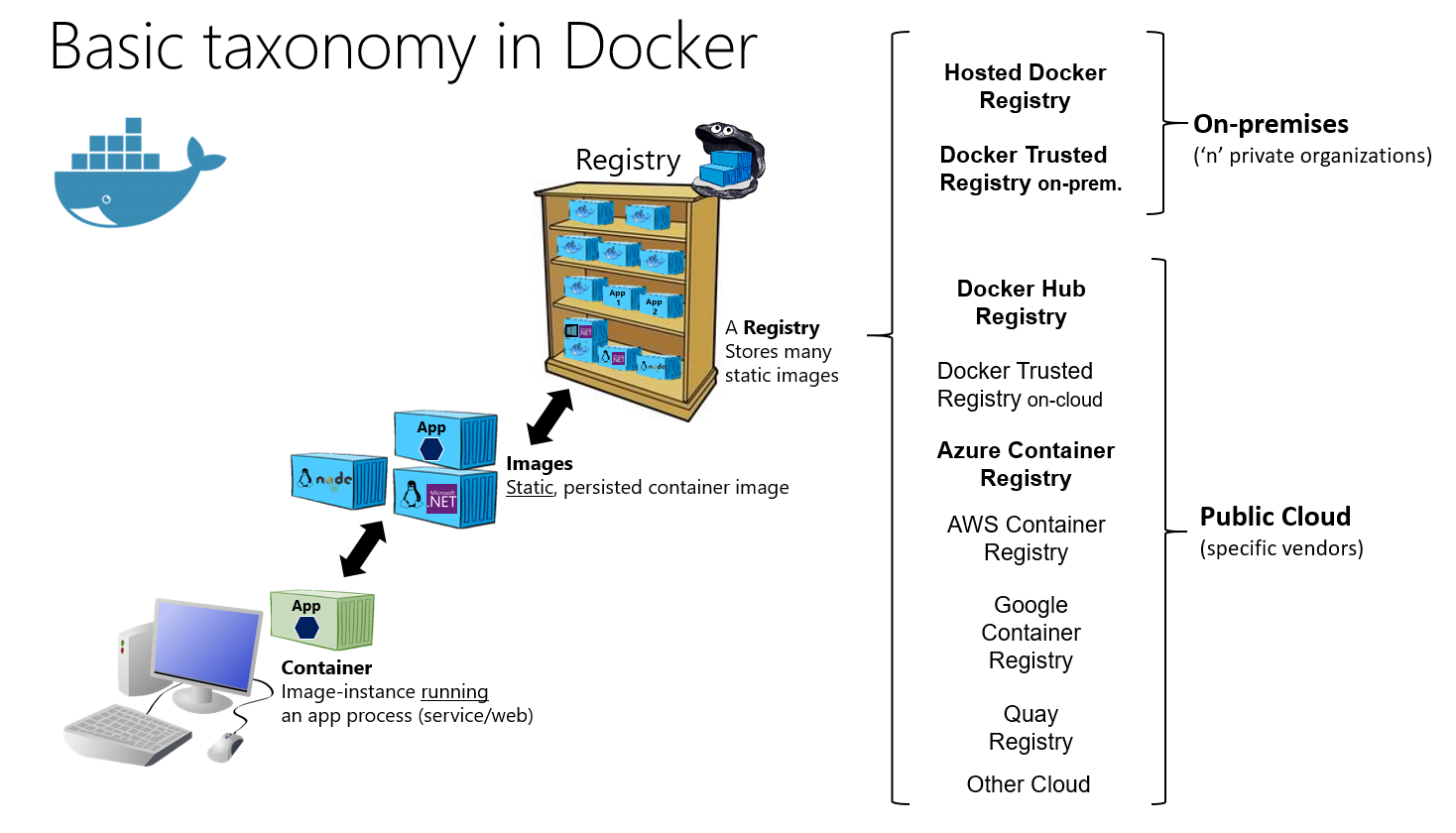
The video below explains how to find images on Docker Hub and introduces the concept of a private registry in Azure.
Intro to Docker - A Tool Every Developer Should Know
These clips explain the role of Docker Hub and introduce Azure's private registry service.
First, watch from 22:48 to 25:43. This section shows how to browse Docker Hub, find official base images (like httpd), and understand image tags (like alpine for smaller variants).
AZ-204 Exam EP 18: Azure Container Instances (ACI)
Now, let's connect this to Azure. This segment from 'A Guide To Cloud' introduces Azure Container Registry (ACR).
Watch from 5:44 to 6:54. This clip defines ACR as a managed private Docker registry service in Azure and explains its role in your development pipeline.
6. Summary of Core Docker Terminology
We've covered several key terms in this lesson. Let's watch one final, concise video segment that recaps all of them in a structured way. This will help solidify your understanding.
AZ-204 Exam EP 18: Azure Container Instances (ACI)
This segment from 'A Guide To Cloud' provides clear, exam-focused definitions for all the core Docker terms we've discussed.
Watch from 2:53 to 5:27. This is a very important summary. Listen for the definitions of: Container, Container Image, Build, Pull, Push, Dockerfile, and Registry.
Conclusion
In this lesson, you've learned the essential concepts of containerization with Docker. This foundational knowledge is critical for the AZ-204 exam and for using containers effectively in your development workflow.
Key Takeaways:
- Containers solve the "it works on my machine" problem by packaging an application and its dependencies into a single, portable unit.
- Containers are more lightweight and efficient than Virtual Machines because they share the host OS kernel instead of bundling a full guest OS.
- An Image is a read-only template (a blueprint or class).
- A Container is a live, running instance of an image (an object).
- Images are built from layers, which enables caching and efficient storage.
- A Registry is a service for storing and distributing images. Docker Hub is a public registry, and Azure Container Registry (ACR) is Azure's private registry service.
Next Steps
Now that you understand what containers, images, and registries are, our next lesson will be hands-on. You will learn how to build a Docker image for a .NET application using a Dockerfile. We'll take a simple .NET web API and package it into an image, preparing it for deployment anywhere.