Hello! Welcome to the next lesson in our AZ-204 preparation course.
In our previous session, we built orchestrations using the function chaining and fan-out/fan-in patterns. These patterns are excellent for coordinating sequences of tasks and parallel work within your application's logic. Today, we'll address a different but equally common challenge: how to manage long-running workflows initiated by an external client.
This lesson directly addresses the learning outcome: implement the async HTTP API pattern in a Durable Functions orchestration. This pattern is fundamental for building robust, scalable serverless backends that handle tasks lasting more than a few seconds, such as processing a large file, running a report, or waiting for human approval.
1. The Challenge of Long-Running HTTP Operations
Given your experience with REST APIs, you know that a client typically sends an HTTP request and waits for a synchronous response. This works well for quick operations. But what if a task takes 10 minutes? The client's request would time out, and they would have no way of knowing if the operation succeeded or what the result was.
The async HTTP API pattern solves this. It's a standard web development pattern, also known as the "polling consumer pattern," that decouples the start of an operation from its completion. The flow is as follows:
- A client sends an HTTP request to start a long-running operation.
- The server immediately accepts the request and returns an HTTP
202 Acceptedresponse. This response contains a URL in theLocationheader (or in the body) where the client can check the status of the operation. - The client then periodically polls this "status" URL.
- While the operation is in progress, the status URL returns an HTTP
202 Accepted. - Once the operation is complete, the status URL returns an HTTP
200 OKwith the final result in the response body.
Durable Functions has first-class, built-in support for this entire pattern, making it incredibly easy to implement.
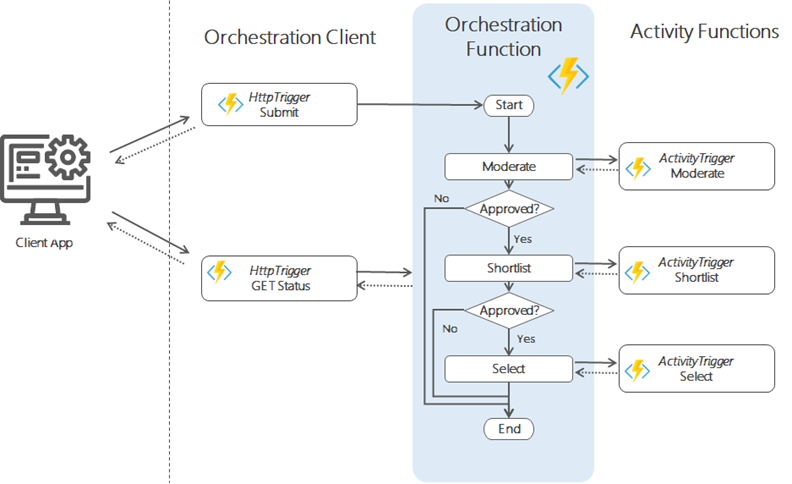
To get the official definition of this pattern from Microsoft, please read the following short section from the documentation.
HTTP features in Durable Functions
This document provides the official explanation for what Durable Functions calls 'Async operation tracking'. It clearly lays out the client/server flow and confirms how this pattern is built into the Durable Functions HTTP APIs.
Read the section titled 'Async operation tracking'. Focus on the numbered list describing the client/server flow. This reinforces the core mechanism of the pattern.
2. The Basic Pattern in Action
Let's see what this looks like in practice. The following video provides a concise demonstration of starting a Durable Function via HTTP and polling for its status.
Serverless but Stateful! - Azure Durable Functions Are AWESOME!
In this video, Nick Proud demonstrates the core async HTTP API pattern. He will start a durable orchestration and show you the exact response payload that Durable Functions provides, which makes implementing this pattern so simple.
Watch from the beginning to 6:20. Pay close attention to: The initial HTTP call to the HttpStart function. The JSON response payload containing the id and various management URIs, especially statusQueryGetUri. How he uses the statusQueryGetUri to poll the orchestration's status, first seeing 'Running' and then 'Completed' with the final output.
As you saw, the DurableTaskClient's CreateCheckStatusResponse method automatically generates the 202 Accepted response with the correct management URLs. You don't have to manually construct these URLs or implement the status endpoint; the framework handles it for you.
3. Hands-On: Long-Running Orchestration with Human Interaction
The async HTTP API pattern becomes even more powerful when a long-running process needs external input to continue. This is often called the "human interaction" pattern. Imagine an expense report that requires a manager's approval. The workflow must start, then pause and wait for the approval event before it can complete.
Let's implement this. We will create an orchestration that simulates an approval process. It will run a task, wait for an external "approval" event, and then finish.
Step 1: Create the New Functions
In your existing function app project, add a new C# file (e.g., ApprovalWorkflow.cs). We'll add an orchestrator, an activity, and an HTTP starter.
// In a new C# file, e.g., ApprovalWorkflow.cs

using Microsoft.Azure.Functions.Worker;
using Microsoft.Azure.Functions.Worker.Http;
using Microsoft.DurableTask;
using Microsoft.DurableTask.Client;
using Microsoft.Extensions.Logging;

public static class ApprovalWorkflow
{
    // The Orchestrator Function
    [Function(nameof(ApprovalOrchestration))]
    public static async Task<string> ApprovalOrchestration(
        [OrchestrationTrigger] TaskOrchestrationContext context)
    {
        var logger = context.CreateReplaySafeLogger(nameof(ApprovalOrchestration));
        string requestDetails = context.GetInput<string>();

        logger.LogInformation("Step 1: Processing request for '{requestDetails}'.", requestDetails);
        await context.CallActivityAsync(nameof(ProcessInitialRequest), requestDetails);

        logger.LogInformation("Step 2: Awaiting external approval event named 'ApprovalEvent'.");

        // The orchestration will pause here until an event is received.
        // We specify a timeout of 10 minutes.
        try
        {
            bool approvalResult = await context.WaitForExternalEvent<bool>("ApprovalEvent", TimeSpan.FromMinutes(10));

            if (approvalResult)
            {
                logger.LogInformation("Approval received. Completing process.");
                return "Approved";
            }
            else
            {
                logger.LogInformation("Request was denied. Completing process.");
                return "Denied";
            }
        }
        catch (TimeoutException)
        {
            logger.LogWarning("Approval timed out after 10 minutes.");
            return "Timed Out";
        }
    }

    // The Activity Function
    [Function(nameof(ProcessInitialRequest))]
    public static void ProcessInitialRequest([ActivityTrigger] string requestDetails, FunctionContext context)
    {
        var logger = context.GetLogger(nameof(ProcessInitialRequest));
        logger.LogInformation("Executing initial processing for request: {requestDetails}", requestDetails);
        // Simulate work like saving to a database, sending a notification, etc.
    }

    // The HTTP Starter Client Function
    [Function("ApprovalWorkflow_HttpStart")]
    public static async Task<HttpResponseData> ApprovalWorkflow_HttpStart(
        [HttpTrigger(AuthorizationLevel.Anonymous, "post")] HttpRequestData req,
        [DurableClient] DurableTaskClient client,
        FunctionContext executionContext)
    {
        var logger = executionContext.GetLogger("ApprovalWorkflow_HttpStart");

        string instanceId = await client.ScheduleNewOrchestrationInstanceAsync(
            nameof(ApprovalOrchestration), "Expense report for Project Titan");

        logger.LogInformation("Started approval orchestration with ID = '{instanceId}'.", instanceId);

        return client.CreateCheckStatusResponse(req, instanceId);
    }
}
Step 2: Run and Test the Workflow
Now, let's test the full end-to-end flow.
- Start the Function App: Run your project (F5 in Visual Studio).
- Start the Orchestration: Use Postman or a similar tool to send a
POSTrequest to thehttp://localhost:7071/api/ApprovalWorkflow_HttpStartendpoint. - Inspect the Response: The response will be an HTTP
202 Accepted. In the body, you'll find a JSON payload. Copy the entire payload to a text editor. It will look something like this:{ "id": "YOUR_INSTANCE_ID", "statusQueryGetUri": "http://.../instances/YOUR_INSTANCE_ID?...", "sendEventPostUri": "http://.../instances/YOUR_INSTANCE_ID/raiseEvent/{eventName}?...", "terminatePostUri": "http://.../instances/YOUR_INSTANCE_ID/terminate?..." } - Check the Status: In the console output of your running function, you should see the logs "Step 1: Processing..." and "Step 2: Awaiting external approval...". If you make a
GETrequest to thestatusQueryGetUri, theruntimeStatuswill beRunning. - Send the Approval Event: Now, we need to send the "ApprovalEvent".
- Take the
sendEventPostUri. - Replace
{eventName}withApprovalEvent. The URL will look like.../raiseEvent/ApprovalEvent?.... - In Postman, create a new
POSTrequest to this modified URL. - Set the
Content-Typeheader toapplication/json. - In the request body, send
trueto approve orfalseto deny. - Send the request.
- Take the
- Verify Completion: Look at your function's console output. You will see the log "Approval received. Completing process." The orchestration has resumed.
- Check Final Status: Make another
GETrequest to thestatusQueryGetUri. TheruntimeStatuswill now beCompleted, and theoutputfield will show"Approved".
This hands-on exercise demonstrates the complete async HTTP API pattern, including how an external system can interact with a long-running, paused workflow.
4. Advanced Interaction: Timeouts and Competing Events
In a real-world scenario, you can't wait forever for an approval. You need a timeout. Also, what if you want the workflow to proceed if either an approval is received or a timeout occurs?
This is a perfect use case for Task.WhenAny, which you've seen before. The orchestrator can create multiple tasks—one waiting for an external event and another being a durable timer—and proceed as soon as the first one completes.
Let's watch a video that demonstrates this "competing events" concept in a more complex, real-world scenario.
How To Orchestrate Workflows With Azure Durable Functions? (With real-life example)
This video from Codewrinkles implements a full 'notify support' workflow. It's a great example of combining timers and external events. It also touches on a critical concept for Durable Functions: determinism.
Watch the following segments: 11:40 - 15:30: The presenter walks through the orchestrator code. Focus on how he sets up tasks for both the external event (owner found) and a timer. 15:30 - 17:25: This is critical. Pay close attention to the discussion on why orchestrators must be deterministic, using context.CurrentUtcDateTime instead of DateTime.Now, and the dangers of infinite loops. 17:25 - 19:02: See how Task.WhenAny is used to determine which task (the event or the timeout) completed first, and how the logic branches accordingly.
The key insight is that an orchestrator isn't just a linear script; it's a coordinator of tasks. By using Task.WhenAny, you can create sophisticated workflows that react to multiple potential inputs over a long period.
Conclusion
You've done a great job today. Mastering the async HTTP API pattern is crucial for building robust, interactive, and long-running serverless applications, a common requirement in many business solutions and a key topic for the AZ-204 exam.
Key Takeaways:
- The async HTTP API pattern is used to manage long-running operations initiated by external clients without timing out.
- The standard flow is: Client calls start endpoint -> Server returns
202 Acceptedwith a status URL -> Client polls the status URL -> Server returns200 OKwith the result upon completion. - Durable Functions has built-in support for this via the
DurableTaskClientand itsCreateCheckStatusResponsemethod. - Orchestrations can pause and wait for external input using
context.WaitForExternalEvent<T>(). - External events are sent via the
sendEventPostUriprovided in the initial response payload. - Use
Task.WhenAnycombined withcontext.CreateTimer()andcontext.WaitForExternalEvent()to handle competing events, like an approval or a timeout. - Remember that orchestrator code must be deterministic. Always use
context.CurrentUtcDateTimefor current time.
Next Steps
We have now covered the major patterns of Durable Functions. In the next module, we will shift gears from serverless functions to another popular and powerful compute model on Azure: containers. You'll learn what containers are, how to package your .NET applications into them using Docker, and how to run them on Azure.