Hello! Welcome back to our journey through Azure Durable Functions for the AZ-204 certification.
In our last lesson, we built a function chain, a powerful pattern for executing a sequence of tasks in a specific order. You saw how an orchestrator can call a series of activity functions, passing the output of one to the next, much like an assembly line.
Today, we'll explore a different, equally important workflow: parallel processing. Our learning outcome is to implement the fan-out/fan-in pattern in a Durable Functions orchestration. This pattern is essential when you need to perform many independent tasks concurrently to improve performance and throughput.
1. Understanding the Fan-Out/Fan-In Pattern
Imagine you need to process a hundred images to generate a thumbnail for each. With function chaining, you would process them one by one, which would be slow. A much more efficient approach is to start all 100 thumbnail generation tasks at the same time and then, once they are all complete, gather the results. This is the essence of the fan-out/fan-in pattern.
- Fan-Out: The orchestrator function starts multiple activity functions in parallel.
- Fan-In: The orchestrator waits for all the parallel activities to finish.
- Aggregate: After the "fan-in," the orchestrator can aggregate the results from all the completed activities.
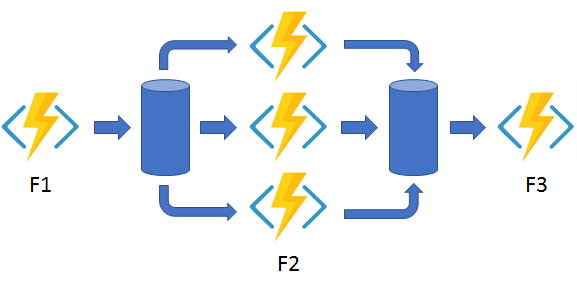
This pattern should feel conceptually familiar given your experience with concurrent programming in .NET. The key difference here is that the Durable Functions framework manages the distribution and reliability of these parallel tasks, which could be running across many different virtual machines.
To solidify your understanding, please read the following introduction to the pattern.
Fan-out/fan-in scenarios in Durable Functions
This article from the official Microsoft documentation introduces the fan-out/fan-in pattern using a clear scenario: backing up site content. It explains why a simple, single-function approach doesn't scale and how Durable Functions simplifies parallel execution.
Read the 'Scenario overview' section. Focus on understanding the problem (backing up files) and why the fan-out/fan-in pattern is a more robust and scalable solution than a single function or a manual queue-based approach.
2. Implementing the Fan-Out/Fan-In Orchestrator
Now, let's implement this pattern. We will modify the project you created in the last lesson. Our goal is to create an orchestration that:
- Gets a list of work items (e.g., a list of document IDs to process).
- "Fans out" by starting a parallel activity function for each document.
- "Fans in" by waiting for all processing activities to complete.
- Aggregates the results (e.g., calculates the total number of words processed).
The core of this logic lies in how we call the activities from the orchestrator. Instead of await-ing each call, we launch them all and store their Task objects in a list. Then, we use Task.WhenAll to wait for all of them to complete.
Let's look at the C# code that enables this.
Fan-out/fan-in scenarios in Durable Functions
This section of the documentation provides the C# code for an orchestrator that implements the fan-out/fan-in pattern. Pay close attention to how tasks are created, added to an array, and then awaited using Task.WhenAll.
Review the C# code under the 'Orchestrator' section. The code shown uses the older in-process model, but the core logic is identical. Note the loop that creates tasks, the await Task.WhenAll(tasks) line, and the final tasks.Sum() to aggregate results.
3. Hands-On: Building the Orchestration
Now, let's apply this in your project. You can add a new file or modify the one from the previous lesson. We'll create three new functions: an orchestrator, and two activities.
Step 1: Create the Activity Functions
First, let's create the activity functions that will do the work. The first gets our list of items, and the second processes a single item.
// In a new C# file (e.g., FanOutFanIn.cs)

[Function(nameof(GetWorkItems))]
public static List<string> GetWorkItems([ActivityTrigger] object input, FunctionContext context)
{
    var logger = context.GetLogger(nameof(GetWorkItems));
    logger.LogInformation("Getting work items...");
    // In a real app, this would come from a database or blob storage.
    return new List<string>
    {
        "Report-Alpha.docx",
        "Budget-2024-Final.xlsx",
        "Project-Phoenix-Spec.pdf",
        "Meeting-Notes-Q3.txt"
    };
}

[Function(nameof(ProcessWorkItem))]
public static async Task<int> ProcessWorkItem([ActivityTrigger] string documentName, FunctionContext context)
{
    var logger = context.GetLogger(nameof(ProcessWorkItem));
    logger.LogInformation("Processing document: {documentName}", documentName);

    // Simulate work, like counting words or processing data.
    await Task.Delay(TimeSpan.FromSeconds(5));

    // Return a result, e.g., the number of characters in the name.
    return documentName.Length;
}
Step 2: Create the Orchestrator Function
This is the most important part. The orchestrator will call GetWorkItems once, then loop through the results to "fan out" calls to ProcessWorkItem.
// In the same C# file

[Function(nameof(FanOutFanInOrchestrator))]
public static async Task<long> FanOutFanInOrchestrator(
    [OrchestrationTrigger] TaskOrchestrationContext context)
{
    var logger = context.CreateReplaySafeLogger(nameof(FanOutFanInOrchestrator));
    logger.LogInformation("Orchestration started.");

    // 1. Get the list of work to be done.
    var workItems = await context.CallActivityAsync<List<string>>(nameof(GetWorkItems), null);

    // 2. Fan-Out: Start all processing tasks in parallel.
    logger.LogInformation("Fanning out to {count} activities.", workItems.Count);
    var processingTasks = new List<Task<int>>();
    foreach (var workItem in workItems)
    {
        // We DON'T await here. We add the task to a list.
        Task<int> task = context.CallActivityAsync<int>(nameof(ProcessWorkItem), workItem);
        processingTasks.Add(task);
    }

    // 3. Fan-In: Wait for all the parallel tasks to complete.
    await Task.WhenAll(processingTasks);
    logger.LogInformation("All activities completed (fanned in).");

    // 4. Aggregate the results.
    int totalChars = processingTasks.Sum(task => task.Result);
    logger.LogInformation("Aggregation complete. Total characters: {total}", totalChars);

    return totalChars;
}
Step 3: Create an HTTP Starter
Finally, create a new HTTP-triggered client function to start this specific orchestration.
// In the same C# file

[Function("FanOutFanIn_HttpStart")]
public static async Task<HttpResponseData> FanOutFanIn_HttpStart(
    [HttpTrigger(AuthorizationLevel.Anonymous, "get", "post")] HttpRequestData req,
    [DurableClient] DurableTaskClient client,
    FunctionContext executionContext)
{
    var logger = executionContext.GetLogger("FanOutFanIn_HttpStart");

    // Function input comes from the request content.
    string instanceId = await client.ScheduleNewOrchestrationInstanceAsync(
        nameof(FanOutFanInOrchestrator));

    logger.LogInformation("Started orchestration with ID = '{instanceId}'.", instanceId);

    // Returns an HTTP 202 response with location header that contains
    // the URI of the management API to query the status of the orchestration.
    return client.CreateCheckStatusResponse(req, instanceId);
}
Step 4: Run and Test
Run your project (F5 in Visual Studio). Use Postman or a browser to send a POST request to the FanOutFanIn_HttpStart endpoint.
- You will get back a response with a
statusQueryGetUri. - If you query this URI immediately, you'll see the status is "Running".
- Wait a few seconds. Notice in the function console that all "Processing document..." logs appear almost simultaneously. This is the fan-out in action!
- After about 5 seconds (the delay in our activity), query the status URI again. The status should now be "Completed", and the
outputfield should show the sum of the lengths of all the document names.
4. Real-World Considerations
The basic pattern is powerful, but in production environments, you need to consider a few more things, like controlling the level of parallelism and handling errors.
Let's watch a video that uses a different real-world scenario to demonstrate the fan-out/fan-in pattern and discusses some of these advanced concepts.
How To Orchestrate Workflows With Azure Durable Functions? (With real-life example)
This video from Codewrinkles presents a 'notify support' workflow. While it uses a slightly different fan-in mechanism (waiting for any one of several events to happen), it's a great demonstration of starting parallel tasks and coordinating them.
Watch from 01:35 to 01:52 to hear the presenter's definition of the pattern. Then, jump to 14:22 and watch until 18:57. Focus on how the orchestrator creates and manages multiple tasks simultaneously (sending an email and waiting for a response). The core idea is the concurrent management of tasks, which is central to the fan-out pattern.
As you build more complex systems, two topics become critical:
- Controlling Parallelism: What if
GetWorkItemsreturned 10,000 items? Fanning out to 10,000 parallel activities could overwhelm your function app or downstream services. A common solution is to process items in batches. - Error Handling: What if one of the 10,000 activities fails?
Task.WhenAllwill throw an exception as soon as one task fails. You need a strategy for handling partial failures.
The following blog post provides excellent code examples for these advanced scenarios.
How to Implement Fan-Out/Fan-In Patterns with Azure Durable Functions
This blog post from OneUptime gives a fantastic overview of the pattern and includes code for more advanced, production-ready scenarios.
Read the sections 'Controlling Parallelism' and 'Error Handling and Retries'. You don't need to implement this code now, but understand the concepts. Note how the code processes items in batches and how retry options can be configured for activities.
Conclusion
Excellent work! You've now implemented one of the most common and powerful patterns in distributed computing. By dispatching work in parallel, you can build highly scalable and performant serverless applications.
Key Takeaways:
- The fan-out/fan-in pattern is used to execute multiple independent tasks concurrently.
- Fan-out is achieved by calling activity functions in a loop without
awaitand collecting theTaskobjects in a list. - Fan-in is achieved by using
await Task.WhenAll()to wait for every task in the list to complete. - After the fan-in, you can aggregate the results from the completed tasks.
- For production systems, consider controlling the degree of parallelism with batching and implementing robust error handling and retry policies.
Next Steps
So far, we've seen orchestrations that run to completion relatively quickly. But what about very long-running processes that might take hours or even days? How does an external client start such a process and get the result later? In our next lesson, we will explore the async HTTP API pattern, which is designed specifically for this scenario.