Introduction
Hello! In our last lesson, you successfully deployed a .NET application to Azure Container Instances (ACI), experiencing firsthand how to run a single container in a serverless environment. ACI is an excellent tool for simple, isolated tasks, but modern applications often consist of multiple, interconnected services.
This brings us to today's topic. How do you run, scale, and manage a collection of containerized microservices without getting bogged down in complex infrastructure? The answer is Azure Container Apps.
This lesson addresses the learning outcome: Describe the features and use cases of Azure Container Apps. We will explore what Container Apps is, its core architectural concepts, and the powerful features it offers for building resilient, scalable applications. This is a conceptual lesson that will build the foundation you need for our next hands-on lab, where you'll deploy an application to this service.
1. From ACI to ACA: The "Sweet Spot" for Containerized Apps
You've seen that ACI is like a "serverless Docker run" command in the cloud—simple and direct. Azure Container Apps (ACA) is the next level up. It's a fully managed, serverless platform designed specifically to host containerized applications and microservices.
ACA occupies a strategic middle ground, offering more features than ACI but without the full operational complexity of a service like Azure Kubernetes Service (AKS). To understand where ACA fits, it's best to see it in context.
Azure Container Apps (ACA) vs Azure Container Instances (ACI) vs Azure Kubernetes Service (AKS)
To start, let's get a clear understanding of what Azure Container Apps is and where it fits in the Azure container ecosystem. This video from the MadeForCloud channel provides an excellent comparison between ACI (which you've used), ACA, and the more complex Azure Kubernetes Service (AKS).
Watch the segment from 03:09 to 04:02. Focus on how ACA is described as a 'fully managed serverless container platform' that runs on AKS behind the scenes, providing a 'sweet spot' for applications with medium complexity.
As the video highlights, ACA is built on top of Kubernetes, but it completely manages and hides that complexity from you. This allows you to focus on your application code—which, given your background leading development teams, is where you want your focus to be—rather than on managing infrastructure.
2. Core Architectural Concepts
To work with Container Apps, you need to understand its fundamental building blocks. These concepts provide the structure for deploying and managing your applications.
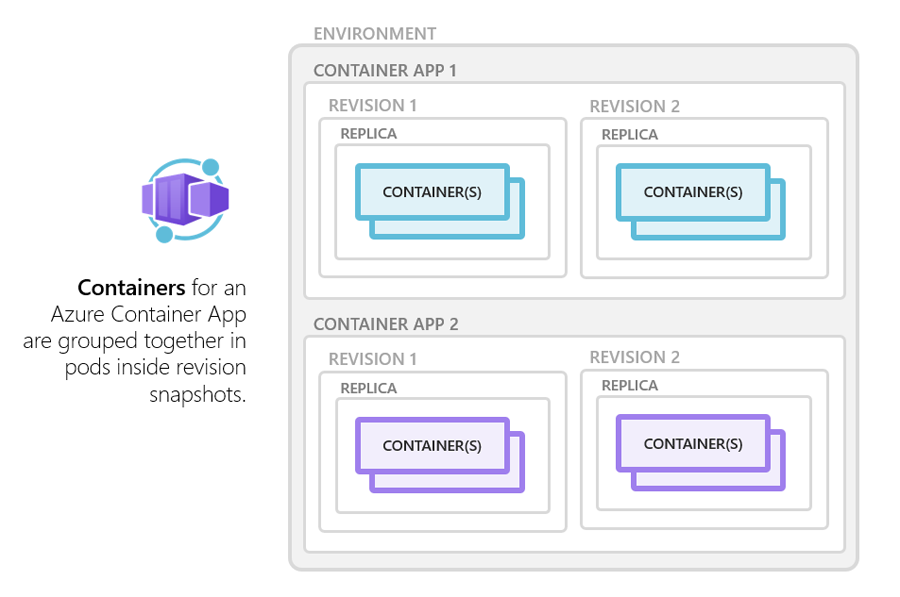
Let's break down these components.
Use Azure Container Apps to build, deploy, diagnose, and monitor your .NET apps
The following video from Microsoft Azure Developers explains these core architectural concepts with clear visuals.
Watch the section from 02:54 to 04:39. Pay close attention to the explanation of: Environment: The virtual network boundary for your apps. Revisions: The mechanism for versioning and enabling safe deployment strategies like traffic splitting. Replicas: The running instances of your app that allow it to scale.
To summarize the key terms:
- Environment: A secure boundary that groups a set of container apps. Apps within the same environment are deployed into the same virtual network and can communicate with each other easily and securely using DNS-based service discovery. You might create separate environments for development, testing, and production.
- Container App: Represents your application or microservice. It's where you define the container image to use, resource requirements, and scaling rules.
- Revision: An immutable snapshot (a specific version) of your container app. Whenever you update your app's configuration or container image, a new revision can be created. This is a powerful feature that enables versioning and safe deployment patterns like A/B testing or blue-green deployments by allowing you to split traffic between different revisions.
- Replica: A running instance of a specific revision. Scaling your application means running more replicas. ACA can automatically add or remove replicas based on defined rules.
3. Key Features: The Power of Open Source
Azure Container Apps integrates powerful open-source technologies to provide a rich feature set out of the box. This lets you build sophisticated distributed systems without having to manually set up and configure these tools yourself.
Azure Container Apps is packed with features designed to simplify the development of containerized applications. This official overview from Microsoft Learn provides a comprehensive list, which we'll summarize next.
Quickly scan the 'Features' section of this document. You don't need to memorize every item, but get a feel for the breadth of capabilities provided, such as Dapr integration, autoscaling with KEDA, and built-in service discovery.
Here are the most critical features for a developer to understand:
- Dynamic Autoscaling (KEDA): ACA uses the Kubernetes Event-driven Autoscaler (KEDA). This means your app can scale based not just on CPU and memory, but on a wide variety of event sources. For example, it can scale the number of replicas based on the number of messages in an Azure Service Bus queue or the rate of incoming HTTP requests. Most apps can even scale to zero, meaning you pay for no resources when the app is idle.
- Microservices Enablement (Dapr): It offers built-in integration with the Distributed Application Runtime (Dapr). Dapr provides a set of APIs that simplify common microservice challenges, such as:
- Service-to-service invocation (service discovery)
- State management
- Publish/subscribe messaging
- Secret management
This is an optional feature, but it can significantly accelerate the development of robust, distributed applications.
- Built-in Ingress and Service Discovery: ACA can automatically provide an HTTPS endpoint for your application, complete with a TLS certificate. Within an environment, services can discover and call each other by name, simplifying the network configuration for your microservices architecture.
- Application Lifecycle Management: The revision system enables advanced deployment scenarios like traffic splitting. You can direct a small percentage of traffic (e.g., 5%) to a new revision to test it in production (a "canary" release) before rolling it out to all users.
- Jobs: In addition to long-running services and APIs, you can run jobs that execute on a schedule, on-demand, or in response to an event, and then shut down.
4. Common Use Cases
The features of Azure Container Apps make it a versatile platform suitable for a range of modern application patterns.
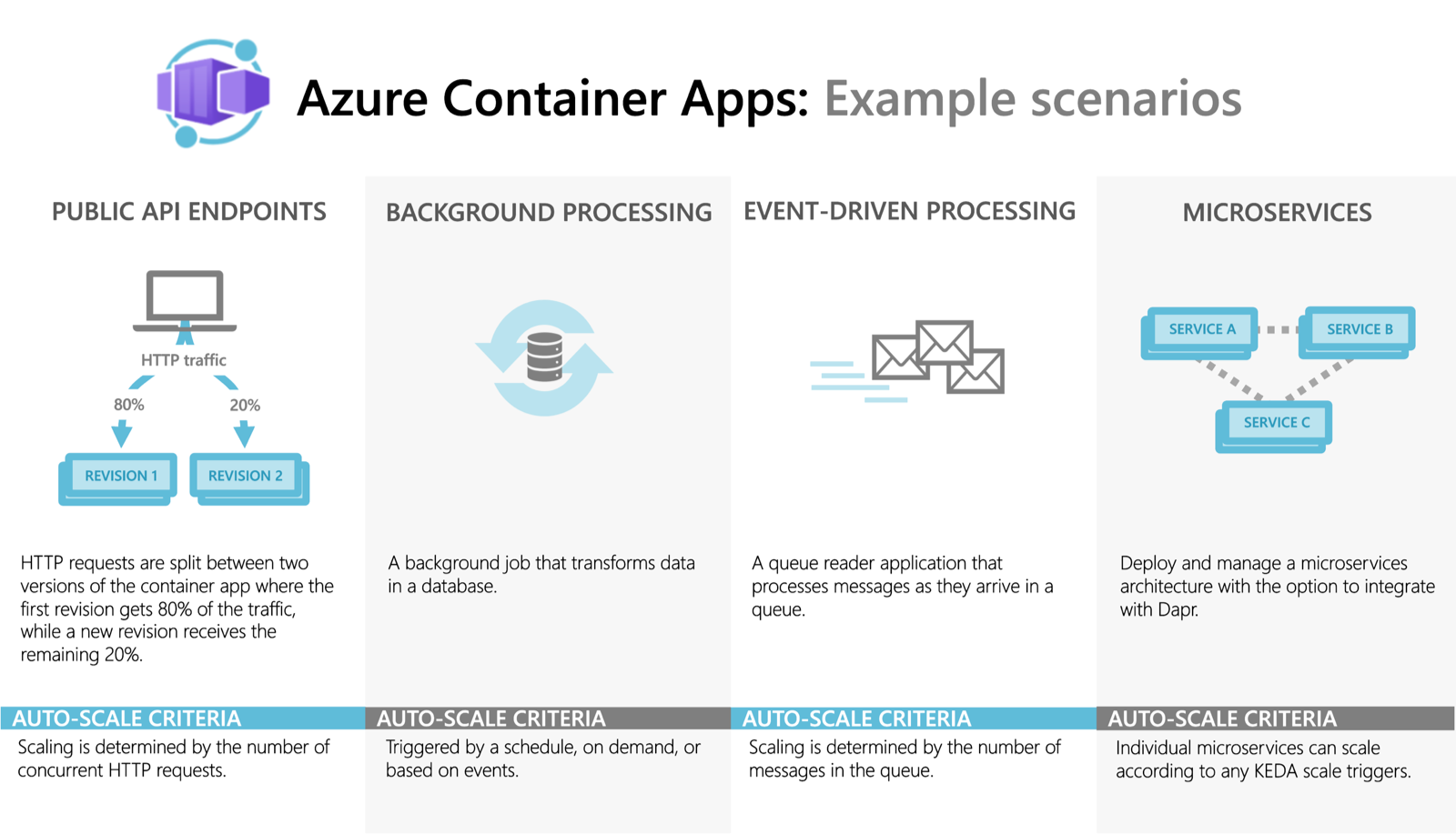
As shown in the diagram, the main use cases are:
- Public API Endpoints: Deploying public-facing REST APIs that need to scale automatically based on HTTP traffic.
- Background Processing: Running containerized jobs for tasks like data transformation, report generation, or scheduled maintenance.
- Event-Driven Processing: Building applications that react to events, such as processing items from a message queue. KEDA's scaling capabilities are perfect for this, as the app can scale out to handle a surge in messages and then scale back to zero.
- Microservices: This is the primary use case. ACA provides the ideal environment for deploying multiple, independent services that communicate with each other, with each service having its own scaling rules and lifecycle.
5. ACA vs. Other Azure Container Services
Knowing when to choose ACA over other services is a key skill for the AZ-204 exam. Having worked with ACI and now understanding ACA, let's formalize the comparison.
Comparing Container Apps with other Azure container options
This Microsoft Learn document provides a detailed comparison of Azure's container offerings, which is essential reading for the exam.
Read the sections titled 'Azure Container Apps', 'Azure Container Instances', and 'Azure Kubernetes Service'. Focus on the key differentiators that help you decide which service to use for a given scenario.
Here is a summary table to help you consolidate this information:
| Feature | Azure Container Instances (ACI) | Azure Container Apps (ACA) | Azure Kubernetes Service (AKS) |
|---|---|---|---|
| Primary Use Case | Single containers, task automation, build jobs | Microservices, APIs, event-driven apps, jobs | Full-fledged container orchestration at scale |
| Management Level | Serverless (no infra to manage) | Fully managed PaaS (serverless compute) | You manage worker nodes, upgrades, and cluster config |
| Scaling | Manual | Advanced, event-driven (KEDA), scales to zero | Full control, complex autoscaling options |
| Networking | Basic (public IP per instance) | Built-in ingress, service discovery, VNet | Full control (CNI plugins, service mesh, etc.) |
| Developer Experience | "Run a container" | "Build an application" | Full Kubernetes API access and control |
| Best For | Simplicity and speed for single containers | Developer productivity for microservices | Maximum control and flexibility |
In short:
- Use ACI for the simplest tasks.
- Use ACA when you want to build applications and microservices with powerful features without managing Kubernetes.
- Use AKS when you need direct access to the Kubernetes API and full control over the cluster environment.
Conclusion
In this lesson, you've learned that Azure Container Apps is a powerful, serverless platform that provides the ideal environment for running modern, containerized microservices. It abstracts away the complexity of Kubernetes while still providing its power through features like event-driven scaling, built-in service discovery, and a revision-based deployment model.
Key Takeaways:
- Azure Container Apps is the "sweet spot" between the simplicity of ACI and the power of AKS.
- Its architecture is based on Environments, Container Apps, Revisions, and Replicas.
- It is powered by open-source technologies like Kubernetes, KEDA, and Dapr to provide advanced features out-of-the-box.
- The primary use cases include microservices, public APIs, event-driven processing, and background jobs.
Next Steps
Now that you understand what Azure Container Apps is and why you'd use it, our next lesson will be hands-on. We will take the same Docker image from your Azure Container Registry and deploy it as a microservice to Azure Container Apps, putting these concepts into practice.