Hello! Welcome to the second module of your AZ-204 certification journey.
Introduction
In the previous module, you mastered the fundamentals of Infrastructure as Code (IaC) by provisioning an Azure Storage Account using Bicep. You now know how to create Azure resources in a declarative, repeatable manner.
Now, we shift our focus from how to provision resources to what specific services we will use to build and host our applications. This module, "Developing for Azure App Service," is central to the AZ-204 exam and highly relevant to your background as a .NET developer.
Today's lesson addresses the learning outcome: Describe the features, pricing tiers, and use cases of Azure App Service. We will explore:
- What Azure App Service is and its core concepts.
- The key features that make it a powerful Platform-as-a-Service (PaaS).
- The different pricing tiers and how they map to various needs, from development to production.
- Common scenarios where App Service is the ideal choice.
This lesson is foundational. It provides the "why" and "what" before we dive into the "how" of deploying your first .NET application in the next lesson.
What is Azure App Service?
At its core, Azure App Service is a fully managed platform for building, deploying, and scaling web applications and APIs. As a Platform-as-a-Service (PaaS) offering, it abstracts away the underlying infrastructure—such as virtual machines, operating systems, and web servers (like IIS). This allows you to focus purely on your application code and business logic, which is a natural fit for your development background.
App Service can host various types of applications, including web apps, RESTful APIs, and mobile back-ends. Given your experience with C#, .NET, and REST APIs, you'll find it to be Azure's most direct and feature-rich environment for hosting your solutions.
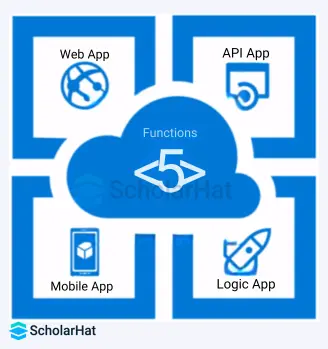
A critical concept to understand is the distinction between an App Service and an App Service Plan.
- App Service: This is your deployed application—your code, its configuration, and its unique URL (like
yourapp.azurewebsites.net). - App Service Plan: This represents the underlying compute resources (the virtual machine or VMs) that run your App Service. It defines the region, operating system (Windows/Linux), CPU, memory, and storage.
Think of the App Service Plan as the server and the App Services as the multiple websites you can host on that server. You are billed for the App Service Plan, not for each individual app within it.
To start, let's watch a short introduction that covers these fundamental concepts.
Azure App Service (Web Apps) Tutorial
This video from Adam Marczak - Azure for Everyone provides a clear, high-level introduction to Azure App Service and the concept of an App Service Plan.
Watch from 00:25 to 02:19. Pay close attention to the explanation of how an App Service relates to an App Service Plan and the variety of supported languages.
Key Features of Azure App Service
App Service is more than just a place to run your code; it comes with a rich set of features designed to support the entire application lifecycle.
- Multi-language and OS Support: Natively supports .NET, .NET Core, Java, Ruby, Node.js, PHP, and Python. You can run your apps on either Windows or Linux.
- DevOps Integration: Provides first-class continuous integration and continuous deployment (CI/CD) with Azure DevOps, GitHub, Bitbucket, and other tools. You can set up pipelines that automatically build and deploy your code upon a
git push. - Scalability: This is one of the most powerful features of PaaS.
- Scale Up (Vertical Scaling): Increase the compute resources for your app by moving to a higher pricing tier (e.g., more CPU, RAM, and storage).
- Scale Out (Horizontal Scaling): Increase the number of VM instances running your app to handle higher traffic loads. This can be done manually or automatically based on performance metrics like CPU usage.
- Deployment Slots: These are live apps with their own hostnames, which you can use as staging or testing environments. You can deploy to a staging slot, test your changes, and then "swap" it with the production slot. This enables zero-downtime deployments.
- Security: Offers robust security features, including integration with Microsoft Entra ID for user authentication, IP restrictions, and managed identities for secure access to other Azure services.
- Custom Domains & SSL: You can easily map custom domain names to your app and secure them with TLS/SSL certificates.
The following video provides a great overview of these features.
Azure App Service (Web Apps) Tutorial
Let's continue with the same video to get an overview of the most important features of App Service.
Watch from 02:19 to 03:42 and then from 10:42 to 11:19. The first segment covers general features, and the second provides a clear visual explanation of 'Scale up' vs. 'Scale out'.
App Service Plans and Pricing Tiers
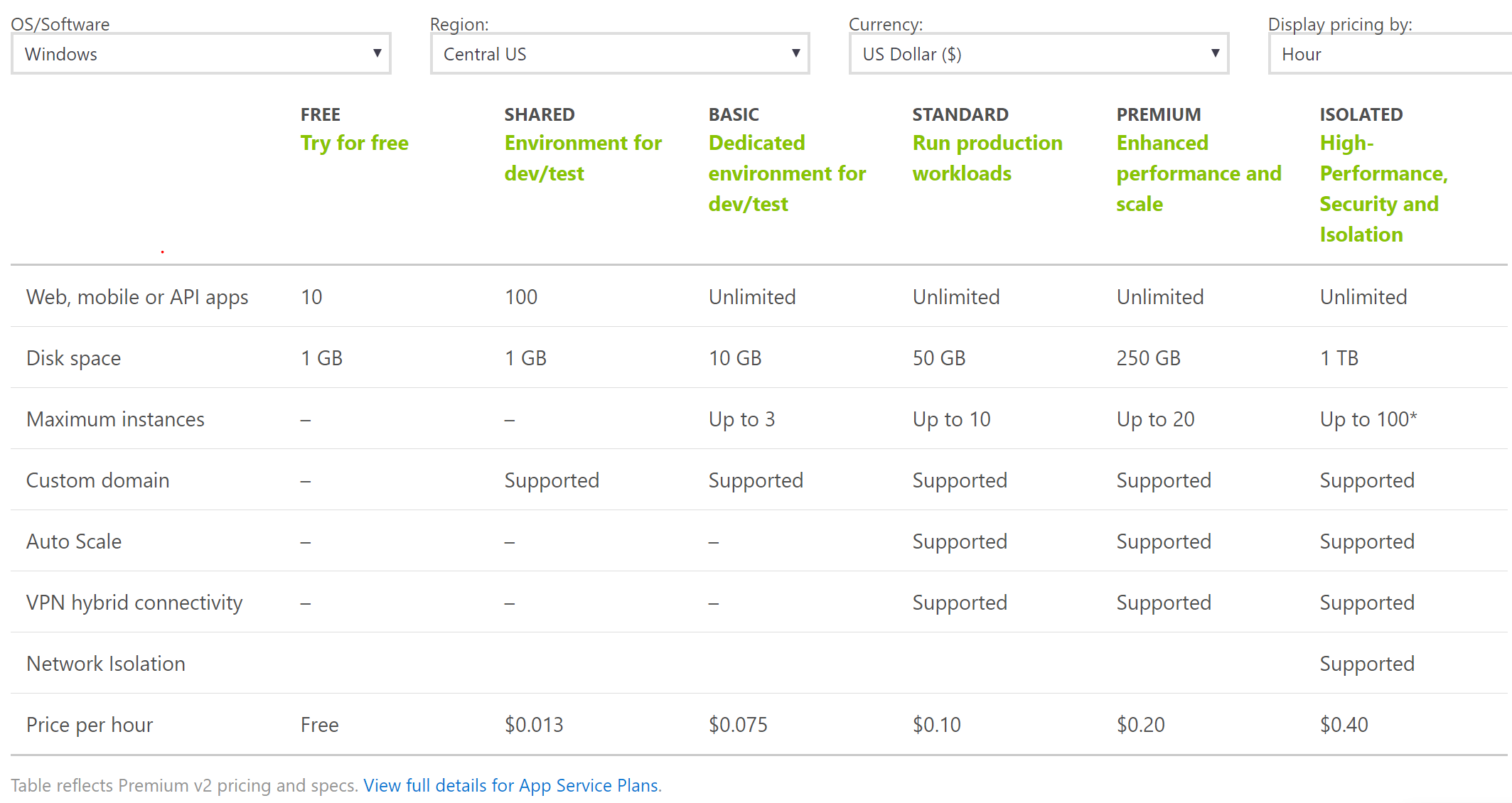
The choice of an App Service Plan is the most significant decision you'll make regarding cost, performance, and available features. The plan's pricing tier determines everything from whether you can use a custom domain to how many instances you can scale out to.
The tiers are broadly categorized based on the underlying compute environment:
- Shared Compute (
Free,Shared): Your app runs on a VM alongside other customers' apps. These tiers are intended for development, testing, and low-traffic hobby sites. They have resource quotas and do not support scaling out. - Dedicated Compute (
Basic,Standard,Premium): Your app runs on dedicated VMs. Only apps within your own App Service Plan share these resources. These tiers are designed for production workloads and offer progressively more features like deployment slots, auto-scaling, and daily backups as you move from Basic to Premium. - Isolated: Your app runs in a completely isolated and dedicated environment within an Azure Virtual Network. This provides maximum security and performance for mission-critical applications.
The following resources provide a comprehensive breakdown of these tiers. Start with the video for a conceptual overview, then use the Microsoft Learn document as a detailed reference.
AZ-204 Exam EP 03: App Service Plan
This video from A Guide To Cloud focuses specifically on App Service Plans, explaining the different categories and how billing works.
Watch from 03:39 to 09:10. This will give you a solid understanding of the different pricing tier categories (Shared, Dedicated, Isolated) and how the cost is calculated.
Now, let's dive into the official documentation for a detailed look at what each tier offers.
Azure App Service Plans - Microsoft Learn
The Microsoft Learn documentation is the definitive source for App Service Plan details. Please read the following sections to solidify your understanding of the tiers and their implications.
Read the sections 'What are Azure App Service plans?', 'Pricing tiers', 'Considerations for running and scaling an app', 'Cost of App Service plans', and 'Scaling for capabilities or features'. This will reinforce the concepts from the video and provide the detailed information needed for the exam.
To bring it all together, here is a helpful comparison table that summarizes the key features available in each of the main tiers.
Use Cases: When to Choose App Service
With a clear understanding of its features and tiers, deciding when to use App Service becomes straightforward. It excels in the following scenarios:
- Hosting Web Applications and APIs: This is its primary purpose. For a .NET developer, it's the most natural choice for deploying ASP.NET Core web apps and Web APIs.
- Mobile Backends: It can easily serve as the backend for mobile applications, providing data storage, authentication, and push notifications.
- Automated Scaling: For applications with variable traffic, the auto-scaling capabilities of the Standard tier and above are invaluable for maintaining performance while managing costs.
- Rapid Development and Deployment (CI/CD): When you need to set up a robust, automated deployment pipeline quickly without managing build servers, App Service's DevOps integrations are a perfect fit.
The following short video provides a simple decision-making framework for when to choose App Service over other Azure compute options like Virtual Machines or Containers.
Azure App Service (Web Apps) Tutorial
To conclude our exploration, let's watch this final clip which presents a decision tree for choosing App Service.
Watch from 17:33 to 19:30. Focus on the scenarios where App Service is recommended for new applications and migrations.
Conclusion
In this lesson, you have gained a comprehensive, conceptual understanding of Azure App Service. This knowledge is crucial for making informed architectural decisions as an Azure developer.
Key Takeaways:
- App Service is a PaaS that manages the infrastructure, letting you focus on code.
- An App Service Plan provides the compute resources, and its pricing tier dictates the cost, performance, and available features.
- The tiers are grouped into Shared, Dedicated, and Isolated, each serving different needs from dev/test to mission-critical production.
- Key features like scaling, deployment slots, and CI/CD integration are what make App Service a powerful platform for modern web development.
- It's the ideal service for hosting .NET web applications and APIs in Azure.
Next Steps
Now that you're familiar with the theory, it's time to put it into practice. In our next lesson, you will create and deploy your first .NET web application to Azure App Service using Visual Studio. You will see firsthand how easy it is to get your code running in the cloud.