Introduction
Welcome to a new module in your AZ-204 learning path! In the previous module, you gained hands-on experience with containerized applications, from building Docker images to deploying and scaling them on Azure Container Apps. This foundation in compute services is essential for modern cloud development.
Now, we shift our focus to another fundamental pillar of any cloud solution: data storage. Applications are rarely useful without data, and Azure provides a rich set of services for storing and managing it. This module, "Implementing Azure Blob Storage," will introduce you to Microsoft's massively scalable object storage solution.
Today's lesson addresses the learning outcome: Describe Azure Blob Storage account types, access tiers, and redundancy options.
Before you can write code to upload or download files, you must first provision a home for that data. This involves making several key architectural decisions that impact performance, cost, and durability. This lesson is conceptual and foundational. We will explore the "what" and "why" behind these choices, preparing you for the hands-on creation of storage resources in our next session.
What is Azure Storage?
At the highest level, all Azure storage services are managed through a resource called a Storage Account. Think of it as a unique namespace in Azure that acts as a container for your data objects. A single storage account can hold:
- Blobs: Massively scalable object storage for text and binary data, which is our focus for this module.
- Files: Managed file shares for cloud or on-premises deployments.
- Queues: A messaging store for reliable messaging between application components.
- Tables: A NoSQL store for schemaless storage of structured data.
Azure Blob (Binary Large Object) Storage is designed to store and serve massive amounts of unstructured data, such as images, videos, documents, and backups.
To get a quick overview of the storage account and the hierarchy of Blob storage, please watch the first few minutes of this video.
AZ-204 Exam EP 11: Solutions that uses Azure Blob Storage
This video from 'A Guide To Cloud' provides a good introduction to what an Azure Storage Account contains and how Blob storage is structured.
Watch the segment from 02:02 to 04:29. Focus on understanding: The role of a Storage Account as a unique, accessible namespace. The definition of Blob storage for unstructured data. The three-level hierarchy: Storage Account -> Container -> Blob.
As you saw, the structure is logical: you create a storage account, then create one or more containers within it (similar to directories), and finally, you place your blobs (files) inside those containers.
Storage Account Types and Performance Tiers
When you create a storage account, the first major decision involves its type and performance characteristics. This choice directly influences which services are available, the underlying hardware, and the pricing model.
There are two primary performance tiers:
- Standard: Uses magnetic drives (HDD). This is a lower-cost option suitable for bulk storage, applications with less sensitivity to latency, and data that is infrequently accessed.
- Premium: Uses solid-state drives (SSD) for high-performance, low-latency workloads. This is ideal for applications requiring fast and consistent response times, such as interactive web applications or high-throughput analytics.
Within these tiers, you select an account kind. While several exist, for the AZ-204 exam and modern development, you should focus on these:
- General-purpose v2 (GPv2): This is the current standard. It supports all storage services (Blobs, Files, Queues, Tables) and both performance tiers (though you choose one at creation). It gives you access to all the latest features, including access tiers, which we'll discuss next. You should almost always choose this unless you have a specific reason not to.
- Premium Block Blobs: A specialized account type that provides the highest performance for block blobs and append blobs. It's built on SSDs and is optimized for workloads with high transaction rates or that need very low-latency access.
Azure Storage Account Types, Performance and Cost
John Savill provides an excellent breakdown of the different account types, performance tiers, and their cost implications. His explanation will help clarify when to choose one over the other.
Please watch the following segments: 00:00 - 01:52: Introduction to Standard vs. Premium and the account kind options. 07:06 - 09:21: Deep dive into the Premium Block Blob account type and its performance characteristics. 15:41 - 18:10: A final summary that clearly articulates the primary use cases for each account type.
The key takeaway is that for most blob storage scenarios, you will start with a Standard General-purpose v2 account. If your application demands very low latency and high transaction rates, you would then consider a Premium Block Blob account.
Blob Access Tiers
For General-purpose v2 accounts, Azure provides another layer of cost optimization called access tiers. This feature allows you to store your blob data in the most cost-effective manner based on how frequently you expect to access it. The cost trade-off is simple: the "hotter" the tier, the higher the storage cost but the lower the access cost.
The three main access tiers are:
- Hot: Optimized for storing data that is accessed frequently. It has the highest storage costs but the lowest access costs. This is the default tier and is perfect for things like images and assets for a live website.
- Cool: Optimized for storing data that is infrequently accessed and stored for at least 30 days. It has lower storage costs but higher access costs compared to the Hot tier. Use cases include short-term backup and disaster recovery datasets.
- Archive: Optimized for storing data that is rarely accessed and stored for at least 180 days, with flexible latency requirements (on the order of hours to retrieve). It has the lowest storage cost but the highest retrieval cost. This tier is for long-term backup, raw original data, and compliance archives. Data in the Archive tier is considered offline and must be "rehydrated" to a Hot or Cool tier before it can be read.
Azure Storage Account Types, Performance and Cost
Let's return to John Savill's video, where he masterfully explains the economics of access tiers.
Watch the segment from 04:36 to 06:58. Pay close attention to the relationship between storage cost and transaction (access) cost for the Hot, Cool, and Archive tiers.
Understanding these tiers is crucial for designing cost-effective solutions on Azure. You can set the tier for a blob when you upload it, or you can change it later, either manually or automatically using Lifecycle Management policies (a topic we will cover in a future lesson).
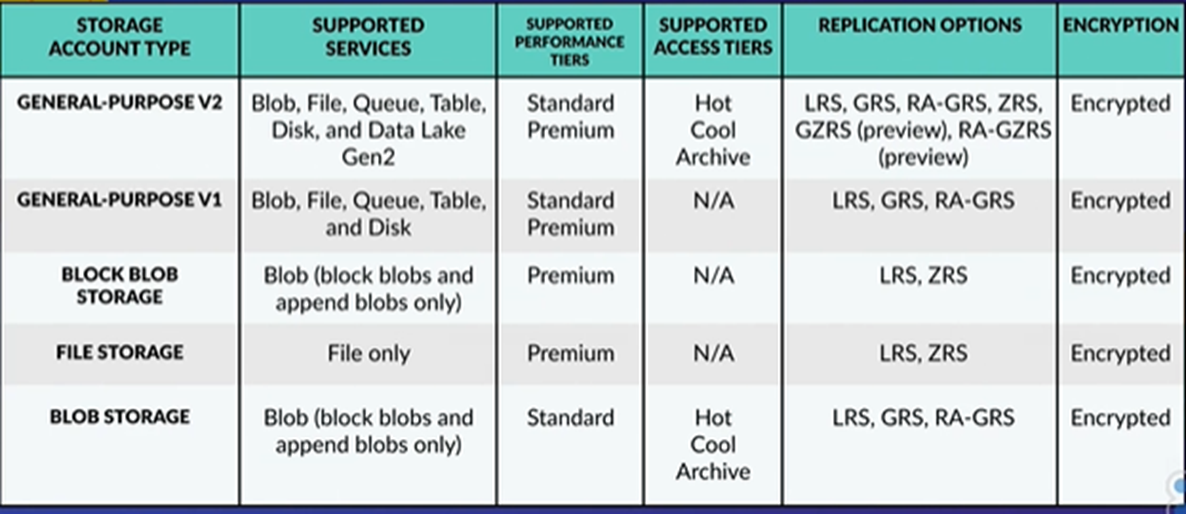
This table provides a great summary of how account types, services, and tiers relate.
Data Redundancy Options
The final, and perhaps most critical, architectural choice is the redundancy option. This determines how many copies of your data are maintained and where they are located, providing protection against everything from a single disk failure to a catastrophic regional disaster.
Your choice here is a trade-off between cost, durability (guarantee against data loss), and availability (guarantee of being accessible).
Redundancy strategies are grouped into two main categories:
1. Redundancy in the Primary Region
These options protect against hardware failures within a single data center or across data centers within one Azure region.
- Locally-Redundant Storage (LRS): Creates three copies of your data within a single physical data center. It's the lowest-cost option but is vulnerable to a large-scale disaster affecting the entire data center.
- Zone-Redundant Storage (ZRS): Creates three copies of your data, spreading them synchronously across three different Availability Zones within the primary region. This protects against a data center-level failure.
2. Geo-Redundancy (Redundancy in a Secondary Region)
These options replicate your data to a secondary Azure region hundreds of miles away to protect against a regional disaster.
- Geo-Redundant Storage (GRS): Combines LRS in the primary region with an asynchronous copy to a secondary region (where it is also stored with LRS).
- Geo-Zone-Redundant Storage (GZRS): The most durable option. It combines ZRS in the primary region with an asynchronous copy to a secondary region.
- Read-Access Variants (RA-GRS and RA-GZRS): These are identical to GRS and GZRS but with an important addition: they allow read-only access to the data in the secondary region even when the primary region is fully operational. This is critical for applications that need the highest possible availability for read operations.
The following image provides an excellent visual of these options.

To solidify your understanding, please study the official Microsoft documentation, which is the definitive source for this topic.
The official Microsoft documentation, 'Azure Storage redundancy,' provides detailed explanations and summary tables that are perfect for study and exam preparation.
Read through this document, focusing on these sections: Introduction: Understand the factors that influence your choice. Redundancy in the primary region: Get the details on LRS and ZRS. Redundancy in a secondary region: Understand GRS and GZRS, and the concept of asynchronous replication. Read access to data in the secondary region: Grasp the purpose of RA-GRS and RA-GZRS. Summary of redundancy options: Pay close attention to the tables. They are an invaluable resource for comparing durability percentages, availability SLAs, and supported services for each option.
Conclusion
In this lesson, you have learned about the fundamental architectural decisions required before using Azure Blob Storage. These choices are not just configuration details; they are critical decisions that define the performance, cost, and resilience of your application's data layer.
Key Takeaways:
- Storage Account Types: For most blob storage needs, General-purpose v2 is the recommended account type. For extreme performance, Premium Block Blobs is the choice.
- Access Tiers: You can balance storage costs and access costs by choosing the right tier (Hot, Cool, or Archive) based on how frequently data is used.
- Redundancy Options: Azure offers a spectrum of choices to protect your data, from LRS (local, low-cost) to GZRS (multi-region, multi-zone, high durability). Adding Read-Access (RA) provides higher read availability.
- The Golden Rule: Your choice for each of these options is always a trade-off, primarily between cost, performance, and durability. Understanding this trade-off is key to being an effective Azure developer.
Next Steps
Now that you have a solid conceptual understanding of these foundational elements, you are ready to put theory into practice. In the next lesson, you will create a storage account and blob containers using the Azure CLI, applying the concepts you've learned today to provision your first piece of Azure Storage infrastructure.