Welcome to the final lesson of our module on managing conversational context. In our previous sessions, we built a robust RAG pipeline, enabled it to understand conversational context by reformulating questions, and implemented history trimming to prevent the context from growing indefinitely.
However, our chatbot still has a critical limitation: its memory is ephemeral. The store dictionary we used to hold conversations is wiped clean every time the application restarts. For any real-world application, especially a Telegram bot meant to interact with multiple users, this is not a viable solution.
Today, we will solve this by implementing a persistent storage backend for our chat histories. You will learn how to use a simple file-based database (SQLite) to save conversations, ensuring they survive application restarts. Crucially, you will see how the session_id we've been using becomes the key to managing distinct, separate conversation histories for multiple users.
The Central Role of session_id
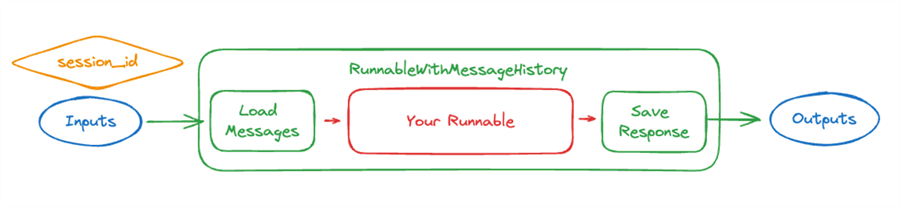
The RunnableWithMessageHistory wrapper is designed for multi-user scenarios. The entire mechanism hinges on the session_id you provide in the config dictionary during invocation. This ID acts as a key to a specific conversation history.
The process is straightforward:
- When you invoke the chain,
RunnableWithMessageHistoryreceives thesession_id. - It uses this ID to call the history factory function (our
get_session_historyfunction) to retrieve the correct message history object. - It loads the messages from this object and passes them into your chain.
- After the chain runs, it takes the new input and the AI's output and saves them back to the same history object.
This flow is visualized in the diagram below.
To see this multi-session management in action, the following video provides a clear and practical demonstration.
Chatbot Using @LangChain With Memory(Chat History) | LangChain Core | LangSmith
This video by Sunny Savita provides an excellent hands-on demonstration of how RunnableWithMessageHistory uses session_id to manage separate conversations.
Watch the section from this segment. The presenter first has a conversation using session_id = 'first_chat' and shows the model remembers his name. Then, he switches to session_id = 'second_chat' and asks the same question; the model has no memory of the name. Finally, switching back to 'first_chat' restores the original context. This perfectly illustrates the concept we're about to implement with persistent storage.
From In-Memory Dictionary to a Persistent Database
Our current get_session_history function relies on a global dictionary. To make our histories persistent, we need to replace this with a real database. We'll use SQLite, a serverless, file-based database engine that is perfect for local development and small-to-medium scale applications. Communication with the database will be handled by SQLAlchemy, a popular Object-Relational Mapper (ORM) for Python.
The core idea is to create a custom chat history class that reads from and writes to our SQLite database, and then have our get_session_history function provide instances of this class to RunnableWithMessageHistory.
For a detailed walkthrough of this process, the following article is an excellent resource. We will be adapting its approach for our project.
Mastering LangChain RAG: Integrating Chat History (Part 2)
This Medium post details how to add persistence to a conversational chain using SQLAlchemy and SQLite, moving from an in-memory dictionary to a robust database backend.
Focus on the section titled Adding Persistence. Pay close attention to how the database models (Session, Message) are defined and how the save_message and load_session_history functions interact with the database. We will build a slightly more integrated version of this.
Implementing the Persistence Layer
Let's start by creating a new file to house all our database-related logic.
1. Create a new file: src/lcel_quickstart/persistence.py
This file will contain our SQLAlchemy database models and our custom chat history class. Add the following code to it.
# src/lcel_quickstart/persistence.py

import sqlite3
from typing import List
from langchain_core.chat_history import BaseChatMessageHistory
from langchain_core.messages import BaseMessage, message_to_dict, messages_from_dict


# This is a simplified, file-based persistence layer.
# For production, you would use a more robust database like PostgreSQL.

class SQLiteChatMessageHistory(BaseChatMessageHistory):
    """
    Chat message history stored in a SQLite database.

    Args:
        session_id: The ID of the session.
        db_path: The path to the SQLite database file.
    """

    def __init__(self, session_id: str, db_path: str = "chat_history.db"):
        self.db_path = db_path
        self.session_id = session_id


        # Create table if it doesn't exist
        with sqlite3.connect(self.db_path) as conn:
            cursor = conn.cursor()
            cursor.execute(
                """
                CREATE TABLE IF NOT EXISTS message_store (
                    session_id TEXT,
                    message_json TEXT
                )
                """
            )
            conn.commit()

    @property
    def messages(self) -> List[BaseMessage]:
        """Retrieve messages from the database."""
        with sqlite3.connect(self.db_path) as conn:
            cursor = conn.cursor()
            cursor.execute(
                "SELECT message_json FROM message_store WHERE session_id = ?",
                (self.session_id,),
            )
            items = [item[0] for item in cursor.fetchall()]

        messages = messages_from_dict([{"type": "string", "data": item} for item in items])
        return messages

    def add_message(self, message: BaseMessage) -> None:
        """Append a message to the database."""
        message_json = message_to_dict(message)

        with sqlite3.connect(self.db_path) as conn:
            cursor = conn.cursor()
            cursor.execute(
                "INSERT INTO message_store (session_id, message_json) VALUES (?, ?)",
                (self.session_id, str(message_json)),
            )
            conn.commit()

    def clear(self) -> None:
        """Clear all messages from the database for this session."""
        with sqlite3.connect(self.db_path) as conn:
            cursor = conn.cursor()
            cursor.execute(
                "DELETE FROM message_store WHERE session_id = ?", (self.session_id,)
            )
            conn.commit()
This SQLiteChatMessageHistory class does three key things:
- It inherits from
BaseChatMessageHistory, satisfying the type requirement for LangChain's history objects. - In its
__init__, it ensures the database file and themessage_storetable exist. - It implements the required methods:
messages(to load history),add_message(to save a message), andclear(to delete history). Each method opens a connection to the SQLite database to perform its operation.
2. Update the Chain to Use the New Persistence Layer
Now, we can modify src/lcel_quickstart/chain.py to use our new SQLiteChatMessageHistory class. The changes are minimal but powerful.
First, remove the old in-memory store and import our new class. Then, update get_session_history.
# src/lcel_quickstart/chain.py


# ... (other imports)
from langchain_community.chat_message_histories import ChatMessageHistory # REMOVE THIS LINE
from langchain_core.chat_history import BaseChatMessageHistory # Keep this
from langchain_core.runnables.history import RunnableWithMessageHistory
from langchain_core.messages import trim_messages
from functools import partial


# Import our new persistence class
from .persistence import SQLiteChatMessageHistory


# REMOVE the global store dictionary
# store = {}

def get_session_history(session_id: str) -> BaseChatMessageHistory:
    """
    Returns a new SQLite-backed chat history object for the given session_id.
    """


    # No more in-memory dictionary. We return a new instance that
    # connects to the database based on the session_id.
    return SQLiteChatMessageHistory(session_id=session_id, db_path="chat_history.db")


# The get_history_aware_rag_chain() function remains UNCHANGED.
# ... (rest of the file)
That's it. We've replaced the ephemeral dictionary with a database-backed history by simply changing what the get_session_history function returns. RunnableWithMessageHistory now seamlessly communicates with our SQLite database through the interface provided by our custom class.
Testing Persistent, Multi-User History
To confirm that our changes work, let's update the main execution block in src/lcel_quickstart/chain.py to simulate two different users interacting with the bot across separate script executions.
# src/lcel_quickstart/chain.py

if __name__ == '__main__':
    import sys

    rag_chain_with_history = get_history_aware_rag_chain()

    if len(sys.argv) < 2:
        print("Usage: python -m src.lcel_quickstart.chain [session_id]")
        sys.exit(1)

    session_id = sys.argv[1]
    config = {"configurable": {"session_id": session_id}}

    print(f"--- Chatting with session_id: {session_id} ---")
    print("--- (Type 'exit' to end session) ---")

    while True:
        try:
            query = input("User: ")
            if query.lower() == 'exit':
                break

            result = rag_chain_with_history.invoke({"input": query}, config=config)
            print(f"AI: {result['answer']}")
        except KeyboardInterrupt:
            break

    print("\n--- Session ended. ---")
Now, you can test the persistence as follows.
Test Run 1: Conversation with "user_eva"
Open your terminal and run the script, passing user_eva as the session ID.
uv run python -m src.lcel_quickstart.chain user_eva
Have a short conversation:
User: My name is Eva. I am a data engineer.
AI: Hello Eva! It's nice to meet you. How can I help you with your data engineering work today?
User: What is LCEL?
AI: LCEL stands for LangChain Expression Language. It is a declarative way to compose chains of components, making it easy to build, customize, and stream complex applications.
User: exit
Test Run 2: Conversation with "user_alex"
Now, run the script again, but this time with a different session ID, user_alex.
uv run python -m src.lcel_quickstart.chain user_alex
Ask a question that would require context from the previous chat.
User: What is my name?
AI: I'm sorry, but I don't have access to your name. You haven't told me what it is yet.
User: exit
The bot correctly states that it doesn't know the name, proving that user_alex's session is isolated from user_eva's.
Test Run 3: Resuming with "user_eva"
Finally, run the script one more time, reusing the first session ID.
uv run python -m src.lcel_quickstart.chain user_eva
Now ask the context-dependent question again.
User: What is my name?
AI: Your name is Eva.
The bot remembers! It successfully loaded the history for user_eva from the chat_history.db file that was created in your project directory. This confirms that our history is both persistent and correctly partitioned by session_id.
The process of using a persistent backend like PostgreSQL is conceptually identical, as demonstrated in this video. The only difference is the specific history class used (PostgresChatMessageHistory) and the connection details.
Building Custom LLM Chatbot | LangChain & Postgres
This video by "Code with Irtiza" demonstrates the exact same pattern using PostgreSQL as the persistent store. It's a great illustration of how the principle applies to different database backends.
You can watch from the beginning to see the setup. The key parts are the explanation of session IDs for isolating user history (), the creation of a get_by_session_id function that returns a PostgresChatMessageHistory object (), and the live demo of starting a new session and resuming an old one ().
Conclusion
Congratulations on completing this module! You have now equipped your chatbot with a persistent, multi-user memory system—a cornerstone of any production-ready conversational application.
Here are the key takeaways from this lesson:
- Ephemeral vs. Persistent Memory: In-memory dictionaries are fine for prototyping, but a database is required for conversations to survive application restarts.
session_idis the Key: This identifier is the mechanism by whichRunnableWithMessageHistorydistinguishes between different users or conversation threads.- Custom History Objects: By implementing the
BaseChatMessageHistoryinterface, you can create custom connectors to any storage backend you need, giving you immense flexibility. - SQLite as a Starter Database: SQLite provides a simple, file-based solution for persistence that is easy to set up and manage during development.
In the next module, "Creating Structured Tools," we will pivot from conversational mechanics to expanding our LLM's capabilities. You'll learn how to make the model call custom functions and return structured data (like JSON), which is the first major step toward building powerful, autonomous agents.