Welcome to the first lesson of our new module, "Creating Structured Tools." In the previous module, we successfully built a conversational RAG pipeline and equipped it with a persistent, multi-user memory system. Our chatbot can now hold distinct, continuous conversations. However, its interactions are still limited to generating free-form text.
Today, we'll take a significant step towards building more powerful and predictable applications. You'll learn how to compel a Large Language Model (LLM) to return its output in a specific, structured format, such as JSON. This is the critical bridge between the probabilistic world of language models and the deterministic world of software systems, APIs, and databases. We will achieve this by defining a schema with Pydantic and binding it to an LLM using LangChain's .with_structured_output() method. This lays the foundation for creating tools and, eventually, autonomous agents.
The Challenge of Unstructured Outputs
By default, LLMs generate text. While you can prompt them to produce JSON or other formats, the output is not guaranteed. The model might generate a string that looks like JSON but has syntax errors, or it might include conversational text around the structured data (e.g., "Sure, here is the JSON you requested:..."). For an application that needs to programmatically use this output—for example, to update a database or call another API—this unreliability is a major point of failure.
This is a familiar problem from the world of data engineering: you need to enforce a schema on incoming data to ensure your pipelines are robust. Pydantic, a library you may have encountered, is a perfect tool for this. It allows us to define a data schema using Python type hints and then validates incoming data against that schema.
The diagram below illustrates this pipeline: unpredictable text from an LLM is passed through a Pydantic validation layer to produce reliable, structured data that your application can safely use.
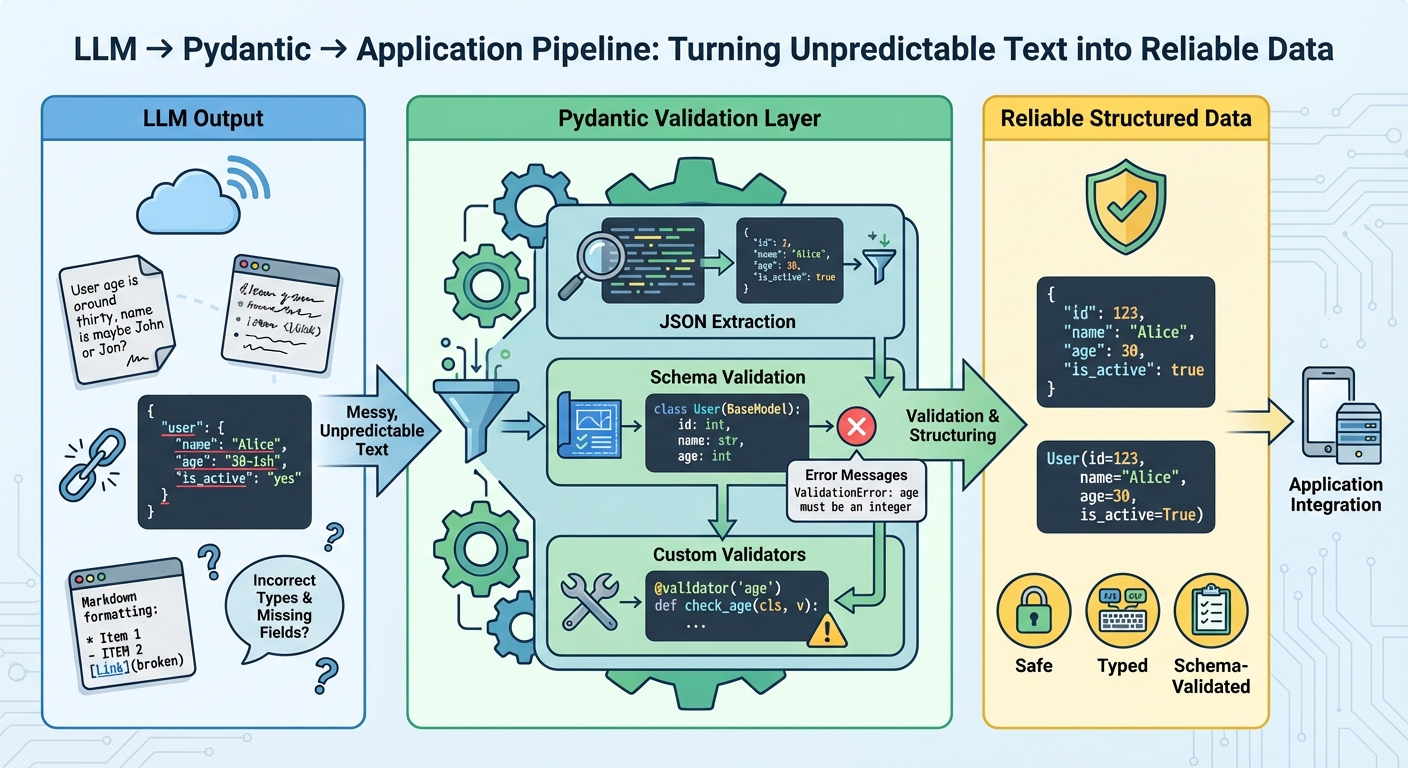
This diagram shows how messy, unpredictable text from an LLM can be transformed into reliable, structured data. A Pydantic validation layer is used to extract, validate against a schema, and structure the output before it's used by the application.
Defining a Schema with Pydantic
LangChain leverages Pydantic to solve this problem. We first define a Pydantic model that represents our desired output structure. This model serves two purposes:
- It acts as a data validation class.
- Its structure and field descriptions provide crucial instructions to the LLM on how to format its response.
Let's imagine we want to extract key information about a person from an unstructured block of text. We can define a Pydantic model for this:
from typing import List, Optional
from pydantic import BaseModel, Field

class UserProfile(BaseModel):
    """Information about a user."""
    name: str = Field(description="The user's full name.")
    age: int = Field(description="The user's age.")
    interests: List[str] = Field(description="A list of the user's interests or hobbies.")
    location: Optional[str] = Field(default=None, description="The user's city and state, if available.")
Here, we've defined a UserProfile with a name, age, a list of interests, and an optional location. Notice the use of Field(description=...). These descriptions are not just for documentation; LangChain passes them to the LLM, which uses them as hints to correctly populate the fields. Being descriptive here significantly improves the reliability of the output.
Binding the Schema with .with_structured_output()
Once we have our Pydantic schema, we can bind it to an LLM using the .with_structured_output() method. This creates a new runnable that, when invoked, will return an instance of our Pydantic model instead of a plain string. This method leverages the "function calling" or "tool use" capabilities of modern models like those from OpenAI, Anthropic, and Google to ensure the output conforms to the provided schema.
The conceptual flow is simple: we provide both the user input and the output schema to the LLM, and it generates an answer string that is then parsed into our schema.
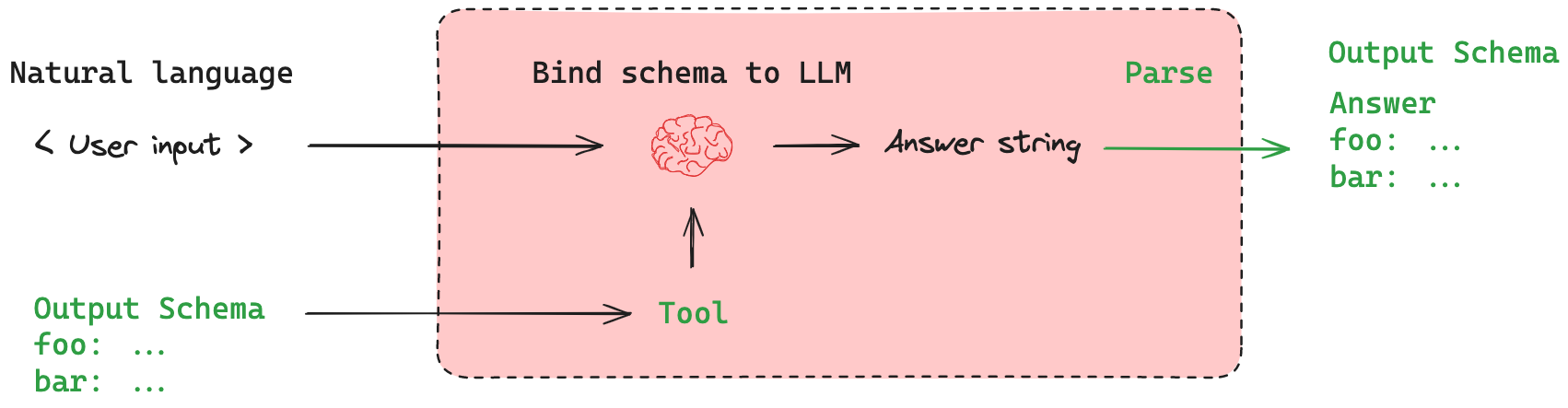
This diagram illustrates the core process: a user's natural language input and a desired output schema are given to the LLM. The model is constrained to generate an output that can be parsed into that schema.
Let's see this in action with a complete, runnable example.
1. Create a new file: src/lcel_quickstart/structured.py
We'll place our structured output logic in this new file.
# src/lcel_quickstart/structured.py
import os
from typing import List, Optional
from dotenv import load_dotenv
from pydantic import BaseModel, Field
from langchain_openai import ChatOpenAI
from langchain_core.prompts import ChatPromptTemplate

# Load environment variables from .env file
load_dotenv()

# --- 1. Define the Pydantic Schema ---
class UserProfile(BaseModel):
    """Structured information about a user."""
    name: str = Field(description="The user's full name.")
    age: int = Field(description="The user's age.")
    interests: List[str] = Field(
        description="A list of the user's interests or hobbies, inferred from the text."
    )
    location: Optional[str] = Field(
        default=None,
        description="The user's city and state, if available."
    )

def extract_user_profile(text: str) -> UserProfile:
    """
    Extracts user profile information from a given text using an LLM.
    """
    # --- 2. Initialize the LLM ---
    # We use a model that supports tool calling, like gpt-4o-mini
    llm = ChatOpenAI(model="gpt-4o-mini", temperature=0)

    # --- 3. Bind the schema to the LLM ---
    structured_llm = llm.with_structured_output(UserProfile)

    # --- 4. Create and invoke the chain ---
    system_prompt = "You are an expert extraction algorithm. Only extract information from the text. Do not add any information that is not present."
    human_prompt = "Extract the user profile from the following text:\n\n{text}"

    prompt = ChatPromptTemplate.from_messages([
        ("system", system_prompt),
        ("human", human_prompt)
    ])

    chain = prompt | structured_llm

    return chain.invoke({"text": text})

if __name__ == '__main__':
    unstructured_text = """
    My name is Alex Thompson, and I just turned 35. I live in Denver, Colorado.
    I spend my weekends hiking in the Rockies, experimenting with new recipes,
    and I'm also part of a local chess club.
    """

    profile = extract_user_profile(unstructured_text)

    print("--- Extracted Profile ---")
    print(f"Name: {profile.name}")
    print(f"Age: {profile.age}")
    print(f"Location: {profile.location}")
    print(f"Interests: {', '.join(profile.interests)}")

    # The output is a Pydantic object, which can be easily converted to a dict
    print("\n--- Pydantic object ---")
    print(repr(profile))

    print("\n--- asdict() output ---")
    print(profile.model_dump())
2. Run the code
From your terminal, execute the script:
uv run python -m src.lcel_quickstart.structured
You should see an output similar to this:
--- Extracted Profile ---
Name: Alex Thompson
Age: 35
Location: Denver, Colorado
Interests: hiking, cooking, chess

--- Pydantic object ---
UserProfile(name='Alex Thompson', age=35, interests=['hiking', 'cooking', 'chess'], location='Denver, Colorado')

--- asdict() output ---
{'name': 'Alex Thompson', 'age': 35, 'interests': ['hiking', 'cooking', 'chess'], 'location': 'Denver, Colorado'}
As you can see, the chain's output is not a string but a UserProfile object. We can access its attributes directly (e.g., profile.name) or convert it to a dictionary with profile.model_dump() for further processing.
This approach is highly recommended for models that support tool-calling/function-calling, as it's more reliable than trying to parse JSON from a string output. For a deeper dive into the mechanics and code, the following resources are excellent.
The Complete Guide to Using Pydantic for Validating LLM ...
This article from MachineLearningMastery provides a fantastic, code-centric overview of using Pydantic with LangChain.
Focus on the section Using LangChain with Pydantic. It contrasts two methods: PydanticOutputParser and with_structured_output(). The code example for with_structured_output() is a clear, concise demonstration of the technique we've just implemented.
The following video also provides a great practical walkthrough of this concept within the context of a slightly larger application, which aligns with your preference for building things.
Structured LLM Output with Pydantic and LangChain
This video from Launch Intelligence demonstrates building a small multi-agent system where structured output is key to passing information between agents.
Pay attention to how Pydantic classes are defined with clear descriptions at this point. Then, see how the with_structured_output method is applied to the LLM at this timestamp. Finally, notice how the agent invokes the chain and easily extracts data from the returned Pydantic object around this segment.
Conclusion
In this lesson, you've learned a powerful technique for controlling the output of LLMs, making their integration into larger software systems far more reliable.
Here are the key takeaways:
- Structured output is essential for building robust applications that programmatically use LLM responses.
- Pydantic is the standard tool for defining an output schema in Python, providing both structure and validation.
.with_structured_output()is the preferred LangChain method for binding a Pydantic schema to modern LLMs that support tool-calling.- Descriptive fields in your Pydantic model are not just comments; they are crucial instructions that guide the LLM to produce the correct output.
In our next lesson, we will explore an alternative method, JsonOutputParser. This parser is useful for models that don't have native tool-calling capabilities or for scenarios where you need to manually parse a JSON string from the model's text output.