In our previous lesson, we explored a powerful and streamlined way to get structured data from an LLM using the .with_structured_output() method. This approach is highly effective, but it relies on modern models that have native "tool-calling" or "function-calling" capabilities. What happens when you're working with a model that doesn't support this feature, or when you need to parse a raw string that you expect to be in JSON format?
This lesson addresses that exact scenario. We will dive into JsonOutputParser, an alternative and more explicit method for ensuring an LLM's response conforms to a specific JSON schema. Instead of relying on a model's built-in features, this technique embeds formatting instructions directly into the prompt itself. You'll learn how to construct a chain that first guides the model to produce a JSON-formatted string, and then safely parses that string into a Python dictionary.
Structured Output: Two Main Approaches
In the previous lesson, we used the model's tool-calling API, which is generally the most reliable method when available. Today, we focus on the second major approach: instructing the model via the prompt to return a JSON string, and then parsing that string.
The JsonOutputParser is designed for this second scenario. It serves two functions:
- Generates Formatting Instructions: It creates a text description of the desired JSON schema (derived from a Pydantic model) that you inject into your prompt.
- Parses the Output: It takes the raw string output from the LLM and parses it into a Python dictionary, ensuring it's valid JSON.
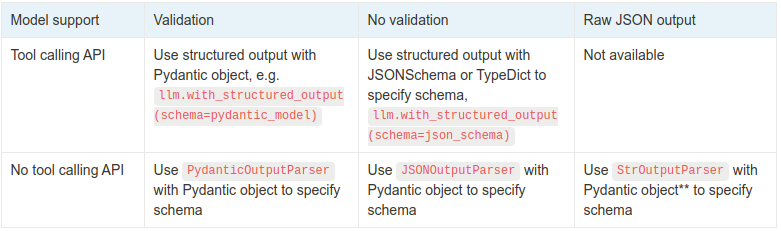
The table below clarifies when to use each method. Today, we're focused on the "No tool calling API" row.
The Core Mechanism: get_format_instructions()
The key to using JsonOutputParser is the get_format_instructions() method. When you create a parser and link it to a Pydantic model, this method generates a string that tells the LLM exactly what JSON structure to produce, including field names, types, and descriptions.
You then include this string in your prompt template. This explicitly instructs the model on how to format its response. The final step in your chain is the parser itself, which takes the LLM's text output and converts it into a Python dictionary.
The goal is to get a structured JSON object like the one below, which you can then use in your application.

Let's modify our project to implement this. We'll add a new function to the structured.py file from the last lesson to extract the same UserProfile information, but this time using JsonOutputParser.
1. Update src/lcel_quickstart/structured.py
Open your existing structured.py file. We need a few more imports and will add a new function.
# src/lcel_quickstart/structured.py
import os
from typing import List, Optional
from dotenv import load_dotenv
from pydantic import BaseModel, Field
from langchain_openai import ChatOpenAI
from langchain_core.prompts import ChatPromptTemplate, PromptTemplate
from langchain_core.output_parsers import JsonOutputParser


# Load environment variables from .env file
load_dotenv()


# --- 1. Define the Pydantic Schema (re-used from previous lesson) ---
class UserProfile(BaseModel):
    """Structured information about a user."""
    name: str = Field(description="The user's full name.")
    age: int = Field(description="The user's age.")
    interests: List[str] = Field(
        description="A list of the user's interests or hobbies, inferred from the text."
    )
    location: Optional[str] = Field(
        default=None,
        description="The user's city and state, if available."
    )

def extract_user_profile(text: str) -> UserProfile:
    """
    Extracts user profile information using .with_structured_output().
    """
    llm = ChatOpenAI(model="gpt-4o-mini", temperature=0)
    structured_llm = llm.with_structured_output(UserProfile)

    system_prompt = "You are an expert extraction algorithm. Only extract information from the text. Do not add any information that is not present."
    human_prompt = "Extract the user profile from the following text:\n\n{text}"

    prompt = ChatPromptTemplate.from_messages([
        ("system", system_prompt),
        ("human", human_prompt)
    ])

    chain = prompt | structured_llm
    return chain.invoke({"text": text})


# --- NEW FUNCTION FOR THIS LESSON ---
def extract_user_profile_with_parser(text: str) -> dict:
    """
    Extracts user profile information using JsonOutputParser.
    """
    llm = ChatOpenAI(model="gpt-4o-mini", temperature=0)


    # 1. Instantiate the parser with our Pydantic schema
    parser = JsonOutputParser(pydantic_object=UserProfile)


    # 2. Create a prompt template that includes format instructions
    prompt = PromptTemplate(
        template="You are an expert extraction algorithm. Extract information from the text.\n{format_instructions}\n{query}\n",
        input_variables=["query"],
        partial_variables={"format_instructions": parser.get_format_instructions()},
    )


    # 3. Build the chain
    chain = prompt | llm | parser


    # 4. Invoke the chain
    return chain.invoke({"query": text})


if __name__ == '__main__':
    unstructured_text = """
    My name is Alex Thompson, and I just turned 35. I live in Denver, Colorado.
    I spend my weekends hiking in the Rockies, experimenting with new recipes,
    and I'm also part of a local chess club.
    """


    # --- Method 1: with_structured_output (from last lesson) ---
    print("--- Using .with_structured_output() ---")
    profile1 = extract_user_profile(unstructured_text)
    print(f"Output type: {type(profile1)}")
    print(repr(profile1))

    print("\n" + "="*40 + "\n")


    # --- Method 2: JsonOutputParser (from this lesson) ---
    print("--- Using JsonOutputParser ---")
    profile2 = extract_user_profile_with_parser(unstructured_text)
    print(f"Output type: {type(profile2)}")
    print(repr(profile2))


    # The parser returns a dict, which we can then validate with Pydantic
    try:
        validated_profile = UserProfile.model_validate(profile2)
        print("\n--- Validated Pydantic object ---")
        print(repr(validated_profile))
    except Exception as e:
        print(f"\nValidation failed: {e}")
2. Run the code
Execute the script from your terminal:
uv run python -m src.lcel_quickstart.structured
You should see output that looks like this:
--- Using .with_structured_output() ---
Output type: <class 'src.lcel_quickstart.structured.UserProfile'>
UserProfile(name='Alex Thompson', age=35, interests=['hiking', 'experimenting with new recipes', 'chess'], location='Denver, Colorado')

========================================

--- Using JsonOutputParser ---
Output type: <class 'dict'>
{'name': 'Alex Thompson', 'age': 35, 'interests': ['hiking in the Rockies', 'experimenting with new recipes', 'chess club'], 'location': 'Denver, Colorado'}

--- Validated Pydantic object ---
UserProfile(name='Alex Thompson', age=35, interests=['hiking in the Rockies', 'experimenting with new recipes', 'chess club'], location='Denver, Colorado')
Notice the key difference:
.with_structured_output()directly returns an instance of theUserProfilePydantic model.JsonOutputParserreturns a standard Pythondict. You can then optionally use the Pydantic model again (UserProfile.model_validate(profile2)) to parse this dictionary into a model instance for further validation and to gain the benefits of a typed object.
For a hands-on walkthrough of this exact pattern, the following video is an excellent resource. It demonstrates how to define a schema, instantiate the JsonOutputParser, and build the chain.
LangChain Tutorial (Python) #3: Output Parsers (String, List, JSON)
This tutorial from Leon van Zyl clearly explains and demonstrates how to use JsonOutputParser.
Watch the section on JSON parsing. The presenter builds an example from scratch, showing how to define a Pydantic class, use get_format_instructions() to guide the model, and construct the LCEL chain. The process he follows is identical to the one we just implemented.
Deeper Dive into the JsonOutputParser Pattern
The pattern we used is a fundamental technique in LangChain for handling models that don't have native tool-calling. Let's examine the resources below, which provide further code examples and reinforce the concept.
Unpacking Output Parsers with LangChain | by Donato_TH - Medium
This article provides a concise overview of various parsers, with a clear example for JsonOutputParser.
Focus on the section about JSON. You can find it by searching for the heading. It presents a compact code snippet that defines a Joke Pydantic model and uses JsonOutputParser to generate a structured response. Pay close attention to how parser.get_format_instructions() is passed into the PromptTemplate under the key "format_instructions".
The next resource provides another practical example, this time for summarizing support tickets, which further illustrates the real-world utility of this pattern.
LangChain 101 — Lesson 3: Output Parser | by Larry Nguyen
This article explains why output parsers are necessary and provides another clear example of JsonOutputParser with Pydantic.
Read the section titled JsonOutputParser. The author defines a CaseSummary Pydantic class and uses it with the parser to structure the LLM's output. This reinforces the pattern of defining a schema, creating a prompt with format instructions, and chaining it all together.
Finally, this last video shows the entire workflow in the context of a practical task: extracting structured metadata from a PDF file. This aligns well with your interest in building practical applications.
Easiest Way to Convert a PDF to JSON using LangChain Output Parsers
This video from "Getting Started with Jeff" walks through a complete project of converting a PDF to JSON using JsonOutputParser.
Watch how the Pydantic schema is defined at this timestamp. Then, see how the JsonOutputParser is created and linked to this schema around this point. Finally, observe how the PromptTemplate and LCEL chain are constructed to bring everything together from this segment.
Conclusion
You have now mastered two distinct methods for obtaining structured output from LLMs. While .with_structured_output() is often simpler and more robust when supported, JsonOutputParser is an indispensable tool for broader compatibility and more explicit control over the model's instructions.
Here are the key takeaways from today's lesson:
JsonOutputParseris used when a model lacks tool-calling abilities or when you need to parse a raw JSON string.- It works by injecting formatting instructions into the prompt via
parser.get_format_instructions(). - The typical LCEL chain for this pattern is
prompt | llm | parser. - The parser's output is a Python dictionary, which can be further validated and converted into a Pydantic model instance.
In our next lesson, we will build upon this foundation. We'll move from just structuring data to defining structured actions. You will learn how to define a custom Python function as a LangChain "tool" that an LLM can learn to call, opening the door to building much more dynamic and capable applications.