In our last session, we significantly improved our RAG pipeline by implementing a history-aware retriever. This allows our chatbot to understand follow-up questions by first reformulating them into standalone queries. However, this introduced a new challenge: as a conversation continues, the chat history grows indefinitely. Passing this ever-expanding history to the language model is inefficient, costly, and will eventually breach the model's context window limit.
This lesson will tackle that problem head-on. You will learn how to implement automatic history trimming, a crucial technique for managing conversational context in any production-grade LLM application. We will explore the trade-offs involved and implement a robust trimming strategy using a built-in LangChain utility, ensuring our chatbot remains performant and cost-effective even during long interactions.
Strategies for Managing Conversation History
When a conversation history becomes too large for a model's context window, we have two primary strategies to manage it:
-
Trimming: This is the simplest approach. We discard older messages and keep only the most recent ones. This can be based on a fixed number of messages (e.g., keep the last 10) or a token limit (e.g., keep the most recent 4000 tokens). It's fast and computationally cheap but risks losing important context from early in the conversation.
-
Summarization: A more sophisticated approach involves using an LLM to periodically summarize the older parts of the conversation. This compressed summary is then used as context instead of the full list of messages. This preserves key information but introduces additional latency and cost due to the extra LLM call for summarization.
For a deeper dive into the pros and cons of these two methods, the following blog post provides an excellent comparison and evaluation.
How To Add Conversational Memory To LLMs Using ...
This article from the Supermemory AI Blog provides a practical comparison of memory management techniques. Focus on understanding the conceptual differences between the two main approaches.
Please read the following sections: Start at the heading Memory With Message Trimming. This section introduces the core idea of trimming and shows a simple implementation. Continue to Memory With Summarization, which explains the alternative approach. Finally, review the table under Evaluating both the techniques to understand the trade-offs in terms of fact retention, token usage, and latency.
As you can see from the evaluation, trimming is a pragmatic choice for many applications. It's a straightforward engineering solution that offers a good balance of performance and context retention, especially for our "crash course" objectives. We'll focus on implementing an intelligent trimming strategy.
The trim_messages Utility
LangChain provides a convenient utility, trim_messages, designed specifically for this task. It offers fine-grained control over how the history is pruned.
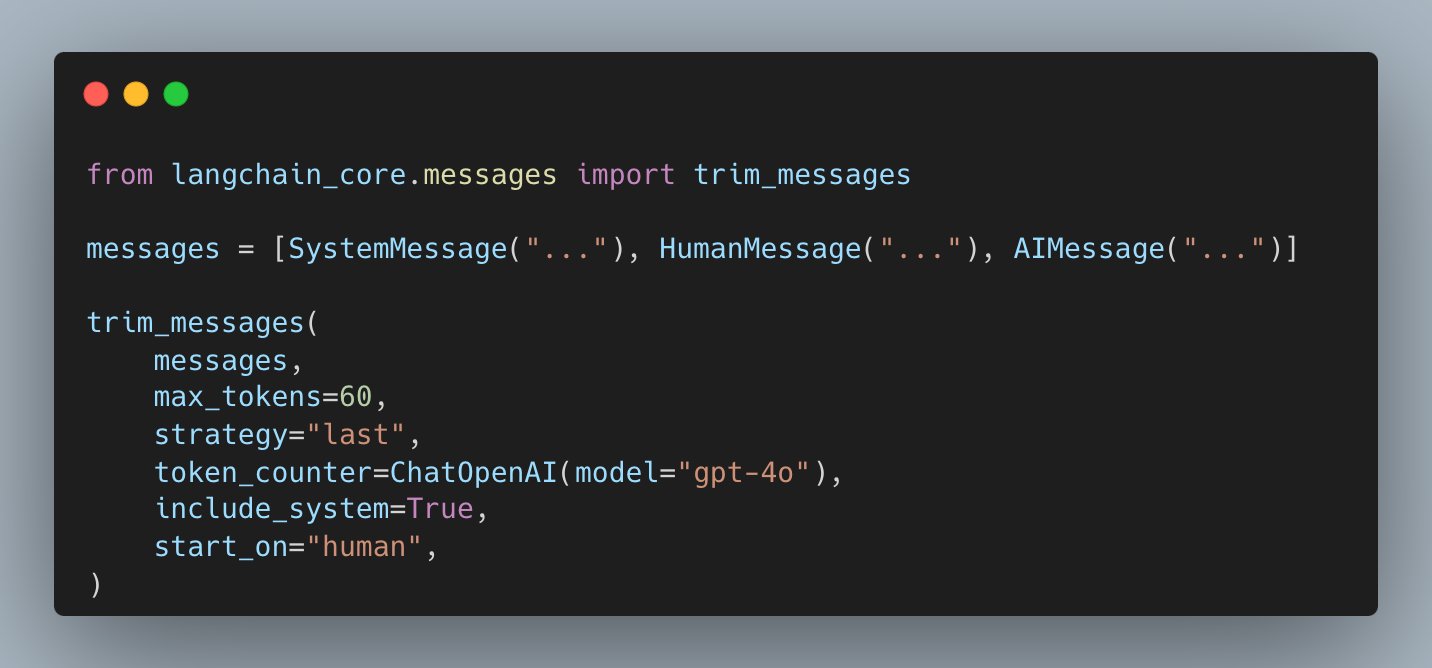
This code snippet shows a typical invocation of the trim_messages function, highlighting its key parameters for managing conversational history based on token limits.
Let's examine the most important parameters:
max_tokens: The maximum number of tokens the final message list should contain.strategy: Determines which part of the history to keep. We'll use'last'to retain the most recent messages.token_counter: A function or model used to count tokens. We can pass aChatOpenAIinstance for accurate counting, or use the string'approximate'for a faster but less precise method.include_system: A boolean (True/False). Whenstrategyis'last', this ensures that if aSystemMessageexists at the beginning of the history, it is always preserved, which is crucial for maintaining the bot's persona.start_on: Ensures the trimmed history begins with a specific message type, typically'human', as most chat models expect this sequence.
The official documentation provides a complete reference for all parameters and their usage.
trim_messages | langchain_core - LangChain Reference Docs
This is the official API documentation for the trim_messages function. It's a useful reference for understanding all the available configuration options.
First, read the introduction to get a high-level overview. Then, review the first example to see a practical application. Finally, skim the Parameters table to familiarize yourself with the key arguments like strategy, token_counter, include_system, and start_on.
Integrating Trimming into the RAG Chain
Now, let's integrate this into our existing get_history_aware_rag_chain function from the previous lesson. Our goal is to trim the chat_history after it's loaded by RunnableWithMessageHistory but before it's passed to our main RAG chain.
We can achieve this by creating a small, reusable component—a trimmer—and inserting it into our LCEL pipeline.
First, add the necessary import to src/lcel_quickstart/chain.py:
# src/lcel_quickstart/chain.py (add this import)

from langchain_core.messages import trim_messages
from functools import partial
Next, we'll update the get_history_aware_rag_chain function. We will define a trimmer using partial from Python's functools library. This creates a new callable with some of the arguments of trim_messages pre-filled, making our code cleaner. We will then insert this trimmer into our chain using a RunnablePassthrough.assign() step.
This new step will intercept the chat_history provided by RunnableWithMessageHistory, apply our trimmer to it, and then pass the pruned history to the rest of the RAG chain.
Here is the updated get_history_aware_rag_chain function. Replace the old version in src/lcel_quickstart/chain.py with this one.
# src/lcel_quickstart/chain.py (replace the existing function)

def get_history_aware_rag_chain():
    """
    Builds and returns a history-aware conversational RAG chain with history trimming.
    """
    retriever = get_retriever()
    llm = ChatOpenAI(model="gpt-3.5-turbo")

    ### 1. Define Trimmer ###
    # We use partial to create a new function with fixed arguments
    trimmer = partial(
        trim_messages,
        max_tokens=4096,  # Corresponds to gpt-3.5-turbo's context window
        strategy="last",
        token_counter=llm, # Use the model's tokenizer for accurate counting
        include_system=True,
        allow_partial=False,
        start_on="human",
    )

    ### 2. Contextualize question ###
    contextualize_q_system_prompt = (
        "Given a chat history and the latest user question "
        "which might reference context in the chat history, "
        "formulate a standalone question which can be understood "
        "without the chat history. Do NOT answer the question, "
        "just reformulate it if needed and otherwise return it as is."
    )
    contextualize_q_prompt = ChatPromptTemplate.from_messages(
        [
            ("system", contextualize_q_system_prompt),
            MessagesPlaceholder("chat_history"),
            ("human", "{input}"),
        ]
    )
    history_aware_retriever = create_history_aware_retriever(
        llm, retriever, contextualize_q_prompt
    )

    ### 3. Answer question ###
    qa_system_prompt = (
        "You are an assistant for question-answering tasks. "
        "Use the following pieces of retrieved context to answer "
        "the question. If you don't know the answer, say that you "
        "don't know. Use three sentences maximum and keep the answer concise."
    )
    qa_prompt = ChatPromptTemplate.from_messages(
        [
            ("system", qa_system_prompt),
            MessagesPlaceholder("chat_history"),
            ("human", "{input}"),
        ]
    )
    question_answer_chain = create_stuff_documents_chain(llm, qa_prompt)

    ### 4. Combine chains ###
    rag_chain = create_retrieval_chain(history_aware_retriever, question_answer_chain)

    ### 5. Add history and trimming ###
    conversational_rag_chain = (
        RunnablePassthrough.assign(
            chat_history=lambda x: trimmer(x["chat_history"])
        )
        | rag_chain
    )

    ### 6. Wrap with memory ###
    chain_with_history = RunnableWithMessageHistory(
        conversational_rag_chain,
        get_session_history,
        input_messages_key="input",
        history_messages_key="chat_history",
        output_messages_key="answer",
    )

    return chain_with_history
Notice the new structure:
- We define
trimmerwith our desired configuration. - We create a new
conversational_rag_chainthat first usesRunnablePassthrough.assignto apply thetrimmerto thechat_historyand then pipes the result into our originalrag_chain. - Finally, this entire construct is wrapped with
RunnableWithMessageHistory. This ensures the full history is loaded from memory, then trimmed, then used by the RAG chain for that specific turn. The full, untrimmed history remains in ourstorefor the next turn.
Testing the Trimming Logic
To see this in action, we need to simulate a long conversation. Let's update the if __name__ == '__main__': block to have a conversation that would likely exceed a small token limit. We can set a very low max_tokens in our trimmer for testing purposes to see the effect clearly.
Temporarily change max_tokens=4096 to max_tokens=300 in the get_history_aware_rag_chain function to easily observe the trimming.
# src/lcel_quickstart/chain.py (update main block for testing)

if __name__ == '__main__':
    rag_chain_with_history = get_history_aware_rag_chain()

    session_id = "test_session_789"
    config = {"configurable": {"session_id": session_id}}

    print("--- History Trimming Demonstration ---")

    # A series of questions to build up history
    questions = [
        "What is LCEL and what is it used for?",
        "What is its main design principle?",
        "Can you give a simple code example?",
        "How does it handle streaming?",
        "What about parallel execution?",
        "And how does it compare to a simple sequence of function calls?",
    ]

    for i, query in enumerate(questions):
        print(f"\nTurn {i+1} - User: {query}")
        result = rag_chain_with_history.invoke({"input": query}, config=config)
        print(f"AI: {result['answer']}")

    print("\n--- Inspecting Final History Store ---")
    history = store[session_id]
    print(f"Total messages in store: {len(history.messages)}")
    print("Messages:")
    for msg in history.messages:
        print(f"- {type(msg).__name__}: {msg.content[:80]}...")
    print("--------------------------------------")

    # Remember to change max_tokens back to 4096 after testing!
Run the script:
uv run python src/lcel_quickstart/chain.py
As you run the script, the conversation will proceed normally. However, behind the scenes, the trimmer is ensuring that the context passed to the LLM at each step does not exceed 300 tokens. The final history stored in our in-memory store object will contain all messages, but you can be confident that each LLM invocation only saw a recent subset of them. After you are done testing, remember to revert max_tokens back to a reasonable production value like 4096.
Conclusion
You have now implemented a critical feature for building scalable and robust conversational AI: automatic history management. By adding a trimming mechanism, you prevent context window overflows and manage API costs effectively.
Key takeaways from this lesson are:
- Long-running conversations require a strategy to manage history size; simply appending messages is not sustainable.
- Trimming (keeping recent history) and Summarization (compressing old history) are the two primary strategies, each with distinct trade-offs in performance, cost, and context retention.
- LangChain's
trim_messagesutility provides a powerful and configurable way to implement a trimming strategy based on token counts. - Using LCEL primitives like
RunnablePassthrough.assign, you can seamlessly integrate custom logic like history trimming into complex chains.
Our chatbot is now more robust. However, our conversation history still vanishes every time the application restarts because it's stored in a simple Python dictionary. In the next lesson, we will address this by exploring how to persist conversation histories for different users, a necessary step for any real-world deployment.