Hello! Welcome to the first lesson in our module on advanced in-memory rate limiting algorithms.
In the previous module, you successfully built and tested a complete, end-to-end rate limiter using the fixed window counter algorithm. You have an interceptor, a key resolver, and an integration test suite to prove it all works. This is a solid foundation. However, as we briefly touched upon, the fixed window algorithm has a significant drawback: the "boundary burst problem," where a client can send a burst of requests straddling the edge of two windows, effectively doubling their allowed rate.
Today, we will address this by implementing a more accurate and robust algorithm.
Your learning outcome for this lesson:
You will implement the in-memory sliding window counter using AtomicLong for thread-safe updates. This will give you a much smoother and more production-ready rate-limiting mechanism.
1. The Sliding Window Counter Algorithm
The key idea behind the sliding window counter is to smooth out the request rate by considering a weighted count from the previous window. Instead of resetting the count to zero at the start of a new window, we approximate the number of requests in a rolling time frame.
Let's visualize this. Imagine a rate limit of 100 requests per hour.
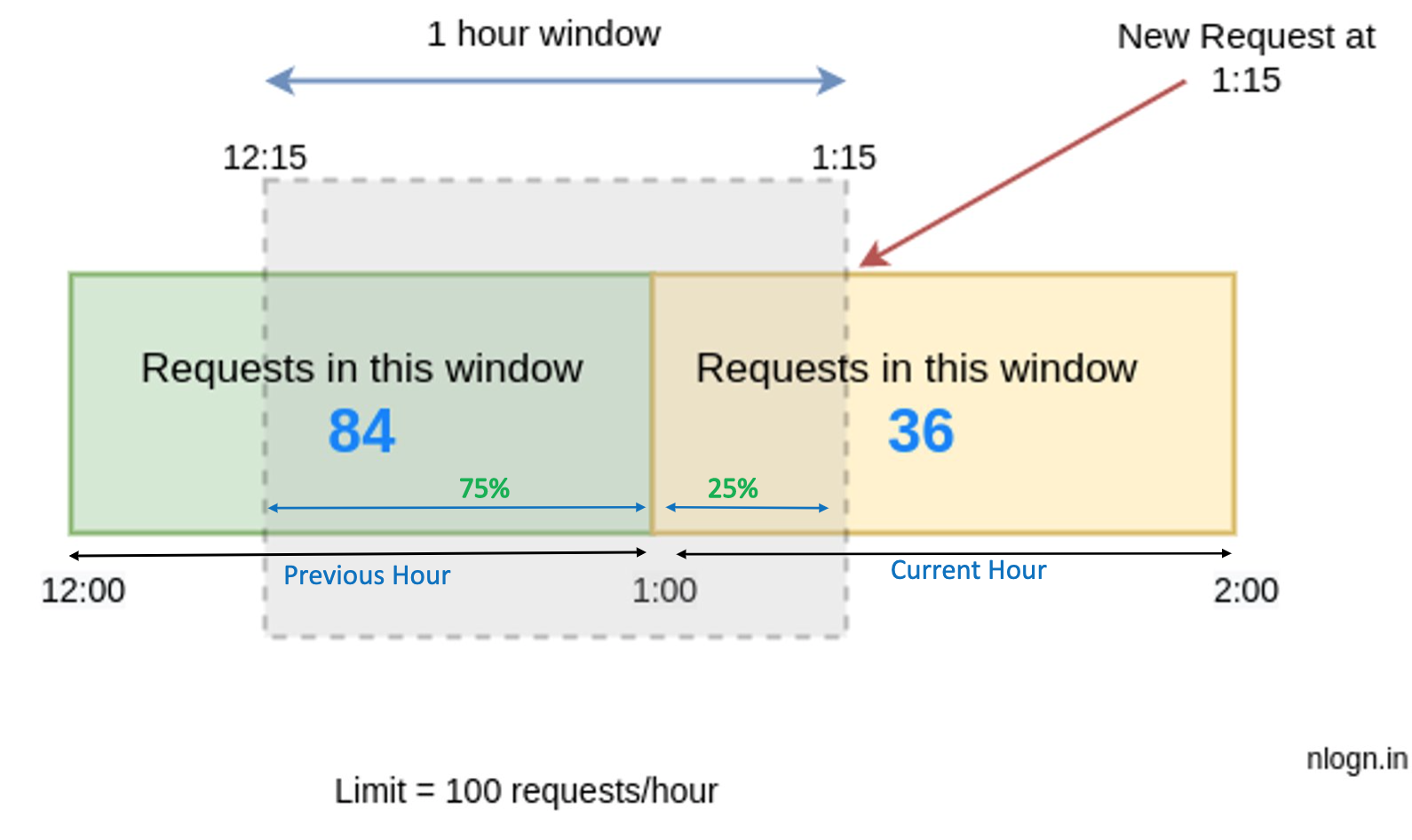
The algorithm works as follows:
- We maintain a count for the current window and the previous window.
- When a new request arrives, we calculate its position within the current window.
- We approximate the number of requests in the true sliding window by taking a weighted sum: a portion of the previous window's count and all of the current window's count.
The formula is:current_weight = (time_elapsed_in_current_window) / window_sizeprevious_window_weight = 1 - current_weighteffective_count = (previous_window_count * previous_window_weight) + current_window_count
If effective_count is below the limit, the request is allowed.
To solidify this concept, please read the first part of the following article, which explains the algorithm and provides a clear example.
How to Implement Sliding Window Rate Limiting in Spring
The article 'How to Implement Sliding Window Rate Limiting in Spring' from OneUptime clearly explains the algorithm's logic and the formula used to calculate the effective count.
Read the sections 'Understanding Sliding Window Rate Limiting', 'The Algorithm', and 'Visual Example'. Focus on how the effective_count is calculated using the weighted sum of the previous and current window counts.
2. Ensuring Thread-Safe Updates with AtomicLong
Your rate limiter will operate in a multi-threaded environment where many requests for the same client could arrive concurrently. If you simply use a long variable for your request counters, you'll encounter race conditions, leading to incorrect counts and failed rate limiting.
For example, if two threads read the value of count (say, 9) at the same time, they will both increment it to 10 and write it back. The final count will be 10, when it should be 11. This is a classic concurrency bug.
We need a way to perform these increments atomically—as a single, indivisible operation. While Java's synchronized keyword can achieve this by locking the entire method, it can introduce performance bottlenecks. A more modern and often more performant approach for simple counter updates is to use atomic variables.
To understand this problem and the atomic solution, watch the following short video.
The video 'Thread Safety in Java' from Telusko provides a practical demonstration of why shared counters fail in multi-threaded code and how AtomicInteger (which is functionally identical to AtomicLong for our purposes) solves the problem without explicit locks.
Watch from 01:31 to 04:49 to see the problem of thread unsafety in action. Then, watch from 06:53 to 07:57 to see how AtomicInteger is used to fix it.
For a deeper dive into the theory, the following paper explains the problem of concurrent updates and presents a clear, thread-safe implementation using AtomicLong.
Optimistic and Pessimistic Concurrency Control with Shared ...
The paper 'Optimistic and Pessimistic Concurrency Control' discusses the challenges of shared memory. It builds a ThreadCounter example that perfectly illustrates the transition from a non-thread-safe implementation to a thread-safe one using AtomicLong.
First, read section '5.1.2.1 Basic Implementation' (Fig 5.3) to see the naive, non-thread-safe counter. Then, read section '5.1.3.3 Making ThreadCounter Thread Safe' (Fig 5.6) to see how it's fixed using AtomicLong. Notice how count++ is replaced with createdThreads.getAndIncrement().
The core methods we will use from AtomicLong are:
incrementAndGet(): Atomically increments the value and returns the new value.get(): Gets the current value.set(long newValue): Sets the value to a new value.
3. Implementing the Sliding Window Counter
Now, let's bring the algorithm and thread-safe counters together. We will create a new class, SlidingWindowCounter, that implements our RateLimiter interface.
The article from OneUptime we looked at earlier provides an excellent, complete implementation that we can adapt. It demonstrates a pragmatic approach to thread safety in this context.
How to Implement Sliding Window Rate Limiting in Spring
Let's return to the OneUptime article. This time, we will focus on the complete Java code for the in-memory implementation.
Study the code under the 'In-Memory Implementation' heading. Pay close attention to the SlidingWindowRateLimiter.java file and the nested WindowData class. We will use this as a blueprint for our implementation.
Let's build our SlidingWindowCounter.java file based on that blueprint.
Step 1: Define the SlidingWindowCounter Class and its State
This class will conform to the RateLimiter interface you've already defined. It will use a ConcurrentHashMap to store the windowing data for each unique client key.
import com.example.ratelimiter.core.RateLimiter; // Your package
import java.util.concurrent.ConcurrentHashMap;
import java.util.concurrent.atomic.AtomicLong;
import java.util.concurrent.locks.ReentrantLock;

public class SlidingWindowCounter implements RateLimiter {
    private final int maxRequests;
    private final long windowSizeMs;
    private final ConcurrentHashMap<String, WindowData> windows = new ConcurrentHashMap<>();

    public SlidingWindowCounter(int maxRequests, long windowSizeSeconds) {
        this.maxRequests = maxRequests;
        this.windowSizeMs = windowSizeSeconds * 1000;
    }

    // A nested static class to hold the data for each window
    private static class WindowData {
        // We will fill this in next
    }

    @Override
    public boolean tryAcquire(String key) {
        // Main logic here
    }

    @Override
    public void clear() {
        windows.clear();
    }
}
Step 2: Define the WindowData Inner Class
This class holds the state for a single client's rate limit. Based on the resource, it needs:
- A counter for the previous window (
long previousCount). - An atomic counter for the current window (
AtomicLong currentCount). This is where ourAtomicLongcomes in. - An identifier for the current window (
long windowId). - A lock to ensure the window rotation logic is atomic.
Why the lock? The sequence of operations—checking the window ID, potentially moving currentCount to previousCount, and resetting currentCount—must happen as a single, indivisible unit. While AtomicLong handles the counter increment safely, a ReentrantLock ensures this more complex, multi-step "window rotation" logic is also safe from race conditions. This fine-grained lock (one per client key) is much more efficient than a global lock on the entire method.
private static class WindowData {
    final ReentrantLock lock = new ReentrantLock();
    volatile long windowId = 0; // Current window identifier
    long previousCount = 0;
    final AtomicLong currentCount = new AtomicLong(0);
}
Step 3: Implement the tryAcquire Method
This is where the core logic resides. Follow these steps inside the method:
- Get current time and window:
long now = System.currentTimeMillis(); long currentWindowId = now / windowSizeMs; - Get or create
WindowDatafor the key:WindowData data = windows.computeIfAbsent(key, k -> new WindowData()); - Lock and execute the critical section:
data.lock.lock();
try {
    // --- All logic below goes inside the try block ---

    // 4. Handle window rotation
    if (data.windowId < currentWindowId) {
        // If the window has moved by more than one, the previous window is stale
        if (data.windowId < currentWindowId - 1) {
            data.previousCount = 0;
        } else { // Window moved by exactly one
            data.previousCount = data.currentCount.get();
        }
        data.currentCount.set(0);
        data.windowId = currentWindowId;
    }

    // 5. Calculate the effective count using the formula
    long windowStart = currentWindowId * windowSizeMs;
    double positionInWindow = (double)(now - windowStart) / windowSizeMs;
    double previousWeight = 1.0 - positionInWindow;

    double effectiveCount = (data.previousCount * previousWeight) + data.currentCount.get();

    // 6. Check the limit and increment
    if (effectiveCount < maxRequests) {
        data.currentCount.incrementAndGet();
        return true; // Allowed
    } else {
        return false; // Denied
    }

} finally {
    data.lock.unlock(); // Always release the lock
}
You now have a thread-safe, in-memory sliding window rate limiter! You can wire this up in your Spring configuration as an alternative RateLimiter bean and your existing interceptor and tests will work with it seamlessly, thanks to the RateLimiter interface.
Key Takeaways
- The Sliding Window Counter algorithm provides smoother, more accurate rate limiting by using a weighted count from the previous and current time windows, solving the "boundary burst" problem of the fixed window approach.
- Simple counters (
long++) are not safe in multi-threaded applications. UsingAtomicLongand itsincrementAndGet()method guarantees that counter updates are atomic and correct, even under heavy concurrent load. - For complex, multi-step state changes like rotating the time windows, a fine-grained lock (e.g.,
ReentrantLockper client key) is a pragmatic way to ensure atomicity without creating a global performance bottleneck.
Next Steps
You've now implemented two of the three core rate-limiting algorithms. The Fixed Window and Sliding Window algorithms are both based on counting requests.
In the next lesson, we will explore a different paradigm with the Token Bucket algorithm. Instead of counting past requests, we'll manage a "bucket" of pre-allocated tokens that represent a client's request budget. This approach is very popular in production systems for its flexibility and predictable behavior.