In our previous lesson, we established a foundation for analyzing model internals by using PyTorch to perform fundamental vector operations. We focused on the geometry of single vectors—their norms, their orientation relative to one another via cosine similarity, and their decomposition through orthogonal projections. Now, we'll scale up from individual vectors to the multi-dimensional tensors that form the lifeblood of neural networks.
This lesson addresses a crucial, practical skill: tracking tensor shapes as they flow through a model. You'll learn how to predict and manage the shape of data through batched matrix multiplications, transpositions, and reshaping operations. Mastering this is not just about avoiding common programming errors; it's a prerequisite for understanding the complex computational pathways inside transformers, where tensors are constantly being multiplied, split, and recombined.
1. From Vectors to Tensors: Understanding Shape
In the last lesson, we worked with 1D tensors, which are equivalent to vectors. However, data in deep learning models, especially transformers, is almost always represented by tensors with three or more dimensions. For example, a batch of text sequences might be represented by a tensor of shape [batch_size, sequence_length, embedding_dimension].
The rank of a tensor is its number of dimensions, and its shape is a tuple of integers describing the size of each dimension. Being able to read and interpret a tensor's shape is the first step to understanding what it represents.
The following article provides an excellent introduction to the concept of tensors and their shapes in PyTorch.
00. PyTorch Fundamentals - Zero to Mastery Learn PyTorch for Deep Learning
This reading introduces the basic building blocks of PyTorch, from scalars to high-dimensional tensors.
Please read the section on tensors. Focus on the definitions of scalar, vector, matrix, and tensor, and how their shape attribute describes their structure. The visual examples will help build your intuition.
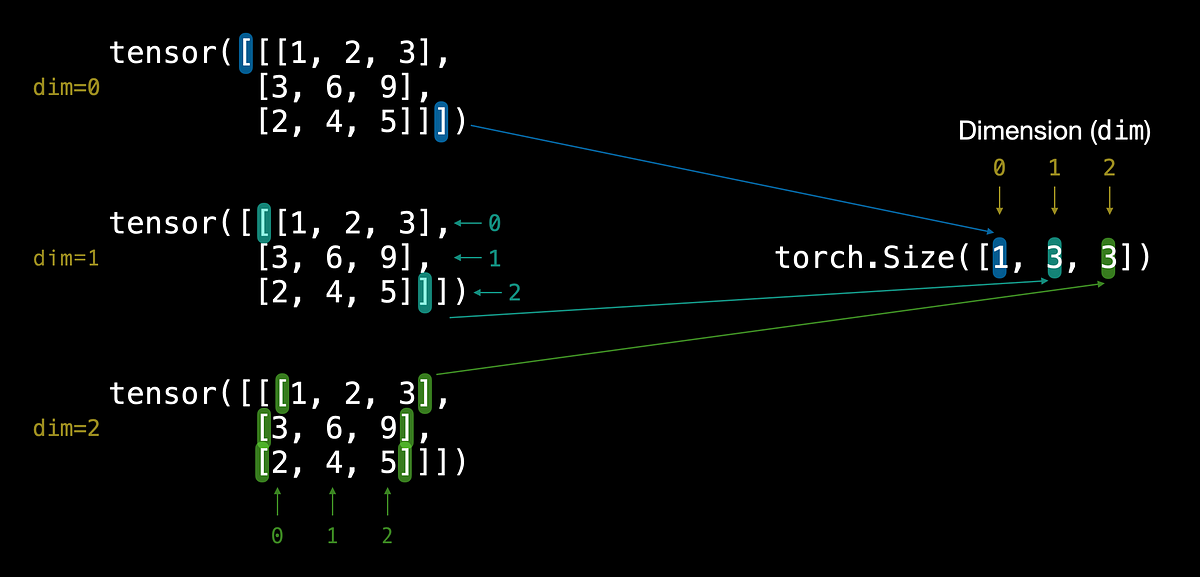
To visualize how tensor dimensions are indexed, consider the following image. It shows a 3D tensor and maps its dimensions (dim=0, dim=1, dim=2) to the corresponding values in the torch.Size output. This mental model is essential for correctly applying operations along specific dimensions.
For a quick video recap on tensor terminology and how to query a tensor's shape programmatically, the official PyTorch channel offers a concise guide.
Introduction to PyTorch Tensors
This video from the official PyTorch channel provides a clear, foundational overview of tensors.
Watch the short clips on tensor terminology and how to query the shape of a tensor.
2. Matrix Multiplication: The Engine of Neural Networks
At the heart of most neural network layers lies matrix multiplication. Your background in linear algebra will serve you well here. The most critical rule for matrix multiplication is that the inner dimensions must match. A matrix of shape (n, m) can only be multiplied by a matrix of shape (m, p). The resulting matrix will have the shape (n, p).
Getting this wrong is one of the most common sources of errors in deep learning code. A key skill is being able to diagnose and fix these "shape errors," often by transposing one of the matrices. A transpose operation swaps a matrix's dimensions. For a 2D matrix, this swaps its rows and columns.
The following reading walks through matrix multiplication in PyTorch and demonstrates how to resolve shape errors using transposition.
00. PyTorch Fundamentals - Zero to Mastery Learn PyTorch for Deep Learning
This part of the tutorial explains the rules of matrix multiplication and shows how to handle the inevitable shape errors that arise.
Focus on the sections Matrix multiplication and One of the most common errors. Pay close attention to the use of the @ operator for matrix multiplication and how tensor.T is used to transpose a tensor to make the shapes compatible.
3. Reshaping, Squeezing, and Permuting
Neural network architectures often require you to manipulate a tensor's shape without changing its contents. For example, you might need to flatten the output of a convolutional layer before feeding it to a linear layer, or add a "batch" dimension to a single data sample. PyTorch provides a versatile toolkit for these operations.
reshape()orview(): Changes the shape of a tensor. The total number of elements must remain the same. For example, a tensor of shape(2, 6)can be reshaped to(4, 3)or(12).permute(): Swaps dimensions. This is different from reshaping; it reorders the existing axes. For example, you can use it to change a tensor from(batch, channels, height, width)to(batch, height, width, channels).unsqueeze(): Adds a new dimension of size 1 at a specified position. This is commonly used to create a batch dimension for a single instance.squeeze(): Removes dimensions of size 1. This is often used to remove the batch dimension from the output when processing a single instance.
This video from deeplizard provides a great visual explanation of these concepts, particularly reshape and the idea of "flattening" a tensor.
Flatten, Reshape, and Squeeze Explained - Tensors for Deep Learning with PyTorch
This tutorial gives an intuitive breakdown of common reshaping operations in PyTorch.
Watch the video from the introduction to understand the importance of shape. Then, focus on the explanation of flattening a tensor using reshape. This is a pattern we'll see often. The brief mentions of squeeze and unsqueeze are also relevant.
For a comprehensive list and description of these functions, the "PyTorch Fundamentals" guide is an excellent reference.
00. PyTorch Fundamentals - Zero to Mastery Learn PyTorch for Deep Learning
This section provides a convenient summary table of key reshaping functions.
Review the section on reshaping. The table summarizing the different methods is particularly useful as a reference.
4. Batched Operations
Modern deep learning frameworks process data in batches to improve computational efficiency. This means that instead of processing one input at a time, we process N inputs simultaneously. Our tensors gain an additional dimension at the beginning: the batch dimension.
When performing matrix multiplication on batched data, the operation is applied independently to each item in the batch. PyTorch provides torch.bmm() (batch matrix multiplication) for this. The shape rule is a natural extension of standard matrix multiplication:
- If input 1 has shape
(b, n, m) - And input 2 has shape
(b, m, p) - The output will have shape
(b, n, p)
Notice that the batch dimension b must be the same for both tensors, and the multiplication (n, m) @ (m, p) happens for each of the b items.
The following tutorial gives a very clear explanation of torch.bmm and other matrix multiplication functions.
Tutorial 2: Introduction to PyTorch — UvA DL Notebooks v1.2 ...
This tutorial from UvA provides concise, technical descriptions of essential PyTorch operations.
Read the list of matrix multiplication functions under the "Operations" heading, starting from the list. Pay special attention to the description of torch.bmm and its explicit shape transformation rule.
A Practical Example
Let's trace the shapes through a simplified transformer-like operation. Imagine we have a batch of 2 sequences, each with 4 tokens, and each token is represented by a 10-dimensional embedding.
-
Input Tensor: The shape is
(2, 4, 10), which we can denote as(batch_size, seq_len, embed_dim).import torch x = torch.randn(2, 4, 10) print(f"Initial shape: {x.shape}") # > Initial shape: torch.Size([2, 4, 10]) -
Linear Projection: We apply a linear layer, which is a matrix multiplication. The weight matrix projects the 10-dimensional embedding to a 20-dimensional space. To do this for all tokens in all sequences, the weight matrix must have shape
(10, 20)or(embed_dim, new_dim).W = torch.randn(10, 20) # Matmul: (2, 4, 10) @ (10, 20) -> (2, 4, 20) h = torch.matmul(x, W) print(f"After linear projection: {h.shape}") # > After linear projection: torch.Size([2, 4, 20])The inner dimensions (10 and 10) match, and the operation is automatically broadcast across the first two dimensions of
x. -
Permute and Reshape: Let's say the next step needs to treat the sequence and batch dimensions together. We can first permute the tensor to bring the
embed_dimto the front, then reshape.# Permute: (2, 4, 20) -> (20, 2, 4) h_permuted = h.permute(2, 0, 1) print(f"After permute: {h_permuted.shape}") # > After permute: torch.Size([20, 2, 4]) # Reshape: Combine the last two dimensions # (20, 2, 4) -> (20, 8) h_reshaped = h_permuted.reshape(20, 8) print(f"After reshape: {h_reshaped.shape}") # > After reshape: torch.Size([20, 8])
This simple sequence shows how you can—and must—keep a mental ledger of tensor shapes as they are transformed by each operation. This will be your constant companion when debugging interpretability experiments.
Conclusion
In this lesson, we made the critical leap from single vectors to the batched, multi-dimensional tensors that neural networks operate on. You now have the conceptual and practical tools to manipulate these fundamental data structures.
Here are the key takeaways:
- Tensors are multi-dimensional arrays defined by their shape and rank.
- Shape mismatches in matrix multiplication are a common bug, typically fixed with a transpose (
.T). - PyTorch offers a suite of functions (
reshape,view,permute,squeeze,unsqueeze) to manipulate tensor dimensions without altering their data. - Batched operations, like
torch.bmm, apply computations efficiently across multiple inputs, a standard practice in deep learning. - Consciously tracking tensor shapes through each step of a computation is an essential skill for both building and interpreting models.
In the next lesson, we will explore einsum, a powerful and concise notation for expressing complex tensor operations. It provides a "mini-language" that can often replace intricate combinations of reshaping, transposing, and matrix multiplications with a single, elegant expression.