Welcome to your first lesson. This course is designed to equip you with the practical skills and conceptual understanding needed to reproduce mechanistic interpretability experiments. We'll begin by building a solid foundation, ensuring you're comfortable with the essential linear algebra and PyTorch tools used to probe the internals of deep learning models.
In this lesson, you will refresh your understanding of fundamental vector operations and learn how to implement them in PyTorch. Specifically, we will cover how to compute vector norms, cosine similarities, and orthogonal projections. Since you have a background in university-level linear algebra, we will focus on the geometric intuition and practical application of these concepts, which are the bedrock of analyzing the high-dimensional activation spaces within neural networks.
1. Vectors, Norms, and Dot Products
In deep learning, we represent everything from word embeddings to neuron activations as vectors. Understanding the geometry of these vectors is the first step toward interpreting what a model has learned. The two most fundamental properties of a vector are its length (or magnitude) and its orientation relative to other vectors.
A vector's length is formally known as its norm. The most common norm is the Euclidean or L2 norm, which you'll remember as the standard geometric length. For a vector , its L2 norm is:
The dot product is an operation on two vectors that tells us about their relative orientation. For two vectors and , their dot product is defined as:
Crucially, the dot product also has a geometric definition that connects it to the norms of the vectors and the angle between them:
This relationship is central to many techniques in machine learning. It provides a way to measure alignment between vectors.
To see how these concepts are implemented in PyTorch, you will now work through a short, interactive notebook.
This Colab notebook demonstrates the basic PyTorch functions for vector operations. We will use it to verify our understanding of norms and dot products.
In the notebook, execute the cells to define the sample tensors x and y. Then, review the code and output for the sections on the dot product and vector norm. Notice how torch.dot() and torch.norm() directly implement the formulas we just discussed.
2. Cosine Similarity: Measuring Directional Agreement
In many interpretability scenarios, we are more interested in the orientation of activation vectors than their magnitude. For example, are the embeddings for "king" and "queen" pointing in a similar semantic direction, regardless of their individual norms?
This is where cosine similarity comes in. By rearranging the geometric formula for the dot product, we can isolate the cosine of the angle between two vectors:
This value, which ranges from -1 to 1, is the cosine similarity.
- 1: The vectors point in the exact same direction.
- 0: The vectors are orthogonal (perpendicular).
- -1: The vectors point in opposite directions.
It provides a normalized measure of similarity that is invariant to the magnitude of the vectors.
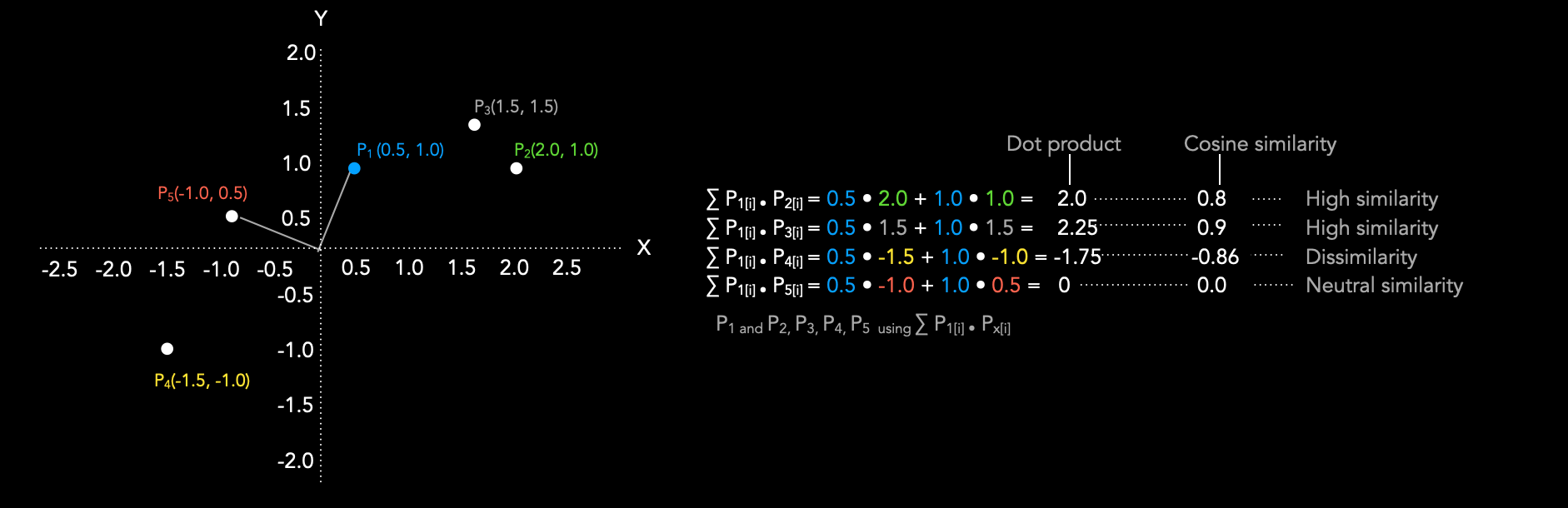
The following reading explains this concept and its importance in machine learning.
22.1. Geometry and Linear Algebraic Operations
This text from the "Dive into Deep Learning" book explains the motivation for using cosine similarity.
Please read the section on Cosine Similarity. Pay close attention to the example of comparing an image with a darker version of itself—it's a great illustration of why a magnitude-invariant measure is often desirable.
Now, let's see how to compute this in code. It's a straightforward combination of the functions we've already used.
This part of the Colab notebook shows the calculation for the angle and cosine similarity between two vectors.
Find the section on Angle Between Vectors. Examine the code, which implements the cosine similarity formula directly using torch.dot and torch.norm.
3. Orthogonal Projections: Decomposing Vectors
A powerful tool in vector analysis is the ability to decompose one vector into components that are parallel and perpendicular to another. The orthogonal projection of a vector onto a vector finds the "shadow" that casts on the line defined by . This resulting vector, let's call it , is the component of that lies in the direction of .

The formula for projecting onto is:
Let's break this down:
- The term is a scalar. It determines how far along the direction of the projection should extend.
- We then scale the vector by this scalar amount to get the final projection vector.
This operation is fundamental to mechanistic interpretability. For instance, we might discover a direction in activation space that corresponds to a specific concept (e.g., "gender" or "plurality"). We can then project a token's activation vector onto this direction to measure how much of that concept is present in the token's representation.
The key property of an orthogonal projection is that the "residual" vector, , is orthogonal to the direction of projection . This means their dot product is zero: .
The following resources provide the geometric intuition and a practical implementation.
22.1. Geometry and Linear Algebraic Operations
This section discusses the geometry of projections in the context of hyperplanes.
Focus on the part that explains the projection of one vector onto another. Read the paragraph starting from this sentence and study the accompanying diagram, Fig. 22.1.5. This will solidify the geometric picture of what a projection represents.
With the theory in place, let's implement and verify this in PyTorch.
This final section of the notebook provides a hands-on implementation of vector projection.
Find and execute the cells under the heading Vector Projection. Study the formula commented in the code and see how it's translated into PyTorch operations. Pay close attention to the verification step. The code calculates the cosine of the angle between the difference vector (y - proj) and the original vector x. As expected, this value is extremely close to zero, confirming that the residual is orthogonal to the projection direction.
Conclusion
In this introductory lesson, we have refreshed key linear algebra concepts and grounded them in practical PyTorch code. These operations are not just abstract mathematics; they are the primary tools we will use to dissect and understand the internal workings of neural networks.
Here are the key takeaways:
- Vector Norms (
torch.norm) measure the magnitude or "strength" of an activation. - Cosine Similarity (
torch.dot/torch.norm) measures the similarity in direction between two vectors, ignoring their magnitudes. This is crucial for comparing the semantic content of embeddings and activations. - Orthogonal Projections allow us to decompose a vector and measure how much of it points in a specific, interpretable direction.
You are now equipped with the basic geometric toolkit for our journey into mechanistic interpretability.
In the next lesson, we will move from single vectors to the world of tensors and batches. You will learn how to track tensor shapes through common neural network operations like matrix multiplication and reshaping. This skill is essential for navigating the complex data flows inside models like transformers.