Welcome to the next step in our journey to master the tools for mechanistic interpretability. In our last lesson, we focused on the fundamental skill of tracking tensor shapes through various PyTorch operations like transpositions, reshaping, and batched matrix multiplication. While essential, juggling these functions can become cumbersome and obscure the underlying mathematical logic.
Today, we will introduce a powerful and elegant tool that unifies many of these operations: einsum. This function implements Einstein summation notation, providing a concise "mini-language" for expressing complex tensor manipulations. By the end of this lesson, you will be able to translate an indexed tensor equation into a PyTorch einsum expression and verify its correctness against a more explicit implementation. This skill is invaluable for both reading and writing the kind of high-level, efficient code often found in modern neural network models like transformers.
1. The einsum Mini-Language
At its core, einsum is a way of expressing operations on tensors by defining how their indices should be combined. Your background in linear algebra, where you've seen summations over indices in matrix multiplication, will be very helpful here.
Einstein's key idea was to make the summation implicit: any index that appears more than once on the input side is automatically summed over. PyTorch's einsum function formalizes this with a simple string notation: input_indices -> output_indices.
Let's break down the rules:
- Input and Output: The string is split by an arrow
->. The part on the left describes the indices of the input tensors, separated by commas. The part on the right describes the indices of the desired output tensor. - Summation (Dummy) Indices: Any index that appears on the left side but not on the right side is summed over. These are often called "dummy" or "summation" indices.
- Output (Free) Indices: Indices that appear on the right side determine the shape of the output tensor. Their order on the right side specifies the order of the dimensions in the output. These are "free" indices.
To get a solid intuition for this, the following video provides an excellent explanation by mapping einsum operations to the familiar structure of nested for loops.
Einsum Is All You Need: NumPy, PyTorch and TensorFlow
This video from Aladdin Persson, "Einsum Is All You Need", will help you build a strong mental model for how einsum works. Please watch the following two segments: First, watch the section that explains einsum using matrix multiplication as a core example. Pay close attention to the distinction between "free indices" (which form the outer loops) and "summation indices" (which form the inner, summing loop). Next, watch the segment that formalizes the general rules of einsum, covering multiplication, summation, and reordering of axes.
Focus on how the presence or absence of an index character in the output string determines whether an axis is kept or summed over.
2. From Indexed Equations to einsum Expressions
Now let's apply these rules to translate standard mathematical expressions into einsum strings. The image below, from a paper on tensor notation, provides a superb visual summary of five fundamental linear algebra operations. For each one, it shows the mathematical summation, the einsum string, and a graphical representation.

Let's work through the Matrix-vector product together:
- Mathematical Equation:
- Inputs: A matrix and a vector .
- Input Indices: The indices for are
iandj. The index for isj. So the left side of oureinsumstring isij,j. - Output: A vector with index
i. So the right side of the string isi. - Summation Index: The index
jappears in the inputs but not the output, so it is the summation index. This matches the in the equation. - Final
einsumString:'ij,j->i'
Notice how the einsum string is a direct and compact representation of the indexed equation.
For a more comprehensive set of examples, the following article, "Einsum is All you Need," is an excellent resource.
Einsum is All you Need - Einstein Summation in Deep ...
This article by Tim Rocktäschel provides a catalog of common tensor operations expressed with einsum. It reinforces the concepts and shows the breadth of operations you can perform.
Please read through the examples in Section 2, from Matrix Transpose to Batch Matrix Multiplication. For each example, compare the mathematical equation (B_{ji} = A_{ij}, etc.) with the corresponding torch.einsum call.
3. Verification in Practice
The final and most important step is to verify that our einsum expression does what we think it does. A reliable way to do this is to write the same operation using explicit PyTorch functions (torch.matmul, torch.sum, .T, etc.) and check that the outputs are identical.
Let's do this for a batched matrix-vector multiplication. Suppose we have a batch of b vectors, each of dimension k, and we want to multiply each of them by a matrix of shape (k, j).
- Input Tensors:
hwith shape(b, k)andWwith shape(k, j). - Indexed Equation:
C_bi = sum_k h_bk * W_ki einsumstring: The inputs have indicesbkandki. The output should have indicesbi. The repeated indexkis summed over. So the string is'bk,ki->bi'.
Now, let's implement and verify this in code.
import torch


# Setup our tensors
b, k, j = 4, 10, 5 # batch size, input dim, output dim
h = torch.randn(b, k)
W = torch.randn(k, j)


# --- Einsum Implementation ---
output_einsum = torch.einsum('bk,ki->bi', h, W)


# --- Explicit Implementation ---
# torch.matmul handles this broadcasting automatically.
# We have (b, k) @ (k, j) -> (b, j).
# Note the shape of W is already correct for matmul.
output_explicit = torch.matmul(h, W)


# --- Verification ---
print(f"Einsum output shape: {output_einsum.shape}")
print(f"Explicit output shape: {output_explicit.shape}")
print(f"Outputs are close: {torch.allclose(output_einsum, output_explicit)}")


# > Einsum output shape: torch.Size([4, 5])
# > Explicit output shape: torch.Size([4, 5])
# > Outputs are close: True
This process of writing both versions and asserting their equivalence is a powerful debugging technique and builds confidence in your understanding.
The following resource provides several more examples comparing einsum with explicit implementations, including for batched operations that are common in neural networks.
Implement Tensor Operations With PyTorch einsum: Basic to Self ...
This article by Amina Shabbeer directly compares einsum with other PyTorch functions for equivalent operations, highlighting its utility in batched contexts.
Please focus on the section "W h — matrix-vector multiplication for a batch of vectors". Notice how torch.einsum("ij,jk->ik", ...) produces the same result as torch.matmul(...) and a torch.nn.Linear layer.
4. Dissecting a More Complex Operation
As operations become more complex, the clarity of einsum truly shines. Consider the operation c = np.einsum("ik,il", a, b).
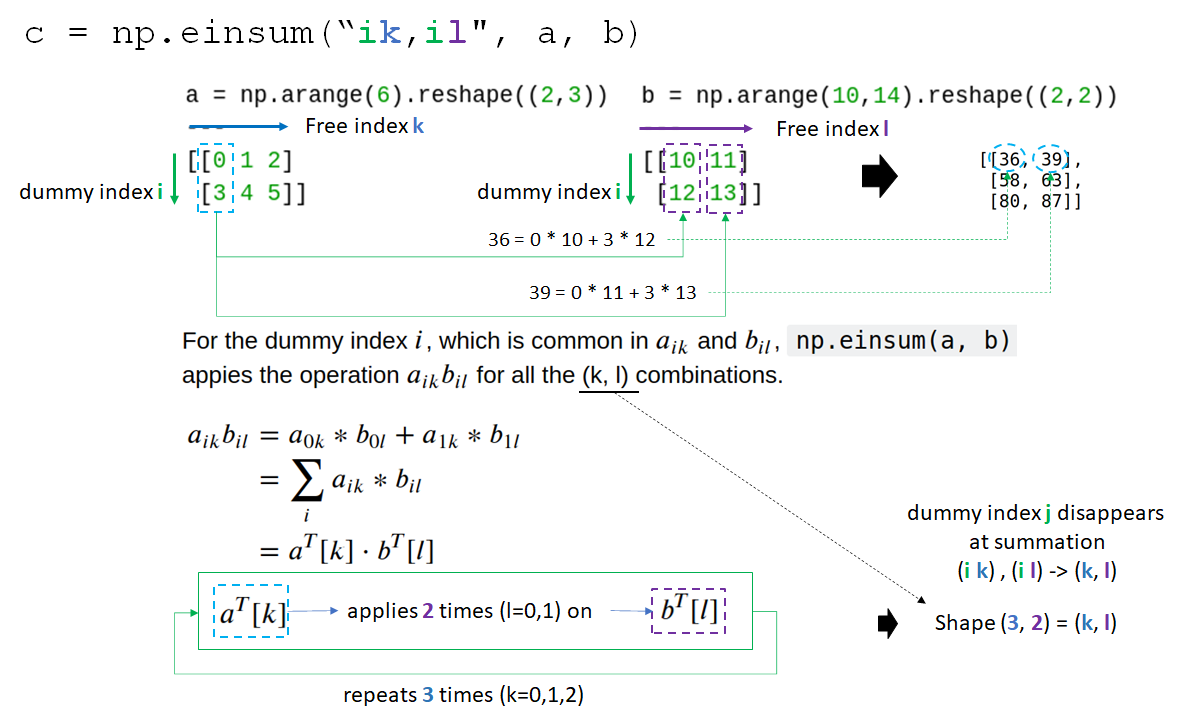
Let's dissect this:
- Inputs:
awith indicesik,bwith indicesil. - Output: The output string is not given, but we can infer it. The index
iis repeated in the inputs, so it will be summed over (it's a "dummy" index). The indiceskandlare not repeated, so they will form the output (they are "free" indices). The implicit output string iskl. So,einsum("ik,il->kl", a, b). - Mathematical Form: .
- Shape Logic: If
ahas shape(I, K)andbhas shape(I, L), the indexiis summed over its sizeI. The resulting tensorcwill have shape(K, L). The image shows this with shapesa:(2,3),b:(2,2), and outputc:(3,2).
This one line of code performs an operation that would otherwise require a combination of transposing, broadcasting, element-wise multiplication, and summation. As we move towards analyzing transformers, we'll see einsum used for even more complex contractions, like computing attention scores.
Conclusion
In this lesson, we demystified einsum and showed how it provides a powerful and uniform interface for a wide range of tensor operations. By mastering its "mini-language," you can write code that is not only more concise but also often more readable, as it expresses the underlying mathematics directly.
Here are the key takeaways:
einsumexpresses tensor operations using an index-based string notation:input_indices -> output_indices.- Repeated indices in the input are multiplied and summed over.
- Indices that appear in the output define the dimensions of the resulting tensor.
- You can translate any indexed tensor equation into an
einsumstring by identifying the input, output, and summation indices. - A crucial skill is to verify your
einsumexpressions against explicit implementations using functions liketorch.matmulandtorch.sumto ensure correctness.
In our next lesson, we will shift our focus from the mechanics of tensor manipulation to a method for interpreting the information stored within them. We will explore Singular Value Decomposition (SVD), a fundamental technique from linear algebra that allows us to find the most important "directions" in a matrix of activations.