Introduction
Hello! In our last lesson, we took a deep dive into the low-level world of bit manipulation, learning how to use bitmasks to directly control individual bits within a variable. This is a powerful technique for performance-critical code and hardware interaction, which is central to your goal of working with Arduino.
Today, we are shifting from low-level hardware control to a fundamental aspect of application development: File I/O (Input/Output). Almost every significant desktop application needs to save and load data, whether it's user settings, documents, or logs. This lesson will teach you how to make your C programs interact with the file system.
Specifically, you will learn to read from and write to text files using standard C file I/O functions like fopen, fprintf, fscanf, and fclose. These functions are the portable, standard library way to handle file persistence, a skill that's just as crucial for building desktop applications as it is for logging sensor data on an Arduino.
1. The Core File I/O Workflow in C
Interacting with files in C follows a consistent and logical pattern. Regardless of whether you are reading or writing, the process involves four main steps:
- Open the File: You use the
fopen()function to request access to a file. You specify the file's path and the mode in which you want to open it (e.g., for reading, writing, etc.). If successful,fopen()returns a special pointer of typeFILE *. - Get a File Handle: The
FILE *pointer is often called a file handle or file stream. It's not a direct pointer to memory in the way we've seen before, but rather an abstraction that represents the connection between your program and the file on the disk. You'll pass this handle to all other functions to tell them which file to work on. - Perform I/O Operations: Once you have a valid file handle, you can use functions like
fprintf()to write formatted data to the file orfscanf()to read formatted data from it. - Close the File: When you are finished, you must call
fclose()with the file handle. This is critical. It ensures that any data buffered in memory is written to the disk, and it releases the system resources associated with the file.
A crucial part of this workflow is error handling. If fopen() cannot open the file (e.g., it doesn't exist, or you lack permissions), it will return NULL. Your program must always check for this to avoid crashing.
#include <stdio.h>

int main() {
    FILE *file_handle;

    // Step 1: Open the file
    file_handle = fopen("my_file.txt", "w"); // "w" is for write mode

    // Step 2: ALWAYS check for an error
    if (file_handle == NULL) {
        perror("Error opening file");
        return 1; // Exit with an error code
    }

    // Step 3: Perform operations (we'll do this in a moment)
    printf("File opened successfully.\n");

    // Step 4: Close the file
    fclose(file_handle);

    return 0;
}
2. Writing to Text Files
Let's start by writing data to a file. Since you're already familiar with printf, learning fprintf will be straightforward. It works exactly the same way, but its first argument is the file handle you want to write to.
The two most common modes for writing are:
"w"(write): Opens a file for writing. If the file does not exist, it is created. If it does exist, its contents are overwritten."a"(append): Opens a file for writing. If the file does not exist, it is created. If it does exist, new data is added to the end of the file.
The following video provides an excellent walkthrough of opening a file, writing to it with fprintf, and understanding the difference between write and append modes.
File Access Basics | C Programming Tutorial
Watch these segments from the 'File Access Basics' video by Portfolio Courses. They clearly demonstrate the fundamental process of opening a file for writing, using functions to write data, and the importance of closing the file.
Please watch from the beginning to timestamp 07:53. Pay close attention to: The explanation of fopen() and the file handle (00:00 - 01:52). How fprintf() is used just like printf() but for files (01:52 - 06:14). The crucial difference between write mode ("w") and append mode ("a") (06:14 - 07:53).
Hands-on Example: Writing a Log File
Let's write a program that logs some data to a file named datalog.txt.
#include <stdio.h>
#include <time.h> // We'll use this to get a timestamp

int main() {
    // Open the file in append mode. This is perfect for a log file!
    FILE *log_file = fopen("datalog.txt", "a");

    if (log_file == NULL) {
        perror("Error opening log file");
        return 1;
    }

    // Get the current time
    time_t now = time(NULL);
    char *timestamp = ctime(&now);
    timestamp[24] = '\0'; // ctime adds a newline, let's remove it

    // Write a formatted string to the file
    fprintf(log_file, "[%s] Sensor reading: %d\n", timestamp, 101);

    // Always close the file
    fclose(log_file);

    printf("Data appended to datalog.txt\n");

    return 0;
}
Compile and run this program a few times. Then, open datalog.txt in a text editor. You should see a new line added each time you ran the program. Now, try changing the mode from "a" to "w" and run it again. You'll see that the file is wiped clean and only contains the single, most recent entry.
3. Reading from Text Files
Reading data follows the same pattern, but we use functions like fscanf(). Just as fprintf is the file-based version of printf, fscanf is the file-based version of scanf.
To read a file, you'll typically open it in read mode ("r").
The most common and robust way to read a file is to do it in a loop until you reach the "End Of File" (EOF). The fscanf function is designed for this: it returns the number of items it successfully read, or the special value EOF when it reaches the end of the file.
The video you watched earlier also has a great section on this.
File Access Basics | C Programming Tutorial
Now, let's watch the section from the same video that covers reading from a file. It introduces fscanf and demonstrates the essential pattern for reading a file until the end.
Please watch from 10:58 to 19:46. Focus on: How fscanf() is used to read formatted data from the file. The while (fscanf(...) != EOF) loop structure. This is a very common and important C idiom.
Hands-on Example: Reading Configuration
Imagine you have a simple configuration file named config.txt with the following content:
username: admin
level: 12
Let's write a program to read these values.
#include <stdio.h>

int main() {
    char username[50];
    int level;

    FILE *config_file = fopen("config.txt", "r");

    if (config_file == NULL) {
        perror("Could not open config.txt. Please create it first");
        return 1;
    }

    // Read the structured text.
    // The format string must precisely match the file's content.
    int items_read = fscanf(config_file, "username: %s\nlevel: %d", username, &level);

    fclose(config_file);

    if (items_read == 2) {
        printf("Configuration loaded successfully:\n");
        printf("Username: %s\n", username);
        printf("Level: %d\n", level);
    } else {
        printf("Failed to parse config file. Items read: %d\n", items_read);
    }

    return 0;
}
This example shows how powerful fscanf can be for parsing structured text. However, it can be fragile. A small change in the file's format can break the fscanf call. For reading whole lines of text, fgets() is often a safer alternative, as it is less likely to cause a buffer overflow.
4. Application in Embedded Systems (Arduino)
You might be wondering how this relates to your goal of working with Arduino. While the standard C library functions we've discussed are for desktop systems, the principles are identical in the embedded world.
For an Arduino, you often log data to an SD card. You use a specific library (e.g., SD.h), but the workflow is the same: you open a file, get a handle, read/write, and close it.
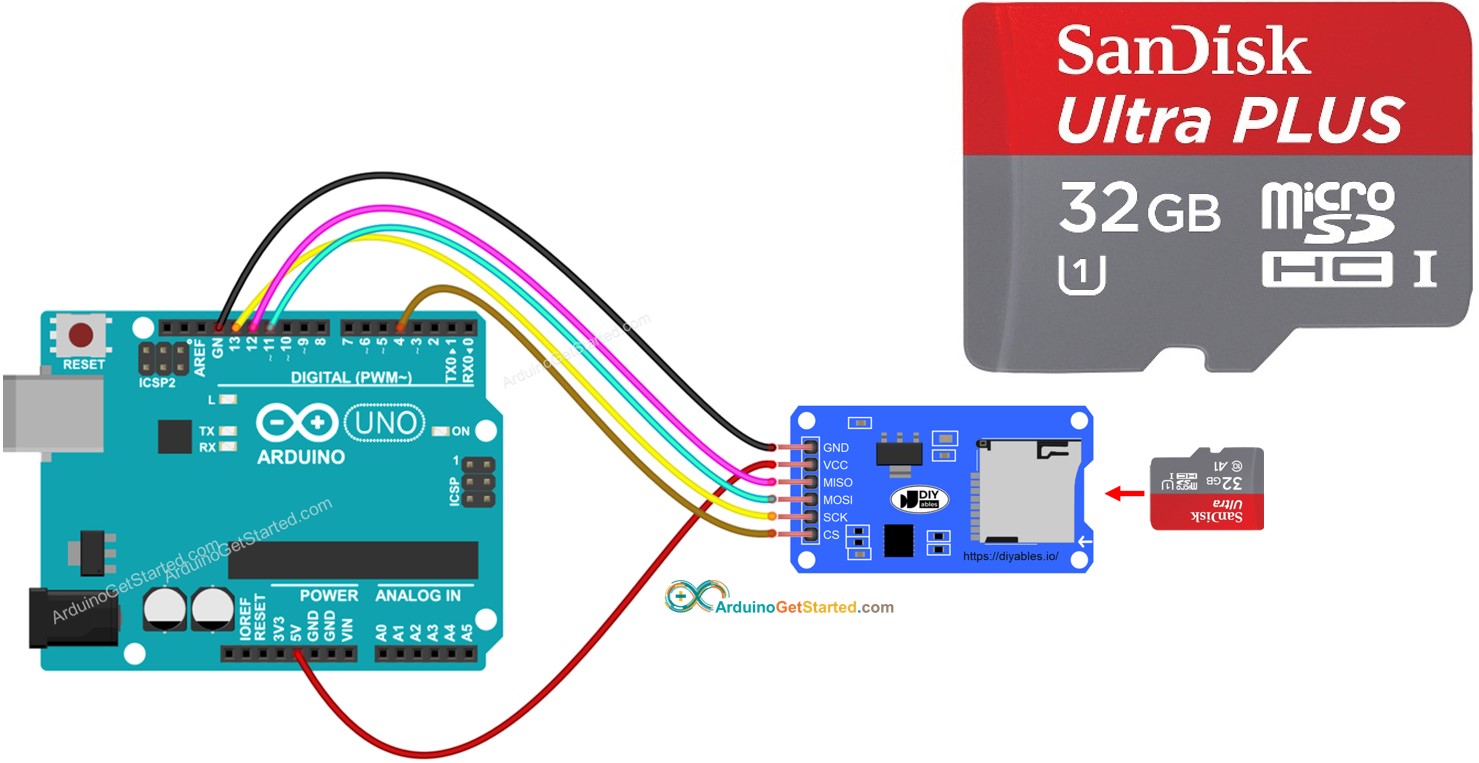
The function names are slightly different, but the concepts map directly:
FILE *f = fopen("log.txt", "a");becomesFile f = SD.open("log.txt", FILE_WRITE);fprintf(f, "Value: %d\n", val);becomesf.println(val);fclose(f);becomesf.close();
By mastering standard C file I/O now, you are already learning the fundamental logic you'll need for data persistence in your future Arduino projects.
5. Reference and Common Pitfalls
File I/O has a few common traps for new programmers. This article provides a fantastic summary of the core functions and, most importantly, a list of common mistakes to avoid.
C File Handling (Basics, Examples, Functions) - WsCube Tech
Please read these sections from the 'C File Handling' article on WsCube Tech. It provides a concise reference for file modes and functions, and highlights mistakes you should watch out for.
First, read the section 'Modes Used in C File Handling' to get a clear table of all the available modes like r+, w+, etc. Then, read the section 'Common Mistakes in File Handling in C'. This is very important practical advice.
Conclusion
In this lesson, you've learned how to make your C programs store data permanently by interacting with the file system. This is a huge step towards building real-world applications.
Key Takeaways:
- The standard file I/O workflow is
fopen->operate->fclose. fopenreturns aFILE*handle, which you must check forNULLto handle errors.- The main modes are
"r"(read),"w"(write, erases existing content), and"a"(append, adds to end of file). fprintfwrites formatted data to a file, just likeprintfdoes to the console.fscanfreads formatted data from a file. It's powerful but requires the file to match the format string exactly.- Always remember to
fcloseyour files to save data and release system resources.
Next Up
We have now covered two critical "advanced" C topics: low-level bit manipulation and high-level file I/O. In our next lesson, we'll explore another important feature of C, the preprocessor, looking at how it's used for constants (#define) and conditional compilation. We will also analyze the risks of using parameterized macros and see when an inline function might be a better choice.