Introduction
Hello! In our last lesson, we covered how to interact with text files using functions like fprintf and fscanf. You learned the standard fopen -> operate -> fclose workflow, which is fundamental for tasks like creating log files or reading simple configurations. While text files are human-readable and great for many purposes, they aren't always the most efficient way to store data.
This lesson builds directly on our file I/O knowledge by introducing binary file I/O. Instead of converting data into text, we'll be saving the raw byte representation of our variables and data structures directly to a file. This is a common and highly efficient technique used in desktop applications to save and load complex data, and in embedded systems to log large amounts of sensor data with minimal overhead.
Your learning outcome for today is to read and write binary data structures to files using fread() and fwrite(). We'll explore why and when to use binary files, learn the syntax of these powerful functions, and put it all into practice by saving and loading an array of C structs.
1. Text vs. Binary Files: The "Why"
Before we jump into the code, it's crucial to understand the difference between the text files we used in the last lesson and the binary files we'll use today.
- Text Files: Store data as a sequence of human-readable characters. When you save the number
123, you are actually storing the characters '1', '2', and '3'. Thefprintfandfscanffunctions handle the conversion between the in-memory representation of the number and its character-based representation. - Binary Files: Store data as a direct, byte-for-byte copy of its in-memory representation. The integer
123is stored as the specific four bytes (on most systems) that represent that number in memory. There is no conversion.
To dig a little deeper into this distinction, please review the following material.
This resource from DigiPen's course materials provides a clear comparison between text and binary data and introduces the fread and fwrite functions.
Please read two parts of this document: Start at the section titled 'Binary Input/Output' and read down to the hex dump examples. Pay attention to the function prototypes for fread and fwrite and the example comparing the file size of integers stored in binary vs. text. Then, scroll down to the table under the note 'The second parameter to fopen is the mode...'. Review the modes for binary files: "rb", "wb", and "ab".
The key takeaway is that binary files are more compact and faster to process because the program doesn't need to perform expensive string-to-number (and vice-versa) conversions. This makes them ideal for saving the state of an application or logging raw data for later analysis. The trade-off is that the files are no longer human-readable.
2. Writing Binary Data with fwrite()
The function for writing binary data is fwrite(). Its prototype looks like this:
size_t fwrite(const void *ptr, size_t size, size_t count, FILE *stream);
Let's break down its arguments:
ptr: A pointer to the data you want to write.size: The size, in bytes, of a single element you are writing. You'll almost always use thesizeof()operator here (e.g.,sizeof(int),sizeof(struct Point)).count: The number of elements you want to write. To write a singleint, this is1. To write an array of 10ints, this is10.stream: TheFILE *handle returned byfopen(), opened in a binary write mode like"wb"(write binary) or"ab"(append binary).
fwrite() returns the number of elements successfully written. It's crucial to check this return value to ensure your data was saved correctly.
The following video provides a practical demonstration of writing a simple struct to a binary file.
This video from CodeVault clearly demonstrates the process of writing a struct to a file using fwrite and even shows you what the resulting binary file looks like in a hex editor.
Please watch from the beginning to timestamp 09:12. Focus on: Opening the file in binary write mode ("wb"). The explanation of each parameter passed to fwrite. The importance of checking the return value of fwrite. The visualization of the binary data in the hex editor. This directly shows you the 'memory dump' concept.
3. A Complete Example: fwrite() and fread() with an Array of Structs
Now let's tackle a more comprehensive and realistic scenario: saving an entire array of structs to a file and then reading it back. This is a common pattern for persisting collections of data.
The function for reading binary data is fread(), and its signature is a mirror of fwrite():
size_t fread(void *ptr, size_t size, size_t count, FILE *stream);
Here, ptr is a pointer to the memory location where you want to store the data read from the file.
The next video is an excellent, complete walkthrough of a program that defines write_data and read_data functions for an array of student structs. It also introduces a clever technique: writing the number of records at the beginning of the file, so you know how much memory to allocate when you read it back.
Read And Write An Array Of Structs To A Binary File | C Programming Example
This video by Portfolio Courses will be our main practical guide. It walks through a complete, well-structured example of writing and reading an array of structs.
Please watch the entire video (00:00 - 18:16), as it covers the full write/read cycle. Pay close attention to: Writing: How fwrite is first used to write the total number of structs, and then again to write the entire array in one go. Reading: The reverse process: fread is first used to read the total, memory is dynamically allocated with malloc, and then fread is called again to read the entire array into the newly allocated memory. Error Handling: Notice how the code consistently checks the return values of fopen, fwrite, and fread.
This video demonstrates a robust pattern for data persistence that you can adapt for your own projects. The combination of writing metadata (the count) along with the data itself is a powerful technique.
4. Portability Caveats: Endianness and Padding
Your experience with Python and Java may have led you to expect data files to be universally portable. With C binary files, that's not always the case. Writing a raw memory dump is fast and efficient, but it exposes you to two "under the hood" hardware details: endianness and struct padding.
Endianness
This refers to the order in which a computer architecture stores the bytes of a multi-byte data type (like an int or float).
- Little-endian (e.g., Intel/AMD CPUs) stores the least significant byte first.
- Big-endian (e.g., many network protocols, older CPUs) stores the most significant byte first.
If you fwrite an int on a little-endian machine and fread it on a big-endian one, you will read a completely different number.
Structure Padding
Compilers often insert invisible, empty bytes into structs to align data members on memory addresses that are optimal for the CPU to access. This is called padding. The result is that sizeof(struct) can be greater than the sum of the sizes of its members.
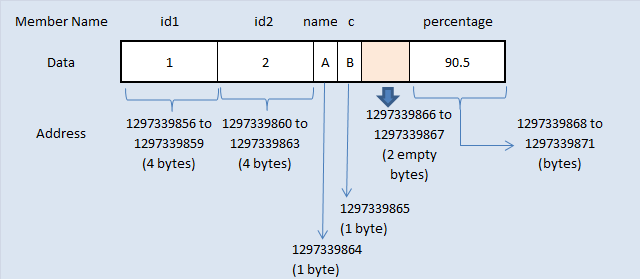
If you compile your code with two different compilers (or on different systems) that use different padding rules, a binary file written by one program will not be readable by the other.
Let's revisit the DigiPen resource to understand these portability issues.
Please read the section titled 'Endian Refresher'. It gives a concise explanation of big-endian vs. little-endian and why it matters, especially for network communication.
For your goals of building desktop applications and working with Arduino (which often uses ARM-based processors), these issues are important to be aware of. If you are only ever reading and writing files on the same machine, you don't need to worry. But if you need to exchange binary data between different systems, you must use a standardized format (like network byte order) or a serialization library that handles these differences for you.
Conclusion
In this lesson, you've moved beyond text files and learned how to persist data in a much more efficient, machine-native format. This skill is a cornerstone of performance-oriented programming in C/C++.
Key Takeaways:
- Binary files store a raw memory dump of data, which is faster and more space-efficient than text files because it avoids data conversion.
- Files must be opened in a binary mode (e.g.,
"wb","rb") for binary I/O. fwrite()writes one or more elements from a memory buffer to a file.fread()reads one or more elements from a file into a memory buffer.- A common and robust pattern is to write the number of records to the file first, followed by the records themselves.
- Binary files are not always portable across different computer architectures due to issues like endianness and struct padding.
Next Up
We've now explored file I/O for both text and binary formats. In the next lesson, we will shift our focus back to the compilation process itself and explore the C preprocessor. You will learn how to use preprocessor directives for defining constants (#define) and for conditional compilation (#ifdef, #if). This is a key tool for writing clean, configurable, and cross-platform code.