Introduction
Welcome to the next phase of your C/C++ journey! In the previous module, you mastered many core concepts of C, culminating in reading and writing data in binary format using fread() and fwrite(). This is a powerful skill, especially for performance-critical applications.
Now, we're transitioning from C to C++. This lesson marks the beginning of Module 5, where we'll explore the core improvements C++ offers over C. We'll start with the most fundamental step: turning C++ source code into an executable program.
Your learning outcome for this lesson is to compile and run a C++ program using g++. Since you enjoy understanding "under the hood" concepts, we won't just learn the command. We'll also dissect the multi-stage process the compiler follows to transform your human-readable code into machine-executable instructions. This provides a solid foundation for everything that follows.
1. Your First C++ Program
Just as C programs commonly use the .c extension, C++ source files typically use .cpp, .cxx, or .cc. We will use .cpp in this course.
Let's start with the classic "Hello, World!" program, C++ style.
// hello.cpp


#include <iostream>

int main() {
    // Print a message to the console
    std::cout << "Hello, C++ World!" << std::endl;
    return 0;
}
You'll notice a few differences from C:
- We
#include <iostream>instead of<stdio.h>. This is the C++ standard library's header for Input/Output streams. - We use
std::coutto print to the console.stdis a namespace, a concept we'll cover soon. For now, think of it as a prefix for standard library components. The<<operator is used to "stream" data tocout. std::endlis used to insert a newline character and flush the output buffer, similar to\nin aprintfstring.
2. Compiling and Running with g++
The GNU Compiler Collection (GCC) includes a C compiler (gcc) and a C++ compiler (g++). While gcc can sometimes compile C++ code, g++ is the correct tool for the job because it automatically links the necessary C++ standard libraries.
Assuming you have g++ installed, compiling your hello.cpp file is straightforward.
The following article gives a concise overview of installing and using g++. We'll focus on the compilation command first.
Please read the sections "Installing GCC" and "Compiling With G++". The installation section provides commands for various systems if you don't have g++ set up. The compilation section shows the basic command we will use.
As the article explains, you can compile and run your program from the terminal with two simple commands.
-
Compile: Open a terminal in the directory where you saved
hello.cppand run:g++ hello.cpp -o helloLet's break this down:
g++: Invokes the C++ compiler.hello.cpp: The input source file.-o hello: The-oflag specifies the name of the output file. We've named our executablehello. If you omit this, the compiler will generate a default file nameda.out(on Linux/macOS) ora.exe(on Windows).
-
Run: Execute the compiled program:
./helloThe
./is necessary to tell the shell to look for the executable in the current directory. You should see the output:Hello, C++ World!

3. Under the Hood: The Four Stages of Compilation
Running a single command like g++ hello.cpp -o hello feels like one step, but the compiler is actually performing a sequence of four distinct tasks. Understanding these stages is key to diagnosing complex build problems and appreciating how your code becomes a running program.
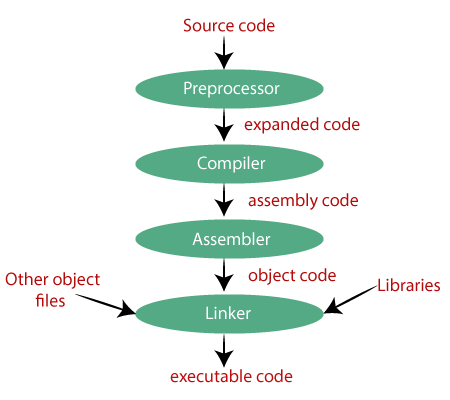
To see these stages in action, the following video provides a quick, practical demonstration using gcc, but the flags and principles are identical for g++.
Understanding how GCC carries out compilation
This video from Engineer Man provides a fast-paced but clear walkthrough of the four compilation stages, showing the command-line flag used to stop at each step.
Watch the entire video (0:00 - 3:52). As you watch, notice how each command transforms the code into a new form: Preprocessing (-E): g++ -E hello.cpp > hello.i. The preprocessor resolves #include directives by copying the contents of header files into your source code and expands any macros. The output is a single, large text file with pure C++ code. Compilation (-S): g++ -S hello.i. The compiler proper translates the preprocessed code into architecture-specific assembly language. The output is a human-readable .s file. Assembly (-c): g++ -c hello.s. The assembler converts the assembly code into machine code (binary), creating an 'object file' with a .o extension. This file is not yet executable. Linking (no flag): g++ hello.o -o hello. The linker takes the object file and links it with other necessary code, such as the C++ standard library functions (like the code for std::cout), to produce the final executable file.
You don't need to perform these steps manually in day-to-day work, but knowing they exist is invaluable. For example, "linker errors" are a common problem that occurs specifically in the final stage when the linker can't find the definition for a function you're trying to use.
4. Practical Workflow in VS Code
Now, let's bring this knowledge into a modern development environment. Since you're familiar with IDEs, let's see how to compile and run C++ code within Visual Studio Code, which is a popular choice for C++ development.
The following video demonstrates two methods for compiling and running a C++ program in VS Code.
Compiling & Executing C++ Programs (VS Code)
This Neso Academy video shows a complete workflow inside VS Code, from creating the file to running the program.
Watch from 01:37 to 13:30. The video presents two methods: Method 1 (Run Build Task): (05:37 - 09:36) This uses a VS Code-specific feature that abstracts the compilation command. It's convenient but hides the underlying g++ call. Method 2 (Using the Terminal): (09:36 - 13:30) This is the more fundamental approach. You'll open the integrated terminal in VS Code and type the same g++ commands we just learned. Please focus your attention on this second method, as it directly reinforces your understanding of the g++ compiler.
Using the integrated terminal (Method 2) is a powerful workflow. It combines the direct control of the command line with the convenience of a code editor, giving you the best of both worlds.
Conclusion
Congratulations on compiling and running your first C++ program! This lesson is a critical bridge from the C world into C++. While the compilation process is similar, we've started using C++-specific features like <iostream> and g++.
Key Takeaways:
g++is the C++ compiler in the GNU Compiler Collection. It's essential to useg++(notgcc) for C++ code to ensure correct linking of standard libraries.- The basic command to compile a file is
g++ <source_file.cpp> -o <executable_name>. - The compiled program is run from the terminal, typically using
./<executable_name>. - The compilation process consists of four main stages: Preprocessing, Compilation, Assembly, and Linking.
- You can use the integrated terminal in IDEs like VS Code to run
g++commands directly, giving you a powerful and transparent workflow.
Next Up
Now that you can create an executable, our next step is to properly interact with it. In the next lesson, we will dive deeper into C++'s approach to console I/O, exploring std::cout for output and std::cin for input. You'll see how C++ streams offer a more type-safe and extensible alternative to C's printf and scanf.