Introduction
Hello! In our last lesson, we took our first steps into manual memory management, learning how to allocate memory on the heap with malloc() and, crucially, how to release it with free(). We established the fundamental rule: for every malloc(), there must be a free() to prevent memory leaks.
Today's lesson addresses the learning outcome: Identify and fix common pointer bugs: null dereference, dangling pointers, and memory leaks. We'll move from the "how-to" of memory allocation to the "what-if" of memory errors. These bugs are some of the most notorious in C programming because they often don't cause immediate, obvious crashes. Instead, they can lead to subtle data corruption or instability that is difficult to trace.
We will cover:
- Null Pointer Dereference: What happens when you use a
NULLpointer. - Dangling Pointers (Use-After-Free): The dangers of using a pointer after its memory has been freed.
- Memory Leaks: A closer look at how they happen, beyond just forgetting to call
free(). - Valgrind: An introduction to a powerful professional tool that acts like a memory detective for your C programs.
This lesson is crucial for developing the defensive programming mindset required for robust C applications. Let's get started.
1. The "Big Three" Pointer Bugs
A. Null Pointer Dereference
This is the most straightforward of the pointer bugs. It occurs when you try to access the value at a NULL address.
- Cause: This typically happens in two scenarios:
malloc()fails to allocate memory and returnsNULL, but your code doesn't check for this and proceeds to use the pointer.- A pointer is intentionally set to
NULL(a good practice for "uninitialized" or "empty" pointers), but is then used before being assigned a valid memory address.
- Result: Attempting to read from or write to address
NULLis forbidden by the operating system. This will cause an immediate program crash, often reported as a "segmentation fault". - Fix: The fix is simple and was introduced in the last lesson: Always check if a pointer is
NULLbefore you dereference it.
int *ptr = (int*)malloc(sizeof(int) * 10);

// The FIX: Always check for NULL after allocation.
if (ptr == NULL) {
    fprintf(stderr, "Memory allocation failed.\n");
    // Handle the error, maybe exit the program.
} else {
    // It's safe to use ptr now.
    *ptr = 100; // No crash!
}

// ... later, after freeing the pointer ...
free(ptr);
ptr = NULL; // Good practice!

// If you try to use it now, a check prevents a crash.
if (ptr != NULL) {
    *ptr = 200; // This code will not run.
}
While a crash is inconvenient, it's actually the best-case scenario for a bug, as it tells you exactly where the problem is. The next two bugs are far more insidious.
B. Dangling Pointers (Use-After-Free)
This is a more dangerous bug. A dangling pointer is a pointer that continues to hold the address of a memory block that has already been deallocated by free().
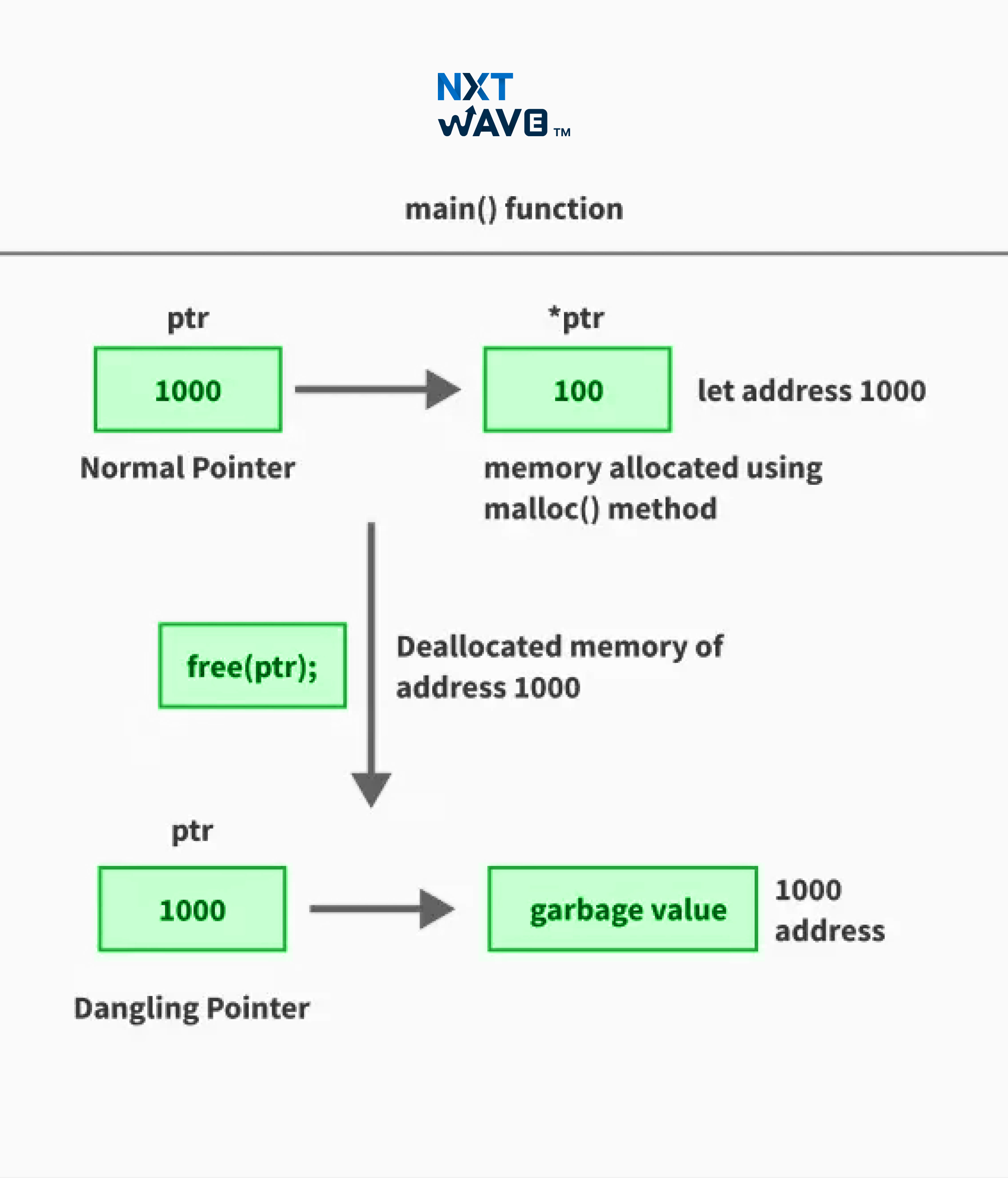
- Cause: Calling
free(ptr)deallocates the memory, but it does not change the value ofptritself. The pointer still "dangles," pointing to a location you no longer own. - Result: This leads to undefined behavior. Three things might happen:
- It might seem to work correctly for a while, if the memory hasn't been reused yet.
- It might crash if the operating system has protected that memory page.
- Worst of all, that memory block could be re-allocated by a later
malloccall for a completely different purpose. Your dangling pointer can then corrupt this new data, leading to bizarre and hard-to-diagnose bugs far from the original error.
- Fix: The established best practice is to set the pointer to
NULLimmediately after freeing it. Since dereferencingNULLcauses a predictable crash, it turns a subtle undefined behavior bug into an easy-to-find null dereference bug.
The following video provides an excellent walkthrough of this problem and its solution.
Dangling Pointers | C Programming Tutorial
The video 'Dangling Pointers' from Portfolio Courses clearly demonstrates why dangling pointers are a problem and introduces the standard C practice for preventing them.
Please watch from 01:34 to 05:11. Focus on: How free() deallocates the memory but doesn't change the pointer variable itself. The demonstration of writing to freed memory and the potential for data corruption. The simple, effective fix of setting the pointer to NULL after freeing it.
The key takeaway is the mantra:free(ptr);ptr = NULL;
C. Memory Leaks
We introduced memory leaks in the last lesson as the result of forgetting to call free(). Another common way to cause a leak is by losing the only pointer to a dynamically allocated block of memory.
Creating garbage objects using C pointers
The article 'Top 20 C pointer mistakes' has a concise section that explains this specific type of memory leak very well.
Please read 'Mistake #11: Creating garbage objects using C pointers'. The code example perfectly illustrates how reassigning a pointer without freeing the original memory block 'orphans' that memory, making it impossible to free.
Here's the code pattern from the article to watch out for:
// 1. Allocate memory and assign its address to 'p'.
int* p = (int*)malloc(sizeof(int));
*p = 5; // Memory block 1 is in use.

// 2. OOPS! Reassign 'p' without freeing the old memory.
p = (int*)malloc(sizeof(int)); // Memory block 2 is allocated.
                               // The address of block 1 is now lost forever.

// Memory block 1 has been leaked.
- Fix: Be disciplined. If you need to re-assign a pointer that currently "owns" a block of memory, free the old block first or use a different pointer variable.
2. A Detective's Toolkit: Using Valgrind
How do you find these subtle memory bugs? Reviewing code helps, but it's not foolproof. In the professional world, developers use specialized tools. For C/C++ on Linux and macOS, the gold standard is Valgrind.
Valgrind is a program that runs your compiled code in a special virtual environment. It meticulously tracks every single memory allocation, deallocation, and access. It's slower than running your program normally, but its detailed reports on memory errors are invaluable.
The following video is a fantastic practical guide to using Valgrind to find the very bugs we've just discussed.
C Dynamic Memory Debugging with Valgrind
Let's watch Brian Fraser's 'C Dynamic Memory Debugging with Valgrind' to see how this powerful tool works in practice.
This video is packed with information. We'll focus on these key segments: What is Valgrind? (01:36 - 03:39): Understand what Valgrind does and the crucial step of compiling your code with the -g flag to include debugging symbols. Finding Memory Leaks (08:01 - 09:07): See how Valgrind reports a memory leak with messages like heap in use at exit and definitely lost. Finding Use-After-Free (10:03 - 11:52): Observe how Valgrind detects an attempt to write to memory that has already been freed, reporting an invalid write on a freed block. Finding Dangling Stack Pointers (14:40 - 17:35): This is an excellent example of another kind of dangling pointer—one pointing to stack memory that's no longer valid after a function returns. See how Valgrind reports uninitialized values in this case.
Valgrind Quick Reference:
- Compile:
gcc -g -Wall my_program.c -o my_program(the-gis essential!) - Run:
valgrind ./my_program - Key Error Messages:
definitely lost: A classic memory leak. You allocated memory and lost the pointer.Invalid read/write ... Address ... is ... bytes inside a block of size ... free'd: A classic use-after-free (dangling pointer) bug.Conditional jump or move depends on uninitialised value(s): Often a sign you're using a pointer to an invalid memory location (like a returned stack variable).Invalid free(): You tried tofree()the same block twice (double-free) or tried tofree()a stack address.
Practical Challenge
Time to be the detective. Here is a small program with several memory bugs. Read the code, predict what the bugs are, and then think about how you would fix them. How do you think Valgrind would report these errors?
#include <stdio.h>
#include <stdlib.h>
#include <string.h>

// This function is supposed to create and return a copy of a string.
char* duplicate_string(const char* original) {
    // BUG-ZONE 1
    char* new_string;
    new_string = (char*)malloc(strlen(original)); // A subtle bug is here
    strcpy(new_string, original);
    return new_string;
}

int main() {
    char* str1 = duplicate_string("Hello");
    printf("String 1: %s\n", str1);

    // BUG-ZONE 2
    free(str1);
    printf("String 1 after free: %s\n", str1);

    // BUG-ZONE 3
    char* str2 = (char*)malloc(50 * sizeof(char));
    strcpy(str2, "Initial string");

    str2 = duplicate_string("A completely new string");

    printf("String 2: %s\n", str2);

    // Final cleanup
    free(str2);

    return 0;
}
Click here to see the analysis and solution
Here are the bugs and their fixes:
-
Bug-Zone 1: Off-by-one in
malloc- Problem:
strlen("Hello")returns 5, but you need 6 bytes to store "H-e-l-l-o" plus the null terminator\0.strcpywill write 6 bytes, overrunning the allocated buffer by one byte. This is a buffer overflow. - Valgrind Report: Valgrind would catch this as an
Invalid write of size 1. - Fix: Always allocate
strlen(str) + 1.// CORRECT new_string = (char*)malloc(strlen(original) + 1);
- Problem:
-
Bug-Zone 2: Use-After-Free
- Problem: The code dereferences
str1in theprintfcall after it has been freed. This is a classic dangling pointer bug. - Valgrind Report: Valgrind would report an
Invalid readon afree'dblock. - Fix: Don't use the pointer after freeing it. If you must keep the pointer variable, set it to
NULL.// CORRECT free(str1); str1 = NULL; // Don't try to print str1 again.
- Problem: The code dereferences
-
Bug-Zone 3: Memory Leak
- Problem: The code first allocates memory for
str2("Initial string"). Then, it reassigns thestr2pointer to the new memory returned byduplicate_string. The pointer to the "Initial string" block is lost, causing a memory leak of 50 bytes. - Valgrind Report: Valgrind would report
50 bytes in 1 blocks are definitely lost. - Fix:
freethe old memory before reassigning the pointer.// CORRECT char* str2 = (char*)malloc(50 * sizeof(char)); strcpy(str2, "Initial string"); free(str2); // Free the old block first! str2 = duplicate_string("A completely new string");
- Problem: The code first allocates memory for
Conclusion
You have now confronted the three most common and dangerous pointer bugs in C. Mastering manual memory management isn't just about knowing the functions; it's about developing the discipline to avoid these pitfalls.
Key Takeaways:
- Null Dereference: A crash caused by using a
NULLpointer. Fix by always checking forNULL. - Dangling Pointer (Use-After-Free): Undefined behavior from using a pointer after its memory is
free'd. Fix by setting pointers toNULLafter freeing them. - Memory Leak: Wasted memory from losing a pointer to an allocated block. Fix by ensuring every allocated block is eventually freed.
- Tools are essential: Bugs can be subtle. Tools like Valgrind are critical for systematically finding and diagnosing memory errors.
With this lesson, we conclude our deep dive into the mechanics and dangers of pointers and raw memory. You have the foundational knowledge to write C code that is both powerful and safe.
In our next lesson, we'll start building on this foundation. Instead of just managing blocks of ints or chars, we'll learn how to group related data together into custom types using structs. This is the first step toward creating more complex and organized data structures in C.