Introduction
Hello! In our last lesson, we explored the "why" and "where" of memory management in C by distinguishing between the stack and the heap. We learned that the stack is for fast, automatic, and scope-bound memory, while the heap provides a large, flexible space for data that needs to persist across function calls or whose size isn't known at compile time.
Today's lesson fulfills the learning outcome: Allocate and deallocate dynamic memory using malloc() and free(). We'll move from theory to practice and learn how to take direct control of heap memory. We will cover:
- The syntax and usage of
malloc()to request memory from the heap. - The critical importance of
free()to release that memory and prevent leaks. - Best practices, such as checking for allocation failures.
- A key use case: creating data inside a function that outlives the function itself.
Mastering manual memory management is a defining skill for a C programmer. It unlocks immense power and performance but, as we'll see, also comes with significant responsibility.
The malloc() and free() Cycle
The two fundamental functions for manual memory management in C are malloc() (memory allocation) and free(). They are partners; for every successful malloc() call, you must have a corresponding free() call. These functions are declared in the <stdlib.h> header file.
1. Allocating Memory with malloc()
The malloc() function reserves a block of a specified size on the heap and returns a pointer to the beginning of that block.
Its function signature is:void* malloc(size_t size);
Let's break this down:
size_t size: This is the number of bytes you want to allocate.size_tis an unsigned integer type. The best practice is to never use a hardcoded number of bytes. Instead, use thesizeof()operator to ensure your code is portable across different systems where data type sizes might vary. For example, to allocate space for 10 integers, you would usesizeof(int) * 10.void*return value:malloc()returns a "generic" pointer of typevoid*. It's a pointer, but it doesn't have a specific data type associated with it. You must cast this pointer to the type you intend to use, likeint*orchar*. This tells the compiler how to interpret the memory block (e.g., as a series of integers) and enables correct pointer arithmetic.
The following video provides a clear, step-by-step introduction to using malloc.
Dynamic Memory with Malloc - Everything you Need to Know
Let's watch the video 'Dynamic Memory with Malloc' by Caleb Curry to see the basic mechanics of allocating memory, calculating its size, and accessing it.
Please watch from 01:36 to 04:15. Focus on: How sizeof() is used to calculate the total number of bytes needed. The need to cast the void* pointer returned by malloc to a specific type (e.g., int*). How you can access the dynamically allocated memory using array-style square bracket notation, just like with a stack-allocated array.
2. Checking for Allocation Failure
The heap is finite. Although it's large, it's possible for a malloc() call to fail, especially if you request a very large block of memory or if the program has been running for a long time. If malloc() fails, it doesn't crash the program; instead, it returns NULL.
It is critical to check for this NULL return value immediately after calling malloc(). Attempting to use a NULL pointer will cause your program to crash (this is a null pointer dereference, which we'll discuss more in the next lesson).
#include <stdio.h>
#include <stdlib.h>

int main() {
    int *arr;
    int n = 10;

    // Allocate memory for 10 integers
    arr = (int*) malloc(sizeof(int) * n);

    // CRITICAL: Check if malloc was successful
    if (arr == NULL) {
        fprintf(stderr, "Error: Memory allocation failed.\n");
        return 1; // Exit with an error code
    }

    printf("Memory allocated successfully!\n");

    // ... you can now use arr safely ...

    // Remember to free the memory when done
    free(arr);

    return 0;
}
3. Deallocating Memory with free()
The memory you allocate with malloc() remains reserved for your program's use until you explicitly give it back to the system. If you lose the pointer to that memory without freeing it, you create a memory leak. This means your program holds onto memory it can no longer use, and its memory footprint will grow over time, potentially causing it to slow down or crash.
The free() function takes the pointer returned by malloc() and deallocates the corresponding memory block, making it available for future allocations.
The signature is simple: void free(void* ptr);
Dynamic Memory Allocation | C Programming Tutorial
The video 'Dynamic Memory Allocation' by Portfolio Courses has an excellent explanation and demonstration of why free() is so important and what happens when you forget it.
Watch from 09:58 to 18:02. This segment covers: The responsibility of the programmer to call free(). What a memory leak is. A powerful practical example where a program without free() continuously consumes system memory until it is killed by the operating system.
This visualization clearly shows the danger of memory leaks. It's a silent bug that might not be obvious in short-running programs but can be fatal in long-running applications like servers or, relevant to your goals, embedded systems.
Here's a complete example putting it all together, with a visual aid.

Under the Hood: How Does free() Know the Size?
A common question is: "If free() only takes a pointer, how does it know how many bytes to deallocate?"
This is a great question that gets to your interest in how systems work. The answer is bookkeeping. The memory allocator (malloc) actually allocates a slightly larger block of memory than you requested. In a hidden "header" section just before the memory block you get, it stores metadata, most importantly the size of the allocation. When you call free(ptr), the free function looks at this hidden header to determine how large the block is.
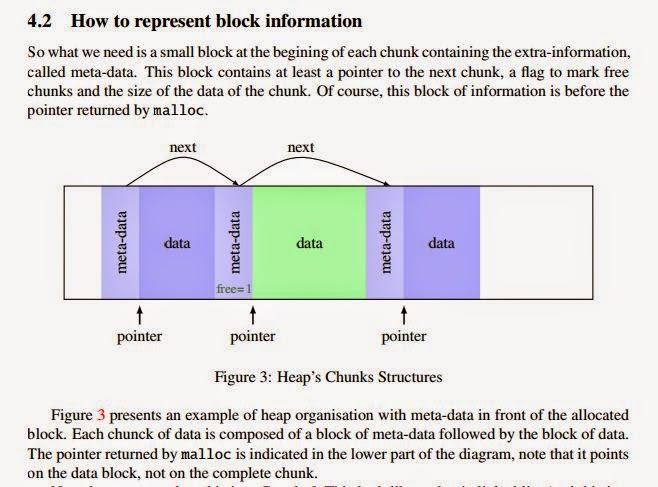
This behind-the-scenes mechanism is fascinating. The following article provides a deeper, yet accessible, look into how malloc might work internally.
To satisfy your curiosity about the inner workings, the article 'Understanding Memory Management, Part 1: C' explains the bookkeeping that makes manual memory management possible.
Read the section titled 'How malloc() works'. It explains how an allocator uses metadata headers to keep track of allocation sizes and how fragmentation can occur. This directly answers the question of how free() knows what to do.
A Key Use Case: Returning Data from a Function
One of the primary reasons to use the heap is to create data within a function that needs to be used by the function's caller. As we know from the last lesson, any variable created on the stack inside a function is destroyed when the function returns. If you try to return a pointer to a local variable, that pointer will be invalid.
By allocating memory on the heap with malloc(), the data exists independently of any function's stack frame. A function can allocate the memory, fill it with data, and safely return the pointer to the caller. The responsibility to free() the memory is then passed to the caller.
Dynamic Memory with Malloc - Everything you Need to Know
Let's return to the Caleb Curry video, which has a perfect demonstration of this exact scenario, contrasting the wrong way (returning a pointer to stack memory) with the right way (returning a pointer to heap memory).
Watch from 10:32 to 13:13. Pay close attention to the compiler warning you get when trying to return a pointer to a local array, and how using malloc resolves this issue.
Conclusion
Today you've learned one of the most fundamental skills in C programming: how to manually manage memory on the heap. This control is what allows C to be used for high-performance and low-level systems programming.
Key Takeaways:
- Use
#include <stdlib.h>to accessmalloc()andfree(). malloc(size_in_bytes)requests memory from the heap. Always usesizeof()to calculate the size.- The
void*pointer returned bymallocmust be cast to your desired pointer type (e.g.,(int*)). - Always check if
malloc()returnedNULLto handle allocation failures gracefully. free(pointer)releases the memory back to the system. Everymallocneeds afree.- Forgetting to
freememory causes a memory leak, where your program's memory usage grows unnecessarily. - The heap allows you to create data in a function that can be safely returned to and used by the caller.
In our next lesson, we will delve into the "dangers" of this power. We'll explore the most common bugs associated with pointers and dynamic memory: null pointer dereferences, using memory after it's been freed (dangling pointers), and strategies for finding and fixing memory leaks.