Introduction
Hello! In our last lesson, we took a major step forward by learning how to organize a C project into multiple source (.c) and header (.h) files. You learned about the crucial difference between declarations and definitions, and how the compiler and linker work together to build a program from separate modules.
In the code examples, you saw a cryptic block of code at the top and bottom of each header file: #ifndef ... #define ... #endif. We called it a "header guard" and promised to explain it later. That time is now.
This lesson directly addresses the learning outcome: Use header guards to prevent multiple inclusion errors. This is not just a best practice; it is an absolutely essential mechanism for writing any C or C++ program that consists of more than a couple of files.
By the end of this lesson, you will understand:
- What the "multiple inclusion problem" is and why it causes compilation errors.
- How traditional header guards solve this problem using preprocessor directives.
- A simpler, modern alternative (
#pragma once) and its trade-offs.
1. The "Double Inclusion" Problem
In the last lesson, our project structure was simple: main.c included vector2d.h. But what happens in a more complex project where header files include other header files?
Let's imagine a program for managing university courses.
- We have a
student.hthat defines aStudentstruct. - We have a
course.hthat defines aCoursestruct. A course contains an array of students, socourse.hmust#include "student.h". - Our
main.cfile needs to work with both students and courses, so it includes bothstudent.handcourse.h.
Here's the structure:
main.cincludesstudent.hmain.cincludescourse.hcourse.halso includesstudent.h
When the preprocessor runs, it effectively copies and pastes the content of included files. For main.c, this means:
- The content of
student.his pasted in. TheStudentstruct is now defined. - The content of
course.his pasted in. - As part of processing
course.h, the content ofstudent.his pasted in again.
The compiler now sees the definition of the Student struct twice in the same file (main.c), which violates C's "One Definition Rule". This results in a "redefinition of 'struct Student'" error, and the compilation fails.
This video provides an excellent walkthrough of this exact problem and introduces the standard solution.
Include Guards | C Programming Tutorial
This video from Portfolio Courses clearly demonstrates the 'double inclusion problem' and how to solve it using traditional header guards.
Watch from the beginning to 06:58. Pay attention to: How including student.h and course.h in the main file causes a redefinition error because course.h also includes student.h. The step-by-step logic of how the #ifndef, #define, and #endif directives prevent the contents of the header from being included a second time.
2. The Solution: Header Guards
As the video explained, the solution is to "guard" the contents of our header files using a special set of preprocessor directives. This ensures that even if a header is included multiple times, its contents are only processed once per source file.
The standard pattern is:
#ifndef UNIQUE_MACRO_NAME_H
#define UNIQUE_MACRO_NAME_H

// All content of your header file goes here...
// (struct definitions, typedefs, function declarations, etc.)


#endif // UNIQUE_MACRO_NAME_H
Let's break down how this works:
#ifndef UNIQUE_MACRO_NAME_H: The preprocessor checks, "has the macroUNIQUE_MACRO_NAME_Hbeen defined yet?".- First Inclusion: The first time
student.his processed,STUDENT_Hhas not been defined. The condition is true.- The preprocessor then immediately executes
#define STUDENT_H, which defines the macro. - It proceeds to include all the content within the block.
- The preprocessor then immediately executes
- Second Inclusion: The next time
student.his encountered in the same source file, the preprocessor again checks#ifndef STUDENT_H.- This time,
STUDENT_His defined. The condition is false. - The preprocessor skips everything until it finds the matching
#endif. The duplicate definition is avoided.
- This time,
This image provides a great visual summary of the process:
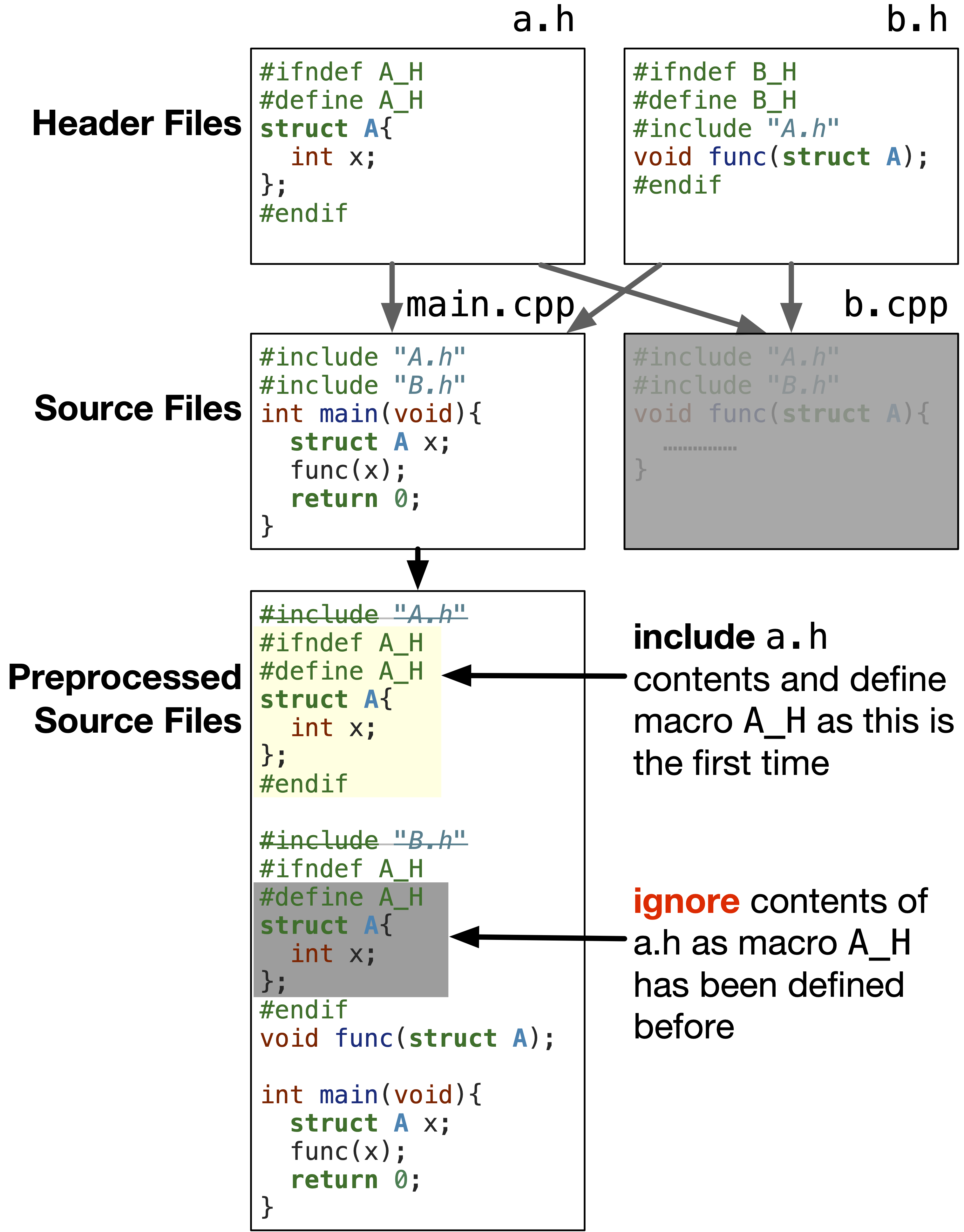
A strong convention is to base the unique macro name on the filename itself, like STUDENT_H for student.h. This makes it predictable and avoids collisions.
3. A Simpler Alternative: #pragma once
As your programming journey continues, you will frequently encounter a more modern and simpler alternative to header guards.
#pragma once

// All content of your header file goes here...
The #pragma once directive is a non-standard but widely supported feature. It tells the compiler to ensure the current file is only ever included once. The compiler handles the mechanics internally, which has a few benefits:
- It's less verbose and less prone to typing errors.
- You don't have to worry about creating a unique macro name or potential name clashes.
The video you watched earlier also briefly covers this.
Include Guards | C Programming Tutorial
The same video also introduces #pragma once, a simpler and widely supported alternative.
Now, watch from 07:39 to 08:45. This section explains what #pragma once does and its advantages over the traditional approach.
4. Header Guards vs. #pragma once: Which Should You Use?
Since you're interested in the "under the hood" details, it's worth knowing the trade-offs. While #pragma once is simpler, traditional guards are guaranteed to be portable because they are part of the C and C++ standards.
#ifndefGuards:- Pros: Standard, guaranteed to work on any compliant C/C++ compiler.
- Cons: More verbose, requires manual management of macro names, potential for bugs if you copy a file and forget to change the macro name.
#pragma once:- Pros: Simple, clean, eliminates a class of copy-paste errors.
- Cons: Not part of the official standard. While support is nearly universal across modern compilers (GCC, Clang, MSVC), it could theoretically fail on an obscure or old compiler. It can also be tricked in complex scenarios involving networked file systems or symbolic links.
Recommendation for Learning: For building robust, professional habits, it is best to use traditional #ifndef guards. They are the most portable and reliable method. Every professional C/C++ developer understands them, and many large-scale projects mandate their use.
For a comprehensive textual reference on this topic, the following article is excellent.
For a detailed textual explanation and further examples, the 'Learn C++' tutorial on this topic is an excellent resource. It covers the problem, both solutions, and best-practice naming conventions.
Read through this article. It reinforces what you saw in the video and adds important details: The Duplicate Definition Problem: Reinforces the 'why'. Header Guards: Explains the #ifndef mechanism again and discusses naming conventions. #pragma once: Discusses the modern alternative and its edge cases. Summary: A concise recap. Focus on understanding the arguments for and against each method.
5. Practical Application
Let's apply this to the vector2d module from our previous lesson. The header file already had a guard in place. Now you understand exactly what it does.
vector2d.h (Fully Understood)
// vector2d.h

// The preprocessor checks if VECTOR2D_H is defined. The first time, it's not.


#ifndef VECTOR2D_H
// So, VECTOR2D_H is immediately defined.


#define VECTOR2D_H

// Now, the actual content of the header is processed.
typedef struct {
    double x;
    double y;
} Vector2D;

double vector_length(Vector2D v);
Vector2D vector_add(Vector2D v1, Vector2D v2);

// On any subsequent inclusion of this file within the same .c file,
// the #ifndef check will fail, and the preprocessor will skip to here.


#endif // VECTOR2D_H
By placing this guard in every header file you write (student.h, course.h, vector2d.h, etc.), you make your project robust against multiple inclusion errors, no matter how complex the dependency tree becomes.
Conclusion
You have now mastered a fundamental mechanism for building scalable and robust C/C++ programs. Understanding and correctly using header guards is a non-negotiable skill for any serious developer.
Key Takeaways:
- The Problem: Including a header file multiple times within a single source file (often through a chain of other includes) leads to "redefinition" errors.
- The Classic Solution: Traditional header guards (
#ifndef/#define/#endif) use a unique preprocessor macro to ensure a header's content is only processed once per compilation unit. - The Modern Alternative:
#pragma onceoffers a simpler syntax but is not part of the C/C++ standard, though it is very widely supported. - Best Practice: For maximum portability and to build professional habits, prefer using the standard
#ifndefguards. Always guard every header file you create.
Next Up
In the last two lessons, you've learned to split your code into multiple files. As you do this, you might notice that compiling from the command line gets repetitive (gcc -Wall -g -o app main.c module1.c module2.c ...). In our next lesson, we will solve this by learning how to write a simple Makefile to automate the compilation of a multi-file project. This is the final piece of the puzzle for efficiently managing C projects.