Introduction
Hello! In our last lesson, you mastered the use of Makefiles to automate the compilation of multi-file C projects. This is a crucial skill for managing complexity and improving efficiency. You learned that make is smart enough to recompile only the necessary files, saving you significant time.
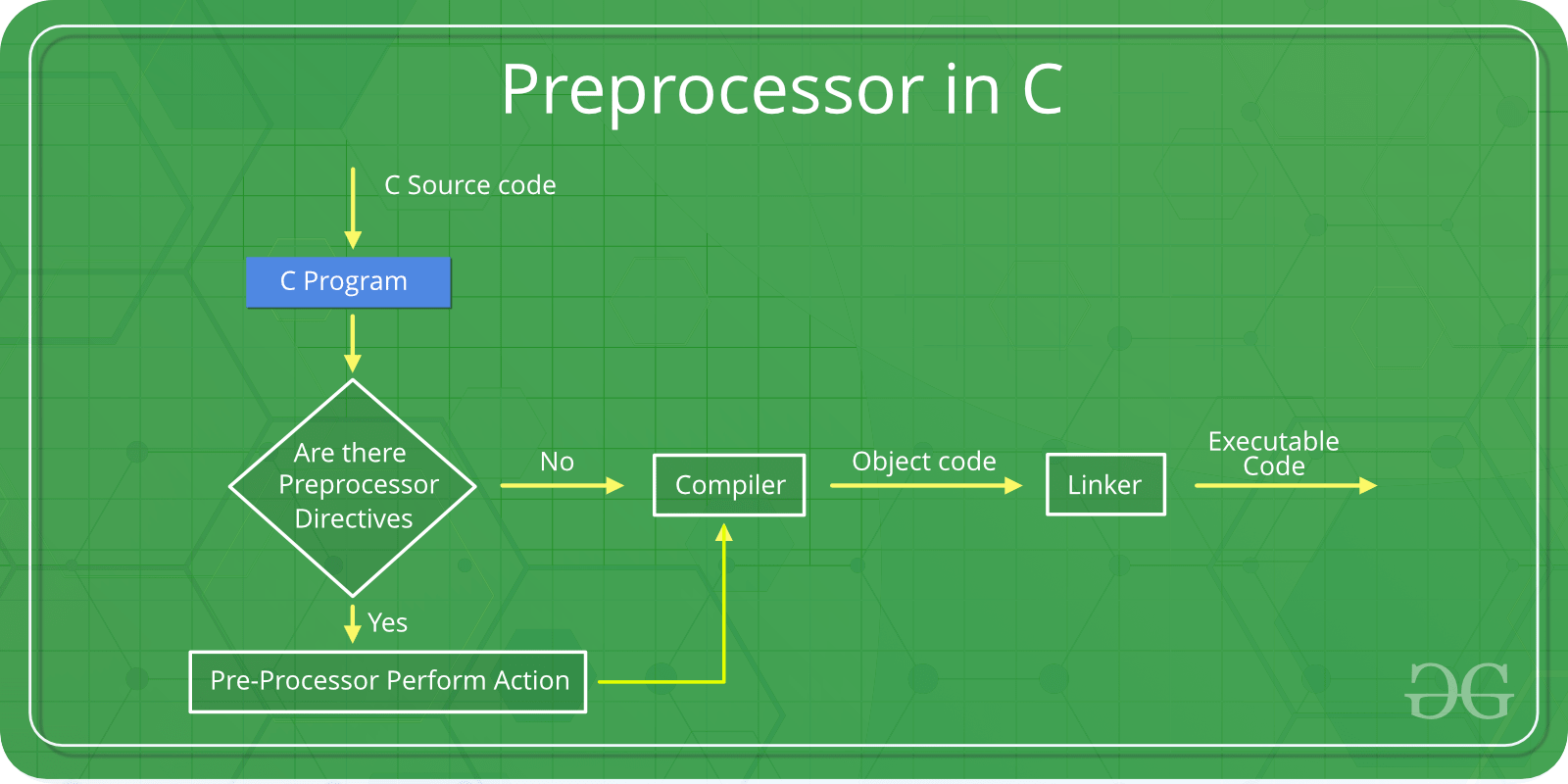
Today, we'll dive into another powerful tool that works hand-in-hand with the compiler: the C Preprocessor. You've already used it every time you've written #include <stdio.h>. The preprocessor is a tool that scans your source code for special directives (lines beginning with #) and modifies the code before the compiler even sees it.
This lesson focuses on how to use preprocessor directives to define constants and implement conditional compilation. This means you can write a single codebase that can be compiled into different versions—for example, a "debug" version with extra logging, or versions tailored for different operating systems or hardware, which is highly relevant to your goals of working on both desktop and embedded systems.
By the end of this lesson, you will be able to:
- Define symbolic constants using
#define. - Use
#if,#elif, and#elseto compile code based on the value of a constant. - Use
#ifdefand#ifndefto compile code based on whether a macro is defined. - Apply these techniques to create different build configurations, such as a debug build.
1. Defining Constants with #define
The most common use of the preprocessor is to define symbolic constants using the #define directive. This works like a search-and-replace operation. Before compiling, the preprocessor replaces every occurrence of the macro's name with its value.
The syntax is straightforward:#define MACRO_NAME value
By convention, macro names are written in ALL_CAPS to distinguish them from regular variables.
Example:
#include <stdio.h>


#define PI 3.14159
#define GREETING "Hello, world!"

int main(void) {
    printf("%s\n", GREETING);
    double circle_area = PI * 5 * 5; // The preprocessor changes this to 3.14159 * 5 * 5
    printf("Area of circle with radius 5: %f\n", circle_area);
    return 0;
}
The C compiler never sees the identifiers PI or GREETING; it only sees the substituted values. This is a powerful way to define constants that can be used throughout your program, including for things like fixed array sizes.
To get a solid grasp of this fundamental concept, please read the following short section from Beej's Guide.
Simple Macros in Beej's Guide to C Programming
This section provides a clear, concise explanation of simple macros used for defining constants.
Read section '19.2 Simple Macros'. Focus on how #define works as a text substitution mechanism before compilation.
2. Conditional Compilation
Conditional compilation is the preprocessor's most powerful feature. It allows you to include or exclude blocks of code from compilation based on certain conditions. This is incredibly useful for:
- Debugging: Including
printfstatements or other checks only in a debug build, which are removed for the final release build. - Platform-Specific Code: Writing code that works on different operating systems or hardware (e.g., using one API on Windows and another on Linux).
- Feature Toggling: Enabling or disabling certain features of your program at compile time.
Checking if a Macro is Defined: #ifdef and #ifndef
The simplest way to control compilation is to check if a macro has been defined. You've already seen this with header guards!
#ifdef MACRO_NAME: "if defined". The code block is included ifMACRO_NAMEhas been defined (even if it has no value).#ifndef MACRO_NAME: "if not defined". The code block is included ifMACRO_NAMEhas not been defined.#else: Provides an alternative block of code.#endif: Marks the end of the conditional block.
Let's see this in action for a typical debug mode scenario.
#ifdef #ifndef Conditional Compilation Directives | C Programming Tutorial
This video introduces the most common use for conditional compilation: checking whether a macro has been defined. This is great for managing features like a debug mode.
Watch the video, focusing on these parts: 1:49 - 4:38: How to use #ifdef, #ifndef, and #undef (which removes a macro definition). 5:18 - 6:19: How to add an #else block for an alternative path. 6:19 - 8:24: Pay attention to the practical examples of enabling a debug mode and compiling code for different operating systems. This connects directly to creating flexible applications.
Here's a code example you can try. You can define a macro directly in your file or pass it to the compiler, which is common practice in Makefiles (gcc -DDEBUG my_program.c).
#include <stdio.h>

// To enable debug mode, you can uncomment the line below,
// or compile with `gcc -DDEBUG your_file.c`
// #define DEBUG

int main() {
    printf("Program starting.\n");

    int user_level = 5;


#ifdef DEBUG
    // This block is only compiled if DEBUG is defined.
    printf("[DEBUG] User level set to %d.\n", user_level);


#else
    // This block is compiled if DEBUG is NOT defined.
    printf("Welcome!\n");


#endif

    printf("Program finished.\n");
    return 0;
}
Try compiling and running this code with and without the -DDEBUG flag to see the difference!
Evaluating Expressions: #if, #elif, #else
While #ifdef is useful, sometimes you need more complex logic. The #if directive evaluates a constant integer expression.
#if expression: The block is included if theexpressionevaluates to a non-zero value.#elif expression: "else if". Can be used to check another condition.#else: The fallback block.#endif: Ends the block.
This is perfect for selecting between multiple configurations. You can also use the defined() operator within an #if statement, which is more flexible than #ifdef because it can be combined with logical operators like && (AND) and || (OR).
This video gives a comprehensive overview of how to use these more powerful directives.
#if #elif #else Conditional Compilation Directives | C Programming Tutorial
Now let's look at the more general #if directive. This allows you to check not just for a macro's existence, but for its value, letting you build more complex logic.
Watch these segments to understand how to use #if: 2:06 - 5:03: This part demonstrates the core structure of #if, #elif, and #else using a 'platform code' example. 5:03 - 8:19: See how the preprocessor evaluates expressions (e.g., non-zero is true) and handles simple arithmetic. 8:19 - 10:09: This section is important. It introduces the defined keyword, which lets you combine checks within a single #if or #elif statement (e.g., #if defined(FOO) && defined(BAR)).
3. Hands-On Activity
Let's apply these concepts in a short exercise that reflects your interest in desktop and embedded development.
Task: Write a C program that configures itself based on a target platform.
- Create a file named
config_test.c. - At the top of the file, define a macro named
TARGET_PLATFORM. You'll change its value to test different scenarios. Start with:#define TARGET_PLATFORM 1 // 1: Desktop, 2: Embedded, 3: Server - Use an
#if/#elif/#elseblock to define another macro,PLATFORM_NAME, and an integer constant,BUFFER_SIZE, based on the value ofTARGET_PLATFORM.- If
TARGET_PLATFORMis1,PLATFORM_NAMEshould be"Desktop"andBUFFER_SIZEshould be4096. - If
TARGET_PLATFORMis2,PLATFORM_NAMEshould be"Embedded"andBUFFER_SIZEshould be256. - If
TARGET_PLATFORMis3,PLATFORM_NAMEshould be"Server"andBUFFER_SIZEshould be16384.
- If
- In your
mainfunction, declare a character array usingBUFFER_SIZE. - Print a message indicating the configuration:
printf("Compiling for platform: %s\n", PLATFORM_NAME); printf("Buffer size allocated: %d bytes\n", BUFFER_SIZE); - Compile and run the program. Then, change the value of
TARGET_PLATFORMto2and then3, and re-compile each time to see the output change.
Bonus Challenge:
Add a DEBUG macro. If DEBUG is defined, use an #ifdef block to also print the size of the buffer using the sizeof operator.
Click here for a possible solution.
#include <stdio.h>

// --- Configuration ---


#define TARGET_PLATFORM 1 // Try changing this to 2, 3, or any other number
#define DEBUG             // Comment this out to disable debug messages

// --- Conditional Compilation ---


#if TARGET_PLATFORM == 1
    #define PLATFORM_NAME "Desktop"
    #define BUFFER_SIZE 4096
#elif TARGET_PLATFORM == 2
    #define PLATFORM_NAME "Embedded"
    #define BUFFER_SIZE 256
#elif TARGET_PLATFORM == 3
    #define PLATFORM_NAME "Server"
    #define BUFFER_SIZE 16384
#else
    #define PLATFORM_NAME "Unknown"
    #define BUFFER_SIZE 128
#endif

int main() {
    char data_buffer[BUFFER_SIZE];

    printf("Compiling for platform: %s\n", PLATFORM_NAME);
    printf("Buffer size configured: %d bytes\n", BUFFER_SIZE);


#ifdef DEBUG
    // Bonus: This code only gets compiled if DEBUG is defined
    printf("[DEBUG] sizeof(data_buffer) = %zu bytes.\n", sizeof(data_buffer));


#endif

    return 0;
}
Conclusion
In this lesson, you've learned how to harness the C preprocessor to write more flexible and maintainable code. You now have the tools to manage constants effectively and create different versions of your program from a single source, a technique used extensively in professional software development.
Key Takeaways:
- The preprocessor is the first stage of compilation; it modifies your code based on directives starting with
#. #defineis used to create symbolic constants, which are replaced with their values before compilation.- Conditional compilation (
#if,#ifdef, etc.) allows you to include or exclude code from the final program. #ifdefand#ifndefare great for simple on/off switches, like aDEBUGmode.#if,#elif, and#elseallow for more complex logic based on the values of constants, perfect for targeting different platforms or versions.
Next Up
So far, we've used #define for simple constants. However, it can also be used to create "function-like macros" that take arguments. In our next lesson, we will explore these powerful, but sometimes tricky, tools. We will cover the risks of parameterized macros and when to prefer inline functions, giving you a deeper understanding of modern and safe C programming practices.