Welcome to the next phase of your internship. In the previous session, you learned how to represent the fundamental pieces of data for our Smart Warehouse system—product IDs, quantities, and prices—using Java's primitive and reference types. Storing data is the first step, but a program truly comes to life when it can act on that data based on user commands.
This lesson will guide your interns in building the very first interactive component of the warehouse application: a command-line menu. This is the initial user interface that will allow a "warehouse operator" to interact with the system. To achieve this, we will explore Java's control flow statements. You will learn how to use loops to keep the program running, if-else statements to make logical decisions, and switch statements to efficiently handle menu choices. By the end, you'll have a functional skeleton for the application that you can continuously build upon.
Let's look at the kind of interactive menu you'll be creating.

The Heartbeat of an Application: The Main Loop
Most interactive applications, from complex video games to simple console tools, are built around a central loop. This loop performs three key tasks, over and over:
- Check for user input.
- Update the program's state based on that input.
- Display the results.
This cycle continues until the user decides to exit. The perfect tool for creating this "heartbeat" in Java is the while loop. We can use a boolean variable as a flag to control the loop. The loop will continue as long as the flag is true.
import java.util.Scanner;

public class WarehouseSystem {
    public static void main(String[] args) {
        // We'll add our variables here later

        boolean isRunning = true; // This flag controls the main loop

        while (isRunning) {
            // 1. Display the menu
            // 2. Get user input
            // 3. Process the choice
        }

        System.out.println("Exiting Warehouse System. Goodbye!");
    }
}
The video below demonstrates how a similar boolean flag and while loop are used to structure a simple banking application. Pay attention to how the loop keeps the program alive until the user chooses to exit.
Code a simple banking program with Java! 💰
Watch this segment from the video "Code a simple banking program with Java!" by Bro Code. It shows how to set up the main application loop.
Focus on the declaration of the is_running boolean variable from this point. Then, see how it's used to wrap the main application logic inside a while loop starting at this timestamp.
Reading User Input with Scanner
To get the user's menu choice, we'll use Java's Scanner class. It's a versatile tool for reading input from various sources, including the console.
Scanner scanner = new Scanner(System.in);
System.out.println("Enter your choice: ");
int choice = scanner.nextInt(); // Reads an integer from the user
However, mixing calls to scanner.nextInt() (or nextDouble(), etc.) with scanner.nextLine() (which reads a full line of text, like a product name) can lead to a very common and confusing bug. This happens because nextInt() reads only the number and leaves the "Enter" keypress (a newline character) in the input buffer. The next time nextLine() is called, it reads that leftover newline and returns an empty string, effectively "skipping" the prompt.
Understanding this is crucial for writing robust input-handling code.
Java scanner.nextLine() Method Call Gets Skipped Error [SOLVED]
The article "Java scanner.nextLine() Method Call Gets Skipped Error" from freeCodeCamp explains this classic beginner problem and its solutions.
First, read the explanation of why the nextLine() call gets skipped. Then, review the cleaner way to handle this, which involves always reading input as a String with nextLine() and then converting, or "parsing," it to the data type you need.
Following this best practice, our input-reading code looks more like this:
Scanner scanner = new Scanner(System.in);
System.out.println("Enter your choice: ");
String input = scanner.nextLine(); // Always read the full line
int choice = Integer.parseInt(input); // Then parse it to an integer
This approach is more predictable and avoids the newline bug entirely. We will revisit this robust parsing technique when we discuss exception handling in a future module.
Handling Choices with switch and if-else
Once you have the user's choice as an integer, you need to execute the correct action. You could use a series of if-else if-else statements, but for a fixed set of menu options, a switch statement is often cleaner and more readable. It checks a variable against a list of possible case values and executes the code associated with the first match.
The following tutorial builds a menu-driven application for a movie theater. Its structure is very similar to our warehouse system. The logic for displaying a menu, using a while loop, and handling user choices with switch is directly applicable.
Build a Movie Theater Manager in Java | CSE1322 Console App Tutorial
This tutorial from AssignmentChef provides excellent examples of the core components of a console menu application.
In the section "Building the Main Menu Loop," focus on the overall structure it proposes. Then, in the section "Implementing Option 4: Sell Confection," examine the switch statement example. Notice how each case corresponds to a menu option, and the default case handles invalid input.
Let's integrate this into our warehouse system code. Inside the while loop:
// Inside the while(isRunning) loop...

System.out.println("\n--- Smart Warehouse Menu ---");
System.out.println("1. Add Item");
System.out.println("2. Remove Item");
System.out.println("3. View Inventory");
System.out.println("4. Exit");
System.out.print("Enter your choice: ");

String input = scanner.nextLine();
int choice = Integer.parseInt(input);

switch (choice) {
    case 1:
        System.out.println("Executing 'Add Item'...");
        // Logic for adding an item will go here
        break;
    case 2:
        System.out.println("Executing 'Remove Item'...");
        // Logic for removing an item will go here
        break;
    case 3:
        System.out.println("Executing 'View Inventory'...");
        // Logic for viewing inventory will go here
        break;
    case 4:
        isRunning = false; // Set the flag to false to exit the loop
        break;
    default:
        System.out.println("Invalid choice. Please try again.");
        break;
}
While switch is great for the main menu, if-else statements are essential for handling conditions within a menu option. For example, when adding an item, you might use an if statement to check if the quantity entered is greater than zero.
A Tour of Java's Loops
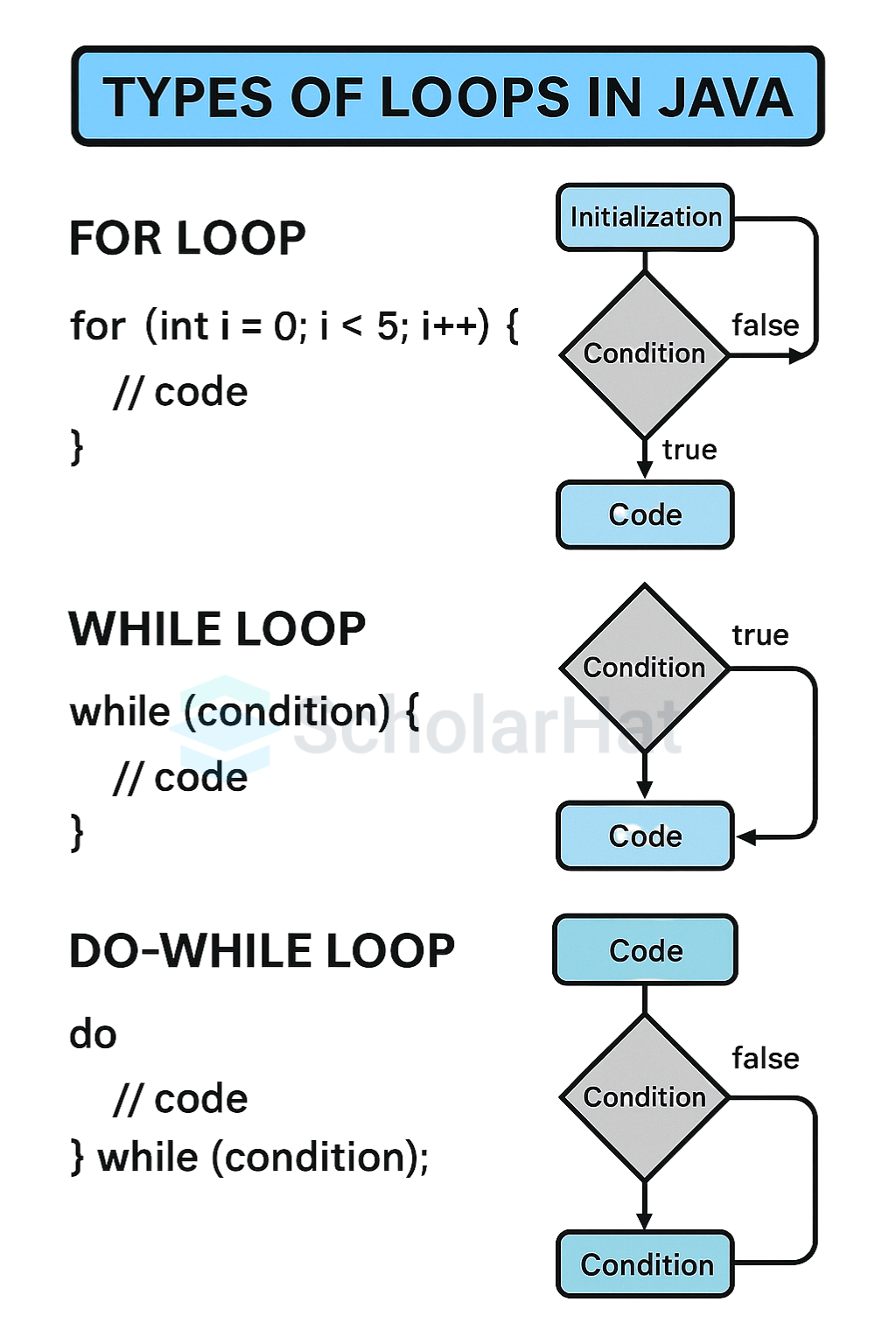
We've already seen the while loop in action. Java provides two other types of loops, each suited for different scenarios.
-
whileloop: The condition is checked before each iteration. If the condition is false initially, the loop body never runs. This is ideal for our main menu, which should not run at all if the program is supposed to exit immediately. -
do-whileloop: The condition is checked after each iteration. This guarantees that the loop body will execute at least once. This is perfect for input validation, where you need to prompt the user for input at least one time and then repeat the prompt if their input was invalid. -
forloop: This loop is designed for situations where you want to iterate a specific number of times or iterate over all elements in a collection (like an array). It combines initialization, condition checking, and an update step into a single line. We will use this extensively when we start managing lists of products.// A simple for loop to count from 1 to 5 for (int i = 1; i <= 5; i++) { System.out.println("Count is: " + i); }
For now, the while loop is the most important for our application's structure.
Conclusion
In this lesson, you've assembled the essential control flow structures needed to build an interactive console application. You now have a working menu that can accept and respond to user commands, forming the foundation of the Smart Warehouse system.
Here are the key takeaways for your interns:
- Main Application Loop: A
whileloop controlled by abooleanflag is a standard pattern for keeping a console application running until the user chooses to exit. - Robust Input Handling: The
Scannerclass is used to get user input. A common pitfall is the newline character left by methods likenextInt(). The best practice is to always read the full line withnextLine()and then parse the string into the desired type. - Conditional Logic: The
switchstatement is ideal for routing menu choices, whileif-elsestatements are used for handling specific logical conditions within each choice. - Loop Types: Java provides
while,do-while, andforloops, each suited for different repetitive tasks.
The main method now orchestrates the entire application flow. However, as we add more logic for adding, removing, and viewing items, it will quickly become large and difficult to manage. In our next lesson, we will address this by learning how to define and use methods. This will allow us to break our code into smaller, reusable, and more organized blocks, which is a cornerstone of professional software development.