Welcome to the next stage of your interns' onboarding. In our last session, we got their development environments running by compiling and executing a basic "Hello World" program. This confirmed that the fundamental tools—the JDK and IDE—are correctly set up. Now, we move from making the program run to making it useful.
This lesson focuses on the first step towards building the Smart Warehouse application: representing data. Any meaningful program needs to work with information, and for our warehouse, this includes product IDs, names, quantities, and prices. We will explore how Java provides a structured way to handle this data through its type system. Your interns will learn to declare and use Java's primitive types for simple values and reference types for more complex objects, laying the essential groundwork for modeling the real-world entities in your warehouse project.
From Raw Data to Meaningful Information
At its core, a computer program manipulates data stored in memory. Java, being a statically-typed language, requires that we explicitly tell it what kind of data we intend to store in a variable. This prevents errors and helps in writing robust, predictable code. Java categorizes its data types into two main groups: primitive and non-primitive (or reference) types.
Let's begin with the fundamental building blocks.
Primitive Types: The Atoms of Data
Primitive types are the most basic data types available in Java. They are not objects and store simple, raw values directly in a reserved memory location. Think of them as the "atoms" of your data—indivisible and fundamental. Java has eight primitive types, which can be grouped by the kind of data they hold.
For the warehouse system, we are primarily interested in numbers and true/false values.
- Integer Types: For whole numbers.
int: The most common choice for whole numbers, likequantity. It uses 4 bytes of memory.long: For very large whole numbers that won't fit in anint. This could be useful for uniqueproductIDvalues. It uses 8 bytes.byteandshort: Smaller integer types that are less commonly used but are available for memory optimization in specific scenarios.
- Floating-Point Types: For numbers with decimal points.
double: The standard choice for decimal values, offering high precision. It's perfect for representingprice. It uses 8 bytes.float: A less precise, smaller alternative todouble.
- Other Primitives:
boolean: Represents a simpletrueorfalsevalue, ideal for flags likeisAvailable.char: Represents a single character.
To get a comprehensive overview of all eight primitive types, their sizes, and when to use them, the following video is an excellent resource for your interns.
Primitives Data Types In Java - All the Primitives And What They Do
This video by Coding with John, "Primitives Data Types In Java," provides a clear and practical walkthrough of Java's eight primitive types.
Please watch the entire video. Pay close attention to: The four integer types and their ranges, explained from this point. Note the use of the L suffix for long literals. The two decimal types, float and double, and their precision, covered from here. Note the f suffix required for float literals. The boolean type for true/false values, from this section.
Based on this, let's declare some variables to represent a single product in our warehouse:
// Using a long for the ID in case we have billions of products
long productId = 120455701L;

// An int is sufficient for quantity on hand
int quantity = 75;

// A double is best for monetary values
double price = 249.99;

// A boolean to track if the item is actively stocked
boolean isStocked = true;
Reference Types: Pointers to Complex Data
While primitives are essential, they can only hold single, simple values. We also need to represent more complex data, like a product's name, which is a sequence of characters. This is where reference types come in.
Unlike primitive types, a reference variable does not store the data value itself. Instead, it stores a reference—a memory address—that points to an object in a different part of memory called the heap. The variable on the stack (where local variables live) holds the "address," and the actual object with all its data lives on the "heap."
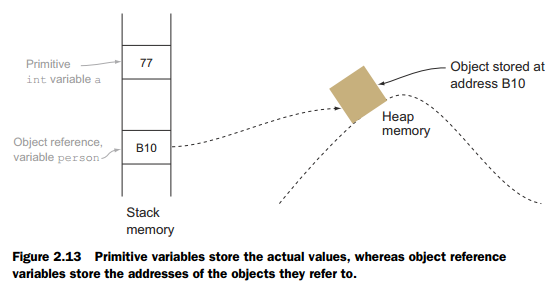
The most common reference type you'll encounter is String.
// The variable 'productName' does not hold "Industrial Laser Cutter".
// It holds the memory address of a String object whose value is "Industrial Laser Cutter".
String productName = "Industrial Laser Cutter";
To truly understand this crucial distinction between how primitive and reference types are handled in memory, the following short video provides an excellent visual explanation.
Primitive and Reference (Object) Types in Memory (Java Tutorial)
This tutorial, "Primitive and Reference (Object) Types in Memory," uses clear diagrams to show how the stack and heap are used.
Watch these key segments: Introduction: The four key rules governing primitives and references. Primitive Types in Memory: See how int variables are created and copied on the stack. Reference Types in Memory: Observe how an array (an object) is created on the heap and pointed to by a reference on the stack. Immutable Objects: A brief look at String and why its value can't be changed.
Bringing It All Together: Modeling Warehouse Data
So far, we have a set of disconnected variables representing one product.
long productId = 120455701L;
String productName = "Industrial Laser Cutter";
int quantity = 75;
double price = 249.99;
This is functional but clumsy. If we wanted to represent a second product, we'd need four more variables. This is not scalable. The logical next step, which you will explore fully in the next module, is to create our own custom reference type—a class—to act as a blueprint for a "product." This allows us to bundle all related data together.
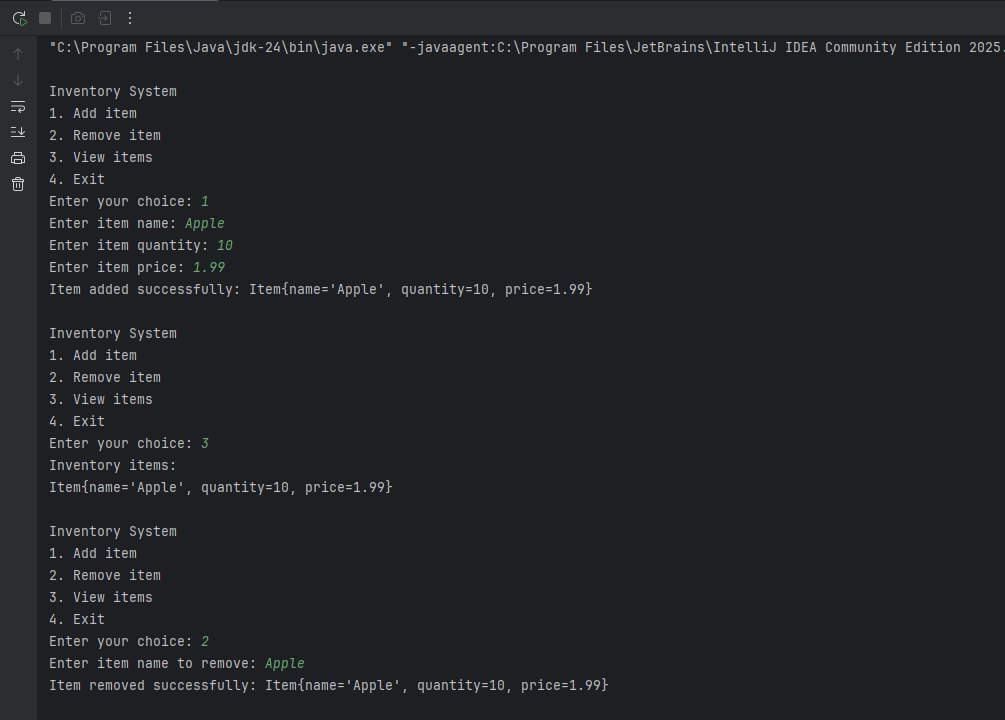
The article "Inventory Management System in Java" provides a perfect example of this. It defines an Item class that groups together the very same types of data we've been discussing.
Inventory Management System in Java - GeeksforGeeks
This article from GeeksforGeeks demonstrates a simple inventory system. We are interested in how it defines the data model for an inventory item.
Focus your reading on the first section, "Item Class". Analyze the code for Item.java. Notice how it uses a String (reference type), an int (primitive type), and a double (primitive type) together to define what an "item" is in the system. The rest of the article is a good preview of where we are headed, but for this lesson, the Item class itself is the key takeaway.
By creating a class like Item, we define a new reference type. We can then create Item objects, where each object has its own name, quantity, and price. This is the foundation of Object-Oriented Programming and is exactly how we'll model the entities in the Smart Warehouse system.
Conclusion
In this lesson, we've established the fundamental concepts of data representation in Java. This knowledge is not just academic; the distinction between primitive and reference types has profound implications for performance, memory usage, and bug prevention (NullPointerException, anyone?).
Here are the key takeaways for your interns:
- Data Types are Blueprints: They define the kind and size of data a variable can hold.
- Primitive Types: Store simple, raw values (
int,double,boolean, etc.) directly in memory (the stack). They are the fast, basic building blocks. - Reference Types: Store a memory address that points to a more complex object (
String, arrays, custom classes) in the heap. They allow for modeling complex entities. - Warehouse Data Modeling: We can represent product data using a combination of types:
longfor IDs,intfor quantity,doublefor price, and theStringreference type for names.
Your interns are now equipped to define the data for the warehouse. In the next lesson, we will empower them to act on this data by implementing control flow constructs like if-else statements and loops. This will allow them to build the first interactive feature of the Smart Warehouse: a command-line menu.