Hello! Welcome to your next lesson on Python's core data structures.
In our last lesson, we worked with string methods like split(), join(), and find(). You learned how to break strings into lists and reassemble them, which showed how different data structures can work together. We've focused a lot on lists, which are flexible and powerful.
Today, we're going to introduce another sequence data structure: the tuple. This lesson will show you how to create and use tuples, and we'll focus on the single most important difference between a tuple and a list: immutability. Understanding this concept is crucial, as it dictates when you should choose one over the other for reasons of data safety, efficiency, and program design.
1. Introducing Tuples: A List You Can't Change
At first glance, a tuple looks very much like a list. It's an ordered collection of items, and you can access elements by their index. The main difference is how you create them and, more importantly, what you can do with them after they're created.
- Lists are created with square brackets:
my_list = [1, 2, 3] - Tuples are created with parentheses:
my_tuple = (1, 2, 3)
This video provides an excellent introduction by comparing lists and tuples across four key characteristics: whether they are ordered, allow duplicates, are indexed, and are mutable.
Python Tuples (Visually Explained) | #Python Course 35
This video from Data with Baraa will walk you through a structured comparison of lists and tuples, highlighting their one critical difference.
Watch from the beginning to 07:15. First, the video will introduce four characteristics to compare data structures. It will then review lists, which you are already familiar with. Finally, it will introduce tuples and demonstrate that while they are ordered, indexed, and allow duplicates just like lists, they are immutable—they cannot be changed. Pay close attention to the TypeError that occurs when trying to modify a tuple.
As the video clearly showed, the defining feature of a tuple is its immutability. Once a tuple is created, its contents are "frozen." You cannot add, remove, or change its elements. This isn't a limitation but a deliberate design feature that provides several advantages.
2. Immutability in Practice: Seeing is Believing
Let's dive deeper into what "immutable" really means when writing code. You've learned about list methods like .append() and .pop(), and how to change an element using its index (e.g., my_list[0] = 5). With tuples, these operations are forbidden.
This article from Real Python provides clear code examples that demonstrate this concept.
The following article, "Lists vs Tuples in Python," clearly demonstrates the difference in mutability with direct code comparisons.
Read the sections titled "Lists Are Mutable, Tuples Are Immutable" and "Lists Have Mutator Methods, Tuples Don’t." Focus on the code examples that show an operation working on a list but raising a TypeError when attempted on a tuple. This will solidify your understanding of what's allowed and what isn't.
Let's reinforce this with our own examples.
# A list is mutable
my_list = [10, 20, 30]
print(f"Original list: {my_list}")

my_list[0] = 99  # We can change an element
my_list.append(40) # We can add an element
print(f"Modified list: {my_list}")


# A tuple is immutable
my_tuple = (10, 20, 30)
print(f"Original tuple: {my_tuple}")


# Now, let's try to do the same things. These lines will cause errors!


# try:
#     my_tuple[0] = 99
# except TypeError as e:
#     print(f"Error changing tuple element: {e}")


# try:
#     my_tuple.append(40)
# except AttributeError as e:
#     print(f"Error appending to tuple: {e}")
If you uncomment and run the try...except blocks, you'll see Python stops you. You get a TypeError for trying to assign a new value to an item and an AttributeError because the .append() method doesn't even exist for tuples.
This visual chart summarizes the key differences we've discussed so far.
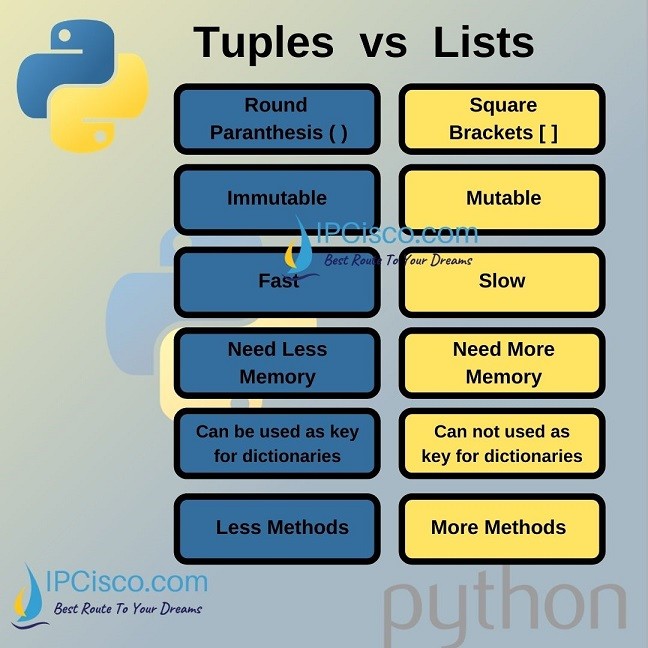
3. Why Use Tuples? Data Integrity and Performance
If tuples are just "limited lists," why bother using them? The immutability of tuples provides two major benefits that are very important in algorithm design and software development:
-
Data Integrity: When you use a tuple, you are guaranteeing that this data will not be accidentally changed elsewhere in your program. If you have a collection of values that should never change, like RGB color values
(255, 0, 0)or geographic coordinates(40.7128, -74.0060), a tuple is the perfect choice. It signals to anyone reading the code that this data is constant. -
Performance: Because Python knows that tuples cannot change, it can perform internal optimizations that make them more efficient than lists in certain ways. Tuples generally use less memory and can be created faster than lists containing the same elements.
This next video does a fantastic job of demonstrating these performance benefits.
Python Tuples || Python Tutorial || Learn Python Programming
This video from Socratica will use Python's built-in sys and timeit modules to prove that tuples are more memory-efficient and faster to create than lists.
Watch the segment from 01:16 to 04:06. You don't need to memorize the sys or timeit code, but focus on the results: the video shows that a tuple occupies fewer bytes in memory and takes less time to create than a list with the exact same data. This is the practical reason why we choose tuples for fixed data.
This performance difference might seem small, but when you are working with millions of data points—a common scenario in algorithms and data science—these efficiencies add up significantly.
4. Special Syntax: Single-Element Tuples and Unpacking
Working with tuples involves a couple of unique syntax rules you need to know.
1. Creating a single-element tuple:
This is a common "gotcha" for beginners. If you just wrap a single value in parentheses, Python treats it as a regular value, not a tuple. To create a tuple with one item, you must include a trailing comma.
not_a_tuple = (42)
is_a_tuple = (42,) # Note the comma!

print(f"Type of (42): {type(not_a_tuple)}")
print(f"Type of (42,): {type(is_a_tuple)}")
2. Tuple Unpacking:
This is a powerful feature that allows you to assign the elements of a tuple to multiple variables in a single line.
# A tuple representing a person's data
person_data = ("Alice", 30, "Software Engineer")


# Unpacking the tuple into variables
name, age, job = person_data

print(f"Name: {name}")
print(f"Age: {age}")
print(f"Job: {job}")
This is much cleaner than accessing each element by its index (name = person_data[0], etc.). This feature is particularly useful when a function returns multiple values (it usually returns them as a tuple).
This next clip from the Socratica video explains these two concepts very clearly.
Python Tuples || Python Tutorial || Learn Python Programming
Let's return to the Socratica video to see demonstrations of the single-element tuple syntax and the powerful tuple unpacking feature.
Watch from 04:06 to 06:40. Pay close attention to the explanation of why the trailing comma is necessary and how tuple assignment (unpacking) works.
5. Practice Exercises
Time to apply what you've learned.
Exercise 1: Confirm the Error
Create a tuple with three of your favorite colors. Then, write a line of code that tries to change the second element to "black". Run the code and observe the TypeError.
# Your code here
Solution
colors = ("blue", "green", "red")


# This line will raise a TypeError
colors[1] = "black"
Exercise 2: Unpacking Coordinates
A 2D point is represented by a tuple (x, y). Create a tuple for the point (15, -7) and use unpacking to assign its values to two variables, x_coord and y_coord. Then, print the variables.
# Your code here
Solution
point = (15, -7)
x_coord, y_coord = point
print(f"The x-coordinate is: {x_coord}")
print(f"The y-coordinate is: {y_coord}")


# Expected output:
# The x-coordinate is: 15
# The y-coordinate is: -7
Exercise 3: When to Use a Tuple
Imagine you are building a simple game. For each of the following data items, decide whether a list or a tuple would be more appropriate and briefly explain why.
- A player's inventory of items, which they can pick up and drop.
- The fixed RGB color value for the sky,
(135, 206, 235). - A list of high scores, which will be updated as new scores are achieved.
- The name and version of your game, e.g.,
("Super Game", "v1.0").
Solution
- List: The inventory is dynamic; its size and contents will change throughout the game.
- Tuple: The color value is a fixed set of three numbers that should not change. A tuple ensures its integrity.
- List: The high score list needs to be modified (sorted, new scores added, old scores removed).
- Tuple: The game's name and version are constant metadata that should not be changed during program execution.
Conclusion
Excellent work! You've now learned about tuples and their defining characteristic: immutability. This is a fundamental concept in Python that has a big impact on how you design your programs.
Key Takeaways:
- Tuples are ordered, indexed collections created with parentheses
(). - They are immutable, meaning you cannot change, add, or remove elements after creation.
- This immutability provides data integrity (prevents accidental changes) and performance benefits (less memory, faster creation).
- Use tuples for fixed collections of data, like coordinates, settings, or constant records. Use lists for dynamic collections that need to change.
- Remember the special syntax for single-element tuples:
(value,). - Use tuple unpacking to assign tuple elements to variables cleanly.
In our next lesson, we will explore dictionaries, another one of Python's core data structures. Unlike lists and tuples which are indexed by numbers, dictionaries let you store and retrieve data using custom "keys," making them incredibly fast for lookups. You'll also see a key connection: because tuples are immutable, they can be used as dictionary keys, while mutable lists cannot