Hello! Welcome to your next lesson on core Python skills.
In our last session, you mastered list comprehensions, a powerful way to create lists concisely. You saw how to use methods like .upper() and .endswith() to transform and filter strings within a comprehension. This was a great first look at how useful string methods can be.
Today, we'll dive deeper into string manipulation. This lesson focuses on three of the most fundamental and frequently used string methods: split(), join(), and find(). Mastering these will allow you to parse, assemble, and search through text data, a critical skill for countless programming problems, especially those you'll encounter in technical interviews.
1. Splitting Strings into Lists with split()
Often, you'll receive data as a single block of text that needs to be broken down into more manageable parts. For example, a sentence needs to be split into words, or a comma-separated list of items needs to be converted into a Python list. The split() method is the perfect tool for this.
Let's start with a video that introduces split() and its counterpart, join().
Python - The split() and join() methods - String Tutorial with Example
This video from Appficial provides a clear introduction to what the split() method does and how to use it.
Watch from the beginning to 02:39. The first 42 seconds give a great overview of split() and join() as opposite operations. Then, pay attention to how split() works by default on whitespace (spaces, tabs, newlines). Finally, see how you can provide a specific character, or 'delimiter', to control where the split happens.
As the video demonstrated, split() breaks a string into a list of substrings.
Default split (on whitespace):
If you call split() with no arguments, it splits the string at any sequence of whitespace and discards empty strings. This is perfect for breaking a sentence into words.
sentence = "this is a sample sentence"
words = sentence.split()
print(words)


# Output: ['this', 'is', 'a', 'sample', 'sentence']
Split with a delimiter:
You can also provide a specific string to split() to act as a delimiter. The string will be split wherever this delimiter is found. This is extremely useful for structured data, like comma-separated values (CSV).
csv_data = "apple,banana,cherry,date"
fruits = csv_data.split(',')
print(fruits)


# Output: ['apple', 'banana', 'cherry', 'date']
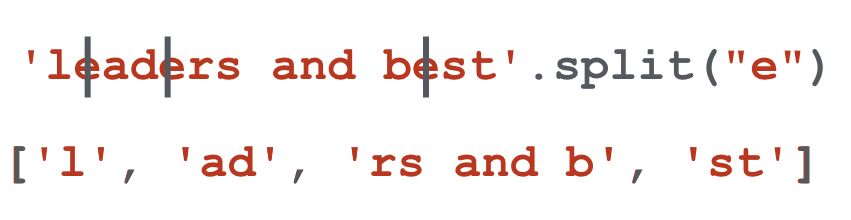
The delimiter itself is removed from the output. This image provides a great visual for how a string is broken apart at each instance of the delimiter.
2. Joining Lists into Strings with join()
The join() method does the exact opposite of split(). It takes an iterable (like a list of strings) and concatenates its elements into a single string, using a specified separator to "glue" them together.
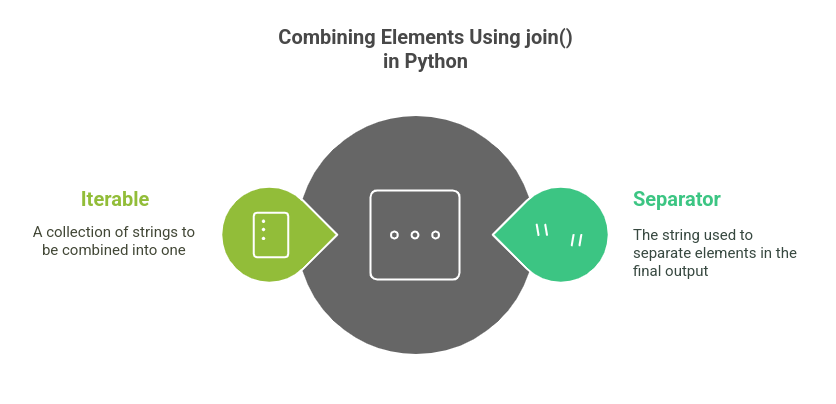
The syntax for join() can seem unusual at first: separator.join(list_of_strings). The separator is the string object the method is called on. This conceptual diagram can help clarify the inputs.
Let's see a practical demonstration of how to use it correctly.
Python - The split() and join() methods - String Tutorial with Example
Let's return to the Appficial video to see join() in action. The video highlights a common pitfall and how to fix it.
Watch from 03:57 to 04:46. Notice what happens when an empty string "" is used as the separator versus a space " ". This is a key distinction.
Let's put this into practice. We can take the list of words from our split() example and join them back into a sentence.
words = ['this', 'is', 'a', 'sample', 'sentence']


# The separator is a single space ' '
sentence = ' '.join(words)
print(sentence)


# Output: 'this is a sample sentence'


# What if we used a different separator?
dashed_sentence = '-'.join(words)
print(dashed_sentence)


# Output: 'this-is-a-sample-sentence'
The key is that the string you call .join() on is the one used as the glue between the elements of the list.
3. Finding Substrings with find()
Another common task is to check for the presence of a substring within a larger string or to find out where it is located. The find() method helps you do this by returning the starting index of the first occurrence of a substring.
Remember, Python strings are indexed starting from 0.
String methods in Python are easy! 〰️
This video from Bro Code gives a quick but thorough explanation of the find() method.
Watch from 01:17 to 02:57. Pay close attention to two key points: what find() returns when the substring is found (its starting index), and what it returns when the substring is not found (-1).
As the video explained, find() is your tool for locating content within a string.
When the substring is found:find() returns the lowest index in the string where the substring is found.
text = "hello world"
position = text.find("world")
print(position)


# Output: 6
# ('w' is at index 6: h=0, e=1, l=2, l=3, o=4, space=5, w=6)
When the substring is NOT found:
If the substring doesn't exist in the string, find() returns -1. This is a special value you can use in conditional statements to check for the presence or absence of a substring.
text = "hello world"
position = text.find("python")
print(position)


# Output: -1

if text.find("python") == -1:
    print("The word 'python' was not found.")
For a quick written summary of all three methods, you can refer to this resource.
Python Strings | Python Education
This guide from Google for Developers provides a concise summary of many string methods, including the three we've just covered. It's a great reference page.
Briefly scan the bulleted list in the "String Methods" section. Locate the descriptions for s.split('delim'), s.join(list), and s.find('other'). Note how they confirm what you've just learned.
4. Practice Exercises
Let's put your new skills to the test. Try to solve these small challenges.
Exercise 1: split()
You have a string containing a list of tags for a blog post. Convert this string into a list of individual tags.
tag_string = "python,programming,algorithms,data structures"


# Your code here:
# tags_list = ...
# print(tags_list)
Solution
tag_string = "python,programming,algorithms,data structures"
tags_list = tag_string.split(',')
print(tags_list)


# Expected output: ['python', 'programming', 'algorithms', 'data structures']
Exercise 2: join()
You are given a list of path components. Join them together to form a valid file path for a Unix-like system (which uses / as a separator).
path_components = ["home", "user", "documents", "report.txt"]


# Your code here:
# file_path = ...
# print(file_path)
Solution
path_components = ["home", "user", "documents", "report.txt"]
file_path = "/".join(path_components)
print(file_path)


# Expected output: 'home/user/documents/report.txt'
Exercise 3: find()
Check if an email address belongs to the domain "example.com".
email = "test.user@example.com"


# Your code here:
# if email.find(...) ...
Solution
email = "test.user@example.com"
if email.find("@example.com") != -1:
    print("This email is from the example.com domain.")
else:
    print("This email is not from the example.com domain.")


# Expected output: This email is from the example.com domain.
Practice Challenge: CSV Data Processor
You are given a string containing a record from a CSV (Comma-Separated Values) file. Your task is to process this string to extract and reformat the data.
Given data:record = "Jane Doe,28,London"
Your tasks:
- Use the
split()method to break therecordstring into a list containing the name, age, and city. - Use the
join()method to create a new, nicely formatted string from the list you created. The desired format is:"Name: Jane Doe | Age: 28 | City: London". - Use the
find()method on the originalrecordstring to determine if the person is from "London" and print a confirmation message.
Write your code to accomplish these three tasks.
Click here to see the complete solution
record = "Jane Doe,28,London"


# Task 1: Split the string into a list of fields
fields = record.split(',')
print(f"Data fields: {fields}")


# Task 2: Create a formatted string
# First, create prefixed strings for each field
formatted_fields = [f"Name: {fields[0]}", f"Age: {fields[1]}", f"City: {fields[2]}"]


# Then, join them with the desired separator
formatted_string = " | ".join(formatted_fields)
print(f"Formatted record: {formatted_string}")


# Task 3: Check if the city is London using find()
if record.find("London") != -1:
    print("Confirmation: The record is for a person from London.")
else:
    print("Confirmation: The record is not for a person from London.")


# Expected Output:
# Data fields: ['Jane Doe', '28', 'London']
# Formatted record: Name: Jane Doe | Age: 28 | City: London
# Confirmation: The record is for a person from London.
Conclusion
Great job! You've added three powerful tools to your Python toolkit. Working with text is a huge part of programming, and these methods will appear again and again.
Key Takeaways:
string.split(delimiter)is used to break a string into a list of substrings. If no delimiter is given, it splits by whitespace.separator.join(list_of_strings)is used to combine a list of strings into a single string, with theseparatorplaced between each element.string.find(substring)is used to locate the starting index of a substring. It returns-1if the substring is not found, making it useful for checks.
In the next lesson, we will continue exploring Python's core data structures by learning about tuples. You'll see how they are similar to lists but with one crucial difference: they are immutable (they cannot be changed). We'll discuss why you might choose to use a tuple instead of a list and how they are used in Python.