Hello! Welcome to your next lesson on Python's core data structures.
In our previous lesson, we explored tuples and their most important feature: immutability. You learned that because they cannot be changed, tuples are perfect for storing fixed collections of data and can even be used in ways that mutable lists cannot. We briefly mentioned one of those special uses at the end of the last lesson, and today we're going to dive right into it.
This lesson introduces the dictionary, one of Python's most powerful and frequently used data structures. While lists and tuples are sequences indexed by integers (0, 1, 2, ...), dictionaries let you access data using custom identifiers called keys. This makes them incredibly efficient for looking up information. Your goal for this lesson is to learn how to use dictionaries to store, retrieve, and delete data using these key-value pairs. This skill is fundamental for programming and is at the heart of many efficient algorithms.
1. What is a Dictionary?
Imagine a real-world dictionary. You don't find a word by its position in the book (e.g., the 50,000th word). Instead, you look up the word itself (the key) to find its definition (the value). A Python dictionary works in exactly the same way.
It's a collection of key-value pairs. Each key is unique within the dictionary and is used to look up its corresponding value.
Let's look at a visual breakdown.
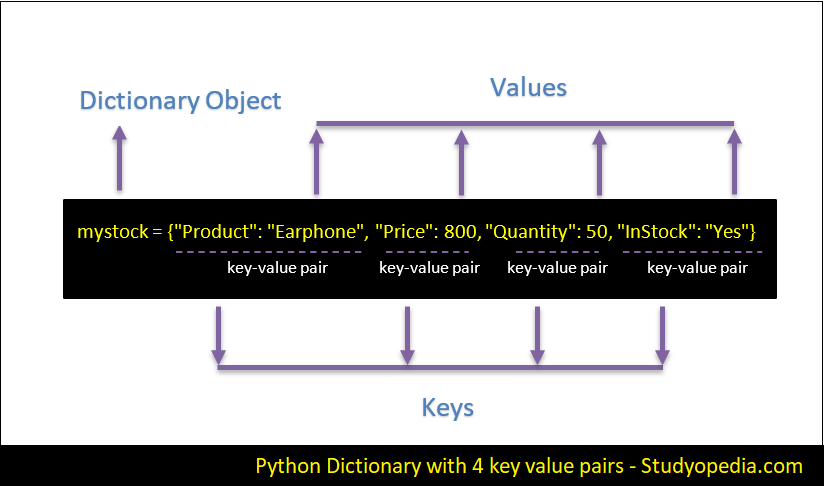
To create a dictionary in Python, you use curly braces {}. Inside, you define your key-value pairs.
- The key and value are separated by a colon (
:). - Each key-value pair is separated by a comma (
,).
# A dictionary representing a user profile
user_profile = {
    "username": "alex_codes",
    "level": 5,
    "is_active": True,
    "completed_quests": ["The First Trial", "The Python's Den"]
}
Notice a few important things:
- Keys are typically strings (like
"username") or numbers. They must be an immutable type. This is why a tuple can be a key, but a list cannot! - Values can be anything: a string, a number, a boolean, or even another data structure like a list.
This first video from Corey Schafer will walk you through creating your first dictionary.
Python Tutorial for Beginners 5: Dictionaries - Working with Key-Value Pairs
This video provides a clear introduction to what dictionaries are and demonstrates how to create one in Python.
Watch from the beginning to 01:32. The video starts with a helpful analogy and then shows the exact syntax for defining a dictionary with several key-value pairs.
2. Storing and Retrieving Data
The primary purpose of a dictionary is to store data so you can retrieve it efficiently.
Retrieving Values
To get a value, you use square brackets [] with the key inside.
user_profile = {
    "username": "alex_codes",
    "level": 5,
}


# Retrieve the value associated with the "username" key
print(user_profile["username"])  # Output: alex_codes
But what happens if you ask for a key that doesn't exist?
# This will cause an error!
# print(user_profile["email"])
Running this code would stop your program and give you a KeyError. To avoid this, you can use the .get() method. It does the same thing, but if the key isn't found, it returns None instead of crashing. You can also provide a default value to be returned.
# Safely get the email, which doesn't exist
email = user_profile.get("email")
print(email)  # Output: None


# Safely get the email, providing a default value
email_default = user_profile.get("email", "no-email-provided")
print(email_default) # Output: no-email-provided
Storing and Updating Values
Adding a new key-value pair or updating an existing one uses the same simple syntax.
user_profile = {
    "username": "alex_codes",
    "level": 5,
}


# Add a new key-value pair
user_profile["email"] = "alex@example.com"
print(user_profile)


# Update the value of an existing key
user_profile["level"] = 6
print(user_profile)
If the key ("email") doesn't exist, the pair is created. If the key ("level") already exists, its value is simply replaced.
Let's watch how this is done in practice.
Python Tutorial for Beginners 5: Dictionaries - Working with Key-Value Pairs
This next clip from Corey Schafer's tutorial covers retrieving, adding, and updating dictionary entries.
Watch from 01:32 to 05:54. Pay close attention to: How to access a value using its key (01:32). The KeyError that happens with a non-existent key and how the .get() method prevents it (02:40). The syntax for adding a new entry (03:58). How the same syntax updates an existing entry (04:36).
3. Deleting Key-Value Pairs
There will be times when you need to remove entries from a dictionary. Python provides two common ways to do this.
-
The
delkeyword: This is a straightforward way to remove a key-value pair.user_profile = { "username": "alex_codes", "level": 6, "email": "alex@example.com" } del user_profile["email"] print(user_profile) # The "email" pair is gone -
The
.pop()method: This method is useful when you want to remove an entry and use its value..pop()removes the key-value pair and returns the value that was removed.user_profile = { "username": "alex_codes", "level": 6, } removed_level = user_profile.pop("level") print(f"The removed level was: {removed_level}") # Output: The removed level was: 6 print(user_profile) # The "level" pair is gone
Like .get(), .pop() can also take a default second argument to return if the key isn't found, which prevents a KeyError.
This final video clip demonstrates both deletion methods.
Python Tutorial for Beginners 5: Dictionaries - Working with Key-Value Pairs
Let's see how to delete items from a dictionary.
Watch from 05:54 to 07:09. The clip clearly shows how to use both the del keyword and the .pop() method to remove entries.
4. Practice Exercises
Time to put this into practice. Open your code editor and try these out.
Exercise 1: Create and Modify
- Create a dictionary to represent a book. It should have keys for
"title","author", and"year_published". - Add a new key-value pair for
"genre"with a value of your choice. - Update the
"year_published"to a different year. - Print the final dictionary.
# Your code here
Solution
# 1. Create the dictionary
book = {
    "title": "The Hobbit",
    "author": "J.R.R. Tolkien",
    "year_published": 1937
}


# 2. Add a new key-value pair
book["genre"] = "Fantasy"


# 3. Update a value
book["year_published"] = 1938 # Correcting to the UK first edition date, for fun.


# 4. Print the result
print(book)


# Expected output might look like:
# {'title': 'The Hobbit', 'author': 'J.R.R. Tolkien', 'year_published': 1938, 'genre': 'Fantasy'}
Exercise 2: Safe Retrieval and Deletion
- Using the
bookdictionary from Exercise 1, try to retrieve the value for the key"rating"using the.get()method. Print the result. - Now, use the
.get()method again to retrieve"rating", but this time provide a default value of"Not Rated". Print the result. - Use the
delkeyword to remove the"genre"key-value pair. - Print the final dictionary.
# Your code here (you can start with the solution from Exercise 1)
Solution
book = {
    "title": "The Hobbit",
    "author": "J.R.R. Tolkien",
    "year_published": 1938,
    "genre": "Fantasy"
}


# 1. Safe retrieval (no default)
rating = book.get("rating")
print(f"Rating (no default): {rating}")


# 2. Safe retrieval (with default)
rating_default = book.get("rating", "Not Rated")
print(f"Rating (with default): {rating_default}")


# 3. Delete the "genre" pair
del book["genre"]


# 4. Print the final dictionary
print(book)


# Expected output:
# Rating (no default): None
# Rating (with default): Not Rated
# {'title': 'The Hobbit', 'author': 'J.R.R. Tolkien', 'year_published': 1938}
Conclusion
Great job! You've just learned how to work with Python's dictionary, a data structure that is essential for building efficient and readable code. Its use of key-value pairs makes it fundamentally different from the integer-indexed lists and tuples we've seen so far.
Key Takeaways:
- Dictionaries store data in key-value pairs inside curly braces
{}. - They are optimized for fast lookups. Finding a value by its key is extremely quick, even in very large dictionaries. This is critical for efficient algorithms.
- You retrieve values using square brackets
my_dict[key]or safely withmy_dict.get(key). - You store or update values using assignment:
my_dict[key] = value. - You delete entries using the
delkeyword (del my_dict[key]) or the.pop()method (my_dict.pop(key)).
In the next module, we're going to take a major step forward. So far, we've used Python's built-in data types (strings, numbers, lists, tuples, dictionaries). We will now learn how to define our own custom data types using classes and objects. This will allow us to model complex, real-world concepts directly in our code, which is the foundation of object-oriented programming and a powerful tool for designing advanced algorithms.