Hello! Welcome back to the course.
In our last lesson, you successfully set up your programming environment and ran your first Python program. You learned how to execute a script from the command line, which is a fundamental skill we'll rely on throughout this course.
Today, we'll dive into the core building blocks of programming. This lesson is about how programs handle information. You will learn how to:
- Use variables to store and label data.
- Work with Python's basic data types: integers, floating-point numbers, strings, and booleans.
- Interact with the user using the
input()andprint()functions.
Mastering these concepts is the first major step toward writing the algorithms you'll need for technical interviews.
1. What are Variables?
Think of a variable as a labeled box where you can store a piece of information. In programming, we give these boxes names (called identifiers) and put values inside them. This allows us to refer to and manipulate data easily. Given your math background, this is very similar to how you use variables like or in algebra to represent unknown values in an equation.
To create a variable in Python, you simply choose a name, use the equals sign (=), and provide the value you want to store.
# Here, 'age' is the variable name and 25 is the value.
age = 25


# 'name' is the variable name and "Alice" is the value.
name = "Alice"
To get a quick introduction to this concept, let's watch a short video.
Python variables for beginners ❎
This clip from the Bro Code channel explains what variables are and how they work in Python.
Watch from 00:09 to 01:01. Focus on the explanation of a variable as a 'reusable container for storing a value'.
2. Basic Data Types
The "type" of data a variable holds determines what you can do with it. You can perform arithmetic with numbers, but not with text. Python has several built-in data types, but for now, we'll focus on the four most fundamental ones.
The same video you just started will now walk you through them.
Python variables for beginners ❎
Continue with the Bro Code video to learn about the four essential data types in Python.
Watch from 04:07 to 11:22. The video covers: Integers (int): Whole numbers (04:07). Floats (float): Numbers with decimal points (05:42). Strings (str): Sequences of text characters (07:21). Booleans (bool): True or False values (08:34).
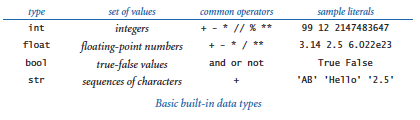
Here is a summary of these data types for your reference:
- Integer (
int): Represents whole numbers, positive or negative (e.g.,10,-3,0). - Float (
float): Represents numbers with a decimal component (e.g.,98.6,-0.5,3.14). - String (
str): Represents text. String values are always enclosed in single (') or double (") quotes (e.g.,"Hello",'Python'). - Boolean (
bool): Represents one of two values:TrueorFalse. Note that the first letter is always capitalized. These are crucial for making decisions in your code.
This table provides a concise overview.
3. Interacting with the User: Input and Output
Programs are much more interesting when they can interact with a user. This is done through input (getting data from the user) and output (displaying data to the user).
Output with print()
You've already used print() to display "Hello, World!". You can also use it to display the value stored in a variable. It's often useful to mix text and variables to create meaningful messages. While there are a few ways to do this, the most modern and readable method is using f-strings.
An f-string is a string literal prefixed with the letter f that allows you to embed expressions, like variable names, directly inside curly braces {}.
Python variables for beginners ❎
Let's return to the Bro Code video to see how to print variables and use f-strings for clean, readable output.
Watch from 00:52 to 04:07. The video explains three ways to print variables with text, but pay closest attention to the third method, f-strings, as it's the one we'll be using.
Input with input() and the Importance of Type Conversion
To get data from a user, we use the input() function. This function displays a prompt to the user, waits for them to type something and press Enter, and then returns what they typed.
There's a critical rule to remember: input() always returns the data as a string.
This means if the user types the number 25, input() gives you the string "25", not the integer 25. If you want to perform math with that number, you first need to convert its data type.
int(value)converts a value to an integer.float(value)converts a value to a float.str(value)converts a value to a string.
This process is called type casting or type conversion.
Python for Beginners - Learn Coding with Python in 1 Hour
The following video from the 'Programming with Mosh' channel provides an excellent demonstration of using input() and why type conversion is so important.
Watch these two segments: Receiving Input (08:59 - 10:52): This part introduces the input() function. Type Conversion (10:52 - 18:41): This is a very important section. It shows the error that occurs when you try to do math with a string from input() and then clearly explains how to fix it by converting the type to int or float.
4. Hands-On Practice
Now it's time to write some code yourself. Open PyCharm (or your chosen editor) and try these exercises.
Exercise 1: Declare and Print
Create a new Python file (e.g., user_profile.py). In this file, write a program that does the following:
- Create a variable
nameand assign it your name (as a string). - Create a variable
ageand assign it your age (as an integer). - Create a variable
height_metersand assign it your height in meters (as a float). - Create a variable
is_learningand set it toTrue(as a boolean). - Use
print()with f-strings to display a summary, like:User Profile: Name: [Your Name] Age: [Your Age] Height: [Your Height] meters Currently learning Python: [True/False]
Solution:
name = "Alex"
age = 28
height_meters = 1.8
is_learning = True

print(f"User Profile:")
print(f"Name: {name}")
print(f"Age: {age}")
print(f"Height: {height_meters} meters")
print(f"Currently learning Python: {is_learning}")
Exercise 2: Area of a Rectangle
Create another Python file (e.g., rectangle_area.py). Write a program that calculates the area of a rectangle.
- Use the
input()function to ask the user for the length of the rectangle. - Use
input()again to ask the user for the width of the rectangle. - Remember that
input()returns strings. Convert both the length and width to floats usingfloat(). - Calculate the area (
area = length * width). - Print the result in a user-friendly sentence, for example: "The area of the rectangle is [area] square units."
Solution:
print("Rectangle Area Calculator")


# Get input from the user
length_str = input("Enter the length of the rectangle: ")
width_str = input("Enter the width of the rectangle: ")


# Convert the string inputs to floats
length = float(length_str)
width = float(width_str)


# Calculate the area
area = length * width


# Print the result
print(f"The area of the rectangle is {area} square units.")
For more reading and examples, you can review the following article.
Lesson 1 Python: Variables, Inputs and Outputs and conditionals
This article from Medium provides a solid textual summary of the concepts we've covered today, including variables, data types, and I/O functions.
Read the sections from "1. Introduction to Variables" through to "6. Combining Text (String Concatenation) and Printing". This will reinforce your understanding of how to declare variables, use basic data types, handle user input, and format your print statements.
Conclusion
Excellent work! You have just learned the absolute fundamentals of how programs manage and process information. These concepts are the foundation upon which all complex algorithms are built.
Here are the key takeaways from today's lesson:
- Variables are named containers for storing data (
name = "value"). - Python's core data types are
int(whole numbers),float(decimal numbers),str(text), andbool(True/False). - The
print()function displays information, and f-strings are a powerful way to format output. - The
input()function gets data from the user, but always as a string. - You must use type conversion functions like
int()andfloat()to turn input strings into numbers before doing calculations.
In the next lesson, we will build directly on this by exploring the different kinds of operators in Python. You'll learn how to perform more complex arithmetic, compare values, and combine logical conditions—all essential skills for controlling how your programs run.