Hello! Welcome to our third lesson.
In the last lesson, we covered the fundamentals of storing information in Python. You learned how to use variables with basic data types like int, float, str, and bool, and how to get data from a user with input() and display it with print().
Today, we will build on that foundation by learning how to work with and manipulate that data. This lesson is about expressions—combinations of values, variables, and operators that Python can evaluate to produce a new value. This is the key to making your programs do useful work, from simple calculations to complex logical checks.
Specifically, you will learn to write expressions using:
- Arithmetic operators to perform mathematical calculations.
- String operators to manipulate text.
- Comparison operators to compare two values.
- Logical operators to combine multiple conditions.
Understanding these operators is essential for building algorithms and is a direct stepping stone to our next topic: making decisions in code.
1. Expressions and Arithmetic Operators
In programming, an expression is a piece of code that produces a value. It's a concept very similar to mathematical expressions you're familiar with from algebra. For instance, 5 + 3 is an expression that evaluates to 8.
The symbols that perform the actual work, like the + sign, are called operators. Let's start with the ones you already know from math: arithmetic operators.
Python Programming #3 - Arithmetic Operators and Strings
This short video from TheCodex channel will introduce you to the basic arithmetic operators in Python and show how they can be used with variables.
Watch from the beginning to 03:07. The video covers addition, subtraction, multiplication, division, and the modulus operator.
The video gave a good overview. For a more detailed guide, including a couple of operators not covered in the video, please read the following text. It also provides clear code examples.
Operators and Expressions in Python
This article from Real Python provides a comprehensive look at arithmetic operators. It's a great reference to have.
Read the section titled "Arithmetic Operators and Expressions in Python". Pay attention to the table of operators, especially the ones that might be new to you: // for floor division (integer division) and ** for exponentiation (powers).
Here's a quick visual summary of the main arithmetic operators in action:

2. String Operators
Operators aren't just for numbers. Some can also work with strings in useful ways. The two most common are + for joining strings together (called concatenation) and * for repeating a string multiple times.
Let's return to the video from TheCodex to see how this works.
Python Programming #3 - Arithmetic Operators and Strings
This next segment from the same video demonstrates how to use the + and * operators with strings.
Watch from 03:07 to 06:00. Notice how adding a space (" ") is necessary when concatenating a first and last name to get the correct formatting.
Hands-On Practice 1: Simple Calculations
Let's apply what you've learned. Create a new Python file and write a program that does the following:
- Ask the user for their year of birth using
input(). - Ask for the current year.
- Convert both inputs to integers (
int). - Calculate the user's approximate age and store it in a variable.
- Print a sentence like:
You are approximately [age] years old. - Create a "silly string" by taking a short word (e.g., "Python") and using the
*operator to repeat it 5 times. Print the result.
Solution:
# Get user input
birth_year_str = input("What year were you born? ")
current_year_str = input("What is the current year? ")


# Convert strings to integers
birth_year = int(birth_year_str)
current_year = int(current_year_str)


# Calculate age
age = current_year - birth_year


# Print the result
print(f"You are approximately {age} years old.")


# String repetition
silly_string = "Python" * 5
print(f"Here is a silly string: {silly_string}")
3. Comparison Operators
Now, let's move on to asking questions. How do we check if a number is greater than another, or if two names are the same? We use comparison operators.
These operators compare two values and, importantly, the expression always evaluates to a boolean value: True or False. This is the fundamental way we create conditions to control how a program behaves.
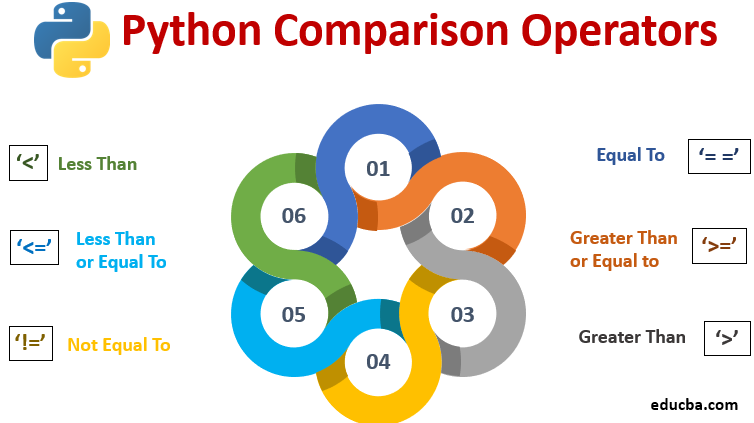
Notice the == operator for checking equality. A very common beginner mistake is to use a single equals sign (=), but remember from our last lesson that = is the assignment operator, used for storing a value in a variable.
# Correct: Checks if age is equal to 18
age == 18


# Incorrect (and causes an error in this context): Tries to assign 18 to age
age = 18
The following reading will give you a thorough understanding of how these operators work with different data types.
Operators and Expressions in Python
Let's go back to the Real Python article to learn about comparison operators.
Read the section titled "Comparison Operators and Expressions in Python". You can skim the parts about comparing lists and tuples for now, but focus on how integers, floats, and strings are compared.
4. Logical Operators
Often, a single comparison isn't enough. You might need to check if multiple conditions are true at the same time. For example, to access a specific feature, a user might need to be over 18 and have a premium subscription.
This is where logical operators come in. There are three in Python:
and: ReturnsTrueonly if both conditions are true.or: ReturnsTrueif at least one condition is true.not: Reverses the boolean value (not TruebecomesFalse, andnot FalsebecomesTrue).
Operators and Expressions in Python
The Real Python article provides an excellent, in-depth explanation of logical operators, including a powerful feature called short-circuit evaluation.
Read the section "Boolean Operators and Expressions in Python". Pay close attention to the tables that show how and and or work. The concept of "short-circuit evaluation" is particularly important in writing efficient and safe code, a key skill for algorithm design.
Hands-On Practice 2: Logical Checks
Let's write a program that uses comparison and logical operators.
- Ask the user for their age.
- Ask the user if they have a driver's license (they should type
yesorno). - Convert the age to an integer.
- Create a boolean variable
is_adultthat isTrueif the age is 18 or greater. - Create a boolean variable
has_licensethat isTrueif the user's input was'yes'. - Create a boolean variable
can_drivethat isTrueonly ifis_adultandhas_licenseare both true. - Print the final value of
can_drive.
Solution:
# Get user input
age_str = input("What is your age? ")
license_str = input("Do you have a driver's license (yes/no)? ")


# Process input
age = int(age_str)
is_adult = age >= 18
has_license = license_str == "yes"


# Use a logical operator
can_drive = is_adult and has_license


# Print the final boolean result
print(f"Eligible to drive: {can_drive}")
5. Operator Precedence
What happens in an expression like 5 + 2 * 3? Does Python do the addition first or the multiplication? Just like in mathematics, Python has a defined order of operations, known as operator precedence. Multiplication has higher precedence than addition, so it happens first (resulting in 11, not 21).
It's helpful to know this order, but even more important is knowing how to control it. You can always use parentheses () to force a part of an expression to be evaluated first and to make your code easier to read.
Operators and Expressions in Python
This final reading from the Real Python article includes a table listing the precedence of all the operators we've discussed.
Read the section "Operator Precedence in Python". Review the table to see the hierarchy. The key takeaway is that you can and should use parentheses to make your intentions clear.
Conclusion
Great job today! You've learned how to move from simply storing data to actively manipulating and evaluating it using expressions. This is a massive step forward in your programming journey.
Here are the key takeaways:
- Arithmetic operators (
+,-,*,/,//,%,**) perform mathematical calculations. - String operators (
+,*) allow you to concatenate and repeat text. - Comparison operators (
==,!=,>,<,>=,<=) compare values and always result in aTrueorFalseboolean value. - Logical operators (
and,or,not) combine boolean values to create more complex conditions. - Operator precedence determines the order of operations, which you can control with parentheses
()for clarity and correctness.
In our next lesson, we will put all this to immediate use. You'll learn how to use the True and False values generated by your expressions to control the flow of your program with conditional statements (if, elif, else). This is where your programs will start to make decisions and behave dynamically.