Hello! Welcome to your fifth lesson on the fundamentals of programming.
In our last lesson, you learned how to use conditional statements (if, elif, else) to control the flow of your program, allowing it to make decisions. This was a huge step in making your code "intelligent."
Today, we'll explore another fundamental type of control flow: iteration, or more simply, loops. Loops allow you to execute a block of code repeatedly, which is the cornerstone of automating repetitive tasks and processing collections of data—both essential skills for designing algorithms.
By the end of this lesson, you will be able to write for and while loops to control iteration in your programs.

1. The while Loop: Repeating Based on a Condition
The first type of loop we'll explore is the while loop. Its logic is very similar to an if statement: it executes a block of code as long as a certain condition remains True.
A while loop has three essential components:
- Initialization: A variable that is set up before the loop starts.
- Condition: The test in the
whilestatement that evaluates toTrueorFalse. The loop continues as long as it'sTrue. - Update: A statement inside the loop that modifies the initialization variable. This is crucial to ensure the condition eventually becomes
False, otherwise you'll create an infinite loop that never ends!
Let's watch a video that demonstrates this structure clearly.
Python While Loops & For Loops | Python tutorial for Beginners
This clip from Dave Gray's tutorial shows how to construct a basic while loop. Notice the initialization, the condition, and the crucial increment step inside the loop.
Watch from 00:50 to 02:32.
As you saw, a typical while loop looks like this:
# 1. Initialization
count = 1


# 2. Condition
while count <= 5:
    print(count)


    # 3. Update
    count = count + 1  # or count += 1

print("Loop finished.")
This code will print the numbers 1, 2, 3, 4, and 5. Once count becomes 6, the condition 6 <= 5 is False, and the loop terminates.
Hands-On Practice 1: Countdown
Let's practice this. In a new Python file, write a while loop that counts down from 5 to 1 and then prints "Liftoff!".
Click here for the solution
number = 5

while number > 0:
    print(number)
    number = number - 1

print("Liftoff!")
2. The for Loop: Repeating for Each Item in a Sequence
While while loops are great for repeating an action until a condition is met, for loops are designed to iterate over a sequence of items. Think of it as "for each item in this collection, do this." The collection could be a list of names, the characters in a string, or a sequence of numbers.
Let's see how to use a for loop to iterate through a list of names and the characters of a string.
Python While Loops & For Loops | Python tutorial for Beginners
This segment shows the basic syntax of a for loop. Pay attention to how the loop variable (x in the video) takes on the value of each item in the sequence, one by one.
Watch from 05:37 to 07:26.
Generating Number Sequences with range()
A very common task in algorithms is to repeat an action a specific number of times. Instead of creating a list of numbers manually, you can use Python's built-in range() function. It's highly efficient for generating number sequences.
The range() function can be used in a few ways:
range(stop): Generates numbers from 0 up to (but not including)stop.range(start, stop): Generates numbers fromstartup tostop.range(start, stop, step): Generates numbers fromstartup tostop, incrementing bystep.
Since you have a solid math background, the start, stop, and step arguments should feel quite intuitive. Let's see it in action.
Python While Loops & For Loops | Python tutorial for Beginners
This part of the video explains how to use range() to control for loops, which is an extremely common pattern in Python.
Watch from 08:49 to 11:30.
Hands-On Practice 2: Finding Even Numbers
Use a for loop with the range() function to print all the even numbers from 2 to 20, inclusive.
Hint: Think about the start, stop, and step arguments for range().
Click here for a solution
# The range goes up to 21 because the stop value is not included.
# The step is 2 to only get even numbers.
for number in range(2, 21, 2):
    print(number)
Note: You could also solve this by looping through every number from 2 to 20 and using an if statement to check if the number is even (if number % 2 == 0:), but using the step argument is more direct.
3. Controlling Loops with break and continue
Sometimes you don't want a loop to run to completion. Python gives you two powerful statements to control the flow within a loop:
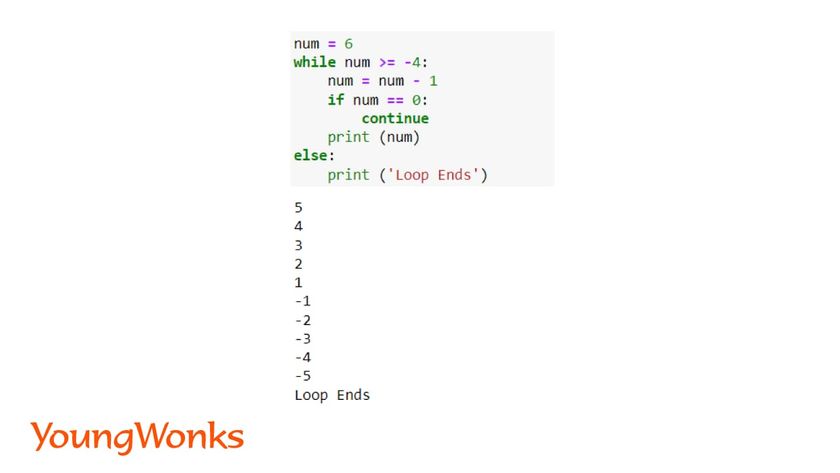
break: Immediately terminates the loop and the program continues at the next statement after the loop.continue: Immediately stops the current iteration and jumps to the beginning of the next one.
Let's see how break and continue work inside both while and for loops.
Python While Loops & For Loops | Python tutorial for Beginners
This video demonstrates how break can stop a loop prematurely and how continue can skip an iteration. The examples are shown for both loop types.
Watch from 02:32 to 04:32 (for while loops) and then from 07:26 to 08:49 (for for loops).
Here's an image showing a clear example of continue in a while loop.
Hands-On Practice 3: Upgrading the Guessing Game
Let's apply these concepts by improving the number guessing game from the last lesson.
- Take your "Guess the Number" code.
- Wrap the entire guessing logic inside a
while True:loop. This creates an infinite loop, allowing the user to guess multiple times. - Inside the loop, if the user guesses the correct number, print a success message and then use the
breakstatement to exit the loop.
Click here for the solution
secret_number = 7

while True:  # This will loop forever until a 'break' is hit
    guess_str = input("Guess a number between 1 and 10: ")
    guess = int(guess_str)

    if guess < secret_number:
        print("Too low!")
    elif guess > secret_number:
        print("Too high!")
    else:
        print("You got it!")
        break  # Exit the loop on correct guess

print("Thanks for playing!")
4. for vs. while: Which One to Choose?
This is a common question for beginners. Here's a simple rule of thumb:
- Use a
forloop when you know in advance how many times you need to loop, or when you want to iterate over a collection (like a list or a string). This is called definite iteration. - Use a
whileloop when you need to loop as long as a certain condition is true, and you don't know how many iterations it will take. For example, waiting for user input or processing data until a specific value is found. This is called indefinite iteration.
For a concise summary of best practices, take a look at the following resource.
An In-Depth Guide to Python Loops
This article provides excellent best practices for using loops. Focus on the points that help you decide between a for and a while loop.
Read the "Best Practices" section. Pay special attention to the first, fourth, and last bullet points, which offer guidance on choosing the right loop and avoiding common pitfalls.
Final Challenge
To pull everything together, let's tackle a small challenge that requires a for loop, if statements, break, and continue.
This resource from learnpython.org provides a great practice exercise to test your understanding of loop control.
Read the exercise description under the "Exercise" heading. Try to solve it yourself in your Python editor before looking at the solution provided on the page. The goal is to loop through the numbers list and print only the even numbers, but stop entirely if you encounter the number 237.
Conclusion
Fantastic work today! You have now mastered the two fundamental loop constructs in Python, which are absolutely essential for building algorithms. You can now write code that repeats tasks, processes collections of data, and responds dynamically to conditions within the repetition.
Here are the key takeaways:
whileloops execute a block of code as long as a condition isTrue. They are ideal for indefinite iteration.forloops execute a block of code for each item in a sequence. They are perfect for definite iteration over lists, strings, or number ranges generated byrange().- You must remember to update the condition variable in a
whileloop to avoid infinite loops. breakprovides an "emergency exit" from a loop.continueskips the current iteration and moves to the next.
In our next lesson, we will learn how to define and call functions. Functions will allow you to organize the code you've been writing into named, reusable blocks, making your programs more modular and easier to read. This is a critical step towards writing complex algorithms.