Hello! Welcome back to your course on getting started with Binance.
In our last two lessons, you successfully created your Binance account and learned how to secure it against common phishing attacks. These are essential foundational steps. Now, it's time to unlock the full functionality of your account so you can move towards your goal of trading and earning with crypto.
Today's lesson is a practical, hands-on task: we will complete the identity verification (KYC) process on Binance. This is a mandatory step required by most financial platforms, including Binance. Completing it will allow you to deposit money, increase your withdrawal limits, and access the full range of features like spot trading and Binance Earn.
Part 1: What is KYC and Why Is It Necessary?
KYC stands for "Know Your Customer." You can think of it as the digital equivalent of showing your ID when you open a new bank account. It's a standard process where a financial service verifies your identity to comply with regulations, prevent fraud, and enhance account security.
To get a clear explanation directly from the source, let's start with a short video from Binance Academy.
How to Complete Identity Verification(KYC) on Binance | #Binance Official Guide
This video, 'How to Complete Identity Verification(KYC) on Binance,' begins by explaining what KYC is and why Binance requires it. This will give you a solid understanding of the purpose behind the steps we're about to take.
Watch the first 55 seconds of the video to understand the 'what' and 'why' of identity verification on Binance.
As the video explained, KYC is about security and compliance. It protects both you and the platform. To reinforce this, the following reading provides a great summary.
Binance Verification What It Is and How To Complete It Safely 2026
This article, 'Binance Verification What It Is and How To Complete It Safely,' clearly explains the reasons for verification and its benefits.
Read the first two sections of the article, from the top down to the heading 'What You Need Before You Start'. This will reinforce why verification is a non-negotiable step for using Binance's core features.
Part 2: Getting Ready for Verification
To make the process as smooth as possible, it's best to have everything you need ready before you start. A failed attempt is usually due to a simple preparation mistake.
Here’s what you'll need:
- A valid, government-issued ID: This can be a Passport, National ID card, or Driver's License. Make sure it is not expired.
- A device with a camera: A smartphone is highly recommended as it's easier to take clear pictures of your ID and complete the "liveness" check. You can also use a computer with a webcam.
- A well-lit room: Good lighting is crucial for taking clear, glare-free photos and for the facial recognition step.
Common Mistakes to Avoid:
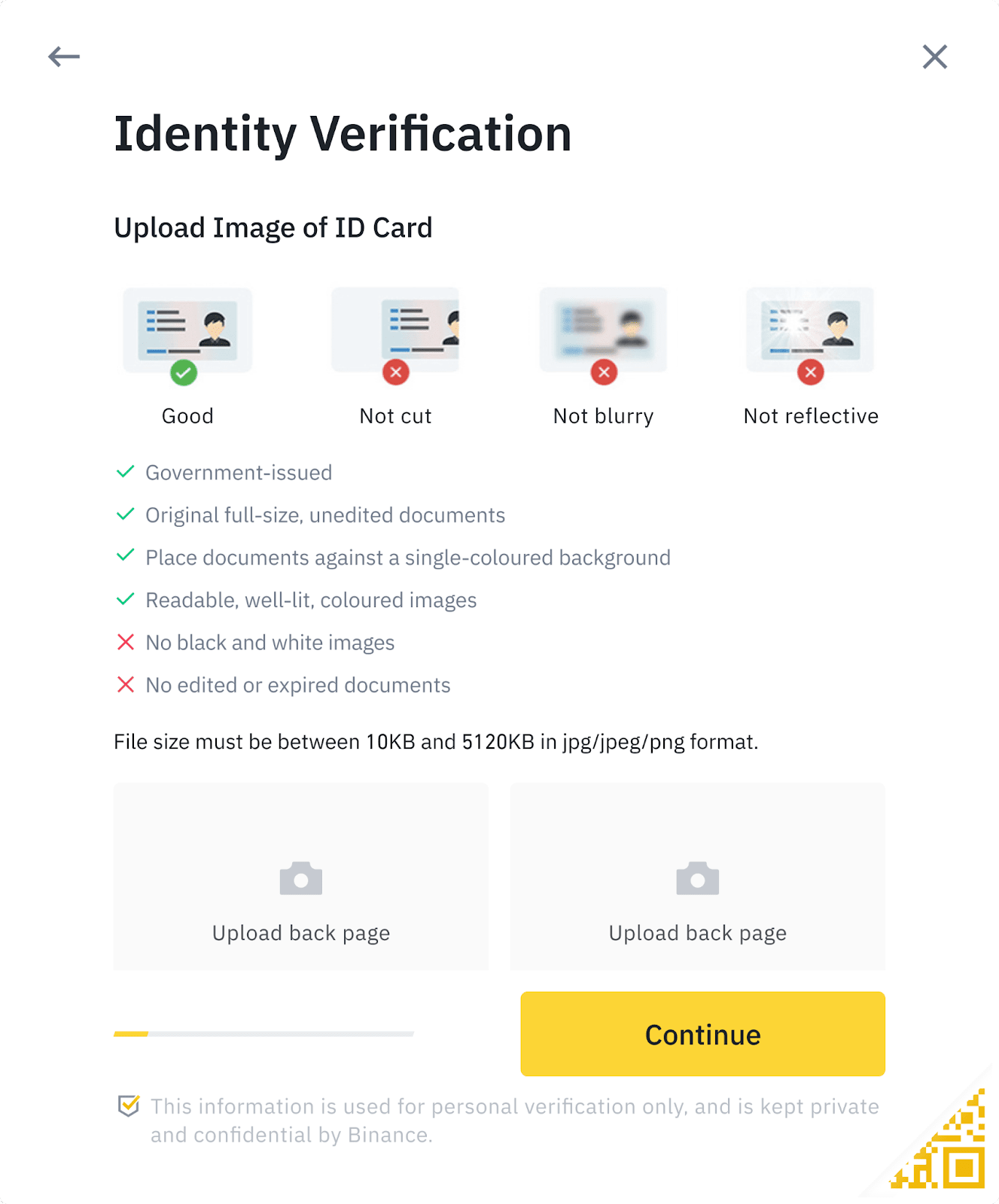
- Blurry or dark photos: Your camera must be able to focus clearly on the text on your ID.
- Glare or reflections: Avoid reflections from lights that might obscure parts of your ID.
- Cropped edges: All four corners of your ID document must be visible in the photo.
- Mismatched information: The personal details you enter (name, date of birth) must match your ID document exactly.
This image shows exactly what Binance is looking for when you upload your ID photos.
Part 3: A Step-by-Step Guide to Completing KYC
Now you're ready to complete the process. We will use the official Binance video guide to walk you through it. I recommend having your Binance app open on your phone so you can follow along in real-time.
Action: Log in to your Binance account on your phone or computer and navigate to the verification section. The video will show you how.
How to Complete Identity Verification(KYC) on Binance | #Binance Official Guide
We'll continue with the official Binance guide. This segment provides a clear, step-by-step visual walkthrough of the entire verification process, from entering your information to completing the face scan.
Watch the video from 00:55 to 02:09. Pause the video as needed to complete each step in your own Binance account.
The most important steps you just completed were:
- Entering Personal Information: Ensuring your name and birthdate match your ID.
- Uploading ID Photos: Taking clear pictures of the front and back of your ID document.
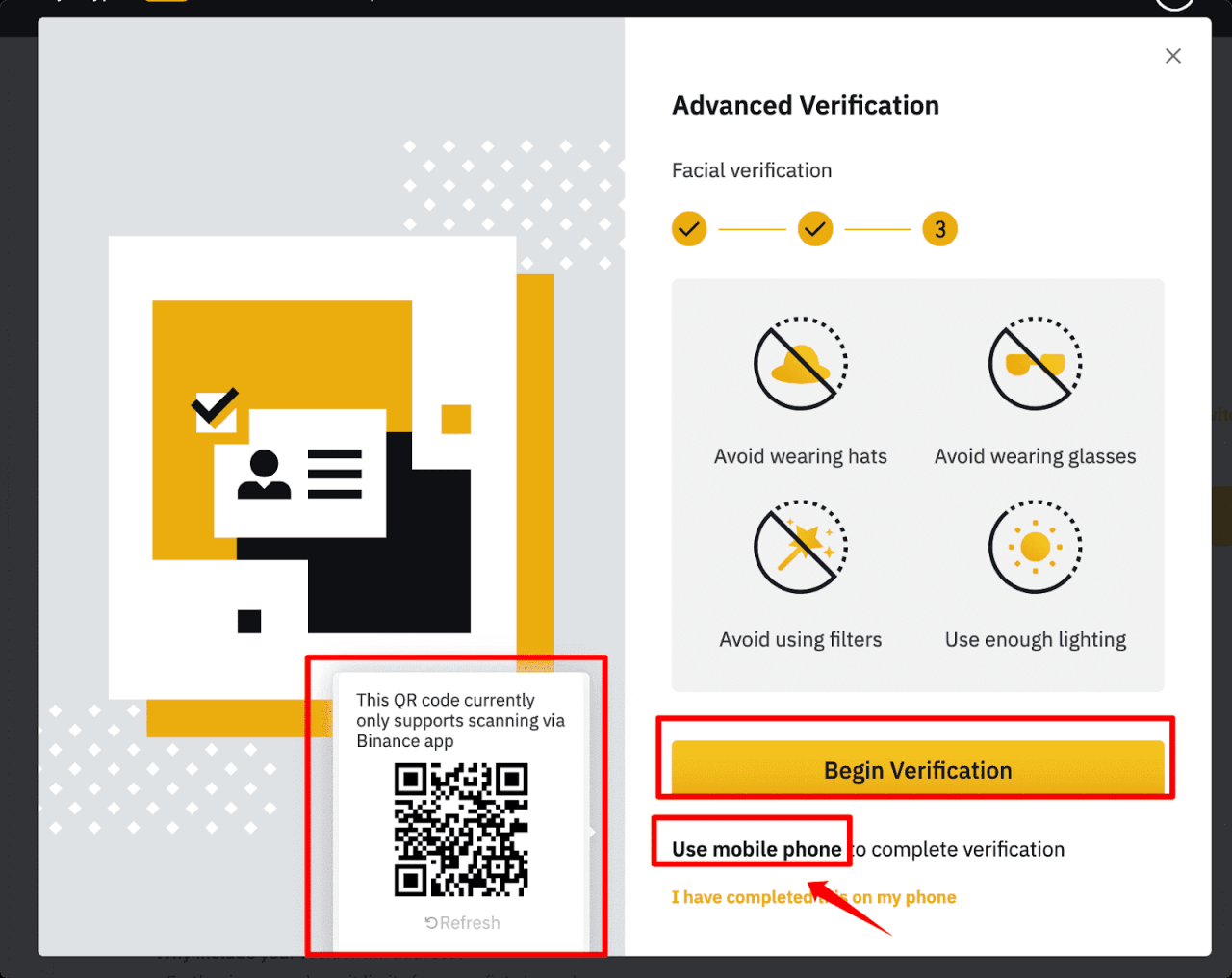
- Completing Face Verification: This "liveness check" confirms you are a real person and the legitimate owner of the ID. You'll be asked to position your face in an oval and may be prompted to move your head, open your mouth, or blink.
Part 4: After You Submit: What's Next?
Once you've submitted your documents, your application status will show as "Under Review" or "Pending."
- How long does it take? Verification is often completed within an hour, but it can take up to 24-48 hours during busy periods. You will receive an email and an in-app notification once it's complete.
- What if it fails? Don't worry. This usually happens because of a photo quality issue or a data mismatch. Binance will tell you the reason for the rejection. Simply review the feedback, correct the issue (e.g., retake your photos in better light), and resubmit. The article from
scribehow.comhas a helpful "Quick decision tree" in the section "If Your Binance Verification Fails or Gets Stuck" if you run into any trouble.
Conclusion
Fantastic work! You have now completed a crucial step in setting up your Binance account. By verifying your identity, you've not only complied with regulations but also significantly enhanced your account's security and unlocked the features you'll need to start your crypto journey.
Key Takeaways:
- KYC (Know Your Customer) is a mandatory identity verification process to prevent fraud and unlock full account functionality.
- To complete KYC, you need a valid ID, a camera, and good lighting.
- The process involves submitting personal information, uploading photos of your ID, and completing a "liveness" facial scan.
- After submission, the review process can take from a few minutes to a couple of days.
What's Next?
With identity verification pending or complete, there is one more critical security layer to add before you deposit any funds. In our next lesson, we will enable two-factor authentication (2FA). This will provide a powerful defense against anyone trying to access your account, even if they somehow get your password.