Hello! Welcome back to your course on using Binance.
In our last lesson, you took a significant first step by creating your Binance account and securing it with a strong, unique password. This is like putting the first high-quality lock on the door to your digital assets. However, a strong lock is only effective if you don't accidentally give the key to a stranger.
Today's lesson builds directly on that foundation. We will focus on how to verify official Binance communications and URLs to avoid phishing attacks. Phishing is one of the most common ways that scammers try to trick you into revealing your login details. By the end of this lesson, you will be equipped with the knowledge and tools to confidently distinguish between legitimate messages from Binance and dangerous fakes.
Part 1: What is Phishing?
Before we dive into the "how," let's clarify the "what." Phishing is a type of scam where an attacker impersonates a trustworthy entity—like Binance, your bank, or a social media site—to trick you into giving up sensitive information such as usernames, passwords, and other account details.
This is usually done through fake emails, text messages, or websites that look identical to the real ones. For a hands-on crypto investor, learning to spot these fakes is not just a helpful skill; it's essential for survival.
To get a quick overview, let's watch the first part of a video from Binance Academy that defines this threat.
How to Set up Anti-Phishing Code on Binance|Explained For Beginners
This short clip from a Binance Academy video, 'How to Set up Anti-Phishing Code on Binance,' provides a clear and concise definition of a phishing attack and gives examples of how it's done.
Watch the video from the beginning until 00:47 to understand what a phishing attack is.
Now that you understand the threat, let's build our first line of defense.
Part 2: Your Secret Handshake: The Anti-Phishing Code
Imagine having a secret handshake with Binance that proves you're talking to the real company. That's exactly what an Anti-Phishing Code does.
It's a unique code (a word or a short phrase) that you create within your Binance account settings. Once it's set up, every single official email from Binance will include this code. If you receive an email claiming to be from Binance but it's missing your code or shows the wrong one, you know instantly that it's a phishing attempt.
This is a powerful and practical tool, so let's set it up on your account right now.
Action: Log in to your Binance account. We will follow a video guide to set up your code.
3 ways to secure your Binance account
This video from the official Binance channel will walk you through setting up your Anti-Phishing Code. It also clearly shows how the code will appear in a legitimate email, which helps connect the setup to the result.
Watch the segment from 04:57 to 07:35. Pause the video as you follow the steps on the Binance website to create and enable your own unique Anti-Phishing Code.
Congratulations! You've just activated a critical security feature. From now on, make it a habit to check for your personal Anti-Phishing Code in every email you receive that claims to be from Binance.
Part 3: Learning to Spot the Fakes
Your Anti-Phishing code protects you from fake emails, but attackers also use fake websites and other tricks. Developing a keen eye for red flags is your next layer of defense.
Let's study some real-world examples to learn what to look out for. The following resource from Binance provides an excellent breakdown of common phishing email tactics.
This Binance Support article, 'Examples of Phishing Emails,' is a practical gallery of scams. It shows you exactly what fraudulent emails look like and highlights the specific details that give them away.
Read the entire article. Pay close attention to the five examples provided. For each one, identify the key red flags the article points out, such as: The sender's email address: Does it use a lookalike domain (e.g., binance-support.io instead of binance.com)? The links: If you could hover your mouse over the buttons or links, where would they actually take you? The message: Does it create a false sense of urgency or make an offer that seems too good to be true (e.g., "your account is suspended," "free Bitcoin giveaway")?
To reinforce these concepts, here is another excellent example of a phishing email.
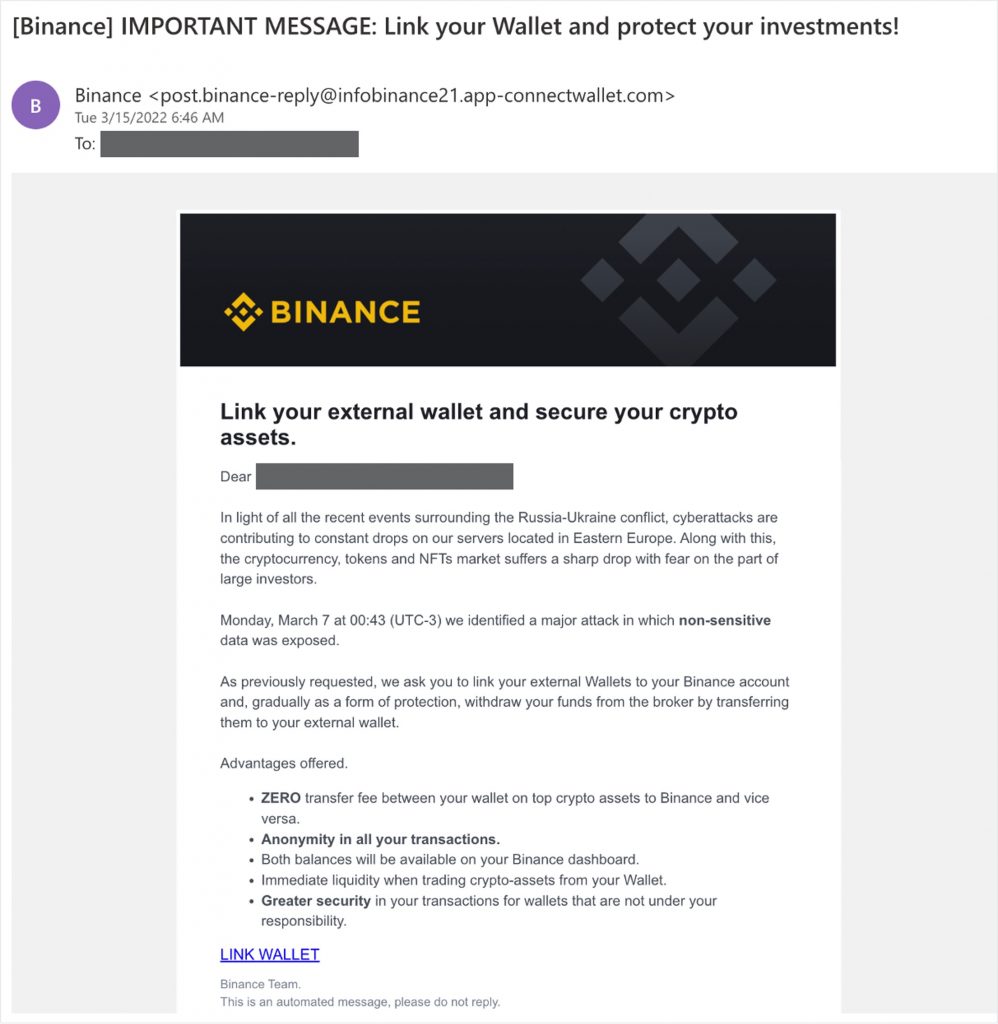
Key Red Flags to Remember:
- Sender's Address: Always inspect the sender's full email address, not just the display name.
- Generic Greetings: "Dear User" is less personal than an official communication, which will often use your name or user ID.
- Urgency and Fear: Messages that threaten to close your account or claim your funds are at risk are designed to make you act rashly.
- Spelling and Grammar: Official communications are usually professionally proofread. Obvious mistakes are a major red flag.
- Suspicious Links: Always hover your mouse cursor over any link or button before clicking to see the actual destination URL in the bottom corner of your browser.
Part 4: When in Doubt, Verify!
Sometimes, a phishing attempt can be very sophisticated. If you're ever unsure about a website, email, or even a Telegram or Twitter account, there is a definitive way to check. Binance provides a tool specifically for this purpose.
Binance Verify is an official page where you can enter a URL, email address, phone number, or social media account to check if it's a verified, official source.

Action: Bookmark the Binance Verify page in your browser now: https://www.binance.com/en/official-verification. If you ever have a doubt, use this tool before clicking any links or providing any information.
Conclusion
Excellent work today. You've moved beyond simply creating your account to actively learning how to defend it. This is a crucial mindset for navigating the crypto space safely.
Key Takeaways:
- Phishing is a common threat where scammers impersonate Binance to steal your login credentials.
- You have set up your Anti-Phishing Code, which is your secret handshake with Binance to verify that emails are legitimate.
- You learned to identify red flags in communications, such as non-official sender addresses, urgent or threatening language, and suspicious links.
- You now have the Binance Verify tool bookmarked to check any source you are unsure about.
What's Next?
Your account is now set up and you're armed with the knowledge to protect it from phishing. The next logical step, and a requirement for using most of Binance's features, is identity verification. In our next lesson, we will walk through the Know Your Customer (KYC) process on Binance. This will unlock your ability to deposit money and start trading.