Hello! Welcome to your next lesson.
In our last session, we took a full tour of the Binance interface on both the web and mobile app. You learned how to find the key sections, including your Wallet, which is where you manage your funds.
Today, we're taking the next crucial, practical step. This lesson is all about funding your account. By the end of our 60 minutes, you will know exactly how to deposit fiat currency (like USD, EUR, etc.) into your Binance account. This is the bridge that connects your regular bank account to the world of crypto, and it's the final setup task before you can make your first purchase.
Why You Need to Deposit Fiat
Before you can buy any cryptocurrency on an exchange like Binance, you need something to buy it with. While some people might transfer existing crypto from another wallet, as a beginner, you'll be starting with fiat currency—the traditional money issued by governments. This process is often called an "on-ramp."
First, a quick reminder: depositing fiat currency is only possible because you completed the Identity Verification (KYC) process in an earlier lesson. This is a standard security and regulatory requirement.
Choosing Your Deposit Method: Speed vs. Cost
Binance offers several ways to deposit fiat, but for beginners, two methods are most common. It's important to understand the trade-off between them.
- Bank Transfer: This is the most recommended method. It involves sending money directly from your bank account to Binance's bank account.
- Pro: Very low fees (often free).
- Con: Can take longer to process (from a few hours to a couple of business days).
- Credit/Debit Card: This allows you to add funds using your bank card.
- Pro: Nearly instant. The funds appear in your account right away.
- Con: Significantly higher fees (usually a percentage of the transaction).
For your first deposit and for most future deposits, the bank transfer is the most cost-effective choice. We'll focus on that method, but we'll also look at how the card option works.
The availability of these methods can vary based on your country and the currency you're using.
Part 1: How to Deposit via Bank Transfer (Web)
Let's walk through the recommended process on the Binance website. The following video provides an excellent step-by-step demonstration.
Binance Tutorial For Beginners 2026 (FULL STEP-BY-STEP GUIDE)
Watch this segment from Collection Crypto's 'Binance Tutorial For Beginners'. It will show you exactly how to initiate a bank deposit. Pay close attention to the critical details mentioned.
Watch the clip from 16:24 to 19:28. Focus on these three key points: How to navigate to the 'Bank Deposit' screen. The importance of the Reference Code. The warning that the name on your bank account must match the name on your Binance account.
As you saw in the video, the process is straightforward, but you must be careful with the details.
Summary of Critical Steps:
- Navigate to Deposit: Go to Buy Crypto > Bank Deposit from the top menu.
- Select Currency & Method: Choose your currency (e.g., EUR) and select the Bank Transfer option. You'll see the fee is usually zero.
- Enter Amount: Specify how much you want to deposit.
- Use Binance's Bank Details: Binance will provide you with the IBAN, bank name, and other details for their bank account. You will use these details to make a transfer from your own online banking app or website.
- THE MOST IMPORTANT STEP: The Reference Code. Binance will show you a unique reference code or memo. You must include this code in the "reference" or "memo" field of your bank transfer. This is how Binance knows the incoming money belongs to your account. If you forget this, your deposit will be significantly delayed or fail.
- Match Your Name. The name on the bank account you are sending from must be the same as the name you used for your Binance KYC verification. Transfers from a different person's account, or even a business account in your name, will be rejected.
Here is a quick visual guide from the Binance Academy that reinforces these steps.

Part 2: The Alternative - Using a Credit/Debit Card
If you need funds instantly and are willing to pay a higher fee, using a card is an option. The process is simpler but more expensive.
Binance Tutorial For Beginners 2026 (FULL STEP-BY-STEP GUIDE)
Now, let's quickly see how a credit card deposit works. The same video from Collection Crypto demonstrates this.
Watch from 14:26 to 16:24. Notice that while the process is fast (you just enter your card details), the presenter also advises against it due to higher fees.
Part 3: A Special Note on Depositing US Dollars (USD)
Depositing USD often works a bit differently than other currencies like EUR or GBP. When you deposit USD, Binance typically converts it automatically into a stablecoin, such as BUSD or FDUSD.
A stablecoin is a type of cryptocurrency designed to hold a stable value, pegged 1:1 to a fiat currency. So, 1 FDUSD is designed to always be worth $1 USD.
Binance Tutorial For Beginners 2026 (FULL STEP-BY-STEP GUIDE)
This can be a point of confusion for new users. The next clip in the video explains this specific case for USD deposits.
Watch from 19:28 to 20:40. The key takeaway is that after depositing USD, you won't have a 'cash balance' in the same way you would with Euros. You will have a balance of a stablecoin (like BUSD in the video's example). We will cover how to use this to buy other crypto in the next module.
Part 4: Depositing on the Binance Mobile App
The process on the mobile app is just as simple. The principles of cost vs. speed are the same.
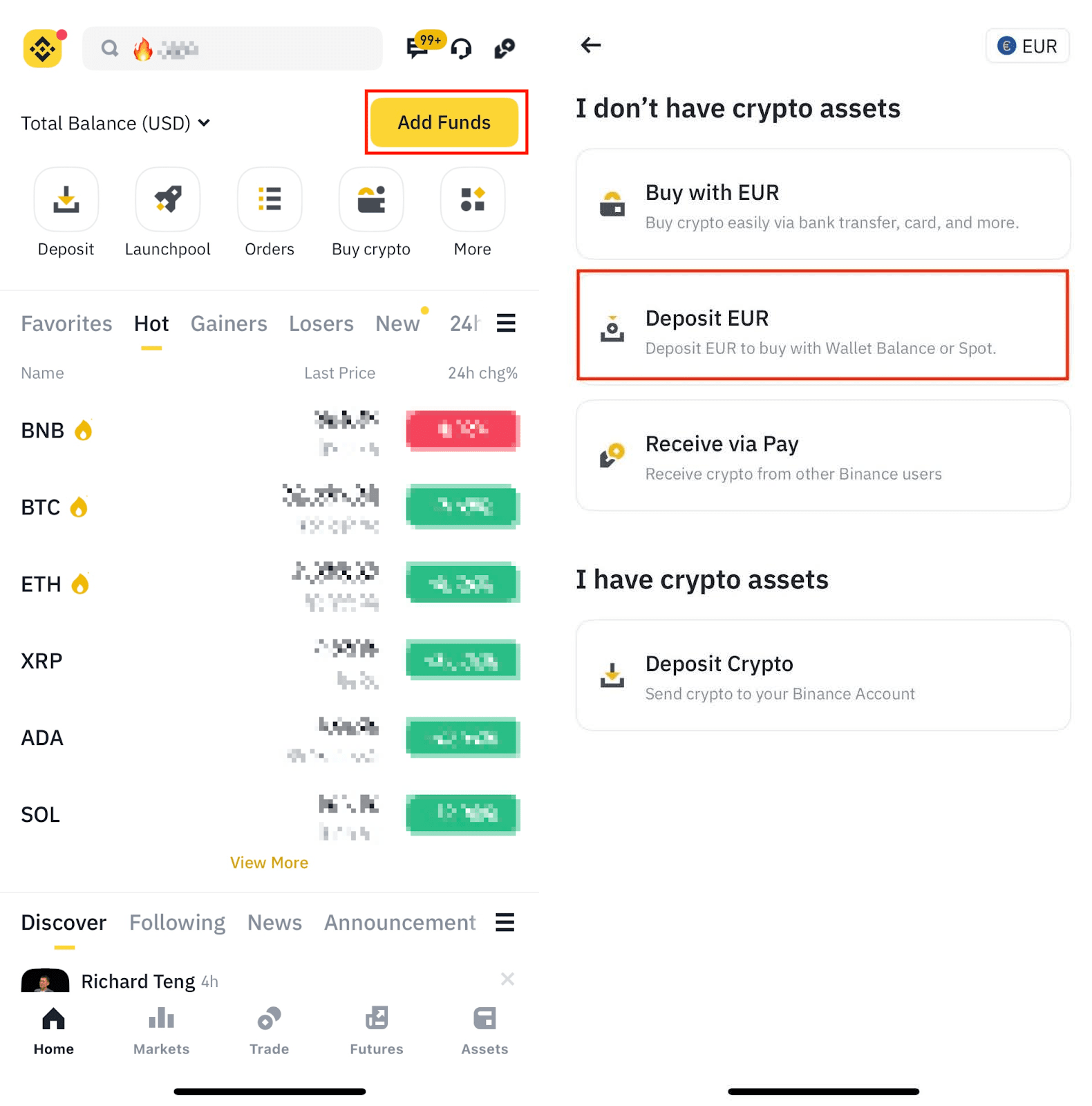
The following video shows the entire flow on mobile.
Binance App Tutorial for Beginners: How to use Binance Mobile App
To see this in action on your phone, let's watch a clip from the 'Binance App Tutorial for Beginners'.
Watch from 07:06 to 09:18. The presenter shows how to navigate to the deposit screen, select a fiat currency, and compare the different deposit options available on the app, reinforcing the same fee differences we've discussed.
Your Turn: A Practical Check
Now it's time for a hands-on exercise. I encourage you to do this now to solidify your understanding.
- Log in to your Binance account (either on the web or mobile app).
- Navigate to the Fiat Deposit section.
- Select your local currency (USD, EUR, GBP, etc.).
- Select the Bank Transfer option.
- Proceed to the screen where Binance shows you the bank details and the unique reference code.
- Take a moment to review this information carefully. This is what you would use in your own banking app to make the transfer.
You do not need to send any money right now. The goal is simply to get comfortable with the process and know exactly where to find the information when you are ready to make your first deposit.
Conclusion
Fantastic! You now have the knowledge to fund your Binance account, which is the last major step in getting set up. You are ready to enter the market.
Key Takeaways:
- You can deposit fiat currency via bank transfer (cheap but slower) or credit/debit card (fast but more expensive).
- For bank transfers, it is absolutely critical that the name on your bank account matches your Binance account and that you include the unique reference code.
- Depositing USD often converts your funds into a dollar-pegged stablecoin.
- The process is similar on both the Binance website and the mobile app.
What's Next?
With your account set up, secured, and now funded (or ready to be funded), you are prepared to make a trade. However, before you click "buy," you need to understand what you are buying and selling.
In our next lesson, we will begin Module 3 by explaining what a trading pair is (e.g., BTC/USDT) and how to find one on Binance. This is the language of the crypto market, and understanding it is the first step to trading intelligently.